Voice Guidance does not Function
Circuit diagnosis · Vehicles built from Jul 2010
Versions by build date: May 2007 – Jul 2008 Aug 2008 – Jun 2010 from Jul 2010
INSPECTION PROCEDURE
| 1. CHECK NAVIGATION SETTING |
 |
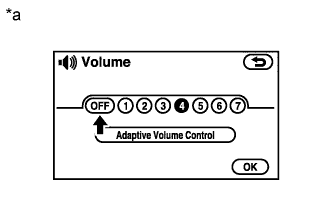
Enter the "Volume" screen.
- Check that "OFF" is not selected.
- OK:
- "OFF" is not selected.
Text in Illustration
*a
|
Example
|
|
NG |
 |
|
| SELECT VOICE VOLUME SETTING OTHER THAN "OFF" |
|
|
| OK |
|
 |
|
| 2. CHECK NAVIGATION SETTING |
|
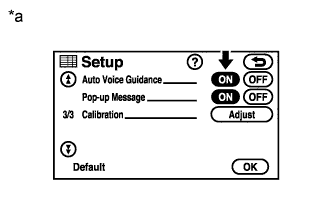
Enter the "Setup" screen.
- Check that "Auto Voice Guidance" is not "OFF".
- OK:
- "Auto Voice Guidance" is not "OFF".
Text in Illustration
*a
|
Example
|
|
NG |
|
|
| TURN AUTO VOICE GUIDANCE "ON" |
|
|
| OK |
|
|
|
| 3. CHECK NAVIGATION SETTING |
|
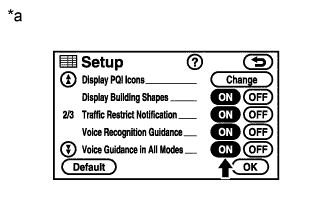
Enter the "Setup" screen.
- Check that "Voice Guidance in All Modes" is not "OFF".
- OK:
- "Voice Guidance in All Modes" is not "OFF".
Text in Illustration
*a
|
Example
|
|
NG |
|
|
| TURN VOICE GUIDANCE IN ALL MODES "ON" |
|
|
| OK |
|
|
|
| 4. CHECK MAP DISC |
|
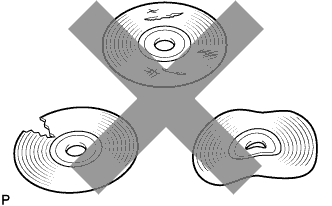
- Check that the map disc is not deformed or cracked.
- OK:
- No deformations or cracks on the map disc
|
NG |
|
|
|
|
| OK |
|
|
|
| 5. CHECK AUDIO FUNCTION |
|
Check that audio can be heard from the driver side speaker.
- OK:
- Audio can be heard.
|
NG |
|
|
| PROCEED TO NEXT SUSPECTED AREA SHOWN IN PROBLEM SYMPTOMS TABLE (Click here)
|
|
|
| OK |
|
 |
|
|