Air conditioning system:
Display (Item)
|
Default
|
Contents
|
Setting
|
Set Temperature Shift
|
NORMAL
|
To control with shifted temperature against displayed temperature
|
+2 C / +1 C / NORMAL / -1 C / -2 C
|
Ambient Temperature Shift
|
NORMAL
|
To control with shifted temperature against displayed temperature
|
+3 C / +2 C / +1 C / NORMAL / -1 C / -2 C / -3 C
|
Air Inlet Mode
|
AUTO
|
Function to shift from INLET mode to RECIRCULATION mode when A/C is turned ON
|
MANUAL / AUTO
|
Compressor Mode
|
AUTO
|
Function to automatically turn A/C ON by pressing AUTO button when blower is ON and A/C is OFF
|
MANUAL / AUTO
|
Compressor / Air Inlet DEF Operation
|
LINK
|
Function to automatically turn A/C ON linked with FRONT DEF button when A/C is OFF
|
NORMAL / LINK
|
Evaporator Control
|
AUTO
|
Function to set evaporator control to AUTOMATIC position (AUTO) to save power, or to coldest position (MANUAL) to dehumidify air and to prevent windows from fogging up
|
MANUAL / AUTO
|
Foot / DEF Auto Mode
|
ON
|
Function to automatically turn airflow from FOOT/DEF ON when AUTO MODE is ON
|
OFF / ON
|
Foot / DEF Automatic Blow Up Function
|
ON
|
Function to automatically increase blower level when defroster is ON
|
OFF / ON
|
Illuminated Entry:
Display (Item)
|
Default
|
Contents
|
Setting
|
Lighting Time
|
15 s
|
Changes the lighting time of the personal light, interior lights and ignition key cylinder light*1/engine switch illumination*2 after closing all of the doors. (It will quickly fade out when the ignition switch is turned on (IG))
|
7.5 s / 15 s / 30 s
|
I/L when ACC OFF
|
ON
|
Lights up the personal light, interior lights and ignition key cylinder light*1/engine switch illumination*2 when the ignition switch is turned from on (ACC or IG) to off.
|
ON / OFF
|
I/L ON W/Door Key Unlock
|
ON
|
Lights up the personal light, interior lights and ignition key cylinder light*1/engine switch illumination*2 when the doors are unlocked using the mechanical key.
|
ON / OFF
|
Mirr-Foot-Lgt Approached
|
ON
|
Lights up the door mirror foot lights when the key enters actuation area around the doors.
|
ON / OFF
|
Mirr-Foot-Lgt Unlocked
|
ON
|
Lights up the door mirror foot lights when the doors are unlocked using door control transmitter or mechanical key.
|
ON / OFF
|
Mirr-Foot-Lgt w/Master SW
|
ON
|
Lights up the door mirror foot lights when the doors are unlocked with the door control switch.
|
ON / OFF
|
Mirror Foot Light Time
|
15 s
|
Changes the lighting time of the door mirror foot lights.
|
0 s / 7.5 s / 15 s / 30 s
|
Light Control:
Display (Item)
|
Default
|
Contents
|
Setting
|
Response Time
|
Normal
|
Changes the delay timing of lighting the taillight when going into a tunnel when the light control switch is in the AUTO position.
|
Long / Normal
|
Sensitivity
|
Normal
|
Adjusts the sensitivity of the automatic light control function.
|
Light2 / Light1 / Normal / Dark1 / Dark2
|
Disp Ex ON Sen
|
Normal
|
Changes the ambient brightness level required to dim the lights such as the indicator lights of the combination meter, A/C indicator light, and clock.
|
Light2 / Light1 / Normal / Dark1 / Dark2
|
Disp Ex OFF Sen
|
Normal
|
Changes the ambient brightness level required to cancel the dimming of the combination meter indicator lights, A/C indicator light, and clock.
|
Light2 / Light1 / Normal / Dark1 / Dark2
|
Main Body (Main Body ECU):
Display (Item)
|
Default
|
Contents
|
Setting
|
Unlock Key Twice (*2)
|
ON
|
Function that unlocks only driver side door when driver side door key cylinder is turned to UNLOCK once, and unlock all doors when it is turned to UNLOCK twice. For OFF setting, turning it once unlocks all doors.
|
ON / OFF
|
Auto Lock/Shift (*1)
|
ON
|
Function that locks all doors when shift lever is shifted to P from any other position with engine running and all doors closed
|
ON / OFF
|
Auto Unlock/Shift (*1)
|
ON
|
Function that unlocks all doors when shift lever is shifted to P from any other position while the ignition switch is on (IG)
|
ON / OFF
|
All Unlock/Open-Close (*1)
|
OFF
|
Function that unlocks all doors when opening driver door within 10 seconds after turning the ignition switch on (IG)
|
ON / OFF
|
Auto Lock (*1)
|
OFF
|
Function that locks all doors when the vehicle reaches a certain speed
|
ON / OFF
|
MAIN BODY (Main body ECU)
Display (Item)
|
Default
|
Contents
|
Setting
|
Wireless Control
|
ON
|
ON/OFF of wireless door lock function
|
ON / OFF
|
Hazard Answer Back
|
ON
|
When LOCK switch on transmitter pressed, all hazard warning lights illuminate once. When UNLOCK switch pressed, all hazard warning lights illuminate twice.
|
ON / OFF
|
Wireless Buzzer Resp*
|
ON
|
Function that makes wireless buzzer sound for answer-back when transmitter LOCK/UNLOCK switch pressed
|
ON / OFF
|
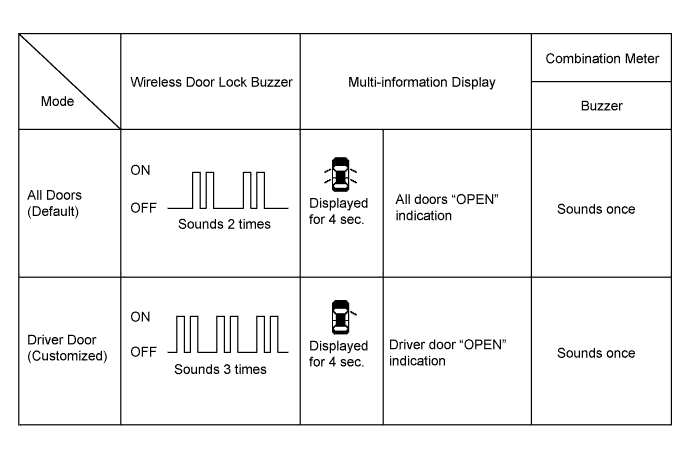
Open Door Warning*
|
ON
|
If door is not completely closed and transmitter LOCK switch is pressed, this function sounds a buzzer for 10 seconds.
|
ON / OFF
|
Unlock 2 Operation*
|
OFF
|
Function that unlocks driver side door when unlock switch on transmitter is pressed once, and unlocks all doors when pressed twice. If setting is OFF, pressing unlock switch once makes all doors unlock.
|
ON / OFF
|
Auto Lock Time
|
30s
|
This function controls amount of time from unlocking doors to automatic re-locking function.
|
30 s / 60 s / 120 s
|
MAIN BODY (Main Body ECU)
Display (Item)
|
Default
|
Contents
|
Setting
|
Wireless Control
|
ON
|
ON/OFF of wireless door lock function
|
ON / OFF
|
Hazard Answer Back
|
ON
|
When LOCK switch on transmitter pressed, all hazard warning lights illuminate once. When UNLOCK switch pressed, all hazard warning lights illuminate twice
|
ON / OFF
|
Wireless Buzzer Resp*1
|
ON
|
Function that makes wireless buzzer sound for answer-back when transmitter LOCK/UNLOCK switch pressed
|
ON / OFF
|
Open Door Warning*1
|
ON
|
If door is not completely closed and transmitter LOCK switch is pressed, this function sounds a buzzer for 10 seconds
|
ON / OFF
|
Unlock 2 Operation*1
|
OFF
|
Function that unlocks driver side door when unlock switch on transmitter is pressed once, and unlocks all doors when pressed twice. If setting is OFF, pressing unlock switch once makes all doors unlock.
|
ON / OFF
|
Panic Function*1
|
ON
|
This function operates the theft deterrent system when PANIC is pressed and held for 0.8 second or more.
|
ON / OFF
|
Auto Lock Time
|
30s
|
This function controls amount of time from unlocking doors to automatic re-locking function.
|
30 s / 60 s / 120 s
|
Wireless Glass Hatch Open*2
|
Long 1
|
This function changes operation method of transmitter to glass hatch.
|
1tim ON: Push once
2tim ON: Push twice
Long 1: Push and hold for 0.6 seconds
Long 2: Push and hold for 0.8 seconds
Prohibit: Does not operate
|
Combination Meter:
Display (Item)
|
Default
|
Contents
|
Setting
|
Key Remind Volume
|
Large
|
Function to change the volume of the key reminder buzzer.
|
Large, Medium, Small
|
Key Remind Sound
|
Slow
|
Function to change the frequency of the key reminder buzzer.
|
Fast, Normal, Slow
|
Units By Region
|
- (*1)
|
Function to change the unit of the display.
|
km/l, Ml/g
|
Language
|
- (*1)
|
Function to change the language of the display.
|
English, Chinese
|
Driver Side Seatbelt Warning Buzzer (*2)
|
On
|
Function to turn on / off the seat belt warning buzzer.
|
On, Off
|
Front Passenger Side Seatbelt Warning Buzzer (*2)
|
On
|
Function to turn on / off the seat belt warning buzzer.
|
On, Off
|