INSTALLATION
Removal / installation · Vehicles built May 2007 – Jul 2008
Versions by build date: May 2007 – Jul 2008 Aug 2008 – Jun 2010 from Jul 2010
| 1.
INSTALL CENTER POWER OUTLET SOCKET COVER |
 |
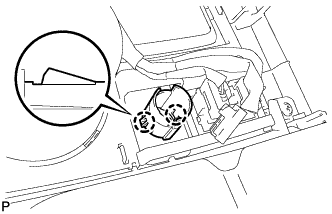
- Engage the 2 claws and install the center power outlet socket cover.
| 2.
INSTALL POWER OUTLET SOCKET ASSEMBLY |
|
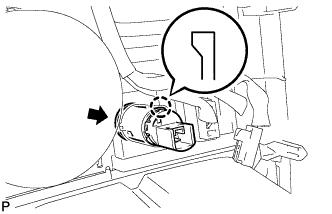
- Engage the claw and install the power outlet socket assembly.
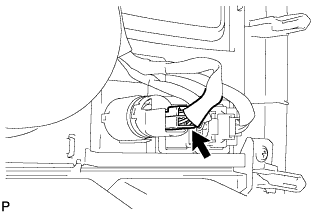
- Connect the connector.
| 3.
INSTALL UPPER CONSOLE PANEL SUB-ASSEMBLY
|
|
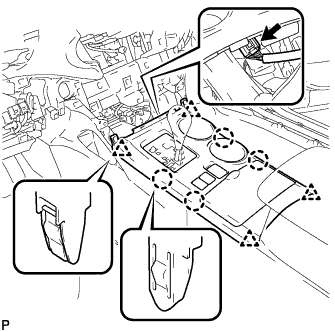
- Connect the connector.
Engage the 4 claws and 4 clips, and install the upper console panel sub-assembly.
| 4.
INSTALL CENTER INSTRUMENT CLUSTER FINISH PANEL ASSEMBLY (w/o Smart Entry and Start System)
|
|
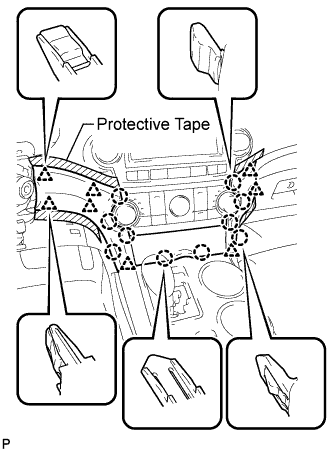
- Apply protective tape to the areas shown in the illustration.
Connect each connector.
Engage the 10 claws and 8 clips, and install the center instrument cluster finish panel assembly.
- NOTICE:
- Do not the damage the instrument panel safety pad assembly and lower instrument panel finish panel sub-assembly.
| 5.
INSTALL CENTER INSTRUMENT CLUSTER FINISH PANEL ASSEMBLY (w/ Smart Entry and Start System)
|
|
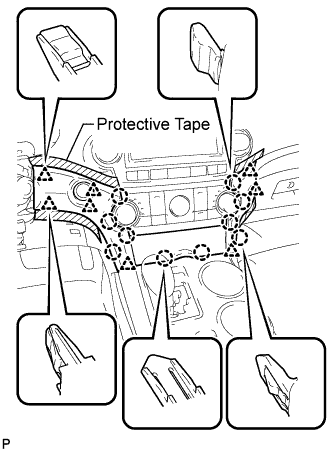
- Apply protective tape to the areas shown in the illustration.
Connect each connector.
Engage the 10 claws and 8 clips, and install the center instrument cluster finish panel assembly.
- NOTICE:
- Do not the damage the instrument panel safety pad assembly and lower instrument panel finish panel sub-assembly.