 |
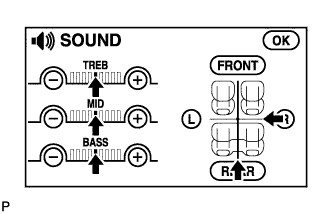
Enter the sound adjustment screen by pressing the "SOUND" switch on the AUDIO display.
NAVIGATION SYSTEM > No Sound can be Heard from Speakers |
| 1.CHECK AUDIO SETTINGS |
|
Enter the sound adjustment screen by pressing the "SOUND" switch on the AUDIO display.
Set volume, fader, and balance to the initial values and check that sound is normal.
|
| ||||
| OK | ||
 | ||
| ||
