 |
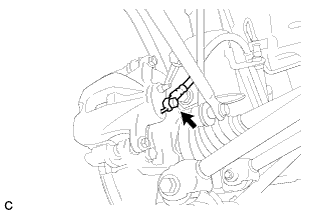
Connect the rear flexible hose to the disc brake cylinder assembly with the union bolt and a new gasket.
- Torque:
- 33 N*m{ 336 kgf*cm , 24 ft.*lbf }
REAR BRAKE FLEXIBLE HOSE > INSTALLATION |
| 1. INSTALL REAR FLEXIBLE HOSE |
|
Connect the rear flexible hose to the disc brake cylinder assembly with the union bolt and a new gasket.
Install the rear flexible hose to the bracket with a new clip.
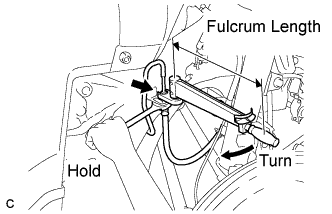 |
Using a union nut wrench (10 mm), connect the brake line to the front brake flexible hose while holding the flexible hose with a wrench.
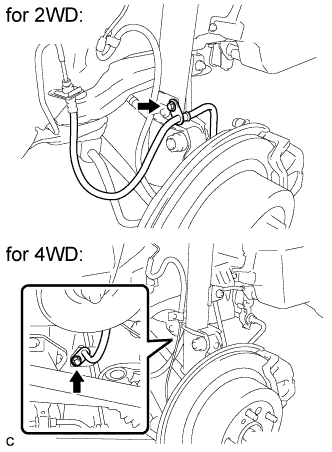 |
Install the rear flexible hose to the absorber bracket with the bolt.
| 2. FILL BRAKE FLUID RESERVOIR |
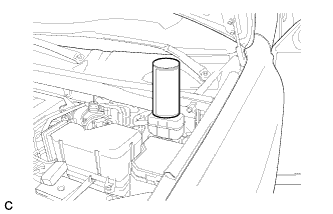 |
Fill the reservoir with brake fluid.
| 3. BLEED BRAKE LINE |
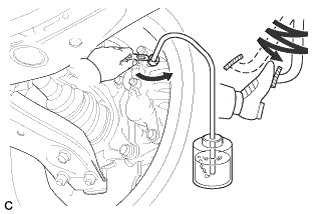 |
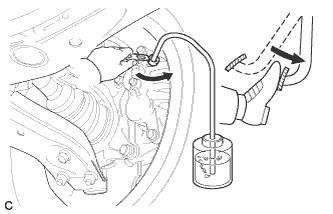
Connect a vinyl tube to the bleeder plug.
Depress the brake pedal several times, and then loosen the bleeder plug with the pedal depressed (*3).
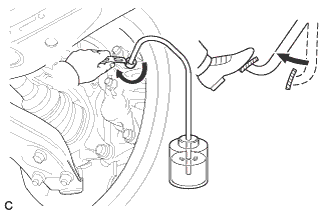 |
When fluid stops coming out, tighten the bleeder plug, and then release the brake pedal (*4).
Repeat (*3) and (*4) until all the air in the fluid is completely bled out.
Tighten the bleeder plug completely.
Repeat the above procedure for each wheel to bleed the brake line.
| 4. BLEED BRAKE ACTUATOR |
Depress the brake pedal more than 20 times with the ignition switch off.
Connect Techstream to the DLC3, and then turn the ignition switch on (IG).
Turn Techstream on and select "AIR BLEEDING" on the screen.
Bleed the air according to "Step 1: Increase Line" on the Techstream display.
|
Connect a vinyl tube to either one of the bleeder plugs.
Depress the brake pedal several times, and then loosen the bleeder plug connected to the vinyl tube with the pedal depressed (*5).
|
When fluid stops coming out, tighten the bleeder plug, and then release the brake pedal (*6).
Repeat (*5) and (*6) until all the air in the fluid is completely bled out.
Tighten the bleeder plug completely.
Repeat the above procedure for the rest of the wheels to bleed the brake lines.
Bleed the suction line according to "Step 2: Inhalation Line" on the Techstream display.
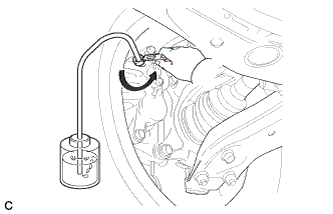 |
Connect a vinyl tube to the bleeder plug at the right front wheel or the right rear wheel and loosen the bleeder plug.
Operate the brake actuator assembly to bleed the air using Techstream (*7).
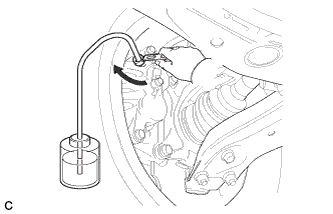 |
Check that the actuator operation has stopped by referring to the Techstream display, and tighten the bleeder plug (*8).
Repeat (*7) and (*8) until all the air in the fluid is completely bled out.
Tighten the bleeder plug completely.
For the rest of the wheels, bleed the air in the same way as stated in the above procedure.
Bleed the pressure reduction line according to "Step 3: Decrease Line" on the Techstream display.
 |
Connect a vinyl tube to either one of the bleeder plugs.
Loosen the bleeder plug (*9).
While keeping the brake pedal fully depressed, operate the brake actuator assembly using Techstream.
|
Tighten the bleeder plug, and then release the brake pedal (*10).
Repeat steps (*9) to (*10) until all the air in the fluid is completely bled out.
Tighten the bleeder plug completely.
Repeat the above procedures for the rest of the brakes to bleed the brake lines.
Bleed the brake lines again according to "Step 4: Increase Line" on the Techstream display.
|
Connect a vinyl tube to either one of the bleeder plugs.
Depress the brake pedal several times, and then loosen the bleeder plug connected to the vinyl tube with the pedal depressed (*11).
|
When fluid stops coming out, tighten the bleeder plug, and then release the brake pedal (*12).
Repeat (*11) and (*12) until all the air in the fluid is completely bled out.
Tighten the bleeder plug completely.
Repeat the above procedures for each brake to bleed the brake lines.
Finish "AIR BLEEDING" on Techstream, and then turn off Techstream.
Disconnect Techstream from the DLC3.
Turn the ignition switch off.
| 5. INSPECT FOR BRAKE FLUID LEAK |
| 6. INSPECT FLUID LEVEL |
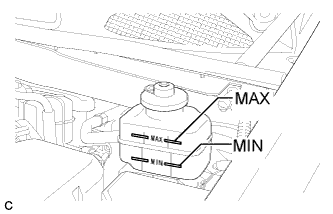 |
Check the fluid level.
If brake fluid level is lower than the MIN line, check for leaks and inspect the disc brake pads. If necessary, refill the reservoir with brake fluid to the MAX line after repair or replacement.
| 7. INSTALL REAR WHEEL |