SMART KEY SYSTEM > ON-VEHICLE INSPECTION |
| 1. CHECK POWER SOURCE MODE CHANGE FUNCTION |
Check the function of the power switch.
Check that power source mode changes in accordance with the conditions of the shift position and brake pedal.
| Brake Pedal | Shift Lever | Power Source Mode Pattern |
| Depressed | P position | When the power switch is pushed once.
|
| Not depressed | P position | Each time the power switch is pushed.
|
| Except P position | Each time the power switch is pushed.
| |
| - | P position | When the power switch is pushed with power source mode on (READY).
|
| - | Except P position | When the power switch is pushed with power source mode on (READY).
|
Check if power source mode changes without pressing the power switch.
With power source mode on (ACC) and the shift position in P, wait for at least 1 hour. Check that power source mode changes from on (ACC) to off automatically.
| 2. CHECK INDICATOR CONDITION |
![]() |
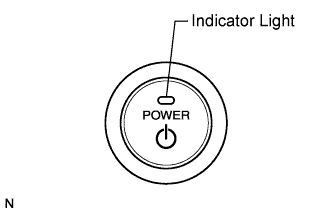
Check the indicator on the power switch.
Check that the power switch indicator turns on and changes color according to the table below.
| Power Source Mode/Condition | Indicator Light Condition | |
| Brake pedal released | Brake pedal depressed, shift lever in P or N | |
| off | OFF | ON (Green) (When key and vehicle IDs match) |
| on (ACC, IG) | ON (Amber) | ON (Green) |
| on (READY) | OFF | OFF |
| Steering lock not unlocked | Flashes (Green) for 15 sec. | Flashes (Green) for 15 sec. |
| System malfunction | Flashes (Amber) for 15 sec. | Flashes (Amber) for 15 sec. |