 |
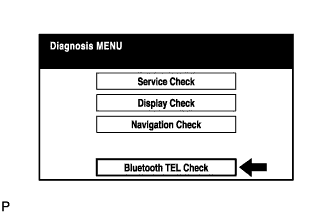
Select "'Bluetooth' TEL Check" from the "Diagnosis MENU" screen.
NAVIGATION SYSTEM > BLUETOOTH TEL CHECK MODE |
| ENTER DIAGNOSTIC MODE (Click here) |
| "BLUETOOTH" TEL CHECK |
|
Select "'Bluetooth' TEL Check" from the "Diagnosis MENU" screen.
| "BLUETOOTH" CHECK |
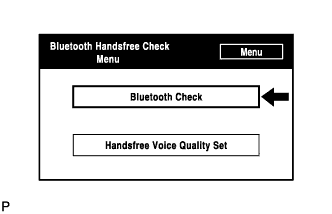 |
Select "'Bluetooth' Check" from the "'Bluetooth' Handsfree Check Menu" screen.
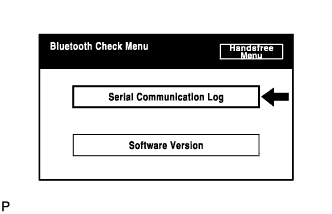 |
Select "Serial Communication Log" from the "'Bluetooth' Check Menu" screen.
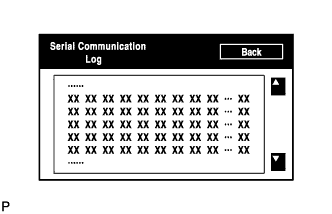 |
The communication log data in the display ECU are displayed on this screen.
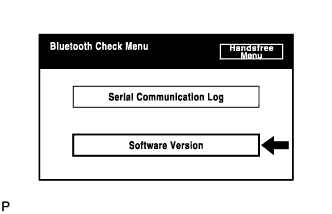 |
Select "Software Version" from the "'Bluetooth' Check Menu" screen.
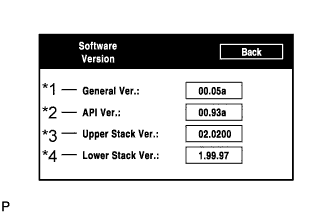 |
Check the software version of the "Bluetooth" module.
| Display | Contents |
| General Version/*1 |
|
| API Version/*2 | API software version is displayed. |
| Upper Stack Version/*3 | Upper Stack version is displayed. |
| Lower Stack Version/*4 | Lower Stack version is displayed. |
| HANDSFREE VOICE QUALITY SET |
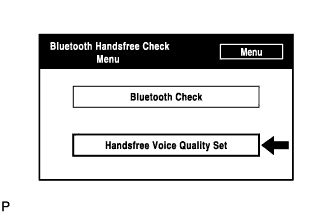 |
Select "Handsfree Voice Quality Set" from the "'Bluetooth' Handsfree Check Menu" screen.
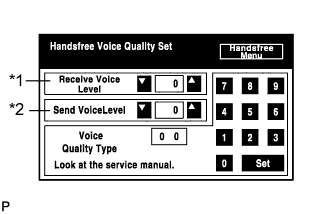 |
Check the handsfree voice level.
| Display | Contents |
| Received voice level adjustment/*1 | Setting possible for the voice level received from "Bluetooth" compatible phones. |
| Sent voice level adjustment/*2 | Setting possible for the voice level sent to "Bluetooth" compatible phones. |