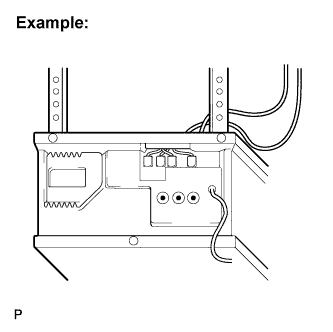
Re-registration of codes in the garage door opener system. (registration mode)
- NOTICE:
- When programming a garage door opener system, you may operate a garage door or other device. To prevent injury, it is necessary to make sure that people and objects are out of the way of the garage door or other device.
- Before beginning programming of the garage door opener system, turn off the engine and remove the key from the ignition key cylinder.
- The garage door opener system cannot be used with openers that:
(1) Were manufactured before April 1, 1982.
(2) Do not meet Federal Safety Standards (for example, garage doors without a jam protection function).
- HINT:
- 3 transmitter codes can be registered with the garage door opener system. It is possible to register one handheld transmitter code (original transmitter) for each of the three garage door opener system switches.
- Disconnecting the vehicle's battery will not erase the transmitter codes registered in the garage door opener system.
- An attempt to overwrite a previously registered code may fail. In this case, the previously registered handheld transmitter code will not be erased.
- To successfully program the garage door opener system, it may be necessary to replace the handheld transmitter battery before programming.
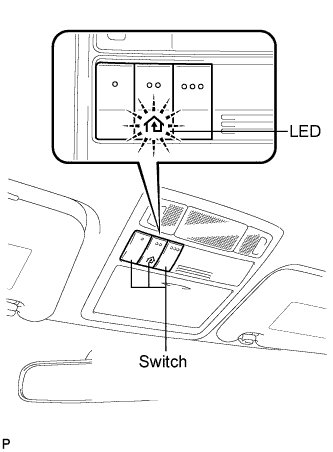
Select one of the garage door opener system switches to program.
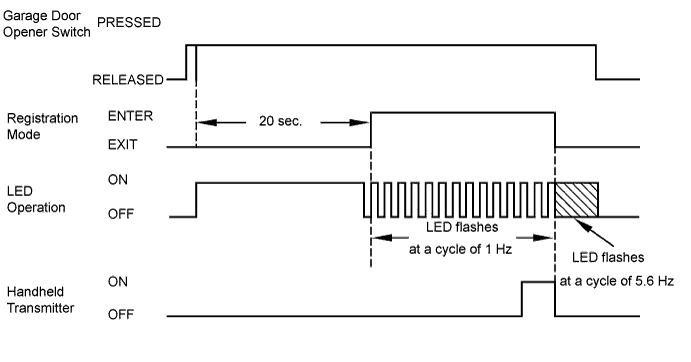
Press and hold the selected switch for 20 seconds. The garage door opener system will enter registration mode. Continue to hold this switch during steps 3 and 4.
- HINT:
- The garage door opener system LED should stay on while holding the selected switch for the 20-second period. After entering registration mode, the LED will flash approximately 1 time per second (1 Hz). This indicates that the garage door opener system has entered registration mode and is listening for a code from a handheld transmitter.
After the garage door opener system has entered registration mode, bring the original handheld transmitter within 2 to 9 cm (0.7 to 3.5 in.) of the garage door opener system. Press and hold the switch on the handheld transmitter. If the flashing speed of the garage door indicator light changes from the slow speed to a faster speed, proceed to step 4.
- HINT:
- Some handheld transmitters stop transmitting after 1 to 2 seconds. In this case, continue to hold the selected garage door opener system switch while pressing the handheld transmitter switch for two seconds at a time. Repeat the cycle of pressing and releasing the transmitter switch while monitoring for a change of the flashing speed of the indicator LED.
When the indicator light begins to flash more rapidly, release both switches. This indicates that the garage door opener system has been successfully programmed. If the garage door opener system fails to program, review all hints before trying the programming process again.
- HINT:
If transmitter registration fails: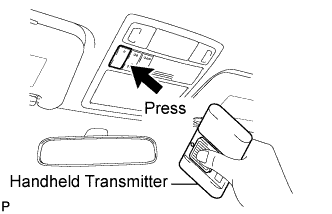
(1) The battery in the handheld transmitter may be weak or need to be replaced.
(2) The handheld transmitter and opener device to be registered may not be compatible with the vehicle's garage door opener system.- After entering the garage door opener system registration mode, registration of the handheld transmitter code must be completed within 90 seconds. If 90 seconds have elapsed, the garage door opener system will enter low power mode.
- For first time programming it may be necessary to press and hold the two outer switches until the indicator light begins to flash rapidly. The length of time that it is necessary to hold the switches for in this case should be approximately 20 seconds.
- In some cases, the garage door indicator light may flash slowly (1 time per second (1 Hz)) as soon as the selected garage door opener system switch is pressed. This indicates that the system is ready or "listening" for a code from a handheld transmitter. Continue to hold the switch and proceed from step 3.
 |
|
 |