 |
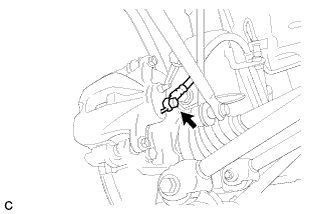
Connect the rear flexible hose to the disc brake cylinder assembly with the union bolt and a new gasket.
- Torque:
- 33 N*m{ 336 kgf*cm , 24 ft.*lbf }
REAR BRAKE FLEXIBLE HOSE > INSTALLATION |
| 1. INSTALL REAR FLEXIBLE HOSE |
|
Connect the rear flexible hose to the disc brake cylinder assembly with the union bolt and a new gasket.
Install the rear flexible hose to the bracket with a new clip.
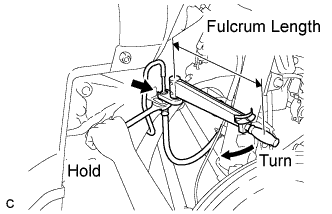 |
Using a union nut wrench (10 mm), connect the brake line to the front brake flexible hose while holding the flexible hose with a wrench.
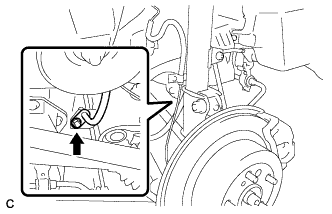 |
Install the rear flexible hose to the absorber bracket with the bolt.
| 2. BLEEDING PRECAUTION |
| 3. FILL RESERVOIR WITH BRAKE FLUID |
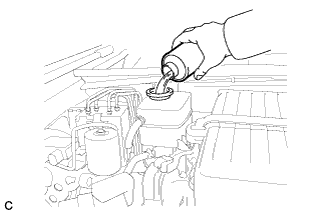 |
Add brake fluid into the reservoir.
| 4. BLEED BRAKE SYSTEM |
Connect the Techstream to the DLC3 with the power switch off.
Check that the parking brake is set, and turn the power switch on (IG).
Enter the following menus: Chassis / ABS/VSC/TRC / Air Bleeding.
Select the menu on the Techstream display based on the following list.
| Select "Usual air bleeding" on the Techstream display. |
| Air bleeding (no part replacement) | Select "Actuator has been removed" on the Techstream display. |
|
|
| Brake master cylinder reservoir (removal, installation or replacement) |
|
|
|
After air bleeding or replacement, tighten the bleeder plug.
| 5. INSPECT FOR BRAKE FLUID LEAK |
| 6. PERFORM ACCUMULATOR ZERO DOWN |
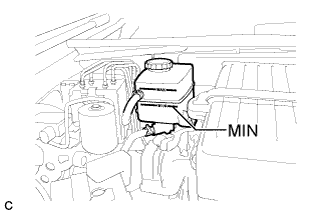 |
Drain the brake fluid in the reservoir tank near the MIN line.
Connect the Techstream to the DLC3 with the power switch off.
Check that the parking brake is set, and turn the power switch on (IG).
Enter the following menus: Chassis / ABS/VSC/TRC / Utility / Electronically Controlled Brake system Utility / Zero Down.
When the buzzer sounds, turn the power switch off.
| 7. INSPECT AND ADJUST FLUID LEVEL IN RESERVOIR |
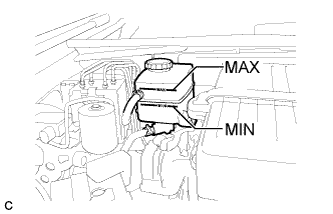 |
Inspect the fluid level. If the brake fluid level is lower than the MIN line, inspect for brake fluid leakage and brake pad. After repair or replacement, adjust the brake fluid level in the reservoir as specified below.
Add the brake fluid to the MAX line with the power switch on (IG).
| 8. INSTALL REAR WHEEL |
| 9. CLEAR DTC |
Clear the DTCs (Click here).
| 10. CHECK FOR DTC |
Check for DTCs. If any DTC is output, perform the troubleshooting for that DTC (Click here).