 |
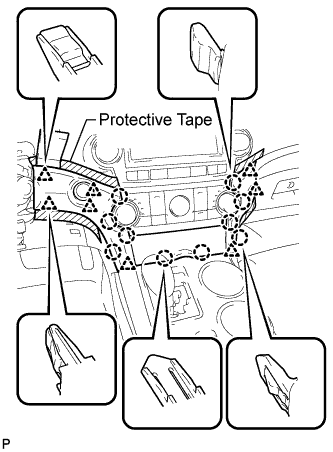
Apply protective tape to the areas shown in the illustration.
CENTER POWER OUTLET SOCKET > REMOVAL |
| 1. REMOVE CENTER INSTRUMENT CLUSTER FINISH PANEL ASSEMBLY |
|
Apply protective tape to the areas shown in the illustration.
Using a moulding remover, disengage the 10 claws and 8 clips starting from the upper part of the center instrument cluster finish panel assembly.
Disconnect each connector and remove the center instrument cluster finish panel assembly.
| 2. REMOVE UPPER CONSOLE PANEL SUB-ASSEMBLY |
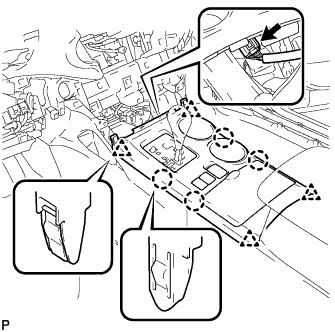 |
Disengage the 4 claws and 4 clips.
Disconnect the connector and remove the upper console panel sub-assembly.
| 3. REMOVE POWER OUTLET SOCKET ASSEMBLY |
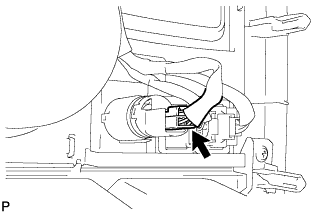 |
Disconnect the connector.
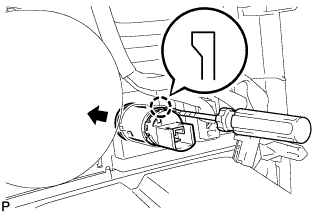 |
Disengage the claw and remove the power outlet socket assembly.
| 4. REMOVE CENTER POWER OUTLET SOCKET COVER |
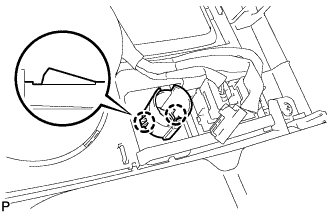 |
Disengage the 2 claws and remove the center power outlet socket cover.