RM3160E
_58
Vehicle Interior
_019712
SEAT
_0109369
SEAT MEMORY SWITCH
G
SEAT SEAT MEMORY SWITCH INSPECTION
PROCEDURE

 84927C
1.INSPECT SEAT MEMORY SWITCH (DRIVER DOOR)
a.
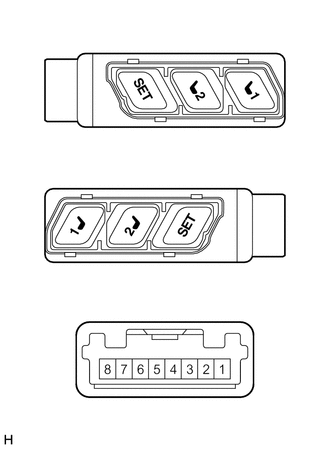
2.698,1.479 2.698,1.125
false
2.125,1.479 2.125,1.125
false
1.563,1.479 1.563,1.125
false
0.74,2.885 0.74,2.531
false
1.302,2.896 1.302,2.542
false
1.854,2.885 1.854,2.531
false
0.073,0.26 0.531,0.677
0.458,0.417
12
false
*A
0.104,1.688 0.594,2.073
0.49,0.385
12
false
*B
2.646,1.51 3.063,1.875
0.417,0.365
10
false
*a
2.073,1.51 2.531,1.833
0.458,0.323
10
false
*b
1.5,1.5 2.052,1.833
0.552,0.333
10
false
*c
0.417,3.25 1.073,3.854
0.656,0.604
10
false
*d
0.677,2.906 1.094,3.271
0.417,0.365
10
false
*a
1.25,2.917 1.708,3.24
0.458,0.323
10
false
*b
1.802,2.906 2.354,3.24
0.552,0.333
10
false
*c
| *A | for LHD |
| *B | for RHD |
| *a | M1 Switch |
| *b | M2 Switch |
| *c | SET Switch |
| *d | Component without harness connected
(Seat Memory Switch (Driver Door)) |
Check the seat memory switch (driver door).
i.
Measure the resistance according to the value(s) in the table below.
- Standard Resistance:
Tester Connection Condition Specified Condition 4 - 2 M1 switch pressed Below 1 Ω M1 switch not pressed 10 kΩ or higher 3 - 2 M2 switch pressed Below 1 Ω M2 switch not pressed 10 kΩ or higher 8 - 2 SET switch pressed Below 1 Ω SET switch not pressed 10 kΩ or higher
If the result is not as specified, replace the seat memory switch (driver door).
b.
Check that the switch illumination comes on.
i.
Apply battery voltage to the seat memory switch (driver door) and check that the switch illumination comes on.
- OK:
Battery Connection Condition Specified Condition Battery positive (+) → 5
Battery negative (-) → 7Always Switch illumination comes on
If the result is not as specified, replace the seat memory switch (driver door).