RM3160E
_56
Audio / Visual / Telematics
_060168
TELEMATICS
_0298542
MAYDAY BATTERY
A
TELEMATICS MAYDAY BATTERY REMOVAL
PROCEDURE

 1. PRECAUTION
86740
2.REMOVE TELEMATICS TRANSCEIVER
86725
3.REMOVE MOBILE PHONE BATTERY
a.
0,0 0,0
false

|
Remove in this Direction (1) |

|
Remove in this Direction (2) |
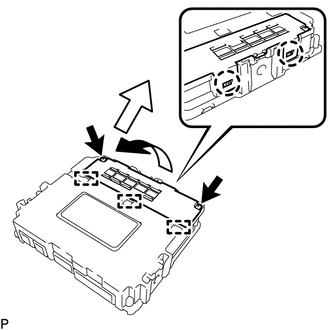
Loosen the 2 screws.
- HINT:
-
The 2 screws cannot be removed because they are integrated into the battery cover sub-assembly.
b.
Disengage the 2 claws and 3 guides as shown in the illustration to remove the battery cover sub-assembly.
c.
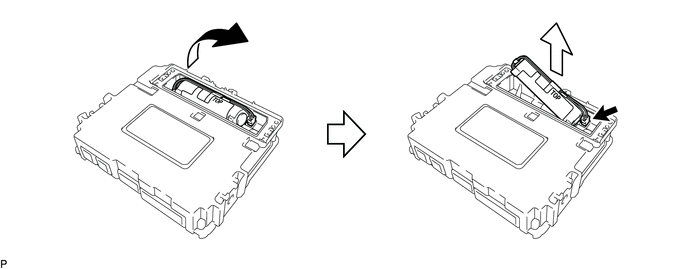
Lift the battery, disconnect the connector and remove the battery as shown in the illustration.
0,0 0,0
false
|
|
Remove in this Direction (1) |
|
Remove in this Direction (2) |