PRE-COLLISION PRE-COLLISION SYSTEM DETAILS INDICATOR LIGHT/WARNING LIGHT/MULTI DISPLAY
OPERATION
Warning Indication
The combination meter assembly uses the multi-information display, PCS warning light, VSC OFF indicator light and buzzer to provide the driver with pre-collision system malfunction and indications.
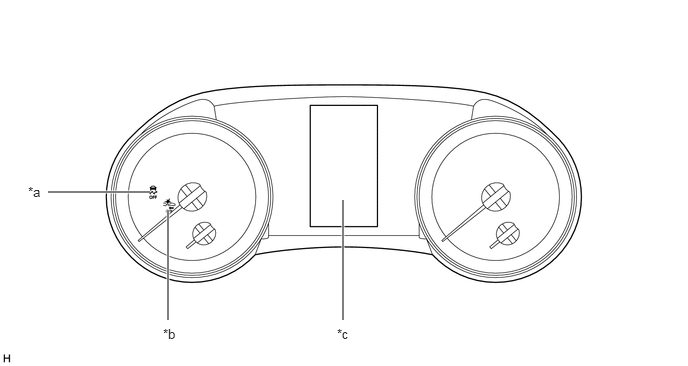
| *a | VSC OFF Indicator Light | *b | PCS Warning Light |
| *c | Multi-information Display | - | - |
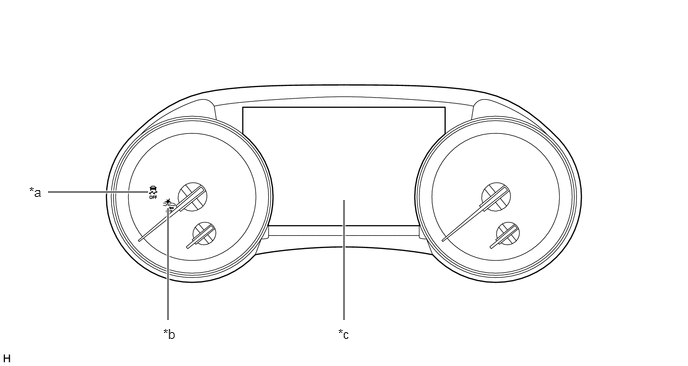
| *a | VSC OFF Indicator Light | *b | PCS Warning Light |
| *c | Multi-information Display | - | - |
If the forward recognition camera determines that the possibility of a collision is high, it sends a signal to the combination meter assembly and meter mirror sub-assembly*. Upon receiving this signal, the combination meter assembly and meter mirror sub-assembly* indicates a warning using the multi-information display, headup display* and buzzer. Details are indicated below.
*: Models with headup display
| Multi-information Display/Headup Display* | Buzzer |
|---|---|
|
*: Models with headup display |
|
| BRAKE! | Sounds Continuously |
If the pre-collision system is disabled, a message will be displayed on the multi-information display.
| Multi-information Display | PCS Warning Light |
|---|---|
| Pre-Collision System OFF | Illuminates |
If the VSC operation has been disabled, a message will be displayed on the multi-information display.
| Multi-information Display | VSC Indicator Light | PCS Warning Light |
|---|---|---|
| VSC Turned OFF Pre-Collision Brake System Unavailable | Illuminates | Illuminates |
When the system is not available, the following warning occurs to warn the driver.
| Multi-information Display | Detail | PCS Warning Light | Buzzer | DTC |
|---|---|---|---|---|
| Pre-Collision System Malfunction Visit Your Dealer | This message appears when the forward recognition camera detects a system malfunction | Illuminates | Sounds once | Repair is required DTCs are stored |
| Pre-Collision System Unavailable | ·
Millimeter wave radar sensor assembly misaligned ·
Millimeter wave radar sensor assembly temperature malfunction ·
Millimeter wave radar sensor assembly voltage malfunction |
Illuminates | - | - |
| Pre-Collision System Unavailable Clean Sensor | Dirty center mark of upper radiator grille or millimeter wave radar sensor assembly | Illuminates | - | - |
| Front Camera Unavailable See Owner's Manual | Dirty or fog windshield glass over the forward recognition camera | Illuminates | - | - |
| Front Camera Unavailable | ·
Forward recognition camera temperature malfunction ·
Forward recognition camera voltage malfunction ·
Other forward recognition camera malfunction |
Illuminates | - | - |
Changing settings of the pre-collision system
Enabling/disabling the pre-collision system
The pre-collision system can be enabled/disabled on setting display screen of the multi-information display.
- HINT:
-
The system is automatically enabled each time the ignition switch is turned to IGNITION ON mode.
If the system is disabled, the PCS warning light will turn on and a message will be displayed on the multi-information display.
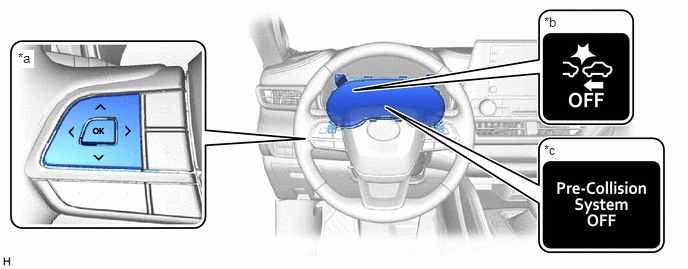
| *a | Steering Pad Switch Assembly | *b | PCS warning Light |
| *c | Multi-information Display | - | - |
Changing the pre-collision warning timing
The pre-collision warning timing can be changed on setting display screen of the multi-information display.
- HINT:
-
The warning timing setting is retained when the ignition switch is turned off. However, if the pre-collision system is disabled and re-enabled, the operation timing will return to the default setting (middle).
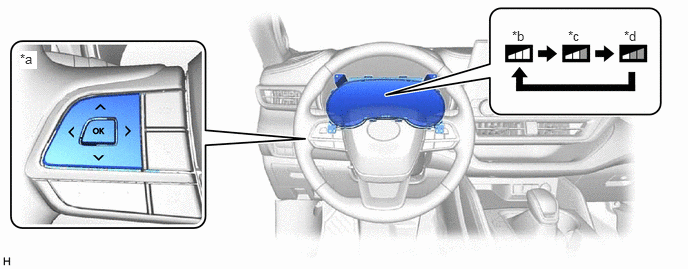
| *a | Steering Pad Switch Assembly | *b | Early |
| *c | Middle (This is the default setting.) | *d | Late |