PARK ASSIST / MONITORING PANORAMIC VIEW MONITOR SWITCH INSPECTION
PROCEDURE

 84721A
1.INSPECT PANORAMIC VIEW MONITOR SWITCH (FRONT WIDE VIEW SWITCH)
Remove the panoramic view monitor switch (front wide view switch).
Click hereAudio / Visual / Telematics>PARK ASSIST / MONITORING>PANORAMIC VIEW MONITOR SWITCH>REMOVAL
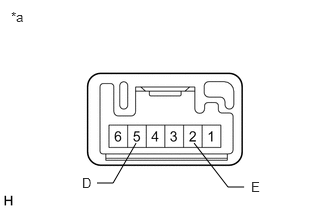
| *a | Component without harness connected
(Panoramic View Monitor Switch (Front Wide View Switch)) |
Measure the resistance according to the value(s) in the table below.
- Standard Resistance:
Tester Connection Switch Condition Specified Condition 5 (D) - 2 (E) Panoramic view monitor switch (front wide view switch) pushed Below 1 Ω Panoramic view monitor switch (front wide view switch) not pushed 10 kΩ or higher
If the result is not as specified, replace the panoramic view monitor switch (front wide view switch).
Check that the switch illumination illuminates.
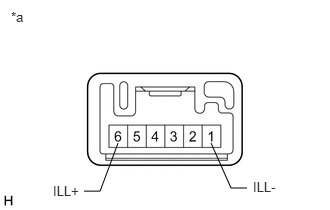
| *a | Component without harness connected
(Panoramic View Monitor Switch (Front Wide View Switch)) |
Apply auxiliary battery voltage to the panoramic view monitor switch (front wide view switch) and check that the switch illumination illuminates.
- OK:
Connection Specified Condition Auxiliary battery positive (+) → Terminal 6 (ILL+)
Auxiliary battery negative (-) → Terminal 1 (ILL-)Illuminates
If the result is not as specified, replace the panoramic view monitor switch (front wide view switch).
Install the panoramic view monitor switch (front wide view switch).
Click hereAudio / Visual / Telematics>PARK ASSIST / MONITORING>PANORAMIC VIEW MONITOR SWITCH>INSTALLATION