MAINTENANCE A25A-FXS, A25B-FXS AUXILIARY BATTERY INSTALLATION
PROCEDURE

 1.INSTALL AUXILIARY BATTERY
w/ Battery Insulator:
Install the battery insulator to the auxiliary battery.
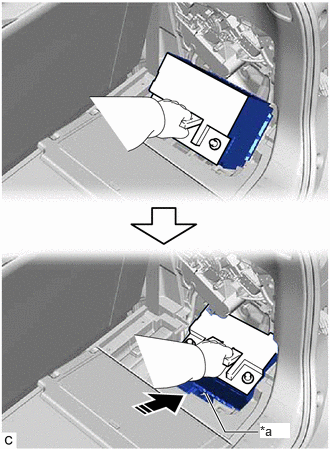
| *a | Slope |

|
Install auxiliary battery in this direction |
Lower the auxiliary battery along the slope to install it as shown in the illustration.
Install the battery clamp sub-assembly with the bolt and nut.
- Torque:
- 5.4 N*m (55 kgf*cm, 48 in.*lbf)
Connect the battery hose to the auxiliary battery.
- NOTICE:
-
After replacing the auxiliary battery, install the ventilation hole plug supplied with the new auxiliary battery or the ventilation hole plug from the old auxiliary battery to the ventilation hole on the side to which the battery hose is not connected.
Connect the cable to the positive (+) auxiliary battery terminal and tighten the nut.
- Torque:
- 5.0 N*m (51 kgf*cm, 44 in.*lbf)
Close the battery terminal connector cover.
2.CONNECT CABLE TO NEGATIVE AUXILIARY BATTERY TERMINAL
Connect the cable to the negative (-) auxiliary battery terminal and tighten the nut.
- Torque:
- 5.4 N*m (55 kgf*cm, 48 in.*lbf)
- NOTICE:
-
When disconnecting the cable, some systems need to be initialized after the cable is reconnected.
-
Click hereGeneral>INTRODUCTION>REPAIR INSTRUCTION>INITIALIZATION
58441L
3.INSTALL BATTERY SERVICE HOLE COVER
Engage the 2 guides and 6 claws to install the battery service hole cover.
Return the deck board assembly to its original position.