RM37A0E
_58
Vehicle Interior
_086897
POWER OUTLETS (INT)
_0448969
WIRELESS CHARGER ASSEMBLY
A
POWER OUTLETS (INT) WIRELESS CHARGER ASSEMBLY REMOVAL
PROCEDURE

 1.REMOVE CONSOLE BOX ASSEMBLY
861C0
2.REMOVE MOBILE WIRELESS CHARGER CRADLE ASSEMBLY
3.REMOVE WIRELESS CHARGER ASSEMBLY
a.
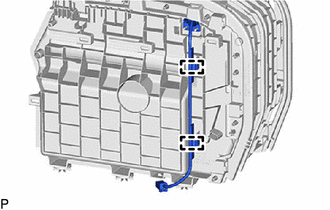
Disengage the 2 clamps.
b.
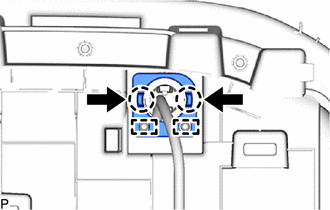
While pushing the tabs of the pivot hinge as shown in the illustration, disengage the 2 claws and 2 guides.
c.
0,0 0,0
false

|
Remove in this Direction |
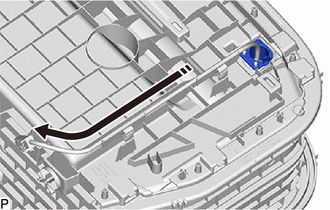
Remove the pivot hinge as shown in the illustration.
d.
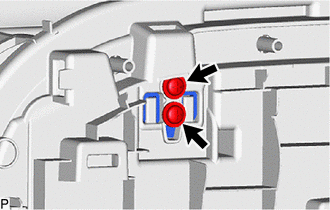
Remove the 2 screws.
e.
0,0 0,0
false
|
|
Remove in this Direction |
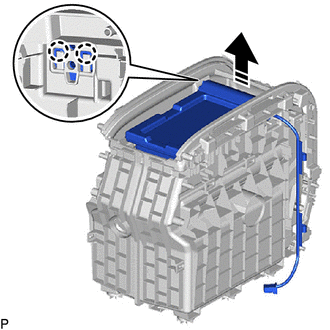
Disengage the 2 claws as shown in the illustration to remove the wireless charger assembly.
82176B
4.REMOVE REAR CONSOLE BOX WIRE
a.
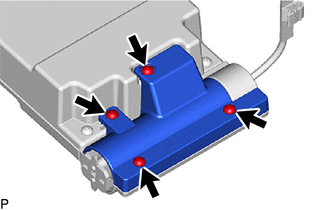
Using a T20H "TORX" driver, remove the "TORX" 4 screws and torque cover.
b.
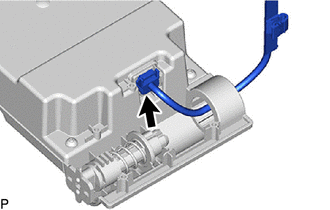
Disconnect the connector to remove the rear console box wire.