Home › INTRODUCTION › INTRODUCTION › REPAIR INSTRUCTION

REPAIR INSTRUCTION > INITIALIZATION


System Name
Power Window Control System
Meter / Gauge System

RESET (INITIALIZE) POWER WINDOW REGULATOR MOTOR (for Driver Side)

NOTICE:
Resetting the power window regulator motor (initializing the pulse sensor) is necessary if one of the following occurs: 1) the battery cable is disconnected; 2) the power window regulator master switch, wire harness, power window regulator switch, power window regulator or power window regulator motor is replaced or removed / installed; or 3) the ALT H-fuse, AM1 H-fuse, IG1 H-fuse, PWR H-fuse, DOOR fuse, ECU-IG & GAUGE fuse or IG1 relay is replaced. If resetting is not performed, the master switch will not be able to operate the AUTO UP / DOWN function and jam protection function.

  1. Turn the ignition switch ON.

  2. Open the power window halfway by pressing the power window switch.

  3. Fully pull up on the switch until the power window is fully closed and continue to hold the switch for at least 1 second.

  4. Check that the AUTO UP / DOWN function operates normally.
    If the AUTO UP / DOWN function operates normally, reset operations are completed. If abnormal, follow the 3 steps below.

  5. Disconnect the cable from the negative (-) battery terminal for 10 seconds.

  6. Connect the cable to the negative (-) battery terminal.

  7. Perform the first 4 steps again.
    If the AUTO UP / DOWN function operates normally, reset operations have been completed at this time. If abnormal, follow the 4 steps below.

  8. Turn the ignition switch ON.

  9. Open the power window halfway by pressing the power window switch.

  10. Fully pull up on the switch until the power window is fully closed and continue to hold the switch for approximately 12 seconds after the power window is fully closed.

  11. Check that the AUTO UP / DOWN function operates normally.


RESET COMPASS IN COMBINATION METER

CAUTION:
  1. Strictly observe posted speed limits, traffic laws and road conditions.
  2. Make sure no people are near the vehicle.

NOTICE:
  1. Perform the circling calibration in a spacious area that does not have artificial magnetic influence. For example, underground parking lots, areas under a steel tower and areas between tall buildings are not acceptable.
  2. When performing calibration, do not operate the air conditioner, power windows, or any other electrical equipment.
  3. A compass may become magnetized during shipping by vessels or freight cars. Make sure to perform calibration and ensure that the calibration is performed properly. If calibration cannot be completed in spite of performing the circling calibration described below, the vehicle's magnetic field may be interfering with the calibration. Demagnetize the vehicle using a demagnetizer and perform calibration again.

  1. Circling calibration

    1. Select compass mode.

    2. Press and hold INFO for 3 seconds to enter the compass correction mode.

    3. Press RESET.

    4. Drive the vehicle slowly in a circle once within 128 seconds.

      HINT:
      1. If the circling calibration is completed, the correct direction is displayed automatically.
      2. If the correct direction is not displayed after driving the vehicle as specified, change the vehicle location.

    5. If there is not enough space to drive in a circle, perform the following:

      1. Drive the vehicle forward with the steering wheel fully turned to the right, and then drive in reverse with the steering wheel fully turned to the left.
      2. Repeat the pattern above 2 times within 128 seconds.

      HINT:
      1. If the circling calibration is completed, the correct direction is displayed automatically.
      2. If the correct direction is not displayed after driving the vehicle as specified, change the vehicle location.

  2. Compass correction mode cancellation

    1. Press RESET after performing the circling calibration.

    2. Press INFO or wait for 6 seconds to end the compass correction mode.


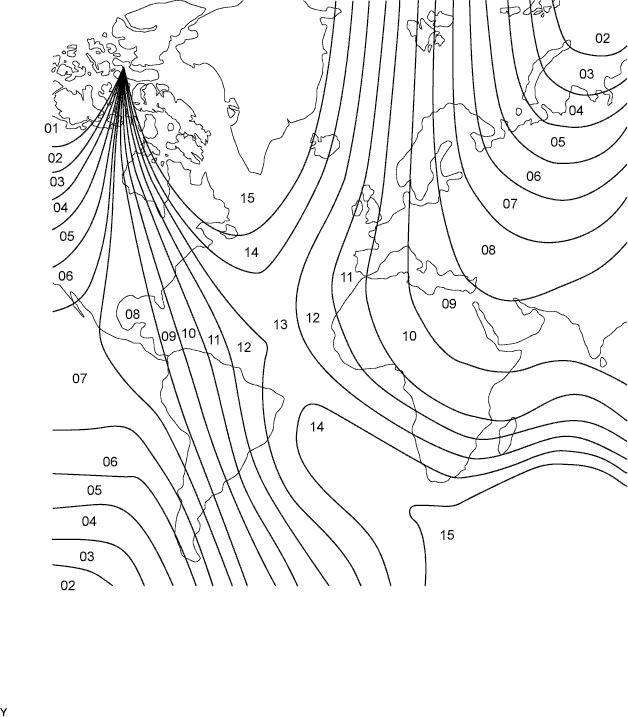
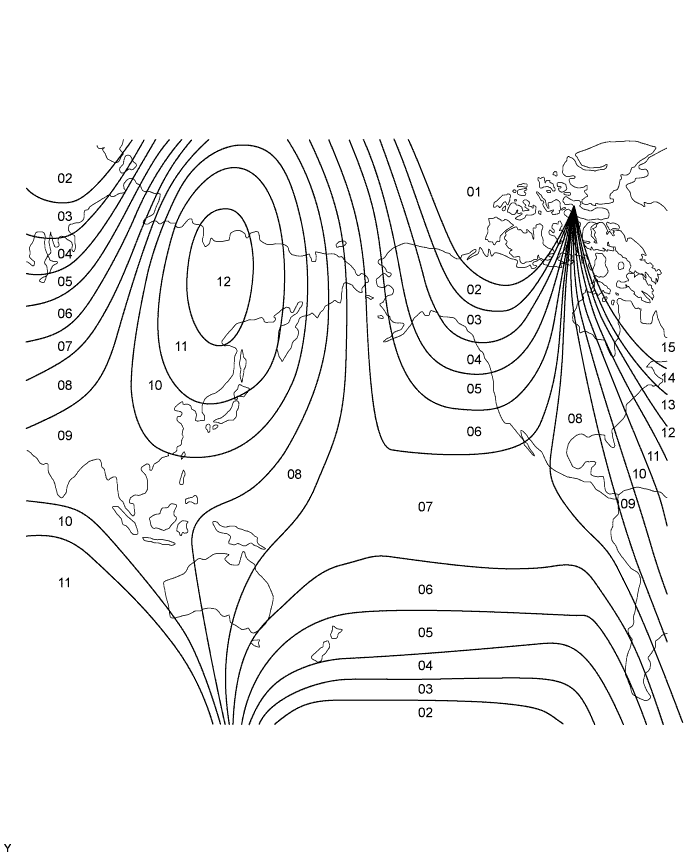
  3. Zone setting

    1. Select compass mode.

    2. Press and hold INFO for 3 seconds to enter compass correction mode.

    3. Press H to select a higher zone number.

    4. Press M to select a lower zone number.


    5. Press INFO or wait for 6 seconds to end compass correction mode.

      E110247E01


      E110246E01