AUTOMATIC TRANSMISSION SYSTEM > DTC CHECK / CLEAR |
| CHECK DTC (USING INTELLIGENT TESTER) |
|
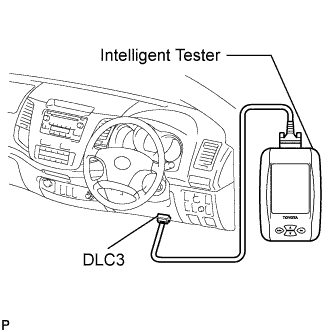
Connect the intelligent tester to the DLC3.
Turn the ignition switch to ON and push the tester main switch on.
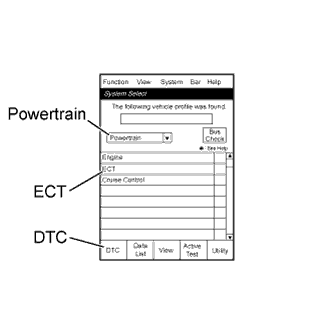 |
Enter the following menus: Powertrain / ECT / DTC.
Check and make a note of DTCs and freeze frame data.
Confirm the details of the DTCs (Click here).
| CHECK DTC (NOT USING INTELLIGENT TESTER) |
 |
Turn the ignition switch to ON.
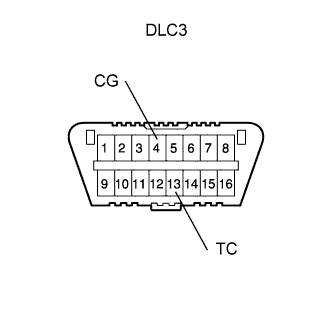
Using SST, connect terminals 13 (TC) and 4 (CG) of the DLC3.
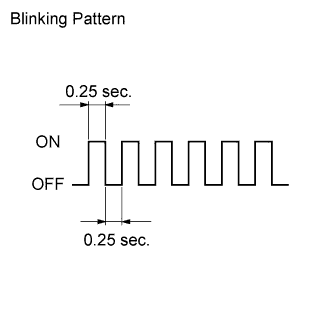 |
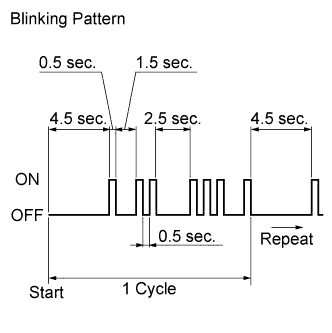
Read DTCs by observing the MIL. If a DTC is not detected, the MIL blinks as shown in the illustration.
 |
Example
DTCs 12 and 31 are detected and the MIL starts displaying the DTCs as shown in the illustration. The MIL blinking pattern of DTC 12 is displayed first.
A 2.5 second pause occurs. This pause will occur between the MIL blinking pattern of each DTC.
The MIL blinking pattern of DTC 31 is displayed.
A 4.5 second pause occurs. This pause occurs when the MIL blinking pattern is the last of a string of multiple DTCs.
The MIL repeats the display of the string of DTCs again.
Check and make a note of the DTCs.
After completing the check, disconnect terminals 13 (TC) and 4 (CG) to turn off the display.
Confirm the details of the DTCs (Click here).
| CLEAR DTCS AND FREEZE FRAME DATA (USING INTELLIGENT TESTER) |
 |
Connect the intelligent tester to the DLC3.
Turn the ignition switch to ON (do not start the engine) and push the tester main switch on.
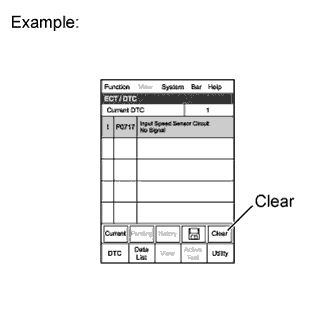
Enter the following menus: Powertrain / ECT / DTC / Clear.
Erase DTCs and freeze frame data by pressing YES on the tester.
Turn the ignition switch off and then turn it on again. Check that the monitor is not displaying any DTCs.
| CLEAR DTCS AND FREEZE FRAME DATA (NOT USING INTELLIGENT TESTER) |
 |
Perform either one of the following operations.
Disconnect the cable from the negative (-) battery terminal for more than 1 minute.
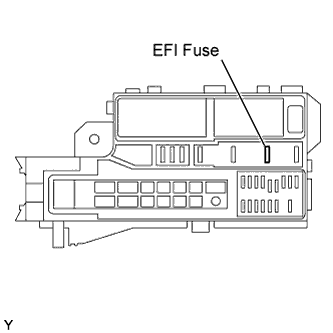
Remove the EFI fuse from the engine room junction block and relay block.