AIRBAG SYSTEM > DTC CHECK / CLEAR |
| CHECK DTC (USING SST CHECK WIRE) |
|
Check the DTCs (present trouble code).
Turn the ignition switch ON, and wait for approximately 60 seconds.
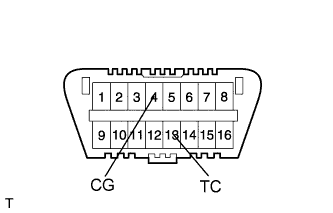
Using SST, connect terminals 4 (CG) and 13 (TC) of the DLC3.
Check the DTCs (past trouble code).
Using SST, connect terminals 4 (CG) and 13 (TC) of the DLC3.
Turn the ignition switch ON, and wait for approximately 60 seconds.
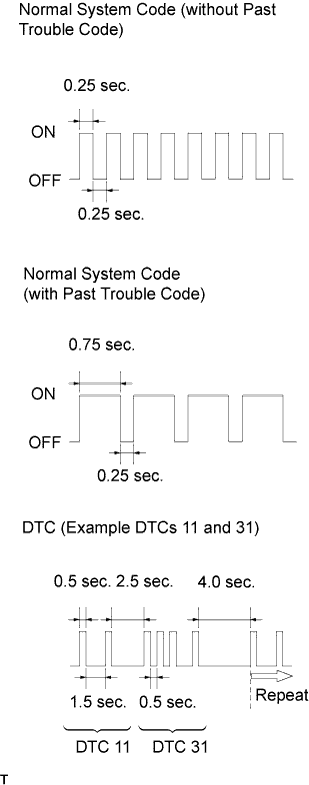 |
Read the DTCs.
Read the blinking patterns of the DTCs. Examples of the blinking patterns for the normal system code and DTCs 11 and 31 are shown in the illustration.
| CLEAR DTC (USING SST CHECK WIRE) |
When the ignition switch is turned OFF, the DTCs are erased.
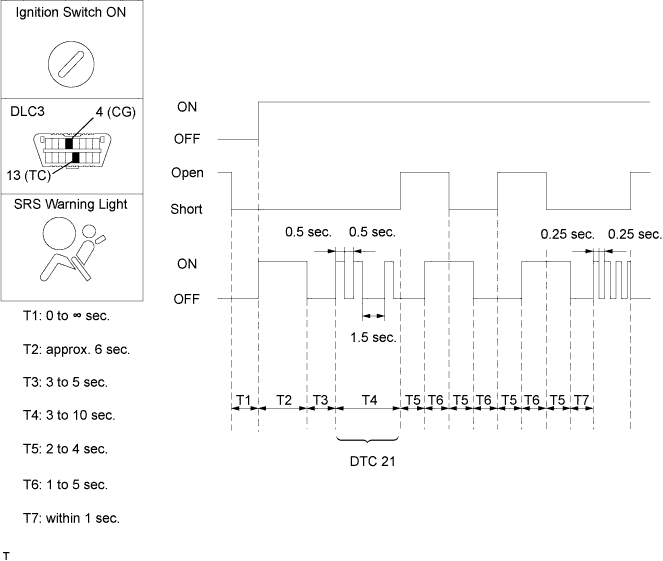
Using SST, connect terminals 13 (TC) and 4 (CG) of the DLC3, and then turn the ignition switch ON.
After DTCs are output, disconnect terminal 13 (TC) of the DLC3 within 3 to 10 seconds. Check that the SRS warning light illuminates 3 seconds later.
After the SRS warning light illuminates, connect terminal 13 (TC) of the DLC3 within 2 to 4 seconds. Check that the SRS warning light turns off within 2 to 4 seconds.
After the SRS warning light turns off, disconnect terminal 13 (TC) of the DLC3 within 2 to 4 seconds. Check that the SRS warning light illuminates within 2 to 4 seconds.
After the SRS warning light illuminates, connect terminal 13 (TC) of the DLC3 within 2 to 4 seconds. Check that the SRS warning light turns off within 2 to 4 seconds. Also check that the normal system code is output within 1 second.
| CHECK FOR DTC (USING INTELLIGENT TESTER) |
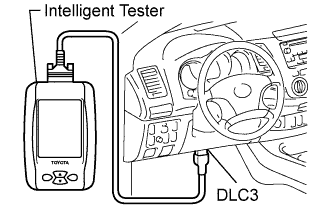 |
Connect the intelligent tester to the DLC3.
Turn the ignition switch ON.
Check for DTCs by following the prompts on the tester screen.
| CLEAR DTC (USING INTELLIGENT TESTER) |
Connect the intelligent tester to the DLC3.
Turn the ignition switch ON.
Clear the DTCs by following the prompts on the tester screen.