INSTALLATION
Removal / installation · Vehicles built from Jun 2011
| 1.
INSTALL REAR TELEVISION CAMERA ASSEMBLY |
 |
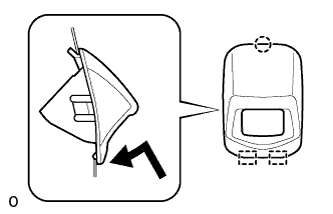
Attach the 2 guides as shown in the illustration.
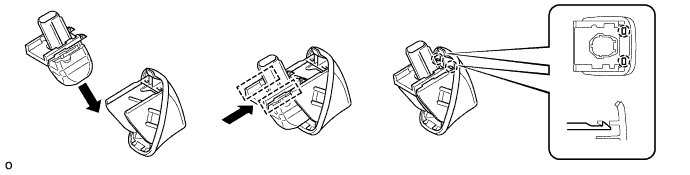

- HINT:
- Make sure that each guide is attached to its corresponding rail.
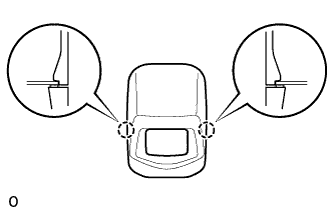
Attach the 2 claws to install the rear television camera assembly.
- NOTICE:
- Visually check that the guides and claws are attached to the back door No. 2 outside garnish.
| 2.
INSTALL BACK DOOR NO. 2 OUTSIDE GARNISH |
|
- Attach the claw and 2 guides as shown in the illustration.
- Attach the 2 claws to install the back door No. 2 outside garnish.
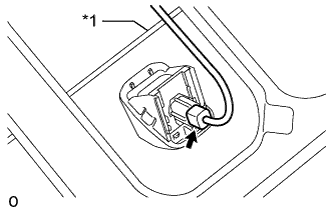
- Connect the connector.
- NOTICE:
- Make sure that the wire harness is between the tail gate inner panel and tail gate lock control link.
Text in Illustration
*1
|
Tail Gate Lock Control Link
|
| 3.
INSTALL TAIL GATE SERVICE HOLE COVER
|
|
for A Deck:
Install the tail gate service hole cover with the 10 screws.
for J Deck:
Install the tail gate service hole cover with the 8 screws.