METER / GAUGE / DISPLAY METER / GAUGE SYSTEM CUSTOMIZE PARAMETERS
PROCEDURE

 1. CUSTOMIZE METER / GAUGE SYSTEM
- HINT:
-
The following items can be customized.
- NOTICE:
- ·
When the customer requests a change in a function, first make sure that the function can be customized.
·Record the current settings before customizing.
Customizing auxiliary fuel tank warning light (for 2TR-FBE)
- HINT:
- ·
"oFF" indicates that the warning is OFF. "on" indicates that the warning is ON.
·When disconnecting the cable from the negative (-) battery terminal, this setting should return to "on".
·There are some cases where the driver will leave the auxiliary fuel tank empty intentionally, for example, when only gasoline is used in the main tank or the engine has no cold starting problems even with alcohol in the tank, such as in warm weather. In such cases, the driver may know that the auxiliary fuel tank is empty, and find the warning unnecessary. It is for this reason that cancel mode is provided.
Press the ODO/TRIP switch until the TRIP B meter appears.
Turn the ignition switch off.
Press the ODO/TRIP switch and hold it down.
Turn the ignition switch to ON.
Wait for 10 seconds or more.
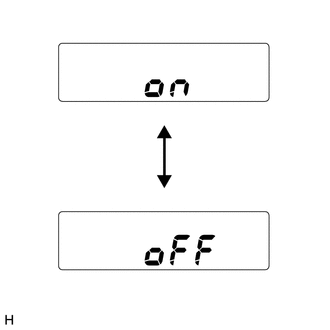
| *a | Auxiliary fuel tank warning light is enabled |
| *b | Auxiliary fuel tank warning light is disabled |
Check that the odometer or trip meter displays the current setting "on".
Press the ODO/TRIP switch.
Check that the odometer or trip meter displays "oFF".
Wait for 5 seconds or more without pressing ODO/TRIP switch to finish this mode.
Turn the ignition switch off.
2. CUSTOMIZE ACCESSORY METER (w/ Accessory Meter Assembly)
- HINT:
-
The following items can be customized.
- NOTICE:
- ·
When the customer requests a change in a function, first make sure that the function can be customized.
·Record the current settings before customizing.
Customizing fuel consumption
- HINT:
-
The units for the average fuel consumption and current fuel consumption can be switched between "L/100km" and "km/l".
Press the INFO switch to display the average fuel consumption or current fuel consumption display.
Press and hold the INFO switch for 2.3 seconds or more.
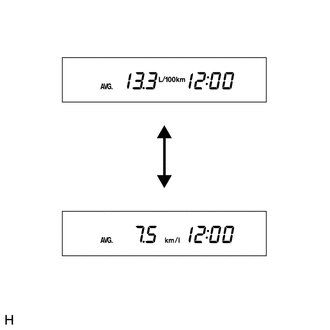
Press the RESET switch and select "L/100km" or "km/l".
- HINT:
-
The initial setting is "km/l".
Press the INFO switch to end fuel consumption customize mode.