RM1840EF
_56
Audio / Visual / Telematics
_009632
NAVIGATION / MULTI INFO DISPLAY
_0052661
NAVIGATION SYSTEM
J
NAVIGATION / MULTI INFO DISPLAY NAVIGATION SYSTEM Display does not Dim when Light Control Switch is Turned ON
PROCEDURE
1.CHECK VEHICLE SIGNAL
a.
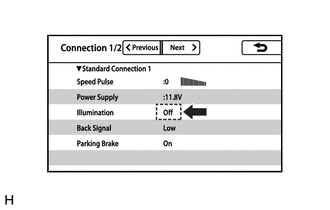
Display the "Connection Status" screen.
Click hereAudio / Visual / Telematics>NAVIGATION / MULTI INFO DISPLAY>NAVIGATION SYSTEM>OPERATION CHECK
b.
Check that the display changes between On and Off according to the light control switch operation.
- OK:
Light Control Switch Condition Display Condition TAIL or HEAD On OFF Off
- HINT:
-
The display is updated once per second. It is normal for the display to lag behind the actual switch operation.
- Result:
Proceed to OK NG
OK
REPLACE NAVIGATION RECEIVER ASSEMBLY
NG
PROCEED TO NEXT SUSPECTED AREA SHOWN IN PROBLEM SYMPTOMS TABLE
Click hereAudio / Visual / Telematics>NAVIGATION / MULTI INFO DISPLAY>NAVIGATION SYSTEM>PROBLEM SYMPTOMS TABLE