NAVIGATION / MULTI INFO DISPLAY NAVIGATION SYSTEM Vehicle Position Mark is not Updated
PROCEDURE
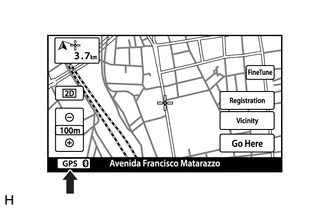
Check that the GPS mark is displayed.
- OK:
GPS mark is displayed.
- Result:
Proceed to OK NG
OK
NG
Click hereAudio / Visual / Telematics>NAVIGATION / MULTI INFO DISPLAY>NAVIGATION SYSTEM>PROBLEM SYMPTOMS TABLE
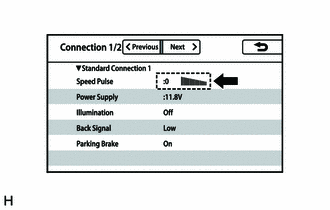
Display the "Connection Status" screen.
Click hereAudio / Visual / Telematics>NAVIGATION / MULTI INFO DISPLAY>NAVIGATION SYSTEM>OPERATION CHECK
While driving the vehicle, check that the value and gauge change in response to changes in vehicle speed.
- OK:
The value and gauge change in response to changes in vehicle speed.
- Result:
Proceed to OK NG
OK
NG
Click hereVehicle Interior>METER / GAUGE / DISPLAY>METER / GAUGE SYSTEM>HOW TO PROCEED WITH TROUBLESHOOTING
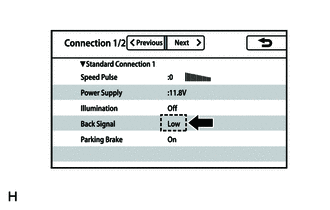
Display the "Connection Status" screen.
Click hereAudio / Visual / Telematics>NAVIGATION / MULTI INFO DISPLAY>NAVIGATION SYSTEM>OPERATION CHECK
Check that the display changes between High and Low according to the shift lever operation.
- OK:
Shift Lever Position Display Not reverse Low Reverse High
- HINT:
-
The display is updated once per second. It is normal for the display to lag behind the actual switch operation.
- Result:
Proceed to OK NG
OK
Click hereAudio / Visual / Telematics>NAVIGATION / MULTI INFO DISPLAY>NAVIGATION SYSTEM>PROBLEM SYMPTOMS TABLE
NG