NAVIGATION SYSTEM > SYSTEM DESCRIPTION |
| NAVIGATION RECEIVER ASSEMBLY OUTLINE |
Conventionally, 2 separate devices, a "radio and display" and a "navigation ECU", are used. This model combines these device into a signal unit.
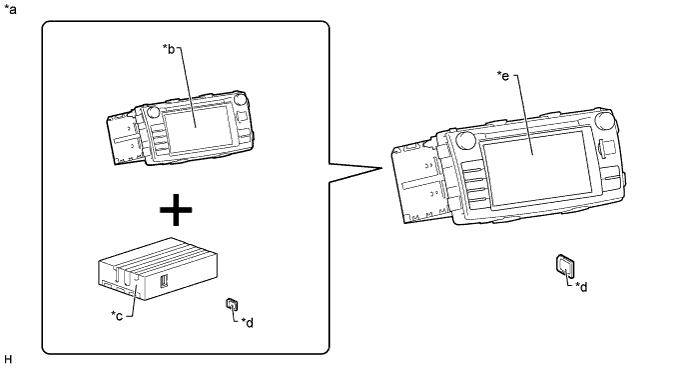
| *a | Example | *b | Radio and Display |
| *c | Navigation ECU | *d | SD Card (Map Data) |
| *e | Navigation Receiver Assembly | - | - |
| NAVIGATION SYSTEM OUTLINE |
Vehicle position tracking methods
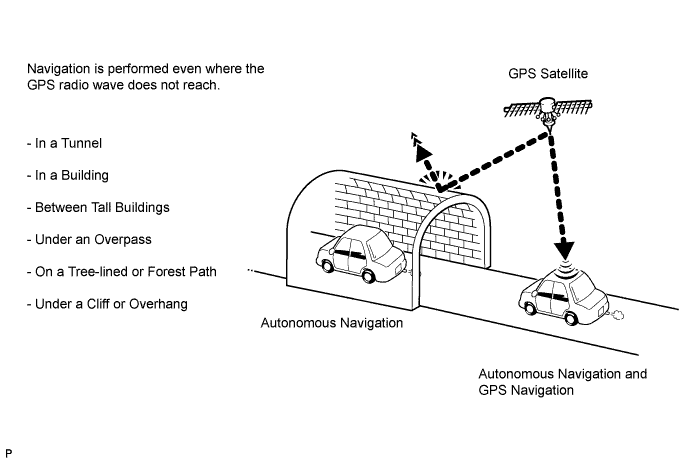
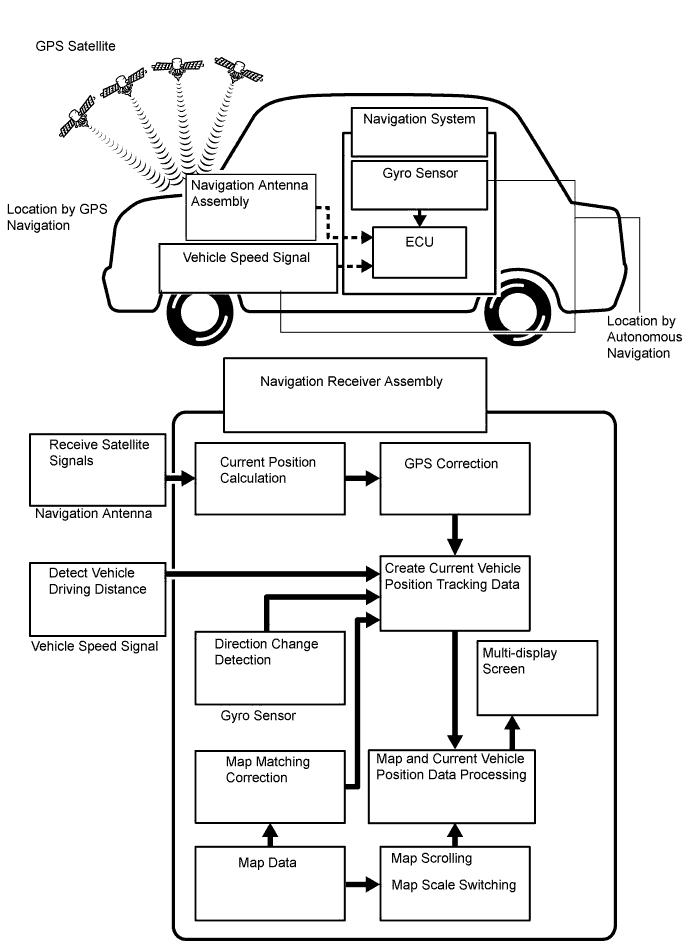
It is essential that the navigation system correctly tracks the current vehicle position and displays it on the map. There are 2 methods to track the current vehicle position: autonomous (dead reckoning) and GPS* (satellite) navigation. Both navigation methods are used in conjunction with each other.

| Operation | Description |
| Vehicle Position Calculation | The navigation receiver calculates the current vehicle position (direction and current position) using the direction deviation signal from the gyro sensor and the running distance signal from the vehicle speed sensor, and creates the driving route. |
| Map Display Processing | The navigation receiver processes the vehicle position data, vehicle running track, and map data from the SD card |
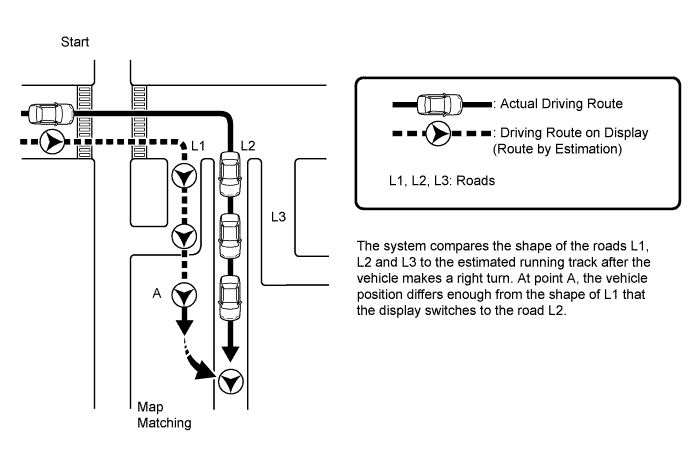
| Map Matching | The map data from the SD card is compared to the vehicle position and running track data. Then, the vehicle position is matched with the nearest road. |
| GPS Correction | The vehicle position is matched to the position measured by GPS. Then, the GPS measurement position data is compared with the vehicle position and running track data. If the position is widely different, the GPS measurement position is used. |
| Distance Correction | The running distance signal from the vehicle speed sensor includes the error caused by tire wear and slippage between the tires and road surface. Distance correction is performed to account for this. The navigation receiver assembly automatically offsets the running distance signal to make up for the difference between it and the distance data of the map. The offset is automatically updated. |

Autonomous navigation
This method determines the relative vehicle position based on the running track determined by the gyro and vehicle speed sensors.
Gyro sensor
Calculates the direction by detecting angular velocity. It is located in the navigation receiver assembly.
Vehicle speed sensor
Used to calculate the vehicle running distance.
GPS navigation (Satellite navigation)
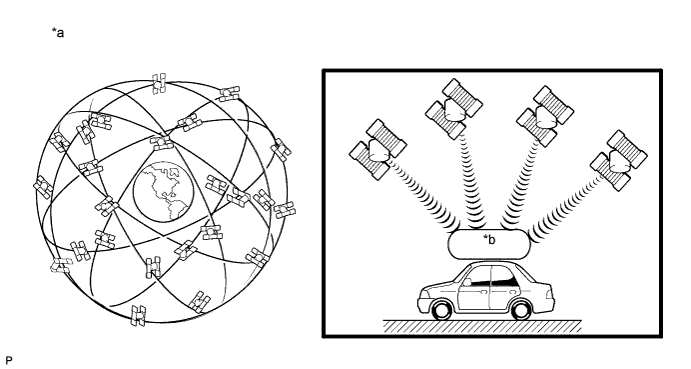
This method detects the absolute vehicle position using radio waves from a GPS satellite*.

| *a | Current longitude/latitude/altitude is determined using the radio wave arrival time from 4 satellites. | *b | GPS |
| Number of Satellites | Measurement | Description |
| 2 or less | Measurement impossible | The vehicle position cannot be obtained because the number of satellites is not enough. |
| 3 | 2-dimensional measurement is possible | The vehicle position is obtained based on current longitude and latitude (this is less precise than 3-dimensional measurement). |
| 4 | 3-dimensional measurement is possible | The vehicle position is obtained based on current longitude, latitude and altitude. |
Map matching
The current driving route is calculated by autonomous navigation (according to the gyro sensor and vehicle speed sensor) and GPS navigation. This information is then compared with possible road shapes from the map data in the SD card and the vehicle position is set onto the most appropriate road.

| TOUCH SCREEN OUTLINE |
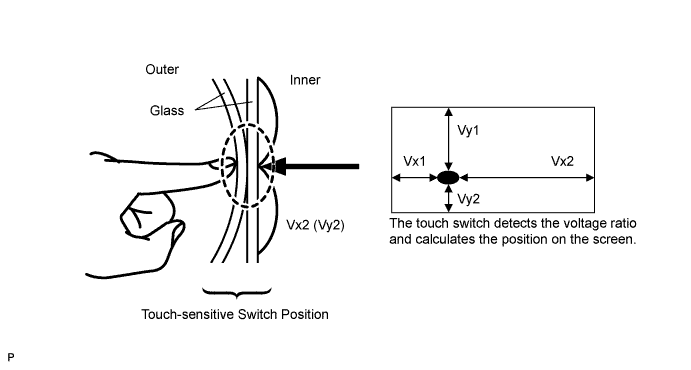
Touch switches are touch-sensitive (interactive) switches operated by touching the screen. When a switch is pressed, the outer glass bends to contact the inner glass at the pressed position. By doing this, the voltage ratio is measured and the pressed position is detected.

| SD OUTLINE |
Precautions for using SD card
Compatible SD cards.
Compatible SD memory cards
8 MB, 16 MB, 32 MB, 64 MB, 128 MB, 256 MB, 512 MB, 1 GB and 2 GB sizes
Compatible SDHC memory cards
4 GB, 6 GB, 8 GB, 12 GB, 16 GB and 32 GB sizes
| CD (Compact Disc) PLAYER OUTLINE |
A Compact Disc player uses a laser pickup to read digital signals recorded on Compact Discs (CD). By converting the digital signals to analog, music and other content can be played.
Usable discs
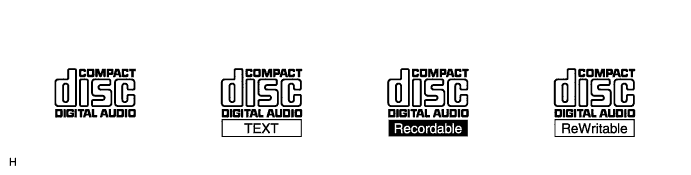
This player can only play audio CDs, CD-Rs (CD-Recordable), and CD-RWs (CD-ReWritable) that have any of the following marks:

Precautions for use of discs
![]() |
Cleaning
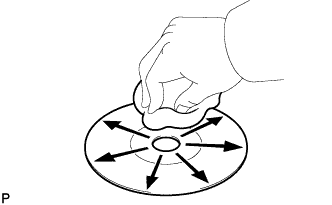
If dirt is on the disc surface, wipe it clean with a soft dry cloth, such as an eyeglass cleaner for plastic lenses, from the inside to the outside in a radial direction.
| MP3/WMA OUTLINE |
MP3/WMA files playable from CDs
Playable MP3 file standards
| Compatible Standard | MP3 (MPEG1 LAYER3, MPEG2 LSF LAYER3) |
| Compatible sampling frequency |
|
| Compatible bit rate |
|
| Compatible channel mode | Stereo, joint stereo, dual channel, monaural |
Playable WMA file standards
| Compatible Standard | WMA Ver. 7, 8 and 9 |
| Compatible sampling frequency | 32, 44.1, 48 (kHz) |
| Compatible bit rate |
|
MP3/WMA files playable from SD cards or USB device
Playable MP3 file standards
| Compatible Standard | MP3 (MPEG1 LAYER3, MPEG2 LSF LAYER3, MPEG2.5 LAYER3) |
| Compatible sampling frequency |
|
| Compatible bit rate |
|
| Compatible channel mode | Stereo, joint stereo, dual channel, monaural |
Playable WMA file standards
| Compatible Standard | WMA Ver. 7, 8 and 9 |
| Compatible sampling frequency | 8, 11.025, 16, 22.05, 32, 44.1, 48 (kHz) |
| Compatible bit rate |
|
ID3 tag and WMA tag
Additional textual information called ID3 tags can be input to MP3 files. Information such as song titles, artist names and album title can be stored.
Additional textual information called WMA tags can be input to WMA files. Information such as song titles and artist names can be stored.
Usable media
Only CD-ROMs, CD-Rs (CD-Recordable), and CD-RWs (CD-ReWritable) can be used to play MP3/WMA files.
Usable media format
Usable media format
| Disc format | CD-ROM Mode 1, CD-ROM Mode 2, CD-ROM XA Mode 2 Form 1, CD-ROM XA Mode 2 Form 2 |
| File format | ISO 9660 Level 1 and Level 2 (Joliet, Romeo), UDF 1.5, UDF 2.0, UDF 2.01, UDF 2.5, Rock Ridge (only compatible parts of ISO 9660) |
Standards and restrictions
| Maximum directory levels | 8 levels |
| Maximum number of characters for a folder name/file name | 32 characters |
| Maximum number of folders | 192 (Including empty folders, root folders, and folders that do not contain MP3/WMA files) |
| Maximum number of files in a disc | 255 (Including non-MP3/WMA files) |
File names
Only files with an extension of ".mp3" or ".wma" can be recognized and played as MP3 or WMA files.
Save MP3 or WMA files with an extension of ".mp3" or ".wma".
| "Bluetooth" OUTLINE |
"Bluetooth" is a trademark owned by Bluetooth SIG, Inc.
"Bluetooth" is a wireless connection technology that uses the 2.4 GHz frequency band.
Handsfree function
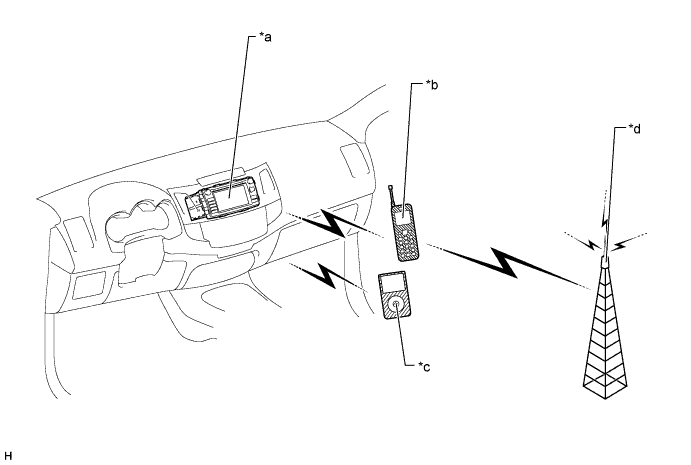
The "Bluetooth" built-in navigation receiver assembly and a "Bluetooth" compatible cellular phone* can be connected using a "Bluetooth" wireless connection. This enables the use of the handsfree function on the cellular phone even if the phone is in a pocket or bag. For this reason, it is not necessary to use a connector or cable to connect the cellular phone.
*: Some versions of "Bluetooth" compatible cellular phones may not function.

| *a | Navigation Receiver Assembly ("Bluetooth" Receiver Antenna Built-in) | *b | "Bluetooth" Compatible Cellular Phone |
| *c | "Bluetooth" Compatible Portable Audio Player | *d | Cellular Tower |
Compatible handsfree devices
| Required "Bluetooth" specifications | Ver. 1.1 or higher (Ver. 2.1+EDR or higher recommended) |
| Compatible profiles |
|
| Maximum number of handsfree devices that can be registered (including audio devices) | 5 |
"Bluetooth" audio function
The "Bluetooth" built-in navigation receiver assembly and a "Bluetooth" compatible portable audio player* can be connected using a "Bluetooth" wireless connection. This enables files stored in the portable audio player to be heard from the vehicle speakers. In addition, operations such as play/stop can be performed directly from the navigation receiver assembly.
*: Some versions of "Bluetooth" compatible audio players may not be able to operate the "Bluetooth" function, or music may play, but functions available using the navigation receiver assembly may be limited.
Compatible "Bluetooth" audio devices
| Required "Bluetooth" specifications | Ver. 1.1 or higher (Ver. 2.1+EDR or higher recommended) |
| Compatible profiles |
|
| Maximum number of audio devices that can be registered | 5 |
| USB AUDIO SYSTEM FUNCTION OUTLINE |
The No. 1 stereo jack adapter assembly is equipped with a USB terminal. Connecting a USB device or "iPod" to the No. 1 stereo jack adapter assembly allows music files to be played. Not only is it possible to play music from a USB device with audio functions, is also possible to play MP3 or WMA music files that are stored on a USB device. In addition, "iPod" control software is installed, allowing file selection from playlists and operation using shuffle mode.
USB audio system compatible model
USB Device
The following device formats can be used:
| Compatible USB device formats |
|
"iPod"
"iPod" is a trademark of Apple Inc., registered in the U.S. and other countries.
| Supported "iPod" Model | Supported Firmware Version or OS Version |
| "iPod nano" 3G | Ver. 1.1.3 |
| "iPod nano" 4G | Ver. 1.0.4 |
| "iPod nano" 5G | Ver. 1.0.2 |
| "iPod nano" 6G | Ver. 1.1 |
| "iPod touch" 1G | iOS 3.1.3 |
| "iPod touch" 2G | iOS 4.2.1 |
| "iPod touch" 3G (32 GB/64 GB) | iOS 4.3.3 |
| "iPod touch" 4G | iOS 4.3.3 |
| "iPod classic" 1G | Ver. 1.1.2 |
| "iPod classic" 2G (120 GB) | Ver. 2.0.1 |
| "iPhone" 1G (iPhone) | iOS 3.1.3 |
| "iPhone" 2G (iPhone 3G) | iOS 4.2.1 |
| "iPhone" 3G (iPhone 3GS) | iOS 4.3.3 |
| "iPhone" iPhone 4 | iOS 4.3.3 |
| Unsupported Models | "iPod shuffle" 1G, 2G, 3G, 4G |
| "iPod photo" 1G, 2G | |
| "iPod" 1G, 2G, 3G, 4G | |
| "iPod mini" 1G, 2G | |
| "iPad" |
| RADIO DESCRIPTION |
Radio frequency band
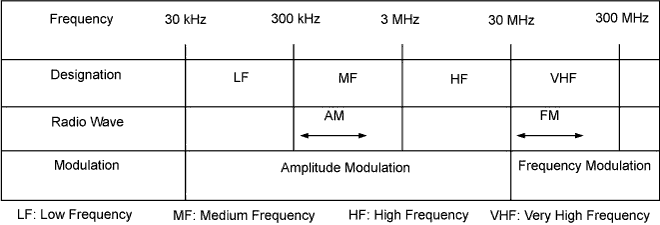
Radio broadcasts use the radio frequency bands shown in the table below.

![]() |
Service area
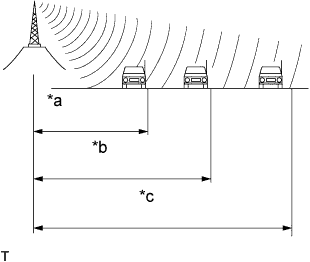
The service areas of AM and FM broadcasts are vastly different. Sometimes an AM broadcast can be received very clearly but an FM stereo broadcast cannot. FM stereo has the smallest service area, and is prone to pick up static and other types of interference such as noise.
| *a | FM (Stereo) |
| *b | FM (Monaural) |
| *c | AM |
Radio reception problems
![]() |
Phasing
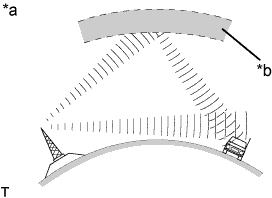
AM broadcasts are susceptible to electrical interference and another kind of interference called phasing. Occurring only at night, phasing is the interference created when a vehicle receives 2 radio wave signals from the same transmitter. One signal is reflected off the ionosphere and the other signal is received directly from the transmitter.
| *a | Phasing |
| *b | Ionosphere |
![]() |
Multipath
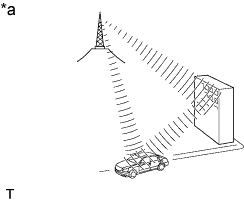
Multipath is a type of interference created when a vehicle receives 2 radio wave signals from the same transmitter. One signal is reflected off buildings or mountains and the other signal is received directly from the transmitter.
| *a | Multipath |
![]() |
Fade out
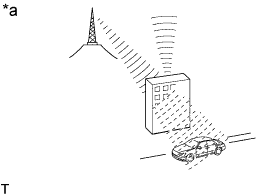
Fade out is caused by objects (buildings, mountains, and other such large obstacles) that deflect away part of a signal, resulting in a weaker signal when the object is between the transmitter and vehicle. High frequency radio waves, such as FM broadcasts, are easily deflected by obstructions. Low frequency radio waves, such as AM broadcasts, are much more difficult to deflect.
| *a | Fade Out |
Noise problem
Technicians must have a clear understanding about each customer noise complaint. Use the following table to diagnose noise problems.
| Radio Frequency | Noise Occurrence Condition | Presumable Cause |
| AM | Noise occurs in a specified area | Foreign noise |
| AM | Noise occurs when listening to an intermittent broadcast | An identical program transmitted from multiple towers can cause noise where the signals overlap |
| AM | Noise occurs only at night | Music beat from a distant broadcast |
| FM | Noise occurs while driving in a specified area | Multipath or phasing noise resulting from a change in FM frequency |
| DIAGNOSTIC FUNCTION OUTLINE |
The navigation system has a diagnostic function (the result is indicated on the master unit).