 |
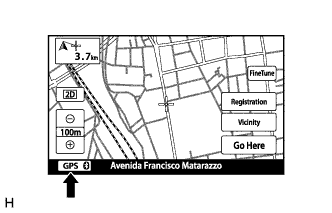
Check that the GPS mark is displayed.
- OK:
- GPS mark is displayed.
NAVIGATION SYSTEM > Route cannot be Calculated |
| 1.CHECK GPS MARK |
|
Check that the GPS mark is displayed.
|
| ||||
| OK | |
 |
| 2.CHECK GPS INFORMATION |
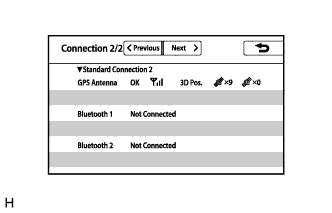 |
Display the "Connection Status" screen (Click here).
Check that all of the items related to "GPS Antenna" are normal.
| Result | Proceed to |
| OK | A |
| NG (w/o Blocking System) | B |
| NG (w/ Blocking System) | C |
|
| ||||
|
| ||||
| A | |
|
| 3.SET DESTINATION |
Set another destination and check if the system can calculate the route correctly.
|
| ||||
| OK | ||
 | ||
| ||
