AUDIO AND VISUAL SYSTEM (for Radio and Display Type) > OPERATION CHECK |
| CHECK PANEL & STEERING SWITCH |
Enter diagnostic mode (Click here).
![]() |
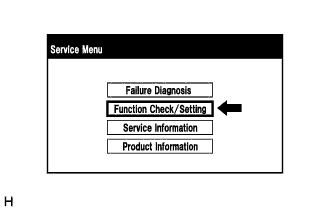
Select "Function Check/Setting" from the "Service Menu" screen.
![]() |
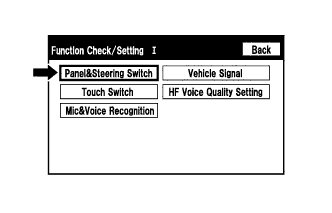
Select "Panel&Steering Switch" from the "Function Check/Setting I" screen.
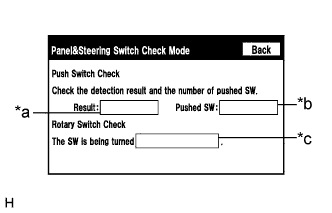
Panel & Steering Switch Check Mode
![]() |
Operate each switch and check that the number of switches pushed and the switch conditions are correctly displayed.
| Display | Content |
| *a: Switch condition | "Pushed" is displayed when any switch is pushed |
| *b: Number of pushed switch |
|
| *c: Rotary switch direction | Direction of rotary switch is displayed |
| CHECK TOUCH SWITCH |
Enter diagnostic mode (Click here).
![]() |
Select "Function Check/Setting" from the "Service Menu" screen.
![]() |
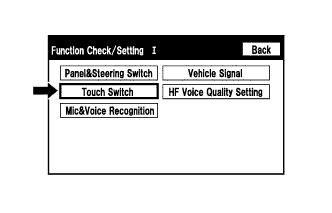
Select "Touch Switch" from the "Function Check/Setting I" screen.
![]() |
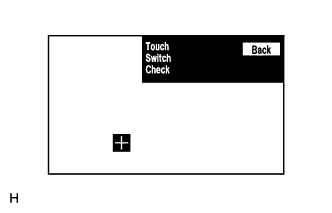
Touch Switch Check
Touch the display anywhere in the open area to perform the check when the "Touch Switch Check" screen is displayed.
| CHECK MICROPHONE |
Enter diagnostic mode (Click here).
![]() |
Select "Function Check/Setting" from the "Service Menu" screen.
![]() |
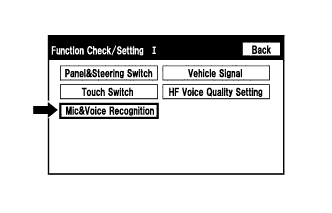
Select "Mic&Voice Recognition" from the "Function Check/Setting I" screen.
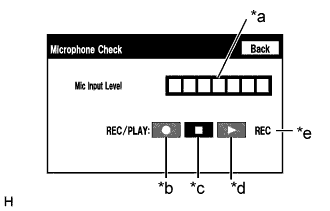
Microphone and Voice Recognition Check
![]() |
When speaking into the microphone, check that the microphone input level meter changes according to the input level.
| Display | Content |
| *a: Microphone input level meter | Monitors the microphone input level every 0.1 seconds and displays the results in 8 different levels |
| *b: Recording switch* | Starts recording |
| *c: Stop switch* | Stops recording and playing |
| *d: Play switch* | Plays the recorded voice |
| *e: Recording indicator* | Comes on while recording |
| CHECK VEHICLE SIGNAL |
Enter diagnostic mode (Click here).
![]() |
Select "Function Check/Setting" from the "Service Menu" screen.
![]() |
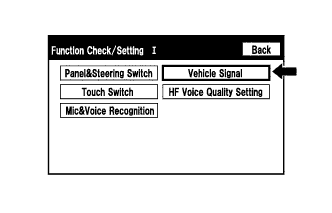
Select "Vehicle Signal" from the "Function Check/Setting I" screen.
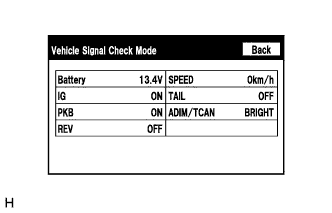
Vehicle Signal Check Mode
![]() |
When the "Vehicle Signal Check Mode" screen is displayed, check all the vehicle signal conditions.
| Display | Content |
| Battery | Battery voltage is displayed |
| IG | Ignition switch ON/OFF state is displayed |
| PKB | Parking brake ON/OFF state is displayed |
| REV | Reverse signal ON/OFF state is displayed |
| SPEED | Vehicle speed is displayed in km/h |
| TAIL | Tail signal (headlight dimmer switch assembly) ON/OFF state is displayed |
| ADIM/TCAN | Tail signal (headlight dimmer switch assembly) ON/OFF state is displayed. |
| CHECK HF VOICE QUALITY SETTING |
Enter diagnostic mode (Click here).
![]() |
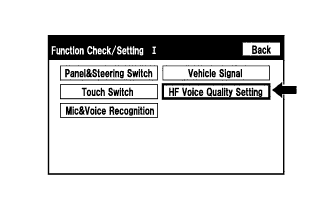
Select "Function Check/Setting" from the "Service Menu" screen.
![]() |
Select "HF Voice Quality Setting" from the "Function Check/Setting I" screen.
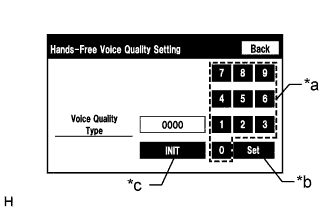
![]() |
Hands-Free Voice Quality Setting
| *a | Numeric keypad |
| *b | Setting button |
| *c | Reset button |
If necessary, refer to the table below to adjust the voice quality type with the numeric keypad.
When adjusting the settings, use the number pad on the screen to input the voice quality type according to the table.
| Parameter | Target Phenomenon | Voice Quality Type | Effect of Changing Voice Quality | Negative Effect of Changing Voice Quality |
| A (Noise) | The other party hears background noise when listening to your voice | 1000 | The amount of background noise the other party hears when listening to your voice is reduced | The volume of voice the other party hears when listening to your voice may temporarily drop |
| B (Noise) | The other party hears a lot of background noise when listening to your voice | 2000 | The amount of background noise the other party hears when listening to your voice is sharply reduced. | The volume of voice the other party hears when listening to your voice may temporarily drop. |
| C (Noise) | The other party hears weak echoes | 0100 | The amount of echo is reduced (low level) | Sound quality of the other party deteriorates (low level) |
| D (Noise) | The other party hears strong echoes | 0200 | The amount of echo is reduced (high level) | Sound quality of the other party deteriorates (high level) |
| Parameter | Target Phenomenon | Voice Quality Type | Effect of Changing Voice Quality | Negative Effect of Changing Voice Quality |
| A+C | The other party hears background noise and weak echoes when listening to your voice | 1100 |
|
|
| A+D | The other party hears background noise and strong echoes when listening to your voice | 1200 |
|
|
| B+C | The other party hears a lot of background noise and weak echoes when listening to your voice | 2100 |
|
|
| B+D | The other party hears a lot of background noise and strong echoes when listening to your voice | 2200 |
|
|
| CHECK SPEAKER |
Turn audio mode on and play any audio source.
Enter diagnostic mode (Click here).
![]() |
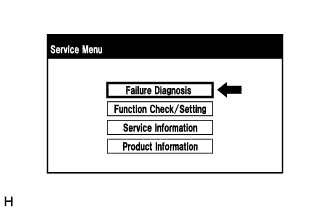
Select "Failure Diagnosis" from the "Service Menu" screen.
![]() |
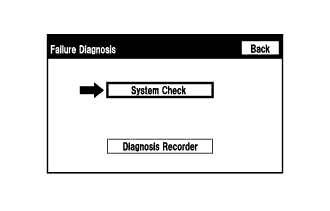
Select "System Check" from the "Failure Diagnosis" screen.
![]() |
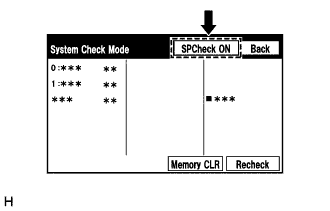
Select "SPCheck ON" from the "System Check Mode" screen.
Check the speaker wiring and check that the speakers are functioning properly.
Sound stops when any of the following conditions are met:
The "SPCheck OFF" switch is pressed.
The ignition switch is turned off.
Diagnostic mode is turned off.
The screen is changed to another screen.
Audio mode is turned off.