RM3250E
_57
Power Source / Network
_038059
2GD-FTV BATTERY / CHARGING
_0263596
BATTERY CURRENT SENSOR
A
2GD-FTV BATTERY / CHARGING BATTERY CURRENT SENSOR INSTALLATION
PROCEDURE

 28850C
1.INSTALL BATTERY STATE SENSOR ASSEMBLY (BATTERY STATE SENSOR ASSEMBLY WITH NEGATIVE BATTERY TERMINAL)
a.
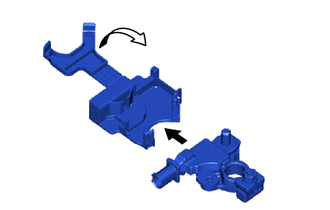
Set the battery state sensor assembly onto the battery current sensor holder, and then attach the 2 claws to install it.
b.
1.313,0.146 1.625,0.302
0.313,0.156
10
false
*a
1.958,0.708 2.271,0.865
0.313,0.156
10
false
*b
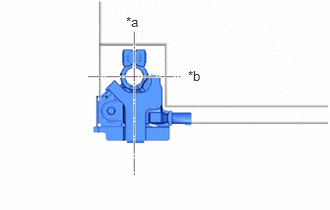
| *a | Front |
| *b | RH |
Install the battery state sensor assembly to the battery and tighten the nut.
- Torque:
- 5.4 N*m (55 kgf*cm, 48 in.*lbf)
- HINT:
-
Position the battery state sensor assembly as shown in the illustration.
c.
Connect the No. 3 engine wire to the battery state sensor assembly with the nut.
- Torque:
- 7.6 N*m (77 kgf*cm, 67 in.*lbf)
d.
Attach the clamp to the battery current sensor holder.
e.
Connect the connector to the battery state sensor assembly.
- NOTICE:
-
When disconnecting the cable, some systems need to be initialized after the cable is reconnected.
-
Click hereGeneral>INTRODUCTION>REPAIR INSTRUCTION>INITIALIZATION