AXLE AND DIFFERENTIAL DIFFERENTIAL SYSTEM(w/ Differential Lock) Lock Switch Circuit
WIRING DIAGRAM
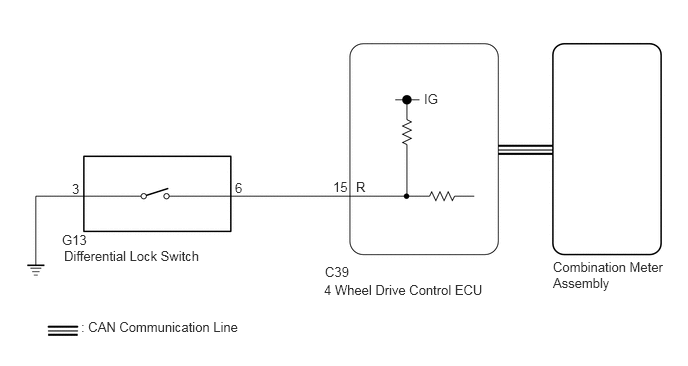
PROCEDURE
Turn the ignition switch to ON.
except Pre-Runner:
Finish switching to L4.
Check the rear differential lock indicator light.
Press the differential lock switch.
After 60 seconds, check the rear differential lock indicator light.
- Result:
Result Proceed to Rear differential lock indicator light blinks or illuminates A Rear differential lock indicator light remains off regardless of switch operation B Rear differential lock indicator light remains illuminated regardless of switch operation C Rear differential lock indicator light rapidly blinks D
Blinking: Blinks at 0.5 second intervals (0.5 seconds on and 0.5 seconds off)
Rapidly blinking: Blinks at 0.25 second intervals (0.25 seconds on and 0.25 seconds off)
A
B
C
D
Select "Bus Check" from the System Selection Menu screen, and follow the prompts on the screen to inspect the CAN Bus.
for LHD: Click herePower Source / Network>NETWORKING>CAN COMMUNICATION SYSTEM(for LHD)>DIAGNOSIS SYSTEM
for RHD: Click herePower Source / Network>NETWORKING>CAN COMMUNICATION SYSTEM(for RHD)>DIAGNOSIS SYSTEM
- OK:
"Bus Check" indicates no malfunctions in CAN communication.
- Result:
Proceed to OK NG
OK
NG
for LHD: Click herePower Source / Network>NETWORKING>CAN COMMUNICATION SYSTEM(for LHD)>HOW TO PROCEED WITH TROUBLESHOOTING
for RHD: Click herePower Source / Network>NETWORKING>CAN COMMUNICATION SYSTEM(for RHD)>HOW TO PROCEED WITH TROUBLESHOOTING
Turn the ignition switch off.
Connect the GTS to the DLC3.
Turn the GTS on.
Turn the ignition switch to ON.
Enter the following menus: Powertrain / Four Wheel Drive / Data List.
According to the display on the GTS, read the Data List.
- Powertrain > Four Wheel Drive > Data List
-
Tester Display Measurement Item Range Normal Condition Diagnostic Note Rear Differential Lock Control SW (R) Differential lock switch status (differential lock switch input signal of R terminal on ECU side) ON or OFF ON: Switch pressed and held
OFF: Switch not pressed-
- Powertrain > Four Wheel Drive > Data List
-
Tester Display Rear Differential Lock Control SW (R) - 50003 363 9
- OK:
Display changes according to differential lock switch operation.
- Result:
Proceed to OK NG
OK
NG
Turn the ignition switch off.
Perform Active Test of the combination meter assembly using the GTS.
- Body Electrical > Combination Meter > Active Test
-
Tester Display Indicat. Rr DIFF LOCK - 50004 122 84
Check the combination meter assembly.
- OK:
The rear differential lock indicator light turns on or off in accordance with the GTS.
- Result:
Proceed to OK NG
OK
NG
Click hereVehicle Interior>METER / GAUGE / DISPLAY>METER / GAUGE SYSTEM>HOW TO PROCEED WITH TROUBLESHOOTING
Remove the differential lock switch.
Click hereDrivetrain>AXLE AND DIFFERENTIAL>REAR DIFFERENTIAL LOCK CONTROL SWITCH>REMOVAL
Inspect the differential lock switch.
Click hereDrivetrain>AXLE AND DIFFERENTIAL>REAR DIFFERENTIAL LOCK CONTROL SWITCH>INSPECTION
- OK:
The differential lock switch operates normally.
- Result:
Result OK NG
OK
NG
Disconnect the C39 4 wheel drive control ECU connector.
Disconnect the G13 differential lock switch connector.
Measure the resistance according to the value(s) in the table below.
- Standard Resistance:
Tester Connection Condition Specified Condition C39-15 (R) - G13-6 Always Below 1 Ω G13-3 - Body ground Always Below 1 Ω
- Result:
Proceed to OK NG
OK
NG
Select "Bus Check" from the System Selection Menu screen, and follow the prompts on the screen to inspect the CAN Bus.
for LHD: Click herePower Source / Network>NETWORKING>CAN COMMUNICATION SYSTEM(for LHD)>DIAGNOSIS SYSTEM
for RHD: Click herePower Source / Network>NETWORKING>CAN COMMUNICATION SYSTEM(for RHD)>DIAGNOSIS SYSTEM
- OK:
"Bus Check" indicates no malfunctions in CAN communication.
- Result:
Proceed to OK NG
OK
NG
for LHD: Click herePower Source / Network>NETWORKING>CAN COMMUNICATION SYSTEM(for LHD)>HOW TO PROCEED WITH TROUBLESHOOTING
for RHD: Click herePower Source / Network>NETWORKING>CAN COMMUNICATION SYSTEM(for RHD)>HOW TO PROCEED WITH TROUBLESHOOTING
Turn the ignition switch off.
Connect the GTS to the DLC3.
Turn the GTS on.
Turn the ignition switch to ON.
Enter the following menus: Powertrain / Four Wheel Drive / Data List.
According to the display on the GTS, read the Data List.
- Powertrain > Four Wheel Drive > Data List
-
Tester Display Measurement Item Range Normal Condition Diagnostic Note Rear Differential Lock Indicator Request Rear differential lock indicator light request Blink4*, Blink3, Blink2, Blink1, ON or OFF ·Blink3: Indicator light rapidly blinks
·Blink2: Indicator light blinks 3 times
·Blink1: Indicator light blinks
·ON: Indicator light illuminates
·OFF: Indicator light turns off
·Blinking: 0.5 second intervals (0.5 seconds on and 0.5 seconds off)
·Rapidly blinking: 0.25 second intervals (0.25 seconds on and 0.25 seconds off)
*: Item not supported, therefore not displayed
- Powertrain > Four Wheel Drive > Data List
-
Tester Display Rear Differential Lock Indicator Request - 50003 363 40
except Pre-Runner:
Finish switching to L4.
Turn the differential lock switch on and off several times and check the GTS display condition of the rear differential lock indicator light.
- Result:
Result Proceed to Data List continues to display ON even when differential lock switch is operated A Data List display changes according to differential lock switch operation B
A
B
Click hereVehicle Interior>METER / GAUGE / DISPLAY>METER / GAUGE SYSTEM>HOW TO PROCEED WITH TROUBLESHOOTING