CLUTCH CLUTCH UNIT(for RC60, RC61) REMOVAL
PROCEDURE

 33030
1.REMOVE MANUAL TRANSMISSION UNIT ASSEMBLY
31126
2.REMOVE CLUTCH RELEASE FORK BOOT
31230
3.REMOVE CLUTCH RELEASE BEARING ASSEMBLY
Remove the clutch release bearing assembly together with the clutch release fork sub-assembly from the clutch housing.
Remove the clutch release fork sub-assembly from the clutch release bearing assembly.
- NOTICE:
-
If the clutch release fork collar comes off from the clutch release fork sub-assembly, replace the clutch release fork collar and clutch release fork dust seal with new ones.
Remove the release bearing hub clip from the clutch release bearing assembly.
31236B
4.REMOVE RELEASE FORK SUPPORT
Remove the release fork support from the manual transmission unit.
31210
5.REMOVE CLUTCH COVER ASSEMBLY
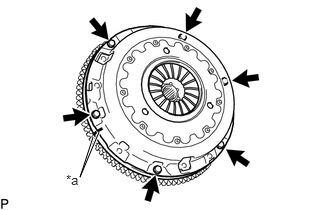
| *a | Matchmark |
Place matchmarks on the clutch cover assembly and flywheel.
Loosen each set bolt one turn at a time until spring tension is released.
Remove the 6 set bolts and pull off the clutch cover assembly.
- NOTICE:
-
Do not drop the clutch disc assembly.
31250
6.REMOVE CLUTCH DISC ASSEMBLY
- NOTICE:
-
Keep the lining part of the clutch disc, the pressure plate and the surface of the flywheel away from oil and foreign matter.
31241
7.REMOVE CLUTCH RELEASE FORK DUST SEAL
Remove the clutch release fork collar from the clutch release fork sub-assembly.
Remove the clutch release fork dust seal from the clutch release fork sub-assembly.