METER / GAUGE / DISPLAY METER / GAUGE SYSTEM CUSTOMIZE PARAMETERS
CUSTOMIZE METER / GAUGE SYSTEM
Customizing with the GTS
Connect the GTS to the DLC3.
Turn the ignition switch to ON.
Turn the GTS on.
Enter the following menus: Customize Setting / Warning or Display.
Select the setting by referring to the table below.
- NOTICE:
-
Be sure to record the current value before customizing.
- Warning
-
Tester Display Description Default Setting ECU Driver Side Seatbelt Warning Buzzer Function to turn on/off the seat belt warning buzzer ON 0:OFF,1:ON Combination meter assembly Front Passenger Side Seatbelt Warning Buzzer Function to turn on/off the seat belt warning buzzer ON 0:OFF,1:ON Combination meter assembly Flasher Sound Volume Adjustment Function to change the flasher sound volume Medium 10:Large,00:Medium,01:Small Combination meter assembly Flasher Sound Tone Setting Function to change the flasher sound tone Tone 1 00:Tone 1,01:Tone 2,10:Tone 3 Combination meter assembly Lane Change Flashing Times Setting Function to change the lane change flashing time 3 000:OFF,001:3,010:4,011:5,100:6,101:7 Combination meter assembly - 50006 7
- Display
-
Tester Display Description Default Setting ECU ECO Drive Indicator Zone Function to enable or disable the eco driving indicator zone display in the multi-information display ON 0:OFF,1:ON Combination meter assembly ODO Display Time After IG OFF Setting Function to change the ODO display time after the ignition switch is turned OFF 30s 00:30s,01:60s,10:600s,11:OFF Combination meter assembly - 50006 14
Customizing with the combination meter assembly (for TFT Display Type)
Turn the ignition switch to ON.
Enter the following menus: Settings.
Select the setting by referring to the table below.
- NOTICE:
-
Be sure to record the current value before customizing.
| Combination Meter Assembly Display | Description | Default | Setting | ECU |
|---|---|---|---|---|
| Language | Function to change the language on the display | English | English, French, Spanish, Thai, Portuguese or Indonesian | Combination meter assembly |
| Units | Function to change the units on the display | L/100 km | km/L, L/100 km | Combination meter assembly |
| Eco Driving Indicator Light | Function to activate/deactivate the ECO driving indicator light | ON | ON or OFF | Combination meter assembly |
| Switch Settings | Function to change the screen assigned to the TOP button on the steering pad switch assembly | - | - | Combination meter assembly |
| Drive Info 1 | Function to change the item to be displayed on Drive Info 1 | ·
Current Fuel Economy (Bar Type) ·
Average Fuel Economy (After Reset) |
·
Current Fuel Economy (Bar Type) ·
Current Fuel Economy (Value Type) ·
Average Fuel Economy (After Reset) ·
Average Fuel Economy (After Start) ·
Average Fuel Economy (After Refuel) ·
Average Speed (After Reset) ·
Average Speed (After Start) ·
Elapsed Time (After Reset) ·
Elapsed Time (After Start) ·
Distance (Range) ·
Distance (After Start) ·
Other (Blank) |
Combination meter assembly |
| Drive Info 2 | Function to change the item to be displayed on Drive Info 2 | ·
Average Speed (After Reset) ·
Distance (Range) |
·
Current Fuel Economy (Bar Type) ·
Average Fuel Economy (After Reset) ·
Average Fuel Economy (After Start) ·
Average Fuel Economy (After Refuel) ·
Average Speed (After Reset) ·
Average Speed (After Start) ·
Elapsed Time (After Reset) ·
Elapsed Time (After Start) ·
Distance (Range) ·
Distance (After Start) ·
Other (Blank) |
Combination meter assembly |
| Pop-up Display | Function to change the interrupt display setting of each item | - | - | Combination meter assembly |
| Color | Function to change the cursor color when selecting a displayed item | Clear Blue | Clear Blue, Clear Turquoise, Deep Orange or Radiant Orange | Combination meter assembly |
| Initialize display | The setting items can be initialized | - | - | Combination meter assembly |
Enter the following menus: Settings Tab /Settings / Eco Savings
Select the setting by referring to the table below.
| Combination Meter Assembly Display | Description | Default | Setting | ECU |
|---|---|---|---|---|
|
*: Changes according to the vehicle specification |
||||
| Gasoline Price | To select the gasoline price | * | $/gal. or $/L | Combination meter assembly |
| Fuel Cons. Comparison | To select the fuel consumption unit | * | MPG or L/100km | Combination meter assembly |
| ECO Savings | To select the eco savings display setting | Basic | Basic or Details | Combination meter assembly |
Customizing with the combination meter assembly (for Dot Display Type)
While on the "SETTINGS" screen of the multi-information display, pressing and holding the DISP switch in the steering pad switch assembly switches to customization mode.
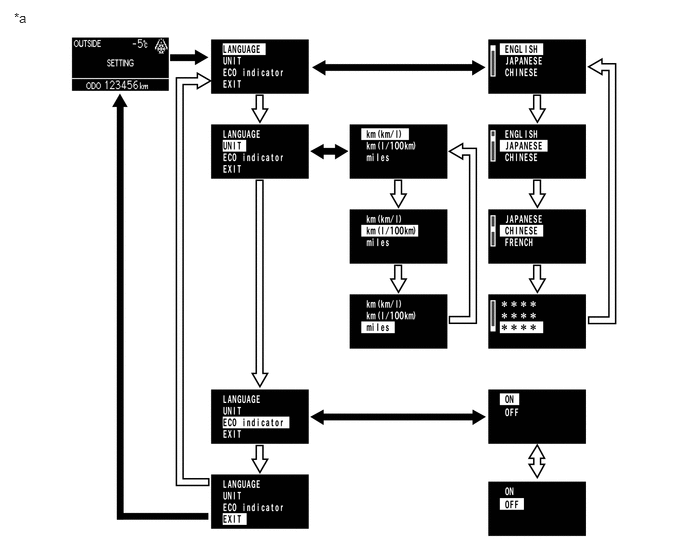
| *a | Example | - | - |

|
Press and hold the DISP switch in the steering pad switch assembly | 
|
Briefly press the DISP switch in the steering pad switch assembly |
| Combination Meter Assembly Display | Description | Default | Setting | ECU |
|---|---|---|---|---|
| LANGUAGE | Function to change the language on the display | English | English, French, Spanish, Thai, Portuguese or Indonesian | Combination meter assembly |
| UNIT | Function to change the units on the display | L/100 km | km/L, L/100 km | Combination meter assembly |
| ECO indicator | Function to activate/deactivate the ECO driving indicator light | ON | ON or OFF | Combination meter assembly |