LIGHTING (INT) MAP LIGHT BULB REPLACEMENT
CAUTION / NOTICE / HINT
- NOTICE:
- ·
When replacing the map light bulb with a new one, if the bulb socket is blue, use a 5 W bulb.
·When replacing the map light bulb with a new one, if the bulb socket is black, use an 8 W bulb.
PROCEDURE

 81260A
1.REMOVE MAP LIGHT ASSEMBLY
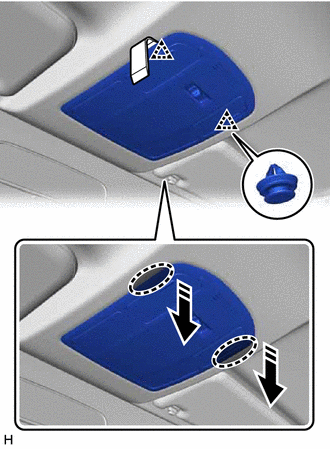

|
Insert Moulding Remover D Here |

|
Remove in this Direction |
Insert moulding remover D at the position shown in the illustration and pull as shown to detach the clip.
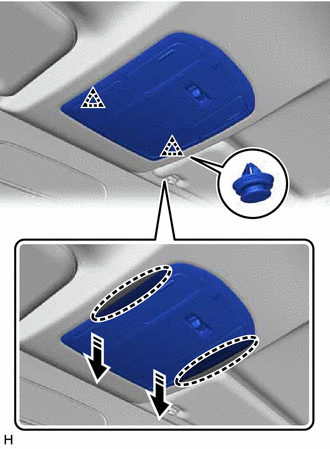
|
|
Place Hands Here |
|
|
Remove in this Direction |
Place your hands in the gap created during the above procedure and pull down to detach the clip as shown in the illustration.
Disconnect the connector and remove the map light assembly.
81936C
2.REMOVE BULB ASSEMBLY
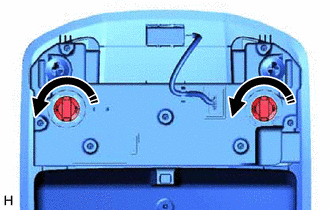
|
|
Remove in this Direction |
Turn the 2 bulb assemblies as shown in the illustration to remove them from the map light.
81260C
3.REMOVE MAP LIGHT BULB
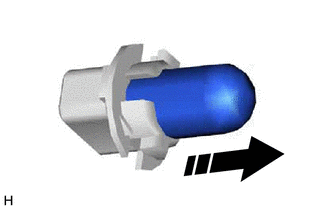
|
|
Remove in this Direction |
Remove the map light bulb.
81260C
4.INSTALL MAP LIGHT BULB
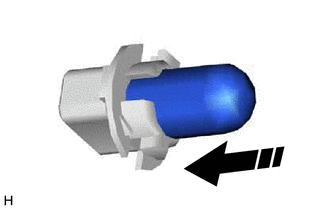
|
|
Install in this Direction |
Install the map light bulb.
81936C
5.INSTALL BULB ASSEMBLY
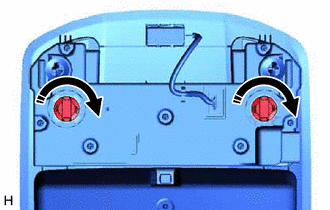
|
|
Install in this Direction |
Turn the 2 bulb assemblies as shown in the illustration to install them to the map light.
81260A
6.INSTALL MAP LIGHT ASSEMBLY
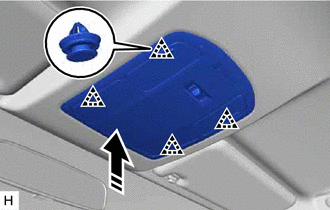
|
|
Install in this Direction |
Connect the connector.
Attach the clip to install the map light assembly as shown in the illustration.