2KD-FTV BATTERY / CHARGING GENERATOR REMOVAL
PROCEDURE

 1. PRECAUTION
- NOTICE:
-
After turning the ignition switch off, waiting time may be required before disconnecting the cable from the battery terminal. Therefore, make sure to read the disconnecting the cable from the battery terminal notice before proceeding with work.
-
Click hereGeneral>INTRODUCTION>REPAIR INSTRUCTION>PRECAUTION
2.DISCONNECT CABLE FROM NEGATIVE BATTERY TERMINAL
- NOTICE:
-
When disconnecting the cable, some systems need to be initialized after the cable is reconnected.
-
Click hereGeneral>INTRODUCTION>REPAIR INSTRUCTION>INITIALIZATION
17705
3.REMOVE AIR CLEANER CAP SUB-ASSEMBLY WITH AIR CLEANER HOSE
17801
4.REMOVE AIR CLEANER FILTER ELEMENT SUB-ASSEMBLY
17701
5.REMOVE AIR CLEANER CASE SUB-ASSEMBLY
16361A
6.REMOVE FAN AND GENERATOR V BELT
7.REMOVE NO. 2 IDLER PULLEY ASSEMBLY
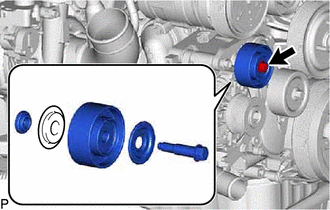
Remove the bolt, 2 pulley plates, No. 2 idler pulley assembly and spacer.
27020
8.REMOVE GENERATOR ASSEMBLY
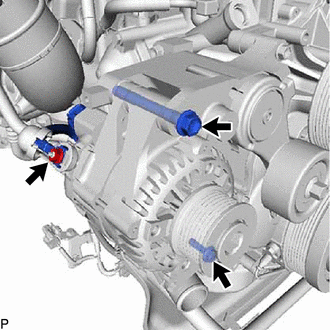
Remove the nut and generator wire from terminal B.
Disconnect the generator connector.
Remove the 2 bolts and generator assembly.