NM1880E
_58
Vehicle Interior
_015498
METER / GAUGE / DISPLAY
_0076926
METER / GAUGE SYSTEM
DE
DETAILS
F
METER / GAUGE / DISPLAY METER / GAUGE SYSTEM DETAILS ACCESSORY METER
CONSTRUCTION
a.
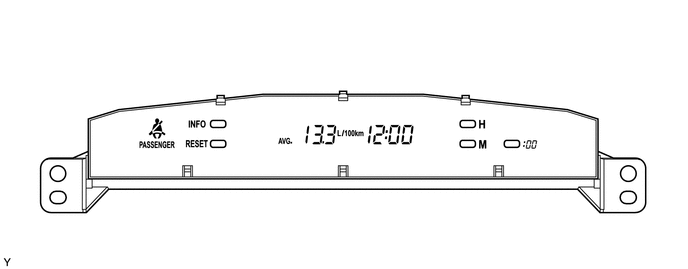
An accessory meter assembly is used, which can show the cruise information display.
b.
A sensor that detects the earth's magnetic field is built inside the inside accessory meter assembly. The compass indicates north as 0° and the forward direction of the vehicle using 8 azimuths.*
*: Except models for South Africa
2.281,1.26 2.281,0.531
true
2.271,2.385 2.271,1.521
true
1.656,2.427 1.656,1.563
true
2.208,0.365 2.396,0.552
0.188,0.188
10
false
*1
1.573,2.458 1.76,2.646
0.188,0.188
10
false
*2
2.198,2.448 2.385,2.635
0.188,0.188
10
false
*3
| *1 | INFO. Switch | *2 | Front Passenger Seat Belt Warning Light |
| *3 | RESET Switch | - | - |
c.
The accessory meter assembly has the following functions:
| Function | Outline |
|---|---|
| Clock and Outside Temperature Display | ·
Displays the clock. ·
Displays the outside temperature. |
| Cruise Information Display | In the cruise information display, 6 types of information can be displayed.
·
Average Fuel Consumption ·
Current Fuel Consumption ·
Average Vehicle Speed ·
Elapsed Time ·
Driveable Distance ·
Compass* |
| Front Passenger Side Seat Belt Warning | Displays the front passenger seat belt warning light. |
d.
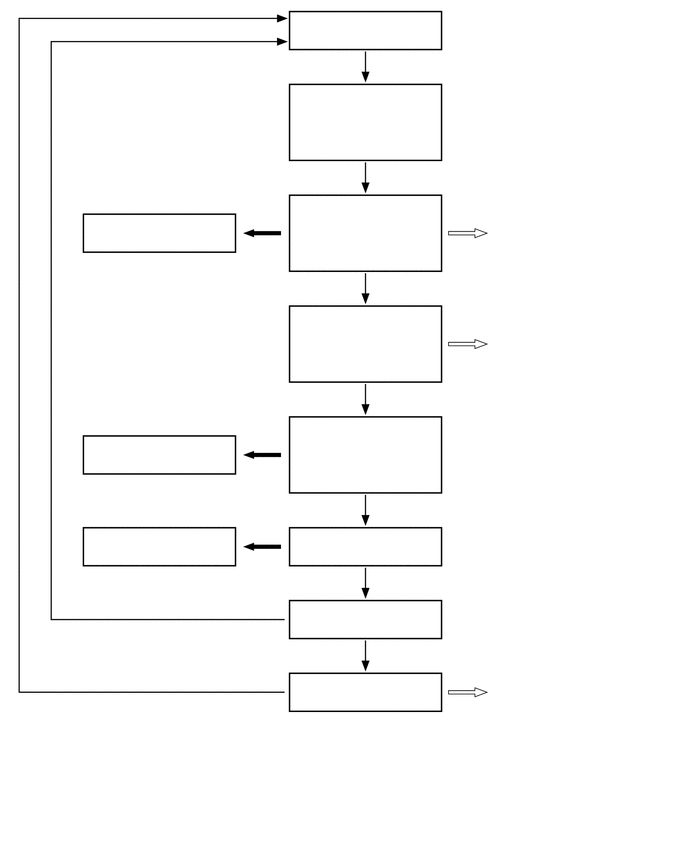
The display of the accessory meter assembly undergoes the following transitions:
3.542,0.219 4.448,0.438
0.906,0.219
10
false
Off Mode
3.958,0.625 4.146,0.844
0.188,0.219
10
false
*1
3.938,1.74 4.125,1.958
0.188,0.219
10
false
*1
2.708,2.125 2.885,2.313
0.177,0.188
10
false
*2
2.708,4.469 2.885,4.656
0.177,0.188
10
false
*2
2.708,5.24 2.885,5.427
0.177,0.188
10
false
*2
3.958,2.917 4.146,3.135
0.188,0.219
10
false
*1
4.771,2.135 4.958,2.313
0.188,0.177
10
false
*3
4.76,3.302 4.948,3.479
0.188,0.177
10
false
*3
4.74,6.781 4.927,6.958
0.188,0.177
10
false
*3
3.917,4.052 4.104,4.271
0.188,0.219
10
false
*1
3.906,5.219 4.094,5.438
0.188,0.219
10
false
*1
3.917,5.979 4.104,6.198
0.188,0.219
10
false
*1
3.906,6.74 4.427,6.958
0.521,0.219
10
false
*1 (*B)
1.552,7.271 2.073,7.49
0.521,0.219
10
false
*1 (*B)
1.51,6.49 2.042,6.708
0.531,0.219
10
false
*1 (*A)
0.51,7.792 3.781,8.167
3.271,0.375
10
false
*A: Models for South Africa
0.51,8.292 3.781,8.667
3.271,0.375
10
false
*B: Except models for South Africa
3.135,0.99 4.563,1.563
1.427,0.573
10
false
Outside Temperature Mode
3.156,2.188 4.542,2.729
1.385,0.542
10
false
Average Fuel Consumption Mode
5.135,2.354 6.74,2.74
1.604,0.385
10
false
Units Setting Display
5.125,3.531 6.771,3.865
1.646,0.333
10
false
Units Setting Display
3.177,3.354 4.542,3.917
1.365,0.563
10
false
Current Fuel Consumption Mode
3.271,4.542 4.51,4.948
1.24,0.406
10
false
Average Vehicle Speed Mode
3.188,5.573 4.542,5.802
1.354,0.229
10
false
Elapsed Time Mode
1.167,5.563 2.385,5.844
1.219,0.281
10
false
Counter Reset
1.156,4.615 2.365,4.896
1.208,0.281
10
false
Counter Reset
1.104,2.313 2.313,2.583
1.208,0.271
10
false
Counter Reset
3.219,6.333 4.552,6.594
1.333,0.26
10
false
Driveable Distance
5.125,6.927 6.927,7.375
1.802,0.448
10
false
Compass Correction Mode
3.229,7.125 4.51,7.365
1.281,0.24
10
false
Compass Mode
| No. | Condition |
|---|---|
| *1 | Pressing the INFO. switch for less than 2.3 seconds |
| *2 | Pressing the RESET switch for less than 0.8 seconds |
| *3 | Pressing the INFO. switch for 2.3 seconds or more |
0.104,0.146 2.542,0.479
2.438,0.333
10
false
Units Setting Display Flowchart
3.521,2.25 3.74,2.469
0.219,0.219
10
false
*3
1.281,1.479 1.5,1.698
0.219,0.219
10
false
*1
2.146,1.458 2.365,1.677
0.219,0.219
10
false
*2
4.885,1.375 5.104,1.594
0.219,0.219
10
false
*1
5.719,1.365 5.938,1.583
0.219,0.219
10
false
*2
0.208,3.333 3.479,3.729
3.271,0.396
10
false
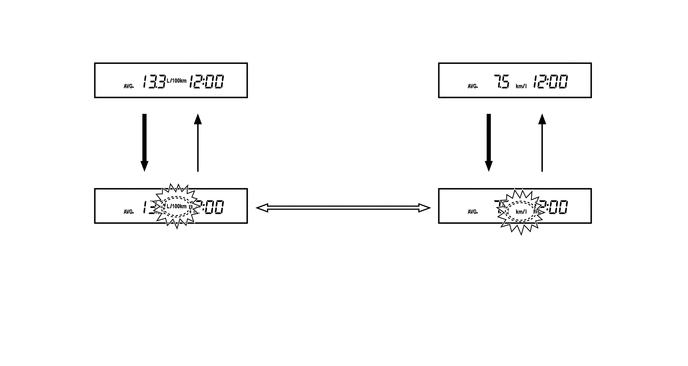
*4: This illustration shows a typical example.
| No. | Condition |
|---|---|
| *1 | Pressing the INFO. switch for 2.3 seconds or more |
| *2 | Pressing the INFO. switch for less than 2.3 seconds or 6 seconds of no operation |
| *3 | Pressing the RESET switch for less than 0.8 seconds |
0.125,0.042 5.646,0.448
5.521,0.406
10
false
Compass Correction Mode Flowchart (Except Models for South Africa)
2.635,0.823 2.844,1
0.208,0.177
10
false
*1
2.646,1.042 2.854,1.219
0.208,0.177
10
false
*2
1.688,1.719 1.896,1.896
0.208,0.177
10
false
*3
2.292,1.719 2.5,1.896
0.208,0.177
10
false
*4
3,2.844 3.208,3.021
0.208,0.177
10
false
*5
0.719,1.146 1.896,1.49
1.177,0.344
10
false
Normal Condition
3.375,1.146 4.948,1.49
1.573,0.344
10
false
Magnetization Warning
0.26,2.042 2.094,2.521
1.833,0.479
10
false
Compass Correction Mode
0.979,2.948 1.948,3.302
0.969,0.354
10
false
Zone Setting
4.156,2.948 5.406,3.302
1.25,0.354
10
false
Circle Calibration
2.99,3.146 3.198,3.323
0.208,0.177
10
false
*6
5.719,1.24 6.354,1.448
0.635,0.208
10
false
*7, *8, *9
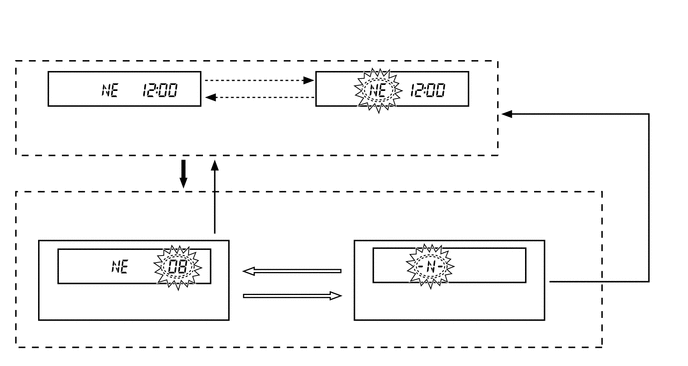
| No. | Condition |
|---|---|
| *1 | When a predetermined level of magnetization has not been met for longer than a certain period of time. |
| *2 | When magnetization correction is conducted via automatic correction or circling calibration. |
| *3 | Pressing the INFO. switch for 2.3 seconds or more |
| *4 | Pressing the INFO. switch for less than 2.3 seconds or 6 seconds of no operation |
| *5 | Pressing the RESET switch for less than 0.8 seconds |
| *6 | When the RESET switch has been pressed for less than 0.8 seconds before circling calibration has been completed. |
| *7 | When circling calibration has been conduced correctly. |
| *8 | When circling calibration has not been conducted correctly. |
| *9 | Pressing the INFO. switch for less than 2.3 seconds |
- HINT:
-
For details of the compass correction mode, refer to the corresponding Repair Manual for this model.