RM1880E
_58
Vehicle Interior
_013240
METER / GAUGE / DISPLAY
_0068630
METER / GAUGE SYSTEM
A
METER / GAUGE / DISPLAY METER / GAUGE SYSTEM CUSTOMIZE PARAMETERS
PROCEDURE

 1. CUSTOMIZE METER / GAUGE SYSTEM
- HINT:
-
The following items can be customized.
- NOTICE:
- ·
When the customer requests a change in a function, first make sure that the function can be customized.
·Record the current settings before customizing.
a.
Customizing fuel consumption (w/ Accessory Meter Assembly)
- HINT:
-
The units for the average fuel consumption and current fuel consumption can be switched between "L/100km" and "km/l".
i.
Press the INFO switch to display the average fuel consumption or current fuel consumption display.
ii.
Press and hold the INFO switch for 2.3 seconds or more.
iii.
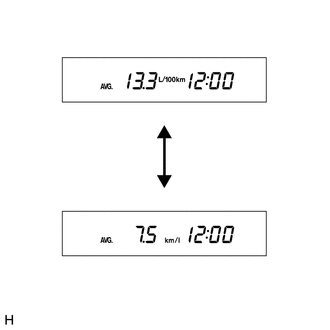
Press the RESET switch and select "L/100km" or "km/l".
- HINT:
-
The initial setting is "km/l".
iv.
Press the INFO switch to end fuel consumption customize mode.