METER / GAUGE / DISPLAY METER / GAUGE SYSTEM GENERAL/CONTROL/DETAILS DETAILS
CONSTRUCTION
Opening/Ending Ceremony
An opening ceremony which allows for anticipation of a pleasant drive is used. The opening ceremony operates as follows:
When the ignition switch is turned to ON, the needles of the speedometer, tachometer, engine coolant temperature gauge and fuel gauge illuminate.
Then, the gauges and panels of the speedometer, tachometer, engine coolant temperature gauge, fuel gauge and multi-information display illuminate.
When the ignition switch is turned off, the panels and needles of the speedometer, tachometer, engine coolant temperature gauge and fuel gauge fade out.
Then, the multi-information display fades out.
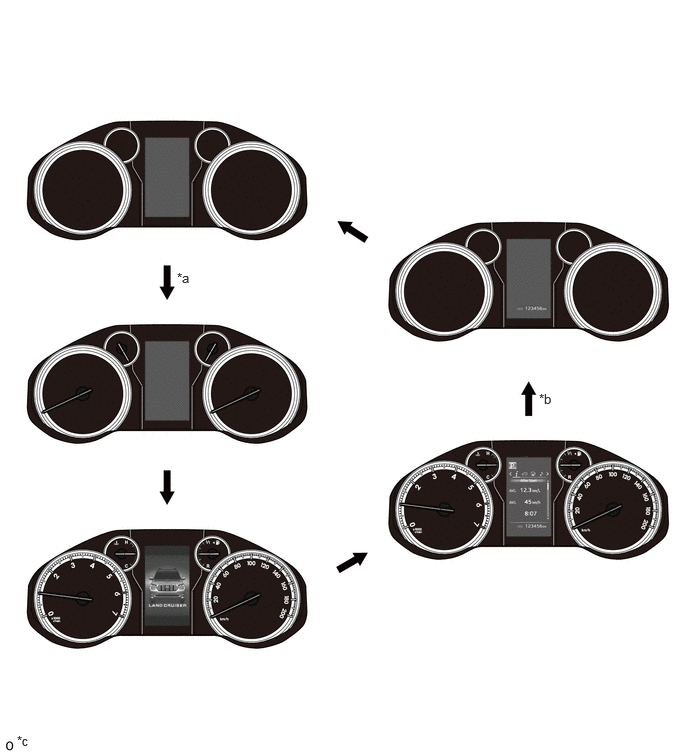
| *a | Ignition Switch Turned to ON | *b | Ignition Switch Turned Off |
| *c | The illustrations shown are examples only. | - | - |
Multi-information Display (Models with Optitron Display Type Combination Meter Assembly)
The multi-information display is located at the center of the combination meter assembly.
The multi-information display shows the following information.
| Item | Outline |
|---|---|
|
*1: Models with automatic transmission *2: Models with cruise control system *3: Models with Toyota Safety Sense *4: Models with multi-terrain select *5: Models with drive mode select *6: Models without AVS *7: Models with AVS *8: Models with stop and start system *9: Models with oil maintenance *10: Models with rear seatbelt warning function |
|
| Shift Position Indicator*1 | The current shift position is displayed. |
| Indicator/Warning | ·
When the display conditions are met, the following indicators illuminate. -
Cruise Control Indicator (Constant Speed Control Mode)*2,*3 -
Cruise Control Indicator (Vehicle-to-vehicle Distance Control Mode)*3 -
Cruise SET Indicator*2, *3 -
Lane Departure Alert Indicator*3 -
Multi-terrain Select Indicator*4 -
CRAWL Indicator*4 -
Rear Passengers' Seat Belt Reminder Indicator*10 |
| Outside Temperature | ·
The outside temperature is displayed. ·
When the outside temperature drops below 3°C (37°F), a warning sign is displayed on the outside temperature display area to warn the driver to drive with caution due to possibly icy road conditions. After the warning sign flashes 10 times, the sign stays on. When the temperature reaches 5°C (41°F), the warning sign goes off. |
| Drive Mode*5 | The currently selected drive mode is displayed:
·
ECO Mode ·
SPORT Mode*6 ·
SPORT S Mode*7 ·
SPORT S+ Mode*7 ·
COMFORT Mode*7 |
| Multi-terrain Select*4 | Displays operating mode of multi-terrain select. |
| CRAWL Control*4 | Displays operating mode of CRAWL control. |
| Information | The following information can be displayed on the multi-information display by switching the tabs.
·
Drive Information ·
Vehicle Information ·
Navigation Information ·
Audio Information ·
Driving Assist System Information*3 ·
Stop and Start System Information*8 ·
Warning Message ·
Settings |
| Vehicle Power Source State | ·
The vehicle power source state is displayed. ·
The following indicator is displayed on the multi-information display. -
Smart Indicator |
| ODO/TRIP Meter | ·
The odometer, trip meter A or trip meter B is displayed. ·
The item shown can be switched by using the ODO/TRIP switch. |
| Oil Maintenance*9 | Displays the remaining distance until the next oil change. |
| Light Control Rheostat | Meter panel luminance can be changed by using the rheostat switch. |
The drive information shows the following information.
| Item | Outline |
|---|---|
|
*1: Models with automatic transmission *2: Models with DPF *3: Models with UREA SCR system |
|
| Drive Information | ·
The following items can be displayed. -
After Start (1)
Average Fuel Consumption After Engine Start-up (2)
Average Vehicle Speed After Engine Start-up (3)
Elapsed Time After Engine Start-up -
After Reset (1)
Current Fuel Consumption (Bar Display) (2)
Average Fuel Consumption Between Reset Operations (3)
Total Average Vehicle Speed Between Reset Operations (4)
Total Elapsed Time Between Reset Operations -
After Refuel (1)
Cruising Range (2)
Average Fuel Consumption After Refueling -
Eco Driving Indicator Zone Display*1 -
Vehicle Speed Display -
DPF Display*2 -
Urea Solution Remaining Display*3 -
Blank |
The vehicle information shows the following information.
| Item | Outline |
|---|---|
|
*: Models with tire pressure warning system |
|
| Vehicle Information | ·
The following items can be displayed. -
TOYOTA Parking Assist-sensor System, Door Open Warning and Steering Angle Display -
Tire Inflation Pressure Display* -
Clinometer Display -
Traction and Differential Lock and Steering Angle Display |
Display Function Flow
The multi-information display flow can be switched as shown in the flowchart below:
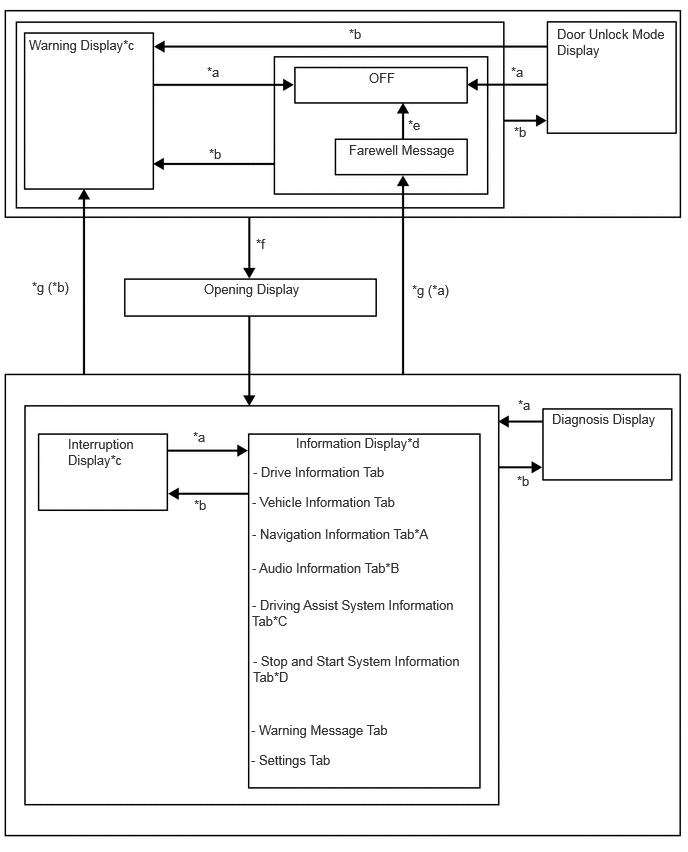
| *A | Models with Navigation System |
| *B | Models with Navigation System or Display Audio System |
| *C | Models with Toyota Safety Sense |
| *D | Models with Stop and Start System |
| *a | Conditions are not met. |
| *b | Conditions are met. |
| *c | If there are multiple display requests, items will be displayed in sequence. |
| *d | Item or display is selected by operating the steering pad switch assembly. |
| *e | ODO display is displayed for a certain period of time after the ignition switch is turned off. |
| *f | Ignition switch off to ON. |
| *g | Ignition switch ON to off. |
Display Tab Operation
The information currently displayed can be switched using the RIGHT switch or LEFT switch of the steering pad switch assembly.
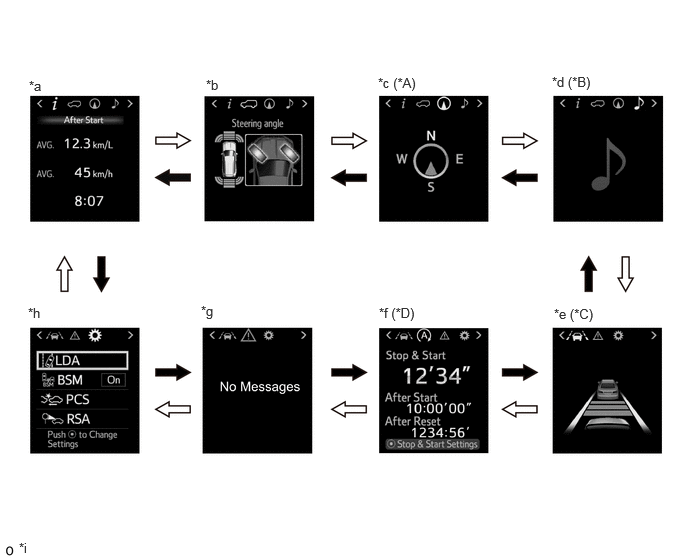
| *A | Models with Navigation System | *B | Models with Navigation System or Display Audio System |
| *C | Models with Toyota Safety Sense | *D | Models with Stop and Start System |
| *a | Drive Information Tab | *b | Vehicle Information Tab |
| *c | Navigation Information Tab | *d | Audio Information Tab |
| *e | Driving Assist System Information Tab | *f | Stop and Start System Information Tab |
| *g | Warning Message Tab | *h | Settings Tab |
| *i | The illustrations shown are examples only. | - | - |

|
RIGHT Switch Operation | 
|
LEFT Switch Operation |
Drive Information
The drive information tab shows vehicle information such as drivable range and fuel consumption.
The drive information display can be changed by using the UP/DOWN/ENTER switch of the steering pad switch assembly.
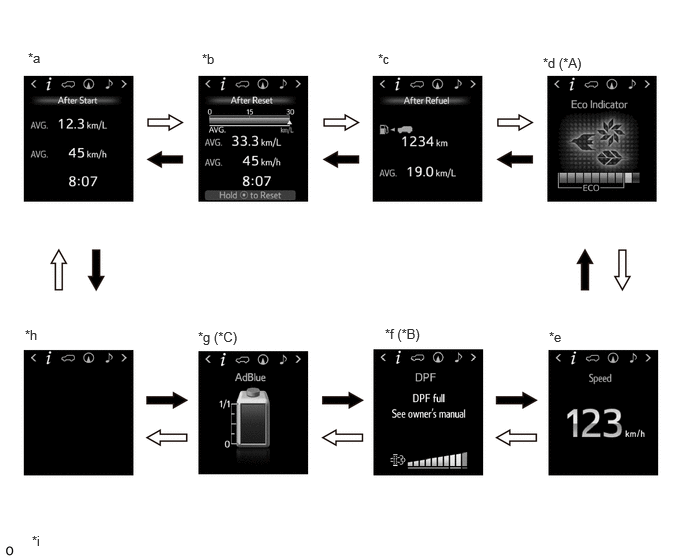
| *A | Models with Automatic Transmission | *B | Models with DPF |
| *C | Models with UREA SCR System | - | - |
| *a | After Start | *b | After Reset |
| *c | After Refuel | *d | Eco Driving Indicator Zone Display |
| *e | Vehicle Speed Display | *f | DPF Display |
| *g | Urea Solution Remaining Display | *h | Blank |
| *i | The illustrations shown are examples only. | - | - |
|
|
UP/DOWN/ENTER switch Operated in DOWN Direction |
|
UP/DOWN/ENTER switch Operated in UP Direction |
Vehicle Information
The vehicle information tab shows vehicle information such as the steering angle, door open warning, TOYOTA parking assist-sensor system display, tire inflation pressure display, vehicle tilt, traction and differential lock.
The vehicle information display can be changed by using the UP/DOWN/ENTER switch of the steering pad switch assembly.
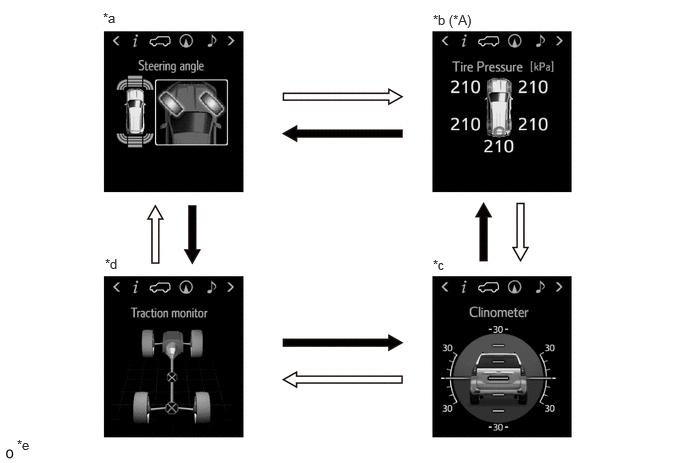
| *A | Models with Tire Pressure Warning System | - | - |
| *a | TOYOTA Parking Assist-sensor System, Door Open Warning and Steering Angle Display | *b | Tire Inflation Pressure Display |
| *c | Clinometer Display | *d | Traction and Differential Lock and Steering Angle Display |
| *e | The illustrations shown are examples only. | - | - |
|
|
UP/DOWN/ENTER switch Operated in DOWN Direction |
|
UP/DOWN/ENTER switch Operated in UP Direction |
Setting Function
The items displayed on the multi-information display can be customized.
The following items can be selected on the information setting screen.
| Item | Available Setting |
|---|---|
| Yaw Assist | Setting for yaw assist can be set to on/off:
·
On ·
Off |
| Sensitivity | Alert sensitivity of lane departure alert system can be changed:
·
High (Icon is displayed) ·
Standard (Icon is displayed) |
| Sway Warning | Vehicle sway warning can be set to on/off:
·
On ·
Off |
| Sway Sensitivity | Vehicle sway warning sensitivity can be selected:
·
High ·
Standard ·
Low |
| Item | Available Setting |
|---|---|
| BSM | The blind spot monitor system can be set to on/off:
·
On ·
Off |
| Item | Available Setting |
|---|---|
| Volume | The volume of the warning buzzer can be selected:
·
1 (Icon is displayed) ·
2 (Icon is displayed) ·
3 (Icon is displayed) |
| Item | Available Setting |
|---|---|
| PCS | The pre-collision system can be set to on/off:
·
On ·
Off |
| Sensitivity | A pre-collision system warning timing can be selected:
·
Early (Icon is displayed) ·
Middle (Icon is displayed) ·
Late (Icon is displayed) |
| Item | Available Setting |
|---|---|
|
*1: Except models for Australia *2: Models for Australia |
|
| RSA | The road sign assist system can be set to on/off:
·
On ·
Off |
| Notification Level | Excess speed notification level can be selected:*1
·
10 km/h (5 mph) ·
5 km/h (3 mph) ·
2 km/h (1 mph) |
| Excess speed notification level can be selected:*2
·
5 km/h ·
3 km/h ·
1 km/h |
|
| Notification Method | Notification method can be selected:
·
Excess Speed: (a)
No Notification (b)
Only visual (c)
Visual and Audible |
| Notification method can be selected:*1
·
Overtaking: (a)
No Notification (b)
Only visual (c)
Visual and Audible ·
Others: (a)
No Notification (b)
Only visual (c)
Visual and Audible |
|
| Item | Available Setting |
|---|---|
| Stop and Start Time | The idling stop time of stop and start system can be selected:
·
Normal ·
Long |
| Item | Available Setting |
|---|---|
| Oil Maintenance | The oil maintenance data can be rested. |
| Item | Available Setting |
|---|---|
| Language | The language used on the multi-information display can be selected:
·
English ·
French ·
German ·
Spanish ·
Italian ·
Chinese ·
Russian ·
Ukrainian ·
Turkish ·
Arabic |
| Unit | The unit displayed on the multi-information display can be selected:
·
MPG (UK) ·
MPG (US) ·
L/100 km ·
km/L |
| ECO Driving Indicator | The ECO driving indicator can be set to on/off:
·
On ·
Off |
| Interruption Display | The following displays that appear as soon as the set conditions are met can be set to on or off:
·
Intersection Guidance ·
Incoming Telephone Display ·
Stop and Start System Operation Time ·
Stop and Start System State Guidance |
| Spare tire/back | The spare tire on back can be set to on/off:
·
On ·
Off |
| Default Settings | The set items can be initialized. |
- HINT:
-
The items displayed differ depending on the vehicle specification.
Interruption Display
When a warning is necessary, the warning message interrupts the current display on the multi-information display.
A warning message is displayed via an interrupt display when a vehicle malfunction occurs to warn the driver. Also, an advice message is displayed via an interrupt display depending on the situation, such as when the driver must proceed with caution.
The master warning light may illuminate or blink and the buzzer in the combination meter assembly may sound depending on the item displayed on the multi-information display.
The intersection guidance and incoming telephone display are linked with the multimedia system and displayed via an interrupt display.
When the rheostat switch is operated, the adjust brightness interrupt display is displayed.
The combination meter assembly displays the following messages based on signals received from the ECM, engine oil pressure switch assembly and engine oil level sensor.
| Message | Master Warning Light | Buzzer |
|---|---|---|
| AdBlue empty Unable to restart engine Fill up AdBlue See owner's manual | Illuminates | Sounds |
| Emissions too high Unable to restart engine Check AdBlue Visit your dealer | Illuminates | Sounds |
| AdBlue level low No start in *** km! Fill up AdBlue See owner's manual | Illuminates | Sounds |
| Emissions too high No start in *** km! Check AdBlue Visit your dealer | Illuminates | Sounds |
| AdBlue level low Fill up AdBlue in *** km See owner's manual | Illuminates | Sounds |
| Emissions too high Check AdBlue Visit your dealer | Illuminates | Sounds |
| AdBlue level low Fill up AdBlue in *** km See owner's manual | - | - |
| Fill up AdBlue in *** km See owner's manual | - | - |
| Release Accelerator | Blinks | Sounds |
| Check Engine Reduced Engine Power Visit Your Dealer | Illuminates | Sounds |
| Check Engine Visit Your Dealer | Illuminates | Sounds |
| Reduced Engine Power Visit Your Dealer | Illuminates | Sounds |
| Engine Maintenance Required Visit Your Dealer | Illuminates | Sounds |
| Engine Coolant Temp High Stop in a Safe Place See Owner's Manual | Illuminates | Sounds |
| Oil Pressure Low Stop in a Safe Place See Owner's Manual | Illuminates | Sounds |
| Fuel Filter Maintenance Required | Illuminates | - |
| Check Fuel System | Illuminates | Sounds |
| AdBlue Dosing Malfunction Unable to Restart Engine Check AdBlue Visit Your Dealer | Illuminates | Sounds |
| Incorrect AdBlue Detected Unable to restart Engine Check AdBlue Visit Your Dealer | Illuminates | Sounds |
| Drive-Start Control Malfunction Visit Your Dealer | Illuminates | Sounds |
| Brake Override Malfunction Visit Your Dealer | Illuminates | Sounds |
| AdBlue Dosing Malfunction No start in ***km Check AdBlue Visit Your Dealer | Illuminates | Sounds |
| Incorrect AdBlue Detected No start in ***km Check AdBlue Visit Your Dealer | Illuminates | Sounds |
| Drain Water from Fuel Filter | Illuminates | Sounds |
| Engine Oil Level Low Add or Replace | Illuminates | |
| DPF full Visit your dealer | Illuminates | - |
| Manual regeneration in process Keep flammables away from vehicle | Illuminates | - |
| Accelerator and Brake Pedals Pressed Simultaneously | Blinks | - |
| AdBlue Dosing Malfunction Unable to Restart Engine Check AdBlue Visit Your Dealer | Illuminates | Sounds |
| Incorrect AdBlue Detected Check AdBlue Visit Your Dealer | Illuminates | Sounds |
| Oil Maintenance Required Soon | - | - |
| Oil Maintenance Required | - | - |
| Resetting oil maintenance data | - | - |
| Resetting of oil maintenance data complete | - | - |
| Resetting Maintenance Data | - | - |
| Resetting of oil maintenance data incomplete | - | - |
| DPF full See owner's manual | - | - |
| DPF regeneration in process | - | - |
| Manual regeneration unavailable DPF normal | - | - |
| DPF manual regeneration available | - | - |
| DPF full Manual regeneration required See owner's manual | - | - |
The combination meter assembly displays the following message based on signals received from the ECM.
| Message | Master Warning Light | Buzzer |
|---|---|---|
| Cruise Control Malfunction Visit Your Dealer | Illuminates | Sounds |
The combination meter assembly displays the following messages based on signals received from the ECM.
| Message | Master Warning Light | Buzzer |
|---|---|---|
| Dynamic radar cruise control proximity warning (image display) | - | Sounds |
| Radar Cruise Control Unavailable Clean Sensor | Illuminates | Sounds |
| Radar Cruise Control Unavailable | Illuminates | Sounds |
| Cruise Control Malfunction Visit Your Dealer | Illuminates | Sounds |
| Dynamic radar cruise control system status (image display) | - | - |
The combination meter assembly displays the following messages based on signals received from the forward recognition camera.
| Message | Master Warning Light | Buzzer |
|---|---|---|
| Lane departure alert (image display) | - | Sounds |
| Lane Departure Alert Malfunction Visit Your Dealer | Illuminates | Sounds |
| Lane Departure Alert Unavailable | Illuminates | Sounds |
| Lane Departure Alert Turned On Yaw Assist Active | - | - |
| Lane Departure Alert Turned On Yaw Assist Inactive | - | - |
| Lane Departure Alert Unavailable at Current Speed | - | - |
| Lane departure alert system status (image display) | - | - |
| Would you like to take a break? | - | Sounds |
The combination meter assembly displays the following messages based on signals received from the forward recognition camera.
| Message | Master Warning Light | Buzzer |
|---|---|---|
| RSA Malfunction Visit Your Dealer | Illuminates | Sounds |
The combination meter assembly displays the following messages based on signals received from the engine stop and start ECU .
| Message | Master Warning Light | Buzzer |
|---|---|---|
| Push * to Prolong Stop & Start and Reduces AC Output | - | - |
| Push * to Balance Stop & Start and AC Output | - | - |
| Stop & Start System Malfunction Visit Your Dealer | Illuminates | Sounds |
The combination meter assembly displays the following messages based on signals received from the ECM.
| Message | Master Warning Light | Buzzer |
|---|---|---|
| High transmission fluid temperature | Illuminates | Sounds |
| Check Transmission System | Illuminates | Sounds |
The combination meter assembly displays the following message based on signals received from the 4WD control ECU.
| Message | Master Warning Light | Buzzer |
|---|---|---|
| <Clinometer> Indicates approx. angles. Ensure that you operate vehicle safely. | - | - |
The combination meter assembly displays the following message based on signals received from the suspension control ECU.
| Message | Master Warning Light | Buzzer |
|---|---|---|
| Check air suspension system | Illuminates | Sounds |
The combination meter assembly displays the following message based on signals received from the tire pressure warning ECU and receiver.
| Message | Master Warning Light | Buzzer |
|---|---|---|
| Tire pressure warning (image display) | - | - |
The combination meter assembly displays the following messages based on signals received from the skid control ECU.
| Message | Master Warning Light | Buzzer |
|---|---|---|
| Braking Power Low Stop in a Safe Place See Owner's Manual | Blinks | Sounds |
| Release Parking Brake | Blinks | Sounds |
| Antilock brake system malfunction | - | Sounds |
The combination meter assembly displays the following messages based on signals received from the skid control ECU.
| Message | Master Warning Light | Buzzer |
|---|---|---|
| Operation not available while multi-terrain select is active | - | - |
| Multi-terrain select has been cancelled | - | - |
| SELECT L4 | - | - |
| Stop the vehicle. And shift to N position or depress clutch pedal | - | - |
| Multi-terrain select not available | - | - |
| MUD & SAND (and image display) | - | - |
| LOOSE ROCK (and image display) | - | - |
| MOGUL (and image display) | - | - |
| ROCK & DIRT (and image display) | - | - |
| ROCK (and image display) | - | - |
The combination meter assembly displays the following messages based on signals received from the skid control ECU.
| Message | Master Warning Light | Buzzer |
|---|---|---|
| Crawl Has Been Deactivated | Illuminates | - |
| Crawl Not Available Select L4 and Shift to [D] or [R] Position | - | - |
| Crawl Not Available Check System Operation Conditions | - | - |
| CRAWL status (image display) | - | - |
The combination meter assembly displays the following messages based on signals received from the clearance warning ECU assembly.
| Message | Master Warning Light | Buzzer |
|---|---|---|
| TOYOTA parking assist-sensor system detection display (image display) | - | - |
| Parking Assist Unavailable Clean Parking Assist Sensor | Illuminates | - |
| Parking Assist Malfunction Visit Your Dealer | Illuminates | - |
| Parking Assist Unavailable | Illuminates | Sounds |
The combination meter assembly displays the following messages based on signals received from the blind spot monitor sensor LH.
| Message | Master Warning Light | Buzzer |
|---|---|---|
| BSM not available | Illuminates | Sounds |
| Check BSM system | Illuminates | Sounds |
The combination meter assembly displays the following messages based on signals received from the main body ECU and certification ECU.
| Message | Master Warning Light | Buzzer |
|---|---|---|
| Push and Hold Engine Switch for Emergency Stop | Blinks | Sounds |
| Shift to N and Press Engine Switch to Restart | Blinks | Sounds |
| Depress clutch and press engine switch to restart | Blinks | Sounds |
| Shift to P position when parked | Blinks | Sounds |
| Auto power off to conserve battery | - | - |
| Key Not Detected Check Key Location | Blinks | Sounds |
| Smart Entry & Start System Malfunction See Owner's Manual | Blinks | Sounds |
| Turn power off | Blinks | Sounds |
| Key detected in vehicle | Blinks | Sounds |
| - | ||
| Depress brake pedal, touch engine switch with key | Blinks | Sounds |
| Depress clutch pedal, touch engine switch with key | Blinks | Sounds |
| Depress brake pedal and push engine switch to start | - | Sounds |
| - | ||
| Depress clutch pedal and push engine switch to start | - | Sounds |
| - | ||
| Push the engine switch while turning the steering wheel in either direction | Blinks | Sounds |
| Key battery low Have your vehicle checked by a dealer | Illuminates | Sounds |
| Shift to P pos. when parked Key not detected Check key position | Blinks | Sounds |
| Key not detected Check key position Turn power off | Blinks | Sounds |
The combination meter assembly displays the following messages based on signals received from the main body ECU.
| Message | Master Warning Light | Buzzer |
|---|---|---|
| Theft Sensor Turned Off | - | - |
| Theft Sensor Turned On | - | - |
The combination meter assembly displays the following messages based on signals received from the driving support ECU assembly.
| Message | Master Warning Light | Buzzer |
|---|---|---|
| BRAKE! | - | Sounds |
| Pre-Collision System Malfunction Visit Your Dealer | Illuminates | Sounds |
| Pre-Collision System OFF | - | - |
| VSC Turned OFF Pre-Collision Brake System Unavailable | - | - |
| Pre-Collision System Unavailable | - | - |
| Front Camera Unavailable | - | - |
| Front Camera Temporarily Unavailable See Owner's Manual | - | - |
| Pre-Collision System Unavailable | - | - |
| Pre-Collision System Unavailable Clean Sensor | - | - |
The combination meter assembly displays the following message based on signals received from the main body ECU.
| Message | Master Warning Light | Buzzer |
|---|---|---|
| Moon Roof Open | Blinks | Sounds |
The combination meter assembly displays the following messages based on signals received from the main body ECU.
| Message | Master Warning Light | Buzzer |
|---|---|---|
| Each door open (image display) | - | - |
| Each door open while driving (image display) | Blinks | Sounds |
| Glass hatch open (image display) | - | - |
| Glass hatch open while driving (image display) | Blinks | Sounds |
The combination meter assembly displays the following message based on signals received from the level warning switch assembly.
| Message | Master Warning Light | Buzzer |
|---|---|---|
| Windshield Washer Fluid Low | - | - |
The combination meter assembly displays the following messages based on signals received from the main body ECU.
| Message | Master Warning Light | Buzzer |
|---|---|---|
| Headlight System Uninitialized Visit Your Dealer | - | - |
| Headlight System Malfunction Visit Your Dealer | Illuminates | Sounds |
| To activate AHB, switch headlights to high beam | - | - |
The combination meter assembly displays the following messages based on signals received from the main body ECU.
| Message | Master Warning Light | Buzzer |
|---|---|---|
| High electric power consumption Some functions disabled | - | - |
| Out. temp over 5°C. Full deicer unavailable. Use defroster. | - | - |
- HINT:
-
The items displayed differ depending on the vehicle specification.
Multi-information Display (Models with Analog Display Type Combination Meter Assembly)
The multi-information display can be switched by operating the ODO/TRIP switch located on the combination meter cluster.
The multi-information display indicates as follows:
| Display | Outline |
|---|---|
|
*1: Models with automatic transmission *2: Models with oil maintenance *3: Except models with 5L-E engine |
|
| Shift Position Indicator*1 | The current shift position is displayed. |
| Odo/Trip | ODO, TRIP A and TRIP B can be selected. |
| Oil Maintenance*2 | Displays the remaining distance until the next oil change. |
| Cruise Information*3 | The following items can be displayed.
·
Cruising Range ·
Current Fuel Consumption ·
Average Fuel Consumption and Eco Driving Indicator Zone Display*1 ·
Average Vehicle Speed |
| Outside Temperature | Displays the outside temperature. |
| Customization*1 | Eco Driving Indicator Light can be turned activated/deactivated. |
Buzzer
The table below shows the warning and reminder functions of the multi buzzer in the combination meter assembly:
| Item |
|---|
·
Driver Seat Belt Warning Buzzer (Intermittent) ·
Reverse Warning Buzzer ·
Pre-collision System Warning ·
Vehicle Proximity Warning ·
Pedestrian Warning/Vehicle Distance Time Alert ·
Entry and Start System Warning Buzzer 1 (Intermittent) ·
Door Open when Shift Position not in P Warning Buzzer ·
Driver Seat Belt Warning Buzzer (Once) ·
Front Passenger Seat Belt Warning Buzzer (Once) ·
Rear Seat Belt Warning Buzzer (Once) ·
Seat Belt Warning Level 2 Buzzer ·
Seat Belt Warning Level 1 Buzzer ·
Key Reminder Warning Buzzer ·
Brake Force Reduction Warning Buzzer ·
Brake Fluid Low Warning Buzzer ·
Engine Oil Pressure Warning ·
Engine Switch Operation while Driving Warning Buzzer ·
Parking Brake Engaged Warning Buzzer ·
Vehicle Sway Warning Buzzer ·
Brake System Temperature Rise Warning/Active Test Buzzer ·
Hill-start Assist Control Buzzer (Level 1) Finish ·
Speed Limit Exceed Warning Buzzer ·
Door Open while Driving Warning Buzzer ·
Entry and Start System Warning Buzzer 2 (Intermittent) ·
Stop and Start System Warning Buzzer ·
Dynamic Radar Cruise Control with Road Sign Assist Over Speed Warning ·
Hill-start Assist Control Buzzer (Level 1) Indication ·
Start while Driving Warning Buzzer ·
Hill-start Assist Control Buzzer (Level 2) Reset ·
Reject Warning Buzzer ·
Dynamic Radar Cruise Control Cancelation due to Low Speed Warning Buzzer ·
Low Speed Zone Leading Vehicle Lost Warning Buzzer ·
Road Sign Assist Buzzer ·
Lane Departure Alert Buzzer ·
Engine Coolant Temperature Warning ·
Multi-information Display Warning Buzzer ·
Fuel Sedimenter Warning ·
4WD Warning Buzzer (Intermittent) ·
4WD Warning Buzzer (3 Times) ·
Brake System Temperature Warning/CRAWL Cancel Warning ·
Hill-start Assist Control Buzzer (Level 2) Set ·
Check Engine Warning Buzzer 1 ·
Check Engine Warning Buzzer 2 ·
Light Reminder Buzzer ·
Sliding Roof Open Warning Buzzer ·
Road Sign Assist System Warning Buzzer ·
Entry and Start System Warning Buzzer (Once) ·
DPF Warning Buzzer ·
Immobiliser Certification Reminder Buzzer ·
Turn Signal/Hazard Warning Operation Buzzer ·
PBA Notification Buzzer ·
ALM Notification Buzzer ·
Brake Inspections Standby Mode Notification Buzzer ·
Radar Axis Adjustment Complete Notification Buzzer ·
Camera Axis Adjustment Complete Notification Buzzer ·
Pre-collision Braking Notification Buzzer ·
Return from Brake Inspection Mode Notification Buzzer ·
Radar Axis Adjustment Incomplete Notification Buzzer ·
Camera Axis Adjustment Start Notification Buzzer |
- HINT:
-
The items displayed differ depending on the vehicle specification.
OPERATION
Eco Driving Indicator Light and Eco Driving Indicator Zone Display
The following table shows the operation of Eco Driving Indicator Light and Eco driving indicator zone display in different driving conditions:
| Driving Condition | Eco Driving Indicator Light | Eco Driving Indicator Zone Display |
|---|---|---|
| While Stopped | Turns off | 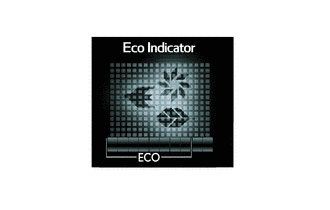
|
| While Eco Driving | Turns on | 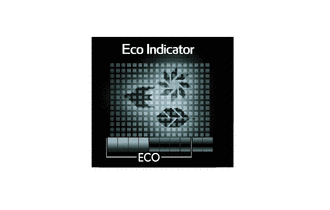
|
| While Non-eco Driving | Turns off | 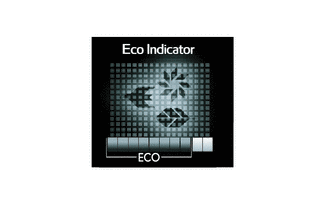
|
| When any of the following conditions is met, operation is stopped.
·
Ignition switch is off. ·
Engine is stopped. ·
Shift lever is not in D. ·
Vehicle is being driven at a speed of 130 km/h (81 mph) or higher. ·
Eco mode is not selected. |
Turns off | 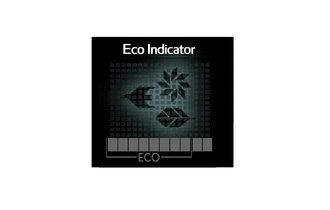
|
| Driving Condition | Eco Driving Indicator Light | Eco Driving Indicator Zone Display |
|---|---|---|
| While Stopped | Turns off | 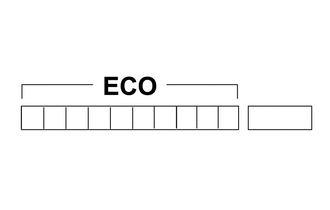
|
| While Eco Driving | Turns on | 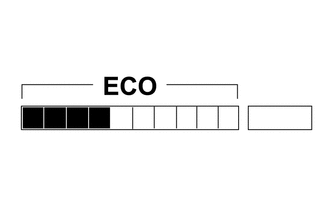
|
| While Non-eco Driving | Turns off | 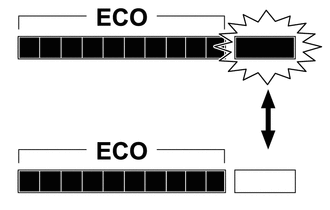
|
| When any of the following conditions is met, operation is stopped.
·
Ignition switch is off. ·
Engine is stopped. ·
Shift lever is not in D. ·
Vehicle is being driven at a speed of 130 km/h (81 mph) or higher. ·
Eco mode is not selected. |
Turns off |
|
Seat Belt Warning Function
When the ignition switch is turned to ON, this system detects the condition of the seat belts based on the signals from the driver, front passenger and rear* seat belt buckle switches and the occupant detection sensor.
*: Models with rear seatbelt warning function
On models except models for G.C.C. countries, the buzzer sounds when the vehicle speed exceeds 20 km/h (12.4 mph) to emphasize the fact that the seat belt is unbuckled.* After 24 seconds, the sound changes for emphasis. The sound continues for 100 seconds. Once a buzzer begins to sound, it will continue until the seat belt is buckled or the ignition switch is turned off.
- HINT:
-
*: In addition, when a seat belt is buckled and then unbuckled after the ignition switch is turned to ON for rear seat belts.
On models for G.C.C. countries, when the seat belt is unbuckled, the buzzer sounds 5 times 1.8 seconds after the ignition switch is turned to ON. The buzzer sounds only 1 time when the vehicle speed exceeds 20 km/h (12.4 mph) to remind the fact that the seat belt is unbuckled. After 24 seconds, the buzzer sounds intermittently to emphasize the fact that the seat belt is unbuckled. After 6 seconds, the sound changes for emphasis. The sound continues for 90 seconds. Once a buzzer begins to sound, it will continue until the seat belt is buckled or the ignition switch is turned off.
- HINT:
-
Upon receiving a request from a user who cannot wear a seat belt for a special reason, the buzzer warning can be canceled using the Global TechStream (GTS). For details, refer to the Repair Manual.
Occupant Detection Sensor
The occupant detection sensor, which is enclosed in the seat cushion of the front passenger seat, is used to detect whether or not the front passenger seat is occupied.
This sensor consists of a construction in which 2 electrode sheets sandwich a spacer. When the occupant is seated, the electrode sheets come in contact with each other through the hole provided in the spacer portion, enabling the current to flow.
Thus, the sensor detects whether or not an occupant is seated in the front passenger seat.