RM27T0E
_56
Audio / Visual / Telematics
_053720
AUDIO / VIDEO
_0260976
TELEVISION DISPLAY
A
AUDIO / VIDEO TELEVISION DISPLAY INSTALLATION
PROCEDURE

 86680A
1.INSTALL TELEVISION DISPLAY ASSEMBLY
a.
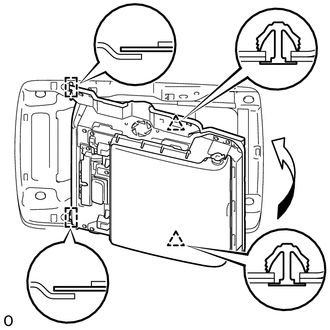
Attach the television display assembly to the 2 guides on the front side of the bracket by moving it in the direction of the arrow in the illustration, and then attach 2 new clips to temporarily install the television display assembly.
b.
2.53,1.759 2.734,1.942
0.204,0.183
10
(1)
2.984,1.252 3.188,1.435
0.204,0.183
10
(3)
0.97,1.703 1.173,1.887
0.204,0.183
10
(4)
1.459,1.06 1.663,1.243
0.204,0.183
10
(2)
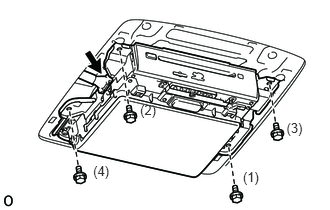
Install the television display assembly with the 4 bolts in the order shown in the illustration.
- Torque:
- 8.5 N*m (87 kgf*cm, 75 in.*lbf)
c.
Connect the connector.
86295
2.INSTALL TELEVISION BASE
a.
Attach the 7 claws and 4 clips to install the television base.
3.CONNECT CABLE TO NEGATIVE BATTERY TERMINAL
- NOTICE:
-
When disconnecting the cable, some systems need to be initialized after the cable is reconnected (See page General>INTRODUCTION>REPAIR INSTRUCTION>INITIALIZATION).