Home › Vehicle Interior › DOOR LOCK › WIRELESS DOOR LOCK CONTROL SYSTEM (w/o Entry and Start System) › 2015.06–2017.08
RM27T0E _58 Vehicle Interior _053730 DOOR LOCK _0261039 WIRELESS DOOR LOCK CONTROL SYSTEM(w/o Entry and Start System) M

DOOR LOCK  WIRELESS DOOR LOCK CONTROL SYSTEM(w/o Entry and Start System)  REGISTRATION  


PROCEDURE

Hide 1.DESCRIPTION OF CODE REGISTRATION

HINT:
·

Recognition code registration is necessary when replacing the door control transmitter or door control receiver.

·

Add mode is used to register new recognition codes while still retaining codes already registered. This mode is used when a new transmitter is added. If the number of registered codes exceeds 6, the previously registered codes will be cleared in order, starting from the first registered code.

·

Rewrite mode is used to clear all the previously registered recognition codes in order to register new recognition codes. This mode is used when the transmitter or door control receiver is replaced with a new one.

·

Confirmation mode is used to confirm how many recognition codes have already been registered before registering any additional recognition codes.

·

Prohibition mode is used to clear all the registered codes and disables the wireless door lock function. This mode is used when the transmitter is lost.

·

The registration procedures must be performed in order.


Hide 2. REGISTER RECOGNITION CODE (USING INTELLIGENT TESTER)

HINT:

For detailed procedures, refer to the prompts on the intelligent tester screen. The number of currently registered codes can be checked on the first screen of Wireless Code Registration.


a.

Turn the ignition switch to ON.


b.

Enter the following menus: Body / Main Body / Utility / Wireless Code Registration.


c.

Press both the lock and unlock switches at the same time for 1 to 1.5 seconds.


d.

Press either switch for more than 1 second within 3 seconds.


e.

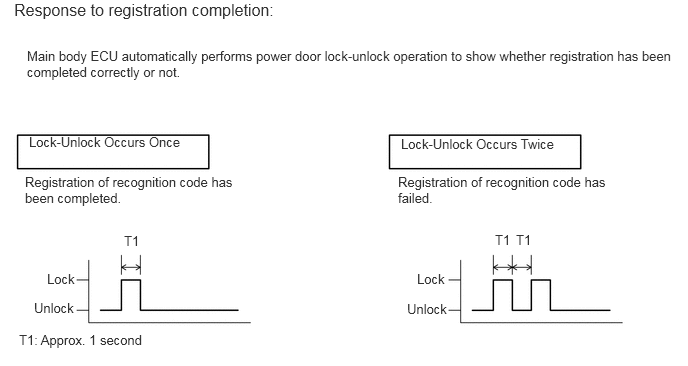
Check the response to the registration completion.
B111915E78
0.302,1.396 2.188,1.573 1.885,0.177 10 false Lock-Unlock Occurs Once 4.177,1.417 6.094,1.594 1.917,0.177 10 false Lock-Unlock Occurs Twice 0.49,2.823 0.823,3 0.333,0.177 10 false Lock 0.354,3.125 0.833,3.333 0.479,0.208 10 false Unlock 1.292,2.427 1.469,2.604 0.177,0.177 10 false T1 4.344,2.823 4.677,3 0.333,0.177 10 false Lock 4.24,3.135 4.698,3.344 0.458,0.208 10 false Unlock 5.156,2.417 5.333,2.594 0.177,0.177 10 false T1 5.375,2.417 5.552,2.594 0.177,0.177 10 false T1 0.146,0 3.167,0.188 3.021,0.188 12 false Response to registration completion: 0.198,3.458 1.615,3.635 1.417,0.177 10 false T1: Approx. 1 second 0.281,0.5 7.01,0.885 6.729,0.385 10 false Main body ECU automatically performs power door lock-unlock operation to show whether registration has been completed correctly or not. 0.26,1.813 2.51,2.219 2.25,0.406 10 false Registration of recognition code has been completed. 4.146,1.813 6.396,2.219 2.25,0.406 10 false Registration of recognition code has failed.

HINT:
·

If the lock-unlock operation occurs twice, the registration of the recognition code has failed. Perform the registration procedures again from the beginning.

·

If registering another transmitter, repeat the procedures after the intelligent tester operation. All 6 recognition codes can be registered consecutively.


f.

Perform either of the following to complete the registration of the recognition codes:

·

Use the intelligent tester to send a completion command.

·

Disconnect the intelligent tester.


Hide 3. REGISTER RECOGNITION CODE (USING SWITCH OPERATION)

a.

Make sure the following conditions are met.

·

No key is inserted in the ignition key cylinder.

·

The driver side door is open (the other doors are closed).

·

The driver side door is unlocked.


b.

Insert and remove the key into/from the ignition key cylinder twice (Insert → Remove → Insert → Remove) within 5 seconds.

HINT:

The procedure should end with the key removed.


c.

Perform the following operations within 40 seconds.

i.

Close and open the driver side door twice (Close → Open → Close → Open).

HINT:

The procedure should end with the door open.


ii.

Insert and remove the key into/from the ignition key cylinder (Insert → Remove).

HINT:

The procedure should end with the key removed.


iii.

Close and open the driver side door twice (Close → Open → Close → Open).

HINT:

The procedure should end with the door open.


iv.

Insert the key into the ignition key cylinder and close all the doors.


d.

Perform the following operations within 40 seconds.

i.

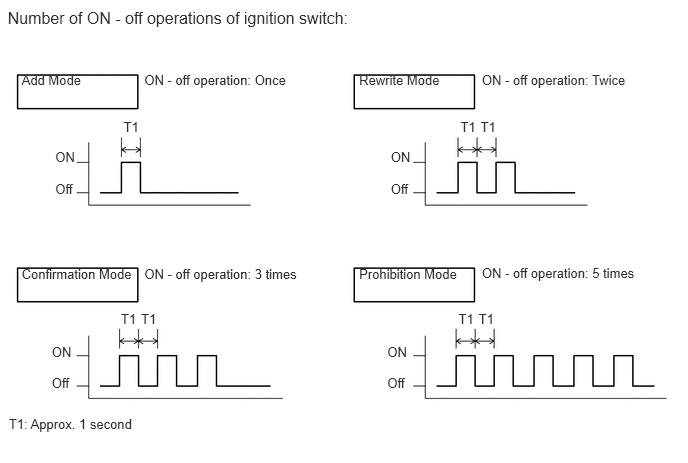
Turn the ignition switch to ON and then off at approximately 1 second intervals. Operate the ignition switch according to the number of times shown below.
B111914E17
0.225,0.749 0.889,0.921 0.665,0.172 10 Add Mode 0.079,0.082 3.971,0.271 3.892,0.189 12 Number of ON - off operations of ignition switch: 1.503,0.749 3.483,0.965 1.981,0.215 10 ON - off operation: Once 0.575,1.556 0.812,1.729 0.237,0.174 10 ON 0.575,1.884 0.798,2.089 0.223,0.205 10 Off 1.287,1.236 1.469,1.410 0.182,0.174 10 T1 3.741,0.749 4.639,0.921 0.898,0.172 10 Rewrite Mode 5.019,0.749 7.095,0.965 2.076,0.215 10 ON - off operation: Twice 4.796,1.236 4.978,1.410 0.182,0.174 10 T1 5.005,1.236 5.187,1.410 0.182,0.174 10 T1 0.225,2.77 1.421,2.942 1.197,0.172 10 Confirmation Mode 1.503,2.77 3.581,2.986 2.078,0.215 10 ON - off operation: 3 times 0.539,3.579 0.802,3.753 0.263,0.174 10 ON 0.539,3.908 0.792,4.113 0.253,0.205 10 Off 4.07,1.556 4.307,1.729 0.237,0.174 10 ON 4.07,1.884 4.293,2.089 0.223,0.205 10 Off 4.034,3.579 4.297,3.753 0.263,0.174 10 ON 4.034,3.908 4.287,4.113 0.253,0.205 10 Off 4.776,3.24 4.958,3.414 0.182,0.174 10 T1 4.986,3.24 5.168,3.414 0.182,0.174 10 T1 1.259,3.24 1.442,3.414 0.182,0.174 10 T1 1.469,3.24 1.652,3.414 0.182,0.174 10 T1 3.741,2.77 4.938,2.942 1.197,0.172 10 Prohibition Mode 5.019,2.764 7.048,2.954 2.029,0.191 10 ON - off operation: 5 times 0.092,4.338 1.513,4.520 1.421,0.182 10 T1: Approx. 1 second

HINT:

If the number of ignition switch ON - off operations is 0, 4, or 6 or more, there will be no response (power door lock and unlock operation) to show which mode has been selected.


ii.

Remove the key from the ignition key cylinder.


e.

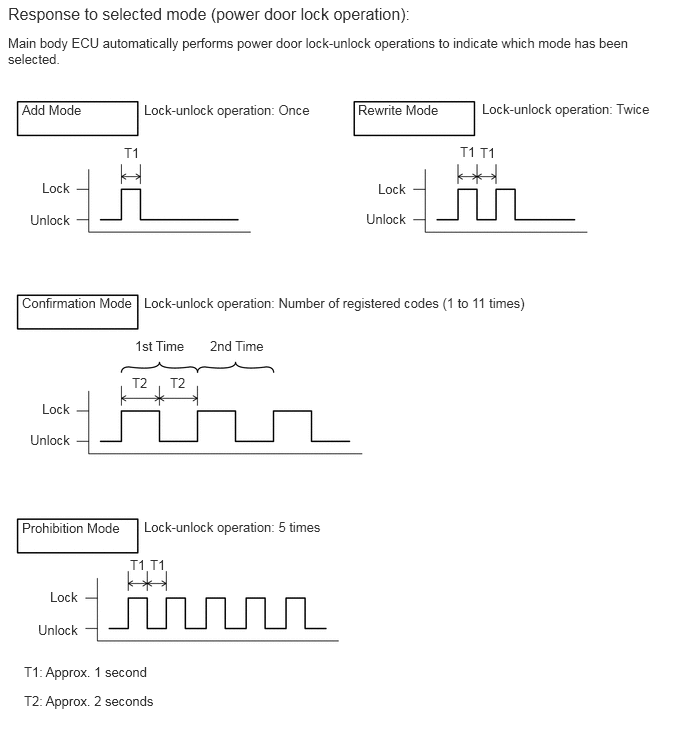
Check that the response begins within 5 seconds after completing the above step, and that the response matches the selected mode.
B222617E12
0.229,1.063 0.896,1.24 0.667,0.177 10 false Add Mode 1.5,1.063 3.552,1.281 2.052,0.219 10 false Lock-unlock operation: Once 1.292,1.51 1.469,1.688 0.177,0.177 10 false T1 3.729,1.063 4.625,1.24 0.896,0.177 10 false Rewrite Mode 5.021,1.052 7.125,1.271 2.104,0.219 10 false Lock-unlock operation: Twice 4.792,1.5 4.969,1.677 0.177,0.177 10 false T1 5,1.51 5.177,1.688 0.177,0.177 10 false T1 0.083,0.042 4.823,0.229 4.74,0.188 12 false Response to selected mode (power door lock operation): 0.083,0.365 6.823,0.75 6.74,0.385 10 false Main body ECU automatically performs power door lock-unlock operations to indicate which mode has been selected. 0.229,3.073 1.427,3.25 1.198,0.177 10 false Confirmation Mode 1.5,3.073 6.073,3.292 4.573,0.219 10 false Lock-unlock operation: Number of registered codes (1 to 11 times) 0.438,4.177 0.781,4.354 0.344,0.177 10 false Lock 0.313,4.5 0.781,4.708 0.469,0.208 10 false Unlock 0.438,1.875 0.781,2.052 0.344,0.177 10 false Lock 0.313,2.208 0.781,2.417 0.469,0.208 10 false Unlock 3.938,1.885 4.281,2.063 0.344,0.177 10 false Lock 3.813,2.198 4.281,2.406 0.469,0.208 10 false Unlock 0.521,6.135 0.865,6.313 0.344,0.177 10 false Lock 0.396,6.479 0.865,6.688 0.469,0.208 10 false Unlock 1.375,3.906 1.552,4.083 0.177,0.177 10 false T2 1.771,3.906 1.948,4.083 0.177,0.177 10 false T2 1.406,3.521 1.969,3.719 0.563,0.198 10 false 1st Time 2.188,3.521 2.792,3.719 0.604,0.198 10 false 2nd Time 0.229,5.417 1.427,5.594 1.198,0.177 10 false Prohibition Mode 1.5,5.406 3.667,5.625 2.167,0.219 10 false Lock-unlock operation: 5 times 0.25,7.219 1.667,7.583 1.417,0.365 10 false T2: Approx. 2 seconds 0.25,6.917 1.667,7.281 1.417,0.365 10 false T1: Approx. 1 second 1.354,5.802 1.531,5.979 0.177,0.177 10 false T1 1.563,5.802 1.74,5.979 0.177,0.177 10 false T1

NOTICE:

After the system has been set to prohibition mode, enter the confirmation mode and check that the number of registered keys is 0.


HINT:
·

In confirmation mode, the lock-unlock operation will occur once for each recognition code that has been registered. For example, if 2 recognition codes have been registered, the lock-unlock operation will occur twice.

·

In confirmation mode, if no recognition codes have been registered, the lock-unlock operation will occur 11 times.

·

If confirmation mode or prohibition mode is selected, the operation ends after the response to the selected mode completes.


f.

If add mode or rewrite mode is selected, perform the following procedures.

i.

Press a single switch (lock or unlock) within 5 seconds.


ii.

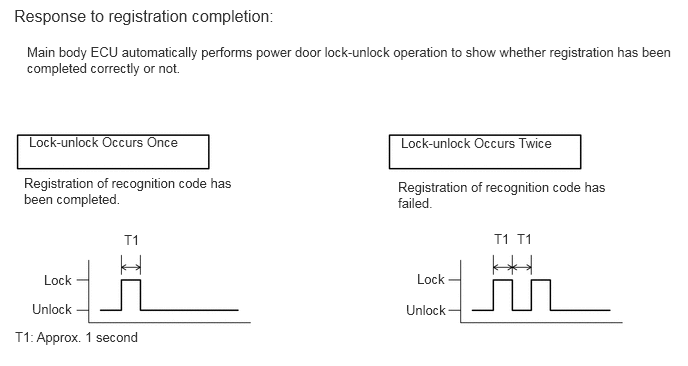
Check that the response begins within 3 seconds after completing the above step, and that the response indicates that registration has been completed correctly.
B111915E79
0.302,1.396 2.188,1.573 1.885,0.177 10 false Lock-unlock Occurs Once 4.177,1.406 6.094,1.583 1.917,0.177 10 false Lock-unlock Occurs Twice 1.292,2.417 1.469,2.594 0.177,0.177 10 false T1 4.344,2.823 4.667,3 0.323,0.177 10 false Lock 4.229,3.146 4.688,3.354 0.458,0.208 10 false Unlock 0.458,2.833 0.781,3.01 0.323,0.177 10 false Lock 0.333,3.135 0.792,3.344 0.458,0.208 10 false Unlock 5.146,2.406 5.323,2.583 0.177,0.177 10 false T1 5.385,2.406 5.563,2.583 0.177,0.177 10 false T1 0.146,0.063 3.646,0.25 3.5,0.188 12 false Response to registration completion: 0.156,3.427 1.573,3.604 1.417,0.177 10 false T1: Approx. 1 second 0.281,0.458 7.01,0.844 6.729,0.385 10 false Main body ECU automatically performs power door lock-unlock operation to show whether registration has been completed correctly or not. 0.25,1.823 2.5,2.229 2.25,0.406 10 false Registration of recognition code has been completed. 4.146,1.865 6.396,2.271 2.25,0.406 10 false Registration of recognition code has failed.

HINT:
·

If the lock-unlock operation occurs twice, the registration of the recognition code has failed. Perform the registration procedures again from the beginning.

·

If registering another transmitter, repeat the procedures after the mode selection response confirmation. All 6 recognition codes can be registered consecutively.


g.

Perform either of the following to complete the registration of the recognition codes:

·

Open a door.

·

Insert the key into the ignition key cylinder.