RM27T0E
_56
Audio / Visual / Telematics
_053720
AUDIO / VIDEO
_0260976
TELEVISION DISPLAY
A
AUDIO / VIDEO TELEVISION DISPLAY REMOVAL
PROCEDURE

 1. PRECAUTION
- NOTICE:
-
After turning the ignition switch off, waiting time may be required before disconnecting the cable from the negative (-) battery terminal.
-
Click hereGeneral>INTRODUCTION>REPAIR INSTRUCTION>PRECAUTION
2.DISCONNECT CABLE FROM NEGATIVE BATTERY TERMINAL
86295
3.REMOVE TELEVISION BASE
a.
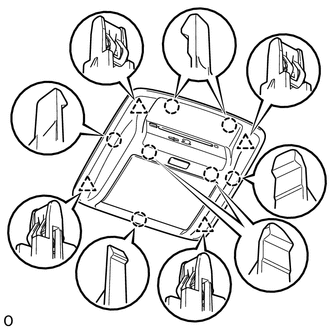
Detach the 7 claws and 4 clips and remove the television base.
86680A
4.REMOVE TELEVISION DISPLAY ASSEMBLY
a.
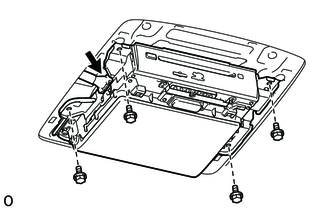
Disconnect the connector.
b.
Remove the 4 bolts.
c.
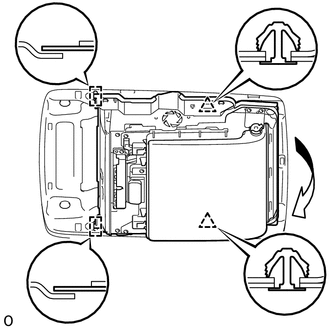
Detach the 2 clips and move the television display assembly as shown in the illustration to detach the 2 guides and remove it.