1GD-FTV ENGINE CONTROL ECD SYSTEM(w/ Urea SCR System) VEHICLE CONTROL HISTORY
DESCRIPTION (ECD SYSTEM)
Vehicle Control History is a function that captures and stores ECU data when triggered by specific vehicle behavior.
If the customer states that the engine stalled or will not start, it may be possible to diagnose the cause of the malfunction by checking the vehicle history information and freeze frame data.
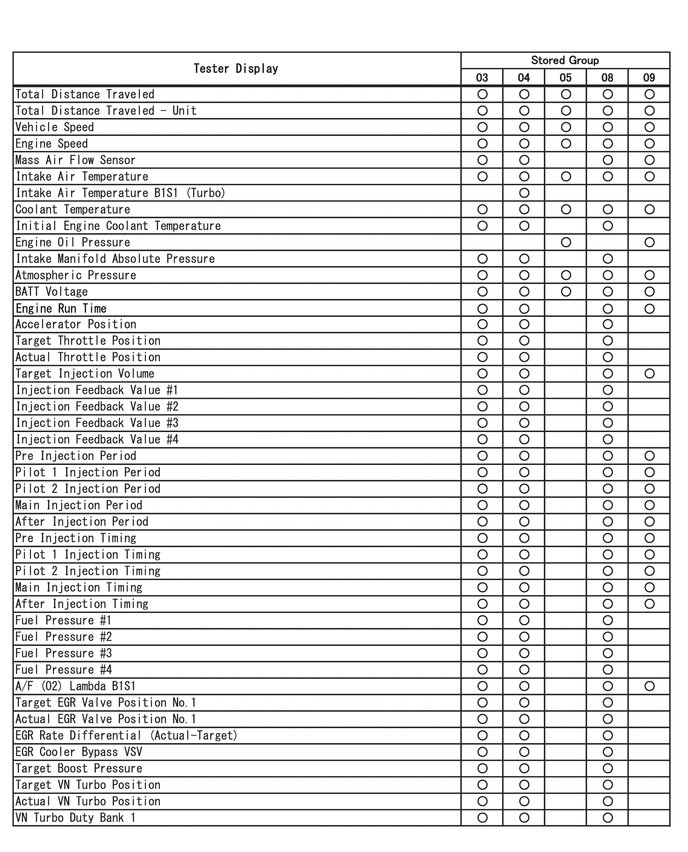
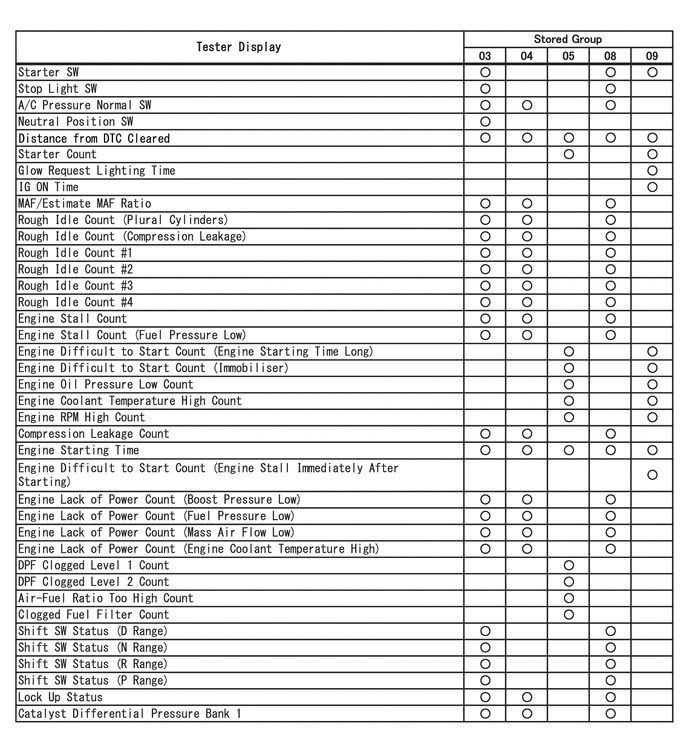
The number of possible stored Freeze Frame Data sets, whether multi Freeze Frame Data is available, the number of freeze frame points, Freeze Frame Data items, the ECU internal range, etc., is different depending on the stored group.
The stored data items for Vehicle Control History Freeze Frame Data are different depending on the stored group. When the value of a data item does not change across all points, only the value of the detection point will be displayed. The contents of the Freeze Frame Data is almost the same as that of the Data List.
PRECAUTIONS (ECD SYSTEM)
As Vehicle Control History may be overwritten whenever the trigger conditions are met, make sure to save Vehicle Control History before performing any inspections.
As Vehicle Control History may be stored when performing an Active Test, learning, etc., make sure to clear the Vehicle Control History before returning the vehicle to the customer.
CHECK VEHICLE CONTROL HISTORY (ECD SYSTEM)
Connect the GTS to the DLC3.
Turn the engine switch on (IG).
Turn the GTS on.
Enter the following menus: Powertrain / Engine / Utility / Vehicle Control History (RoB).
- HINT:
-
It is also possible to display Vehicle Control History during the Health Check, if "Store All Data" is selected.
| Code | Item | Trigger Description | Stored Group | Reference Inspection Procedure | Link |
|---|---|---|---|---|---|
| X0800 | Engine Stall | Detection Condition (Engine Stall)
·
Prerequisite Conditions: The engine is running (after engine is judged to be difficult to start) ·
Detection Conditions: The engine speed decreases to 200 rpm or less, or stops ·
Duration: 0.5 seconds or more |
08 | Flowchart [Engine difficult to start or stalling] step 3 | ( ) |
| The engine stalled due to factors other than the operation of the engine switch | |||||
| X0806 | Engine Stall (Fuel Pressure Low) | It is judged that the engine is stalled due to a drop in fuel pressure | 08 | Flowchart [Engine difficult to start or stalling] step 3 | ()
|
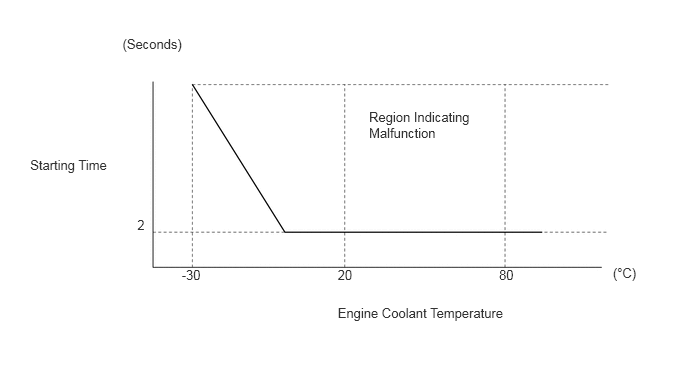
| X0810 | Engine Difficult to Start (Engine Starting Time Long) | Detection Condition (Engine Starting Time Long)
·
Prerequisite Conditions: STA signal is ON ·
Detection Conditions: The engine speed is less than 500 rpm for a long period of time (the starting time is long or the engine does not start) ·
Duration: Refer to Engine Difficult to Start Duration Judgment Region illustration |
09 | Flowchart [Engine difficult to start or stalling] step 3 | ()
|
| X0811 | Engine Difficult to Start (Engine Stall Immediately After Starting) | Detection Condition (Engine Stall Immediately After Starting)
·
Prerequisite Conditions: Within 2 seconds after the engine has started (engine speed is 500 rpm or more) and the engine coolant temperature is -15°C (5°F) or more ·
Detection Conditions: The engine speed decreases to 200 rpm or less (immediately after starting, the engine speed decreases or the engine stalls) ·
Duration: - |
09 | Flowchart [Engine difficult to start or stalling] step 3 | ()
|
| The engine speed decreases or the engine stalls immediately after starting | |||||
| X0812 | Engine Difficult to Start (Immobiliser) | Engine difficult to start due to immobiliser | 09 | Flowchart [Engine difficult to start or stalling] step 3 | ()
|
| X0821 | Rough Idle #1 | Detection Condition (Rough Idle)
·
Prerequisite Conditions: The engine is idling with the vehicle is stopped and the accelerator pedal is fully released ·
Detection Conditions: It is judged that combustion is unstable due to the instantaneous change in engine speed for each cylinder ·
Duration: Depending on the combustion status, between 2 and 10 seconds |
03 | Flowchart [Rough idling or excessive vibration] step 4 | ()
|
| Idling is rough due to unstable combustion in the No. 1 cylinder | |||||
| X0822 | Rough Idle #2 | Idling is rough due to unstable combustion in the No. 2 cylinder | 03 | Flowchart [Rough idling or excessive vibration] step 4 | ()
|
| X0823 | Rough Idle #3 | Idling is rough due to unstable combustion in the No. 3 cylinder | 03 | Flowchart [Rough idling or excessive vibration] step 4 | ()
|
| X0824 | Rough Idle #4 | Idling is rough due to unstable combustion in the No. 4 cylinder | 03 | Flowchart [Rough idling or excessive vibration] step 4 | ()
|
| X082A | Rough Idle (Plural Cylinders) | Idling is rough due to multiple cylinders
As more than one cylinder is affected, the EGR system, fuel system, etc. is suspected |
03 | Flowchart [Rough idling or excessive vibration] step 4 | ()
|
| X082D | Rough Idle (Compression Leakage) | Idling is judged to be rough due to compression leakage | 03 | Flowchart [Rough idling or excessive vibration] step 4 | ()
|
| X0843 | Engine Lack of Power (Boost Pressure Low) | Engine output is insufficient due to a drop in boost pressure | 04 | Flowchart [Lack of power or hesitation] step 2 | ()
|
| X0846 | Engine Lack of Power (Fuel Pressure Low) | Engine output is insufficient due to a drop in fuel pressure | 04 | Flowchart [Lack of power or hesitation] step 2 | ()
|
| X0847 | Engine Lack of Power (Mass Air Flow Low) | Engine output is insufficient due to a drop in mass air flow | 04 | Flowchart [Lack of power or hesitation] step 2 | ()
|
| X0848 | Engine Lack of Power (Engine Coolant Temperature High) | Engine output is insufficient due to the load being limited during high coolant temperature | 04 | Flowchart [Lack of power or hesitation] step 2 | ()
|
| X0850 | Engine Oil Pressure Low | The engine oil pressure is low | 05 | - | - |
| X0851 | Engine Coolant Temperature High | The engine coolant temperature is high (overheating) | 05 | - | - |
| X0852 | Engine RPM High | The engine speed is high (over revving) | 05 | - | - |
| X0854 | Engine Coolant Temperature High (Low Voltage) | The engine coolant temperature is high (overheating) due to a low engine water pump assembly voltage causing the engine water pump assembly to stop
|
05 | - | - |
| X085D | DPF Clogged Level 1 | DPF regeneration is insufficient and PM accumulation requires PM Forced Regeneration | 05 | - | - |
| X085E | DPF Clogged Level 2 | DPF regeneration is insufficient and PM accumulation requires PM Forced Regeneration | 05 | - | - |
| X0860 | Air-Fuel Ratio Too High | The air-fuel ratio is too rich | 05 | Flowchart [Black smoke emitted] | ()
|
| X0861 | Clogged Fuel Filter | The fuel filter cap with element is clogged | 05 | Refer to the P00BB00 inspection procedure | ()
|
| Stored Group | Number of Records | Number of Freeze Frame Points | Multi Freeze Frame Data Sampling Period | Note |
|---|---|---|---|---|
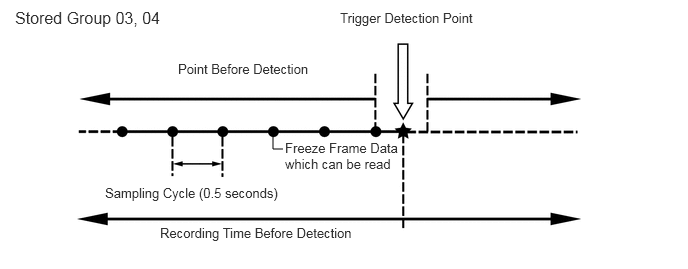
| 03 | 1 code
|
7 points (1 point at detection + 6 points before detection)
|
0.5 seconds | The data can be cleared by using the GTS or by disconnecting the cable from the negative (-) battery terminal. |
| 04 | 1 code
|
7 points (1 point at detection + 6 points before detection)
|
0.5 seconds | The data can be cleared by using the GTS or by disconnecting the cable from the negative (-) battery terminal. |
| 05 | 2 codes
|
1 point (multi freeze frame data not available) | - | ·
The data can be cleared by using the GTS. ·
The data cannot be cleared by disconnecting the cable from the negative (-) battery terminal. |
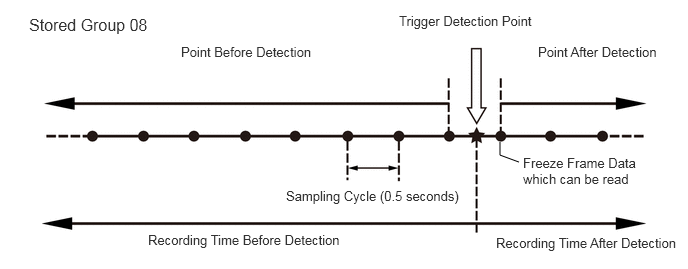
| 08 | 1 codes
|
12 points (1 point at detection + 8 points before detection + 3 points after detection)
|
0.5 seconds | ·
The data can be cleared by using the GTS. ·
The data cannot be cleared by disconnecting the cable from the negative (-) battery terminal. |
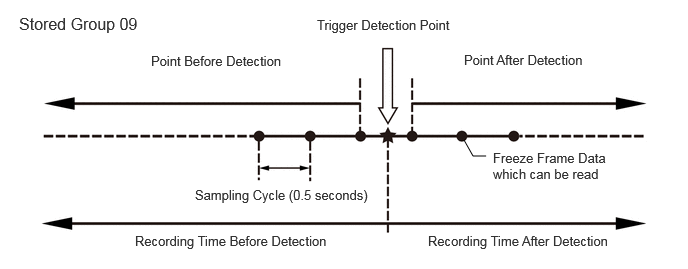
| 09 | 1 code
|
7 points (1 point at detection + 3 points before detection + 3 points after detection)
|
0.5 seconds | The data can be cleared by using the GTS or by disconnecting the cable from the negative (-) battery terminal. |
- HINT:
- ·
Multi Freeze Frame Data makes it possible to display the engine condition (ECU data) both before and after the trigger detection point.
·The number of available points differs depending on the stored group.
·When the value of a data item does not change across all points, only the value at the detection point will be displayed.
 2.948,1.552 2.844,1.552 2.844,1.552 2.844,1.385 false 0.156,0.083 2.917,0.323 2.76,0.24 12 false Stored Group 03, 04 1.854,0.635 3.458,0.906 1.604,0.271 10 false Point Before Detection 1.667,2.344 3.802,2.656 2.135,0.313 10 false Recording Time Before Detection 1.094,1.927 3.063,2.188 1.969,0.26 10 false Sampling Cycle (0.5 seconds) 3.542,0.104 5.135,0.396 1.594,0.292 10 false Trigger Detection Point 2.969,1.458 4.177,1.948 1.208,0.49 10 false Freeze Frame Data which can be read
 5.406,1.688 5.208,1.615 5.208,1.615 5.208,1.479 false 0.302,0.156 1.677,0.354 1.375,0.198 12 false Stored Group 08 4.156,0.135 5.677,0.323 1.521,0.188 10 false Trigger Detection Point 5.604,0.458 7,0.656 1.396,0.198 10 false Point After Detection 1.885,0.458 3.479,0.688 1.594,0.229 10 false Point Before Detection 2.979,1.958 4.885,2.229 1.906,0.271 10 false Sampling Cycle (0.5 seconds) 5.448,1.615 6.875,2.01 1.427,0.396 10 false Freeze Frame Data which can be read 1.542,2.417 3.667,2.656 2.125,0.24 10 false Recording Time Before Detection 5.167,2.448 7.135,2.677 1.969,0.229 10 false Recording Time After Detection
 5.063,1.625 4.927,1.625 4.927,1.625 4.833,1.458 false 3.302,0.177 5.073,0.396 1.771,0.219 10 false Trigger Detection Point 1.573,0.552 3.281,0.813 1.708,0.26 10 false Point Before Detection 4.833,0.542 6.594,0.75 1.76,0.208 10 false Point After Detection 2.031,1.948 4.115,2.198 2.083,0.25 10 false Sampling Cycle (0.5 seconds) 0.198,0.146 1.917,0.417 1.719,0.271 12 false Stored Group 09 5.135,1.563 6.375,2.104 1.24,0.542 10 false Freeze Frame Data which can be read 1.406,2.427 3.802,2.646 2.396,0.219 10 false Recording Time Before Detection 4.458,2.427 6.781,2.656 2.323,0.229 10 false Recording Time After Detection
-
Only 1 measurement point can be displayed for stored group 05 Freeze Frame Data.
CLEAR VEHICLE CONTROL HISTORY (ECD SYSTEM)
Connect the GTS to the DLC3.
Turn the engine switch on (IG).
Turn the GTS on.
Enter the following menus: Powertrain / Engine / Utility / Vehicle Control History (RoB) (Clear).
- NOTICE:
-
By performing this procedure, all stored Vehicle Control History items will be cleared.
VEHICLE CONTROL HISTORY FREEZE FRAME DATA (ECD SYSTEM)
Connect the GTS to the DLC3.
Turn the engine switch on (IG).
Turn the GTS on.
Enter the following menus: Powertrain / Engine / Utility / Vehicle Control History (RoB).
Select a vehicle control history item to access the applicable freeze frame data.
Check the freeze frame Data recorded with the Vehicle Control History.
CHECK VEHICLE CONTROL HISTORY (CHARGING SYSTEM)
Connect the GTS to the DLC3.
Turn the engine switch on (IG).
Turn the GTS on.
Enter the following menus: Powertrain / Engine / Utility / Vehicle Control History (RoB).
| Code | Tester Display | Measurement Item | Diagnostic Note |
|---|---|---|---|
| X0600 | Auxiliary Battery Voltage Low at Start | History of low battery voltage at engine control system start | - |
| X0601 | Auxiliary Battery Voltage Low at IG OFF | History of low battery voltage when engine switch off | - |
| X0602 | Auxiliary Battery Discharge at IG OFF | History of battery becoming discharged when engine switch off | - |
| X0603 | Auxiliary Battery Discharge at Running | History of battery becoming discharged while vehicle being driven | - |
CLEAR VEHICLE CONTROL HISTORY (CHARGING SYSTEM)
Connect the GTS to the DLC3.
Turn the engine switch on (IG).
Turn the GTS on.
Enter the following menus: Powertrain / Engine / Utility / Vehicle Control History (Clear).
- NOTICE:
-
By performing this procedure, all stored Vehicle Control History items will be cleared.
VEHICLE CONTROL HISTORY FREEZE FRAME DATA (CHARGING SYSTEM)
Connect the GTS to the DLC3.
Turn the engine switch on (IG).
Turn the GTS on.
Enter the following menus: Powertrain / Engine / Utility / Vehicle Control History (RoB).
Select a Vehicle Control History item to access the applicable Freeze Frame Data.
Check the Freeze Frame Data recorded with the Vehicle Control History.
| GTS Display | Description |
|---|---|
| Total Distance Traveled | Driving distance |
| Total Distance Traveled - Unit | Unit of driving distance |
| Initial Engine Battery Minimum Voltage | Minimum voltage at engine start |
| Alternator Voltage - Non Active Test | Requested voltage when the regulator forced operation is not executed |
| Alternator Output Duty Ratio | LIN terminal output (power generation rate) |
| Auxiliary Battery Voltage | Battery voltage
(+B1, +B2 terminal) |
| Auxiliary Battery Integrated Current | Battery capacity taking into account battery deterioration. |
| Smoothed Value of Auxiliary Battery Temperature | Calculated battery fluid temperature by battery state sensor assembly |
| Auxiliary Battery Charge Rate | Battery charge percentage calculated by battery state sensor assembly |
| Auxiliary Battery Charging Rate Accuracy | Accuracy of battery charge percentage calculated by battery state sensor assembly |
| Auxiliary Battery Charging Capacity | Charge of battery calculated by battery state sensor assembly |
| Charging Control Mode | Charging control state |
| Average Vehicle Speed during Trip | Average vehicle speed after engine started during current trip |
| Auxiliary Battery Integrated Current during Trip | Integrated current of battery detected by battery state sensor assembly during current trip |
| Auxiliary Battery Charging Integrated Current when Trip before Last | Integrated current charged during the previous trip |
| Auxiliary Battery Discharging Integrated Current when Trip before Last | Integrated current discharged during the previous trip |
| Auxiliary Battery Capacity after IG ON | Battery capacity immediately after engine switch turned to on (IG) |
| Auxiliary Battery SOC at IG ON | Battery status of charge after engine switch turned to on (IG) |
| Auxiliary Battery Capacity after IG OFF | Battery capacity immediately after engine switch turned off |
| Auxiliary Battery SOC at IG OFF | Battery status of charge after engine switch turned off |
| Estimated Open Ended Auxiliary Battery Voltage when IG OFF | Estimated battery release voltage calculated when engine switch is off by the battery state sensor assembly |
| Auxiliary Battery Average Current during IG OFF | Average current while parked (average value of current consumed from when the engine switch is off until lit is on (IG)) |
| IG OFF Time just before IG ON | Parking duration (duration from when the engine switch is off until it is on (IG)) |
| Auxiliary Battery Average Current when Auxiliary Battery Voltage Low (during IG OFF) | Average current when system judges that voltage is low while parked (average current value when the engine switch is off until the system judges the voltage is low while parked) |
| IG OFF Time when Auxiliary Battery Voltage Low (during IG OFF) | Parking duration when system judges that voltage is low while parked (duration from when the engine switch is off until the system judges the voltage is low while parked) |
| Elapsed Time during Auxiliary Battery Voltage Low | Elapsed time that battery voltage detected by battery state sensor assembly was below threshold |
| Average Engine Speed | Average engine speed after engine starts during the current trip |
VEHICLE CONTROL HISTORY (AIRBAG SYSTEM)
- HINT:
-
A part of the control history can be confirmed using the vehicle control history.
-
Click hereVehicle Interior>SUPPLEMENTAL RESTRAINT SYSTEMS>AIRBAG SYSTEM>VEHICLE CONTROL HISTORY