Vehicle Position Mark Deviates Greatly
Circuit diagnosis · Vehicles built Sep 2011 – Dec 2011
INSPECTION PROCEDURE
| 1. CHECK GPS MARK |

Check that the GPS mark is displayed.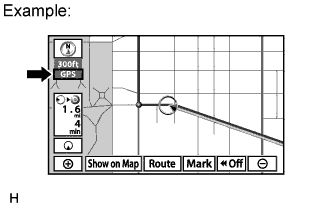

- OK:
- GPS mark is displayed.
|
|
||||

| OK | |
 |
| 2. CHECK VEHICLE SENSOR (OPERATION CHECK) |
Enter the "Vehicle Sensors" screen. Refer to Check GPS & Vehicle Sensors in Operation Check (Click here).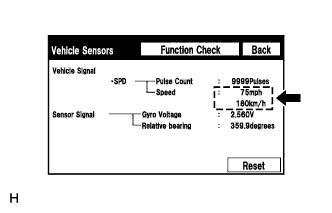
While driving the vehicle, compare the "Speed" indicator to the reading on the speedometer. Check that these readings are almost equal.
- OK:
- The readings are almost equal.
|
|
||||
| OK | |
|
| 3. CHECK VEHICLE SIGNAL (OPERATION CHECK) |
Enter the "Vehicle Signal Check Mode" screen. Refer to Check Vehicle Signal in Operation Check (Click here).
Check that the display changes between ON and OFF according to the shift lever operation.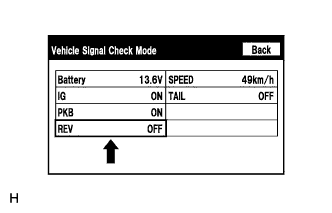
- OK:
Shift Lever Position
Display
Except R
OFF
R
ON
- HINT:
- The display is updated once per second. It is normal for the display to lag behind the actual switch operation.
|
|
||||
| OK | ||
 |
||
| ||