NAVIGATION / MULTI INFO DISPLAY NAVIGATION SYSTEM DETAILS MULTI-DISPLAY
FUNCTION
A wide viewing angle, high contrast 12.3-inch display is installed to the center of the instrument panel.
A Thin Film Transistor Liquid Crystal Display (TFT LCD) is used for the multi-display of the audio head unit. The multi-display shows the audio screen, Bluetooth hands-free screen, vehicle information screen, etc. and can be operated using touch operation, flick operation*, pinch in/pinch out* or drag operation*.
- HINT:
-
*: Flick operation or drag operation may not be possible on all screens.
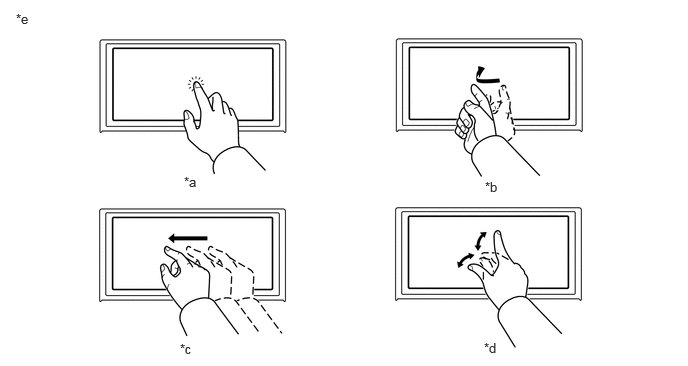
| *a | Touch Operation | *b | Flick Operation |
| *c | Drag Operation | *d | Pinch In/Pinch Out Operation |
| *e | The illustrations shown are examples only. The illustrations may differ from the actual audio head unit. | - | - |
The color setting of the map can be changed depending on the users preference.
The audio source can be switched on the audio source selection screen. The arrangement of the audio sources displayed on the audio source screen can be changed according to the frequency of use.
The home screen can display multiple information screens.
The screen mode can be switched between full screen mode and split screen display mode. Using the split screen display mode, different information can be displayed on main screen and side screen.
An area to display the status bar in which the clock, connection status of a Bluetooth device, etc. can be checked has been provided.
The user can check the current time, Bluetooth connection status, signal strength, remaining battery level of a cellular phone, etc. using the status bar display.
Fuel consumption is displayed.
- HINT:
-
Information displayed on the screen may slightly differ from the actual.
The fuel consumption for 1 trip is displayed.
The maximum fuel consumption and average fuel consumption is displayed, and the average fuel consumption information since the last reset until now is displayed on a graph.
If "Clear" is selected on the screen, the average fuel consumption information up to that time is reset, the average fuel consumption information up to that time is recorded, and a new recording is started. Furthermore, the average fuel consumption of up to 5 previous fuel consumption averages are displayed in a graph as history.
The displayed maximum fuel consumption will be updated when the average fuel consumption exceeds the displayed maximum fuel consumption.
Valet Mode Function (Models with Valet Mode Function)
In valet mode, the screen can be locked with a 4-digit password for when using valet parking to prevent personal information registered to the head unit, such as a home address or phone number, from being seen.