MY SETTINGS MY SETTINGS SYSTEM CONTROL MY SETTINGS CONTROL
FUNCTION OF MAIN COMPONENTS
| Component | Function |
|---|---|
|
*: Models with fingerprint authentication system |
|
| Main Body ECU (Multiplex Network Body ECU) |
·
Identifies the driver based on the identification ID sent from the certification ECU.
·
Sends to each on-board system the identified driver number. |
| Certification ECU (Smart Key ECU Assembly) | Certifies the electrical key and sends the identification ID (key ID) to the main body ECU based on the result of certification. |
| Combination Meter Assembly | Displays the name of the identified driver on the multi-information display when vehicle settings are recalled. |
| Engine Switch (Push Start Switch)* | Identifies the driver using the fingerprint sensor and sends an identification ID (fingerprint ID) to the main body ECU via the certification ECU. |
FUNCTION
The driver is identified based on the identification ID obtained from the driver identification device*, and then the vehicle settings are recalled all at once for the driver that was identified.
- HINT:
-
*: These are authentication devices used to identify the driver such as electrical keys and fingerprint authentication.
The name of the identified driver is displayed on the multi-information display when vehicle settings are recalled.
The system operates in guest mode if the driver has not been registered or could not be identified.
The customization function can be used to turn the system off if the My Settings System will not be used.
A total of 3 regular drivers can be registered.
The customization function can be used to change settings as desired.
- HINT:
-
·
Driver identification device assignment is not yet registered to a driver when the vehicle is first delivered. The system will operate in guest mode until registration is performed.
·Driver identification results are cleared and the system switches automatically to guest mode if an open driver door is closed or the door is locked from outside the vehicle via door lock operation after the ignition switch is turned off.
·If the driver is manually changed, the results of doing so are retained and then the vehicle switches automatically to guest mode if an open driver door is closed or the door is locked from outside the vehicle via door lock operation after the ignition switch is turned off.
·The system starts from the state set by the previous driver when switching to guest mode. The state set by a registered driver will not be affected even if settings are changed in guest mode.
·If the My Settings System is off, memory recall will operate if memory recall has been registered. For details, refer to the SEAT section.
OPERATION
My Settings System Control
The identification ID of the driver identification device must be assigned and registered in order to identify that driver.* Multiple identification IDs can be assigned to a single driver.
- HINT:
-
*: Refer to the owner's manual for information on how to assign and register information.
The main body ECU identifies the driver when they enter the vehicle based on identification ID information authenticated by the driver identification device, and then transmits the applicable driver number to each on-board device.
The on-board devices recall the stored settings based on the user number that was transmitted.
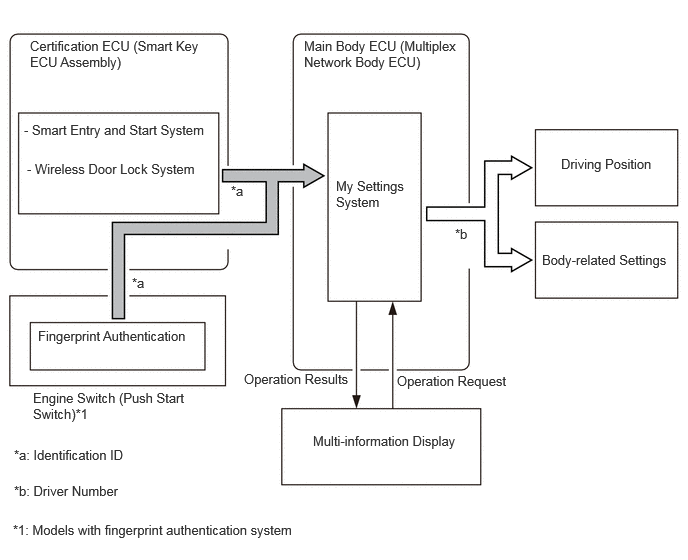
Driver Identification Devices
These are authentication devices capable of being used to identify the driver. Multiple devices are supported, such as electrical keys and fingerprint authentication.
The key ID of an electrical key or the fingerprint authentication ID for fingerprint authentication is obtained by the main body ECU as the identification ID used to identify the driver.
Electrical Key
The driver is identified based on the key ID of the electrical key.
- HINT:
-
·
Up to 7 electrical keys can be assigned and registered to a single driver.
·An electrical key cannot be assigned and registered to the guest driver.
·A single person can be assigned and registered to a single electrical key.
·Electrical keys must be assigned and registered one at a time when assigning and registering them on the multi-information display.
·Electrical keys that have already been assigned to other drivers in the vehicle can be assigned and registered to another driver .
·Deleting the assignment of an electrical key will also delete all other electrical key assignments that have been registered. (Electrical key assignments and registrations cannot be individually deleted.)
Drivers are identified at various times. Driver identification priority is as follows.
| Priority | Description |
|---|---|
| 1 | The first electrical key detected when the driver door is opened |
| 2 | The electrical key detected by vehicle exterior certification for the driver door |
| 3 | The electrical key detected by vehicle interior advance certification |
| 4 | The electrical key used to unlock the door |
- NOTICE:
-
The system may not correctly identify the driver if detection conditions have not been established for the electrical key.
- HINT:
-
The highest priority is "1" with each subsequent level decreasing in priority.
Fingerprint Authentication (Models with Fingerprint Authentication System)
Fingerprint authentication is performed using a push switch with fingerprint authentication functionality, and then the driver is identified based on the fingerprint authentication ID.
- HINT:
-
·
W hen performing the assignment and registration on the multi-information display, up to 2 fingerprints can be assigned and registered for a single driver, and up to 4 fingerprints can be assigned and registered for the guest driver.
Manual Switching
The multi-information display can be used to manually switch to a driver that has already been registered. This is useful for cases where the wrong driver is identified or a different driver takes over while driving.
If the driver is manually switched, the results of doing so will take priority even if the driver is identified using a device of some kind.
Driver Identification Device Priority
The results of the most reliable driver identification device will be prioritized if 2 or more types of devices are detected.
| Priority | Description |
|---|---|
| 1 | Manual Switching |
| 2 | Fingerprint Authentication (Models with Fingerprint Authentication System) |
| 3 | Electrical Key |
- HINT:
-
The highest priority is "1" with each subsequent level decreasing in priority.
Application of Driver Identification Results
Driver identification results are applied or not applied based on the situation, as automatically applying vehicle settings immediately could seem abnormal to the driver.
| Situation | Description |
|---|---|
|
*: Models with fingerprint authentication system |
|
| Prior to beginning to enter vehicle when parked | Driver identification results are applied immediately to the vehicle settings. However, the driving position is not applied. |
| Driver door opened after unlocking door | The driving position associated with the driver identification results is recalled. |
| Beginning to enter vehicle but prior to turning ignition switch to ON | If the driver is identified via fingerprint authentication, results will be applied immediately to vehicle settings.* |
| Ignition switch turned to ON or driver seat buckle switch turned on | If the driver identification results are updated, the driving position associated with the updated driver identification results will be recalled. |
| Ignition switch turned to ON but prior to driving | If the driver identification results are updated, they are not immediately applied to the vehicle settings. Instead, the multi-information display indicates that a new driver was detected, and then the results are applied immediately to the vehicle settings once the driver gives approval. |
| Driving | Driver identification results are not updated. |
Vehicle Settings that can be Registered
The following vehicle settings can be registered.
| Category | System/Function |
|---|---|
| Driving Position | Driver seat position |
| Mirror surface angle of outer mirror | |
| Steering position | |
| Vehicle Settings that can be Set on Multi Display | Door control |
| Air conditioning | |
| Light/Illumination | |
| Vehicle entry settings | |
| Suggestion Services | |
| Display-related | Multi-information Display |
| Headup Display |
- HINT:
-
Some setting items may not be able to be registered even on supported systems and functions.