THEFT DETERRENT / KEYLESS ENTRY ENTRY AND START SYSTEM CONTROL ENTRY AND START CONTROL
FUNCTION OF MAIN COMPONENTS
The main components for the entry function have the following functions:
| Component | Function | |
|---|---|---|
|
*1: Models with power back door system *2: Models with panic alarm function *3: Models with rear door entry function *4: Models with hands free power back door *5: Models without power back door system *6: Models with answer back buzzer function *7: Models with multimedia system (for 12.3 inch display) *8: Models with multimedia system (for 7 inch / 9 inch display) |
||
| Electrical Key (Electrical Key Transmitter Sub-assembly) |
·
Receives the signals from the antennas and returns the ID code to the door control receiver.
·
Outputs information such as the key ID and vehicle ID when request signals that are output by the indoor electrical key antennas, door electrical key antennas and outside electrical key antenna are received.
·
Outputs a request signal when the lock button, unlock button, power back door button*1 or panic button*2 on the electrical key is pushed.
·
Has an integrated mechanical key that can be used to unlock the doors when the key battery is weak. |
|
| Door Control Receiver | Receives the ID code from the electrical key in the actuation area and transmits it to the certification ECU. | |
| No. 1 Indoor Electrical Key Antenna Assembly (Front Floor) | Receives a request signal from the certification ECU and forms an actuation area in the vehicle. | |
| No. 3 Indoor Electrical Key Antenna Assembly (Rear Floor) | ||
| No. 3 Indoor Electrical Key Antenna Assembly (Inside Luggage Compartment) | ||
| Electrical Key Antenna (Outside Back Door) | Receives a request signal from the certification ECU and forms an actuation area around the back door. | |
| Front Door Outside Handle Assembly LH | Unlock Sensor | Detects user entry unlock operations and transmits the door unlock request signal to the certification ECU. |
| Lock Sensor | Detects user entry lock operations and transmits the door lock request signal to the certification ECU. | |
| Door Electrical Key Antenna | Receives the request signal from the certification ECU and forms an actuation area around the front door LH. | |
| Front Door Outside Handle Assembly RH | Unlock Sensor | Detects user entry unlock operations and transmits the door unlock request signal to the certification ECU. |
| Lock Sensor | Detects user entry lock operations and transmits the door lock request signal to the certification ECU. | |
| Door Electrical Key Antenna | Receives the request signal from the certification ECU and forms an actuation area around the front door RH. | |
| Rear Door Outside Handle Assembly LH*3 | Unlock Sensor | Detects user entry unlock operations and transmits the door unlock request signal to the certification ECU. |
| Lock Sensor | Detects user entry lock operations and transmits the door lock request signal to the certification ECU. | |
| Door Electrical Key Antenna | Receives the request signal from the certification ECU and forms an actuation area around the rear door LH. | |
| Rear Door Outside Handle Assembly RH*3 | Unlock Sensor | Detects user entry unlock operations and transmits the door unlock request signal to the certification ECU. |
| Lock Sensor | Detects user entry lock operations and transmits the door lock request signal to the certification ECU. | |
| Door Electrical Key Antenna | Receives the request signal from the certification ECU and forms an actuation area around the rear door LH. | |
| License Plate Light Assembly with Back Door Opener Switch | Back Door Opener Switch | Transmits a back door open request signal to the certification ECU. |
| Back Door Lock Switch | Transmits a door lock request signal to the certification ECU. | |
| Kick Door Control Sensor Assembly*4 | Detects touchless kick actuation operations and outputs signals to the power back door ECU. | |
| Power Distribution Box Assembly | D DOOR UNLOCK Relay | Inputs driver door unlock request signals from the main body ECU and operates the driver door lock motor. |
| ALL DOOR UNLOCK Relay | Inputs passenger door unlock request signals from the main body ECU and operates the door lock motors at the front passenger seat and rear seats. | |
| ALL DOOR LOCK Relay | Inputs door lock request signals from the main body ECU and operates the door lock motor of all doors. | |
| DOOR BACK Relay*5 | Inputs back door open request signals from the main body ECU and operates the back door lock motor. | |
| Front Door Lock with Motor Assembly (for Driver Door)
·
Door Lock Motor
·
Door Lock Position Switch
·
Door Lock Control Switch |
·
Operates the built-in door lock motor in the forward or reverse direction under the control of the main body ECU to lock or unlock the driver door.
·
Uses the built-in door lock position switch to detect whether the doors are locked or unlocked and outputs the result to the main body ECU.
·
Detects the condition of the built-in door lock control switch and outputs mechanical key lock/unlock request signals to the main body ECU. |
|
| Front Door Lock with Motor Assembly (for Front Passenger Door)
·
Door Lock Motor
·
Door Lock Position Switch |
·
Operates the built-in door lock motor in the forward or reverse direction under the control of the main body ECU to lock or unlock the front passenger door.
·
Uses the built-in door lock position switch to detect whether the doors are locked or unlocked and outputs the result to the main body ECU. |
|
| Rear Door Lock with Motor Assembly LH
·
Door Lock Motor
·
Door Lock Position Switch |
·
Operates the built-in door lock motor in the forward or reverse direction under the control of the main body ECU to lock or unlock the rear door LH.
·
Uses the built-in door lock position switch to detect whether the rear door LH is locked or unlocked and outputs the result to the main body ECU. |
|
| Rear Door Lock with Motor Assembly RH
·
Door Lock Motor
·
Door Lock Position Switch |
·
Operates the built-in door lock motor in the forward or reverse direction under the control of the main body ECU to lock or unlock the rear door RH.
·
Uses the built-in door lock position switch to detect whether the rear door RH is locked or unlocked and outputs the result to the main body ECU. |
|
| Back Door Lock with Courtesy Light Switch Assembly*5
·
Back Door Lock Motor
·
Courtesy Switch |
·
Drives the motor in response to signals from the main body ECU and releases the back door latch.
·
Detects whether the back door is open or closed and sends this information to the main body ECU. |
|
| Back Door Lock with Courtesy Light Switch Assembly*1
·
Back Door Lock Motor
·
Sector Switch
·
Pawl Switch
·
Latch Switch
·
Courtesy Switch |
·
Drives the motor in response to signals from the power back door ECU and releases the back door latch.
·
Detects whether the back door is open or closed and sends this information to the main body ECU and power back door ECU. |
|
| Front Door Courtesy Light Switch Assembly (LH) | Outputs open/close signals for the front door LH to the main body ECU. | |
| Front Door Courtesy Light Switch Assembly (RH) | Outputs open/close signals for the front door RH to the main body ECU. | |
| Rear Door Courtesy Light Switch Assembly (LH) | Outputs open/close signals for the rear door LH to the main body ECU. | |
| Rear Door Courtesy Light Switch Assembly (RH) | Outputs open/close signals for the rear door RH to the main body ECU. | |
| Wireless Door Lock Buzzer |
·
Sounds as an answer back for entry lock/unlock and wireless lock/unlock to inform the driver.*6
·
Sounds to inform the driver of malfunctions in the entry and start system. |
|
| Certification ECU (Smart Key ECU Assembly) |
·
Controls the entry and start system in accordance with the signals received from the switches and each ECU.
·
Judges and certifies the electrical key.
·
Controls the antennas and forms detection areas.
·
Transmits the door lock/unlock request signals during the entry function.
·
Sends wireless door lock control signals that are input from the door control receiver to the main body ECU.
·
Sends warning request signals to the main body ECU or combination meter assembly when warning conditions are met. |
|
| Main Body ECU (Multiplex Network Body ECU) |
·
Receives the request signal from the certification ECU and actuates the door lock motors to unlock or lock all the doors.
·
Transmits the condition of each door to the certification ECU.
·
Checks whether all door lock/unlock operations are complete, sends hazard warning light operation signals to the combination meter assembly, outputs sounding request signals to the wireless door lock buzzer*6 and performs answer back operations.
·
Receives warning request signals from the certification ECU and outputs sounding request signals to the wireless door lock buzzer when warning conditions are met.
·
Sends power back door open signals to the power back door ECU.*1
·
Receives back door open signals from ECUs and switches and outputs unlock signals to the back door lock motor.*5 |
|
| Power Back Door ECU (Multiplex Network Door ECU)*1 | Controls the power back door system in accordance with signals received from the switches, sensors and ECUs. | |
| ECM | Sends shift position signals and brake pedal operation signals to the main body ECU. | |
| Brake Actuator Assembly
·
No. 2 Skid Control ECU |
Sends vehicle speed signals to the main body ECU. | |
| Radio Receiver Assembly*7 | Receives function customization information according to the settings screen of the multi-display assembly from the integration control assembly, and sends this information to the main body ECU. | |
| Integration Control Assembly*7 | Sends function customization information according to the settings screen of the multi-display assembly to the radio and display receiver assembly. | |
| Multi-display Assembly*7 | Displays the settings screen. | |
| Radio and Display Receiver Assembly*8 |
·
Displays the settings screen.
·
Sends customization information to the main body ECU. |
|
| Combination Meter Assembly |
·
Displays a message on the multi-information display when an entry unlock mode condition or system malfunction occurs.
·
Sounds the buzzer to inform the driver of malfunctions in the entry and start system.
·
Flashes the hazard warning lights when an answer back operation is performed.
·
Sends vehicle speed signals to the certification ECU. |
|
| Central Gateway ECU (Network Gateway ECU) | Relays the signal between the CAN communication lines. | |
| DLC3 |
·
The Global TechStream (GTS) can be connected to read the Diagnostic Trouble Codes (DTCs) of malfunctions.
·
The Global TechStream (GTS) can be connected to change settings as desired by the user. |
|
The main components for the start function have the following functions:
| Component | Function |
|---|---|
|
*1: Models with fingerprint authentication system *2: Models with multimedia system (for 12.3 inch display) *3: Models with multimedia system (for 7 inch / 9 inch display) |
|
| Electrical Key (Electrical Key Transmitter Sub-assembly) |
·
Receives the signals from the antennas and returns the ID code to the door control receiver.
·
Outputs information such as the key ID and vehicle ID when request signals that are output by the indoor electrical key antennas, door electrical key antennas and outside electrical key antenna are received.
·
Outputs information such as the key ID and vehicle ID when the radio wave signal output by the transponder key amplifier in the certification ECU is received. |
| Door Control Receiver | Receives the ID code from the electrical key in the actuation area and transmits it to the certification ECU. |
| No. 1 Indoor Electrical Key Antenna Assembly (Front Floor) | Receives a request signal from the certification ECU and forms an actuation area in the vehicle. |
| No. 3 Indoor Electrical Key Antenna Assembly (Rear Floor) | |
| No. 3 Indoor Electrical Key Antenna Assembly (Inside Luggage Compartment) | |
| Engine Switch (Push Start Switch)
·
Transponder Key Amplifier |
·
Transmits the engine switch signal to the certification ECU.
·
Certifies the fingerprint of the finger that touches the fingerprint sensor against the preregistered fingerprint information. *1
·
Outputs the fingerprint authentication information to the certification ECU. *1
·
Notifies of the fingerprint authentication result and determines abnormalities in the fingerprint sensor.*1 |
| Stop Light Switch Assembly | Outputs the state of the brake pedal to the certification ECU. |
| Certification ECU (Smart Key ECU Assembly) |
·
Controls the entry and start system in accordance with the signals received from the switches and each ECU.
·
Controls the start function in accordance with the signals received from the switches and each ECU.
·
Switches the power source ("engine switch") among 4 modes (off, on (ACC), on (IG), start) in accordance with the shift position and the brake pedal signal.
·
Certifies the ID code received from the door control receiver and transmits the certification results to the ID code box and steering lock ECU.
·
Judges and certifies the electrical key.
·
Controls the antennas and forms detection areas.
·
Transmits the steering wheel lock/unlock signals.
·
Transmits the immobiliser set/unset request signals.
·
Records the ID codes between the certification ECU, ID code box and steering lock ECU.
·
Controls the security indicator light operation, power source state display (ACCESSORY and IGNITION ON) and key certification indicator display.
·
Sends warning request signals to the main body ECU or combination meter assembly when warning conditions are met.
·
Contains a built-in transponder key amplifier to start the engine when the electrical key does not operate normally due to key battery depletion or electrical wave interference, or when fingerprint authentication cannot produce a match due to finger injury*1 , transfer of the electrical key, etc.
·
Outputs the fingerprint authentication information to the certification ECU. *1
·
Determines the fingerprint authentication result and abnormalities in the fingerprint sensor to display on the meter.*1 |
| ECM |
·
Receives engine start permission signals from the certification ECU and starts the engine.
·
Sends shift position signals and brake pedal operation signals to the main body ECU. |
| Steering Lock Actuator with ECU Assembly
·
Steering Lock ECU |
Receives steering wheel unlock/lock request signals from the certification ECU, and activates the steering lock motor. |
| Shift Lock Control Unit Assembly
·
Shift Control ECU |
Sends shift position P signals to the certification ECU. |
| ID Code Box (Immobiliser Code ECU) | Receives the steering unlock or immobiliser unset request signals from the certification ECU, certifies them and transmits each unset signal to the steering lock ECU or ECM. |
| Combination Meter Assembly |
·
Displays a message on the multi-information display when a power source state or system malfunction occurs.
·
Sounds the buzzer to inform the driver of malfunctions in the entry and start system.
·
Blinks the security indicator light to inform the user that the immobiliser system is set.
·
Sends vehicle speed signals to the ECM. |
| Radio Receiver Assembly*2 | Receives function customization information according to the settings screen of the multi-display assembly from the integration control assembly, and sends this information to the main body ECU. |
| Integration Control Assembly*2 | Sends function customization information according to the settings screen of the multi-display assembly to the radio and display receiver assembly. |
| Multi-display Assembly*2 | Displays the settings screen. |
| Radio and Display Receiver Assembly*3 |
·
Displays the settings screen.
·
Sends customization information to the main body ECU. |
| Brake Actuator Assembly
·
No. 2 Skid Control ECU |
Sends vehicle speed signals to the certification ECU. |
| Central Gateway ECU (Network Gateway ECU) | Relays the signal between the CAN communication lines. |
| DLC3 | The Global TechStream (GTS) can be connected to read the Diagnostic Trouble Codes (DTCs) of malfunctions. |
OPERATION
The special functions of the entry and start system only work when the electrical key is in the actuation area formed by the antennas.
The indoor electrical key antennas form the actuation area of the start function.
The door electrical key antennas and the electrical key antenna form the actuation area of the entry function.
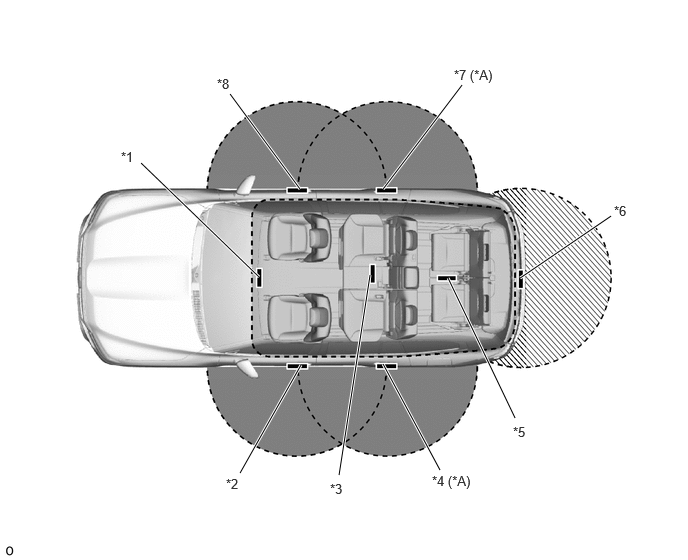
| *A | Models with Rear Door Entry Function | - | - |
| *1 | No. 1 Indoor Electrical Key Antenna Assembly (Front Floor) | *2 | Front Door Outside Handle Assembly LH
·
Door Electrical Key Antenna |
| *3 | No. 1 Indoor Electrical Key Antenna Assembly (Rear Floor) | *4 | Rear Door Outside Handle Assembly LH
·
Door Electrical Key Antenna |
| *5 | No. 3 Indoor Electrical Key Antenna Assembly (Inside Luggage Compartment) | *6 | Electrical Key Antenna (Outside Back Door) |
| *7 | Rear Door Outside Handle Assembly RH
·
Door Electrical Key Antenna |
*8 | Front Door Outside Handle Assembly RH
·
Door Electrical Key Antenna |

|
Exterior Actuation Area |

|
Interior Actuation Area |

|
Outside Back Door Actuation Area | - | - |
| Actuation Area | Details |
|---|---|
|
*1: Models with rear door entry function *2: Models with hands free power back door |
|
| Interior | The interior actuation area of the indoor electrical key antennas (front, rear, inside luggage compartment) is formed when the driver door is opened or closed, while the brake pedal is depressed, when the engine switch is pushed, when a warning is activated, or when the lock sensor or lock switch is on. |
| Exterior | The exterior actuation area formed by the front and rear*1 door electrical key antennas and the outside electrical key antenna is approximately 0.7 m to 1.0 m (2.3 ft. to 3.3 ft.) from the door outside handle or the center of the rear bumper. |
| Around Front and Rear*1 Doors | The exterior actuation area of the door electrical key antennas is formed by transmitting a request signal every 0.25 seconds while the power source is off and each door is locked. In this way, the presence of an electrical key is detected. When locking the door using the lock sensor on the door outside handle, the actuation area is formed when the lock sensor is touched. |
| Around Back Door | The exterior actuation area of the outside electrical key antenna is formed when the lock switch or back door opener switch is on or performing the touchless kick actuation operation*2. |
FUNCTION
The entry and start system consists of the following functions:
| Function | Outline |
|---|---|
| Wireless Door Lock Control | This function is a convenient system for locking and unlocking all the doors at a distance. The operation of this function in the entry and start system is the same as that of the wireless door lock control system. However, the receiver in the certification ECU uses a door control receiver to perform the control. |
| Entry Illumination | When an electrical key enters the exterior actuation area of the door electrical key antenna or outside electrical key antenna, each interior light and engine switch illumination light will illuminate. |
| Entry Unlock | The doors are unlocked by grabbing the door outside handle or pressing the back door opener switch while carrying the electrical key.
·
The driver door outside handle unlocks driver door. (Driver Door Unlock Mode)
·
The driver door outside handle unlocks all doors. (All Door Unlock Mode)
·
The front passenger door outside handle unlocks all doors.
·
The rear door outside handles unlock all doors.*1
·
The back door opener switch unlocks all doors. |
| Entry Lock | All doors are locked by touching the lock sensor of the driver or front passenger door outside handle or by pressing the lock switch of the back door while carrying the electrical key. |
| Reserve Lock Function*2 | When a door other than the back door is closed and its door lock is operated using the lock sensor of door outside handle within the exterior actuation area during auto close operation, a door lock operation will be performed. The door lock operation completes when the back door close operation ends. |
| Hands Free Power Back Door*3 | The back door is opened or closed by performing the touchless kick actuation operation while carrying the electrical key. |
| Answer Back | The wireless door lock buzzer sounds*4 and the hazard warning lights blink once while locking and twice while unlocking when the doors are being locked or unlocked. Also, the answer back function operates when the doors are locked by the automatic relock function. |
| Automatic Relock | If none of the doors are opened within 30 seconds after being unlocked using the entry unlock operation, all the doors will be locked again automatically. |
| Engine Switch Lettering Illumination Indication | Indicates the power source change condition and that the engine start conditions are met by flashing and illuminating the engine switch lettering. |
| Door Open Operation Prohibition | Prohibits the use of entry lock operations to lock the door when any door is ajar or fully open. |
| Prevention of Key Confinement | Prevents the vehicle from being locked with an electrical key left inside it. This function operates in 2 different situations: when the lock switch on the door control switch is used (keyless lock) or when an entry lock operation is performed to lock the vehicle. (Does not operate when the electrical key is in the sleep state.) |
| Start | Changes the power source or starts the engine. |
| Immobiliser | Only permits electrical key registered with the vehicle to start the engine, preventing unauthorized starting of the system. |
| Fingerprint Authentication System*5, *6 | A function that prevents unauthorized engine starting by permitting the engine to start only when the immobilizer is unset and the preregistered fingerprint information is matched. |
| Warning | The entry and start system causes the certification ECU to sound the buzzer in the combination meter assembly and uses the multi-information display in order to alert the driver. |
| Battery Saving |
·
Suppresses battery level drops when the vehicle is not used for a long period of time by extending the interval between or stopping each periodic transmission of the request signal and restricting the entry function.
·
Puts the electrical key in the sleep condition to suppress key battery level drops.*7
·
When the unlock button is pressed 2 times while pressing the lock button of the electrical key, the electrical key stops waiting on standby to receive electrical waves, suppressing key battery level drops. |
| Entry Unlock Mode Switching | Allows switching between 2 modes that can be operated with the entry unlock function.
·
Driver Door Unlock Mode
·
All Door Unlock Mode |
| Key Cancel | The following key functions can be canceled by following certain procedures:
·
Entry unlock/lock
·
Hands free power back door*3
·
Prevention of key confinement
·
Start
·
Warning |
| Key Code Registration | A total of 7 keys can be registered. Key registration enables the registering (writing and storing) of transmitter recognition codes in the EEPROM that is contained in the certification ECU. |
| Customization | Allows the user to change settings as desired. Refer to the Repair Manual for details. |
- HINT:
-
*1: Models with rear door entry function
-
*2: Models with power back door system
-
*3: Models with hands free power back door
-
*4:Models with answer back buzzer function
-
*5:Models with fingerprint authentication system
-
*6:This function is disabled by default. When fingerprint information is registered, the function is enabled automatically.
-
*7: If the electrical key is not operated for a certain amount of time, it is temporarily stopped to reduce power consumption. In this case, verification required for power source mode change, etc. cannot be performed. The electrical key will automatically return from the lower power consumption state if its position is moved while being held.
SYSTEM CONTROL
Entry Unlock Function
When the electrical key is in the actuation area formed by the door electrical key antenna, holding the door outside handle of the driver seat and touching the built-in touch sensor unlocks the driver door only. Continuing to touch the built-in touch sensor for 2 seconds or more unlocks all the doors. And holding any of the front passenger or rear* door outside handles and touching the built-in touch sensor unlocks all the doors. (Driver door unlock mode)
*: Models with rear door entry function
When the electrical key is in the actuation area formed by the door electrical key antenna, holding any of the door outside handles and touching the built-in touch sensor unlocks all the doors. (All door unlock mode)
After the doors have been unlocked, and the hazard lights flash twice at the same time.
- NOTICE:
-
·
When the user quickly performs an unlock operation or abruptly enters the exterior actuation area to perform an unlock operation and is unable to unlock the doors, an unlock operation needs to be performed again. When an unlock operation is performed while wearing gloves, the door may not unlock.
·If another electrical key is in the exterior actuation area, the time it takes to unlock the door(s) after the unlock operation may be slightly longer than usual.
·After the doors are locked, the doors cannot be unlocked for approximately 3 seconds.
·When a wireless door lock, manual door lock or key-linked door lock operation is performed with an electrical key in the interior actuation area or near the vehicle, the entry unlock function may not operate. In this case, it is possible to unlock the doors by performing a wireless door unlock operation.
- HINT:
-
If the doors are locked by wireless door lock operation, the entry and start system or key linked power door lock operation, it may not be possible to unlock the doors using the entry and start system. In this situation, use the wireless door lock function of the electrical key to unlock the doors.
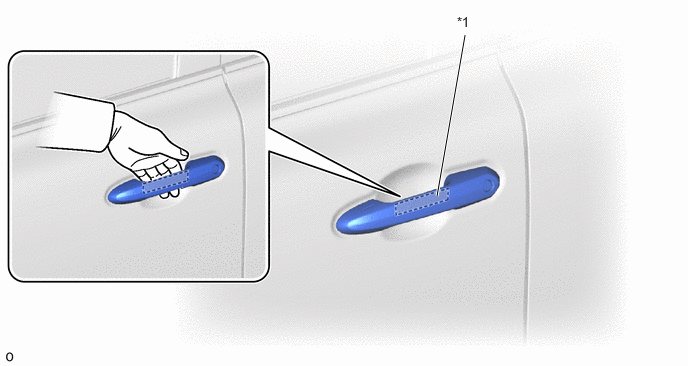
| *1 | Unlock Sensor | - | - |
When the electrical key is in the actuation area surrounding the back door, pressing the back door opener switch will unlock all the doors.
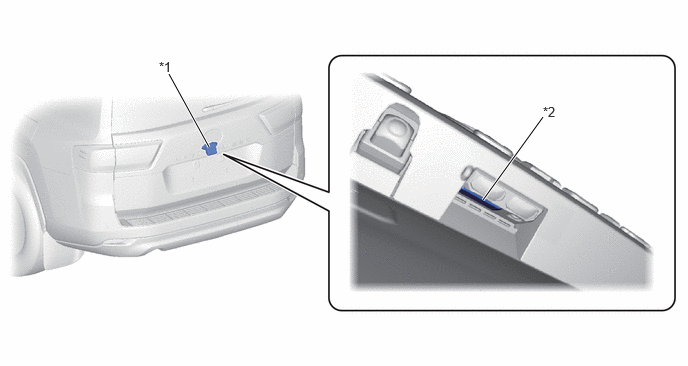
| *1 | License Plate Light Assembly with Back Door Opener Switch | *2 | Back Door Opener Switch |
Entry Lock Function
When the electrical key is in any of the exterior actuation areas, all the doors are locked by touching the lock sensor of the front or rear* door outside handle.
*: Models with rear door entry function
After the doors have been locked, and the hazard lights flash once at the same time.
If the doors do not lock when the lock sensor on the topside of a door outside handle is touched, touch the lock sensors on the top and bottom sides simultaneously by pinching the handle.
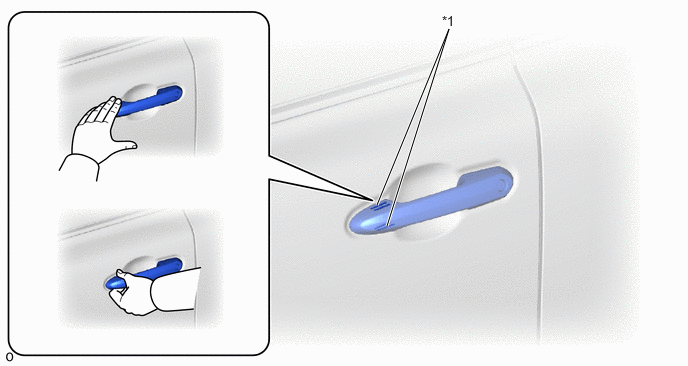
| *1 | Lock Sensor | - | - |
When the electrical key is in the actuation area surrounding the back door, pressing the lock switch of the back door will lock all the doors.
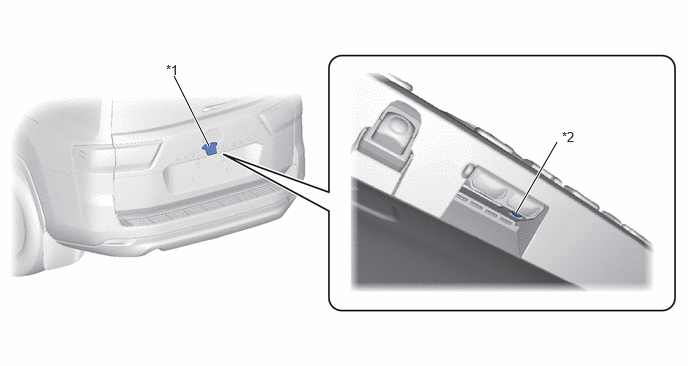
| *1 | License Plate Light Assembly with Back Door Opener Switch | *2 | Lock Switch |
Reserve Lock Function (Models with Power Back Door System)
When a door other than the power back door is closed and the door lock is operated by the lock sensor of the door outside handle within the exterior actuation area during back door auto close operation, a door lock operation will be performed. The door lock operation completes when the back door close operation ends.
Hands Free Power Back Door Function (Models with Hands Free Power Back Door)
When the electrical key is in the actuation area surrounding the back door, performing a touchless kick actuation operation towards the center of the rear bumper will open* or close the back door.
- HINT:
-
*: When the doors are locked, unlock the doors before performing the open operation.
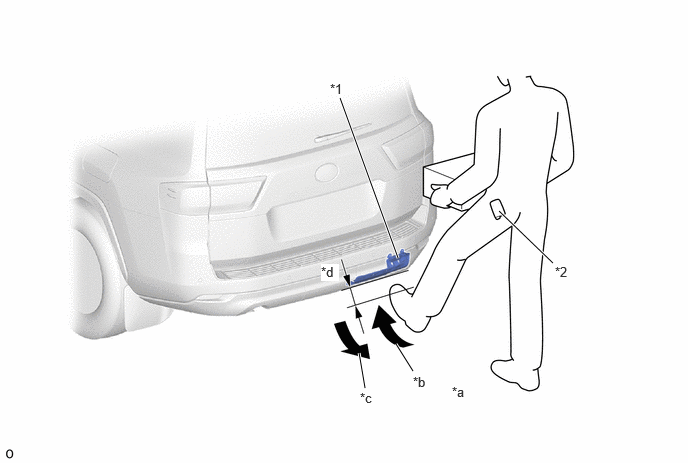
| *1 | Kick Door Control Sensor Assembly | *2 | Electrical Key (Electrical Key Transmitter Sub-assembly) |
| *a | The user carrying an electrical key stands around the center of the rear bumper while maintaining a certain distance (approximately equal to the length of the arm) from the rear bumper. | *b | The user waves a foot within approximately 100 mm (3.94 in.) from the surface of the rear bumper. |
| *c | The user moves the foot away from the surface of the rear bumper. | *d | Approximately 100 mm (3.94 in.) |
Start Function
The power source can be switched and the engine started by carrying the electrical key in the interior detection area, and pressing the engine switch in combination with operating the brake. *1
The power source can be switched and the engine started by carrying the electrical key in the interior detection area, performing the brake operation and fingerprint authentication operation (the meter buzzer sounds after matching), and then pressing the engine switch. *2
When the user carries the electrical key into the vehicle while the power source is off and then depresses the brake pedal while the shift lever is in P, the key certification indicator is displayed on the multi-information display in the combination meter assembly. When the engine switch is pressed while the key certification indicator is displayed, the engine starts.
When the engine switch is pressed while the shift lever is in P, the vehicle is stopped and the engine is running, the power source pattern transitions to power source off. When the engine switch is pressed while the shift lever is in a position other than P, the power source pattern transitions to on (IGR).
*1: Models without fingerprint authentication system
*2: Models with fingerprint authentication system
| Pattern | Brake Pedal | Shift Lever Position | Power Source Change Pattern |
|---|---|---|---|
| A | Depressed | P or N | When the engine switch is pushed once.
·
Off → On (after engine is started) |
| B | Not Depressed | P | Each time the engine switch is pushed.
·
Off → On (ACC) → On (IGP) → Off |
| C | N | Each time the engine switch is pushed.
·
Off → On (ACC) → On (IGP) → On (IGR)
·
On (IGR) → On (IGP) |
|
| D | Not Depressed | P | When the engine switch is pushed in the on (IG) condition.
·
On (IGP)/On (IGR) (engine is started or not started) → Off |
| E | Depressed | N | When the engine switch is pushed in the on (IG) condition.
·
On (IGP) (engine is started or not started) → On (IGR) |
| F | Not Depressed | Except P | When the engine switch is pushed in the on (IG) condition.
·
On (IGR) (engine is started or not started) → off |
| G | Not Depressed | Except P or N | Each time the engine switch is pushed.
·
Off → On (ACC) → On (IGP)
·
On (IGR) → On (IGP) |
| H | When the engine switch is pushed in the on (IG) condition.
·
On (IGP) (engine is started or not started) → On (IGR) |
||
| I | - | N | When the engine switch is pushed in the on (IG) condition.
·
On (engine is started or not started) → On (IGR) |
| J | Depressed | Except P or N | When the engine switch is pushed once.
·
Off → On (IGP)
·
On (ACC) (IGR) → On (IGP) |
| K | - | Except P or N | When the engine switch is pushed in the on (IG) condition.
·
On (engine is started or not started) → On (IGR) |
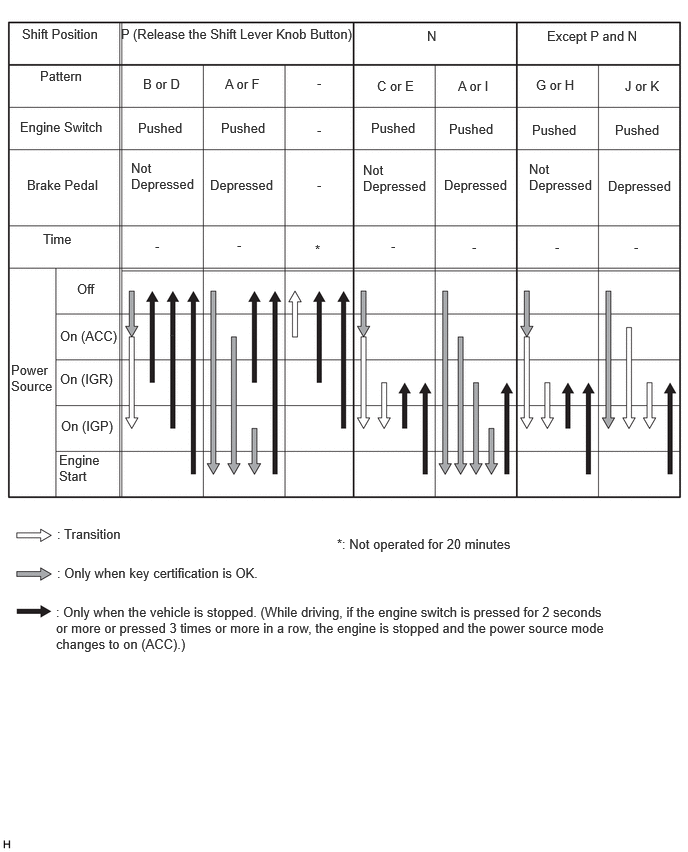
The power source transition is as follows when the battery level of the electrical key is low, the electrical key does not operate normally due to electrical wave interference, or when fingerprint authentication fails or the fingerprint sensor is abnormal*:
The driver uses the mechanical key to unlock the door and enters the vehicle while carrying the electrical key.
The driver touches the electrical key (the surface with the switch) against the front surface of the engine switch while depressing the brake pedal.
Within approximately 10 seconds after the buzzer sounds in the combination meter, the driver releases the brake pedal and presses the engine switch.
With each pressing of the engine switch, the power source mode changes as follows: off → on (ACC) → on (IG) → off.
*: Models with fingerprint authentication system
Engine start when the battery level of the electrical key is low, the electrical key does not operate normally due to electrical wave interference, or when fingerprint authentication fails or the fingerprint sensor is abnormal*:
The driver uses the mechanical key to unlock the door and enters the vehicle while carrying the electrical key.
The driver touches the electrical key (the surface with the switch) against the front surface of the engine switch while depressing the brake pedal with the shift position in P.
Within approximately 10 seconds after the buzzer sounds and the entry warning display illuminates, the driver presses the engine switch while depressing the brake pedal.
Pressing the engine switch starts the engine.
*: Models with fingerprint authentication system
- NOTICE:
-
·
Normally, the operation of the engine switch is disabled while the vehicle is being driven. However, in an emergency, by pushing the engine switch for approximately 2 seconds or more or pushing the engine switch 3 times or more in a row, the driver can stop the engine while the vehicle is in motion.
·If no signals are transmitted to the certification ECU due to malfunctions in the stop light switch assembly, the engine may not start when the engine switch is pushed with the brake pedal depressed. In such cases, performing the following procedure may enable the engine to start: 1) push the engine switch to turn the power source from off to on (ACC), and 2) push the engine switch again and hold it for 15 seconds or more.
·The above 2 operations must be applied only in emergency situations. Under normal conditions, the engine must not be stopped by pushing the engine switch while driving. Also, it should not be started without depressing the brake pedal, or when the shift lever is in any position other than P or N.
Engine Switch Lettering Illumination Indication Function
When the driver or passenger door is opened, the engine switch lettering illumination illuminates.
When the electrical key is carried in an interior actuation area and the brake pedal is depressed, the engine switch lettering illumination quickly flashes.
When the power source mode is on (ACC) or on (IG) (the engine is not started), the engine switch remains illuminated.
When the power source mode changes from on (ACC) or on (IG) (the engine is not started) to off, the power source illumination illuminates.
When the doors are locked with the power source mode off, the engine switch illumination turns off.
| Power Source Mode | Lettering Illumination Condition | Operating Condition |
|---|---|---|
| Off | Off | All doors are closed and locked |
| Approximately 40 seconds elapse after all doors are closed | ||
| Approximately 40 seconds elapse after power source mode changes from on (ACC) or on (IG)(the engine is not started) to off | ||
| 20 minutes elapse after driver door or passenger door is opened | ||
| Illuminates | Power source mode changes from on (ACC) or on (IG) (the engine is not started) to off | |
| Driver door or passenger door changes from open to closed | ||
| Driver door or passenger door changes from close to opened | ||
| Flashes | All of the following conditions are met:
·
Stop light switch is on
·
Shift position is in P
·
Key certification result is OK |
|
| On (ACC) or On (IG) (the engine is not started) | Illuminates | Power source mode is on (ACC) or on (IG) (the engine is not started) |
Fingerprint Authentication System Function (Models with Fingerprint Authentication System)
Fingerprint authentication is performed when the electrical key is carried (smart certification result is OK) and a finger whose fingerprint information has been registered is touched against the fingerprint sensor of the engine switch.
After fingerprint authentication succeeds and the buzzer sounds once, the engine starts when the engine switch is pressed within approximately 5 seconds while depressing the brake pedal. If too much time elapses before the engine switch is pressed, fingerprint authentication will become necessary again.
Certification of the fingerprint information read by the fingerprint sensor is performed within the engine switch. The authentication result is encrypted and then notification is sent to the certification ECU. After receiving the fingerprint authentication result, the certification ECU sends the engine start permission signal to the ECM and then immediately discards the fingerprint authentication result information within the certification ECU.
- NOTICE:
-
·
Some customers may not be able to register their fingerprints because they are too faint, or for other reasons. Such customers cannot use the fingerprint authentication system.
·People who cannot use the fingerprint authentication systems of other electronic devices are also unlikely to be able to use this system.
·Since the fingerprint authentication method varies according to the type of electronic device, the ability to use the system on another electronic device does not necessarily mean that this system can be used.
·The performance of the fingerprint authentication system varies according to the condition of the customer's finger. Conditions such as a dirty, wet or excessively dry finger may cause authentication failure even for customers who succeeded in registering their fingerprint information. In this case, the engine can be started by holding the electrical key over the engine switch.
·Customers whose fingerprint information has not been registered can start the engine by holding the electrical key over the engine switch.
·Fingerprint information for up to 10 fingers can be registered. (For example, 2 fingers each for 3 drivers, and 1 finger each for 4 other users)
·Registering fingerprints for multiple fingers enables a different finger to be used for operation in case of an emergency such as a sudden injury.
·2 or more fingerprints can also be registered according to the usage situation of the driver.
·The power source cannot be turned on (ACC) or on (IG) and the engine cannot be started just by successfully authenticating a fingerprint. Carrying the electrical key is necessary.
·The fingerprint authentication function can be canceled if the user does not wish to use the fingerprint authentication function for a long period of time.
- HINT:
-
·
The fingerprint authentication system does not require a fingerprint authentication result for turning the power source off (stopping the engine).
·If the fingerprint authentication result is a match at any time before the engine start operation, the fingerprint start permission is held until the power source is turned off.
·If the electrical key was held over the engine switch (transponder certification result is OK), the fingerprint start permission is held until the power source is turned off.
The fingerprint information is registered on the multi-information display in the combination meter assembly.
- NOTICE:
-
·
When touching the fingerprint sensor, place the first joint of the finger at the center of the sensor so that the finger contacts the entire sensor surface. (Authentication may not be possible if the sensor is touched using fingertip or side of the finger)
·Touch slowly. Touching too quickly or too strongly, or sliding the finger while touching may prevent correct recognition.
·When touching the fingerprint sensor repeatedly, leave some time between each touch (approximately 1 second). Stabilization time for the electrostatic capacitance is necessary. Repeating the operation too quickly causes authentication failure.
Warning
When any of the situations below occur, the entry and start system sounds the wireless door lock buzzer and a buzzer in the combination meter assembly and displays a message on the multi-information display in order to alert the driver.
| Situation | Condition |
|---|---|
|
*: Models with fingerprint authentication system |
|
| A | The engine is left running and the shift lever is in a position other than P when the driver gets out of the vehicle. |
| B | The engine is left running and the shift lever is in P when the driver gets out of the vehicle. |
| C | The engine is left running when a passenger gets out of the vehicle while holding the electrical key. |
| D | The electrical key is not within the actuation areas. |
| E | The vehicle is driven without an electrical key. |
| F | The electrical key is left in the vehicle. |
| G | A door is ajar. |
| H | The key reminder sounds. |
| I | The key battery is weak. |
| J | Steering lock does not release. |
| K | A malfunction has been detected in a vehicle speed signal, etc. |
| L | The engine cannot be started (system/driver error). |
| M | Immobiliser system certification confirmation occurs. |
| N | An electrical key has been registered to the vehicle. |
| O | Engine start operation guide on (ACC) |
| P | Engine start operation guide on (IG) |
| Q | The power source cannot be turned off (shift lever in any position except P and N). |
| R | The power source cannot be turned off (shift lever in P). |
| S | Auto power off operation occurs. |
| T | Engine emergency stop operation is performed. |
| U | The user performed an emergency engine stop while driving. |
| V | Engine switch is operated while driving. |
| W | Engine switch is operated while driving. |
| X | While the vehicle is stationary, the shift lever is moved to a position other than P or N with the power source on (IG) and the engine stopped. |
| Y | The vehicle starts to roll away with the power source on (IG) and the engine stopped. |
| Z* | Fingerprint authentication failed and the engine could not be started while the brake pedal was depressed. |
| AA* | Fingerprint authentication failed 3 times consecutively while the brake pedal was depressed. |
| AB* | An abnormality was detected in the fingerprint authentication sensor. |
| AC* | The customization setting of the fingerprint authentication system was changed from ON to OFF. |
| AD* | The fingerprint authentication result was a match. |
| AE | Accessory state |
| AF | Ignition on state |
Situation A
There are 2 patterns for situation A.
Pattern 1:
When the shift lever is in a position other than P, the power source is in a mode other than off and the driver opens the door and attempts to get out of the vehicle, the following control is performed:
|
*1: When the brake pedal is depressed or the seat belt is fastened *2: When the brake pedal is not depressed or the seat belt is not fastened |
|||
| Possible Effects without Warning | Sudden vehicle movement, vehicle theft, vehicle roll-away (vehicle creep, such as when N is selected) | ||
| Warning Active Condition | The warning is activated when all of the following conditions are met:
·
The power source is on (ACC) or on (IG).
·
The shift lever is in any position except P.
·
The driver door is opened.
·
The vehicle speed is not detected. |
||
| Warning Method | Combination Meter Assembly | Buzzer | Sounds continuously*1 or sounds intermittently*2 |
| Multi-information Display | The following warning message is displayed:
·
Shift into P before exiting vehicle |
||
| Advisory Display | - | ||
| Wireless Door Lock Buzzer | - | ||
| Warning Stop Condition | The warning is stopped when one of the following conditions is met:
·
The power source is turned off.
·
The shift lever is moved to P.
·
The driver door is closed.
·
The vehicle speed is above 5 km/h (3 mph). |
||
Pattern 2:
Under the situation of pattern 1, the driver closes the door and attempts to leave the vehicle while holding the electrical key. In this situation, the following control is performed:
| Possible Effects without Warning | Sudden vehicle movement, vehicle theft, vehicle roll-away | ||
| Warning Active Condition | The warning is activated when all of the following conditions are met:
·
The power source is on (ACC) or on (IG).
·
The shift lever is in any position except P.
·
The driver door is opened → closed.
·
The electrical key is not detected in the vehicle (interior key certification fails).
·
The vehicle speed is not detected. |
||
| Warning Method | Combination Meter Assembly | Buzzer | Sounds continuously |
| Multi-information Display | The following warning message is displayed:
·
Shift into P before exiting vehicle
·
Key Not Detected Check Key Location |
||
| Advisory Display | - | ||
| Wireless Door Lock Buzzer | Sounds continuously | ||
| Buzzer and Wireless Door Lock Buzzer Warning Stop Condition | The warning is stopped when one of the following conditions is met:
·
The power source is turned off.
·
The shift lever is moved to P.
·
The vehicle speed is above 5 km/h (3 mph).
·
The electrical key is detected in the vehicle (interior key certification result is OK). |
||
| "Shift into P before exiting vehicle" Message Warning Stop Condition | The warning is stopped when either of the following conditions is met:
·
The shift lever is moved to P.
·
The vehicle speed is above 5 km/h (3 mph). |
||
| "Key Not Detected Check Key Location" Message Warning Stop Condition | The warning is stopped when either of the following conditions is met:
·
The power source is turned off.
·
The electrical key is detected in the vehicle (interior key certification result is OK). |
||
Situation B
There are 3 patterns for situation B.
Pattern 1:
When the shift lever is in P and the power source is in a mode other than off (the steering remains unlocked), the driver door is opened and the driver attempts to leave the vehicle. In this situation, the following control is performed:
| Possible Effects without Warning | Vehicle theft | ||
| Warning Active Condition | Condition 1 The warning is activated when both of the following conditions are met:
·
The power source is on (ACC).
·
The driver door is open. Condition 2 The warning is activated when all of the following conditions are met for 1 second:
·
The power source is turned off.
·
The steering lock remains unlocked.
·
The driver door is open.
·
The vehicle speed is not detected. |
||
| Warning Method | Combination Meter Assembly | Buzzer | Sounds continuously at short and even intervals |
| Multi-information Display | - | ||
| Advisory Display | - | ||
| Wireless Door Lock Buzzer | - | ||
| Warning Stop Condition | The warning is stopped when one of the following conditions is met:
·
The power source is on (IG).
·
The driver door is closed.
·
The power source is turned off and the steering wheel lock control is performed. |
||
Pattern 2:
Under the situation of pattern 1, the driver opens and closes the driver door and attempts to leave the vehicle while holding the electrical key. In this situation, the following control is performed:
| Possible Effects without Warning | Vehicle theft | ||
| Warning Active Condition | The warning is activated when all of the following conditions are met:
·
The power source is on (ACC) or on (IG).
·
The shift lever is in P.
·
The driver door is opened → closed.
·
The electrical key is not detected in the vehicle (interior key certification fails).
·
The vehicle speed is not detected. |
||
| Warning Method | Combination Meter Assembly | Buzzer | Sounds once |
| Multi-information Display | The following warning message is displayed:
·
Key Not Detected Check Key Location |
||
| Advisory Display | - | ||
| Wireless Door Lock Buzzer | Sounds 3 times | ||
| Warning Stop Condition | The warning is stopped when either of the following conditions is met:
·
The power source is turned off.
·
The electrical key is detected in the vehicle (interior key certification result is OK). |
||
Pattern 3:
Under the situation of pattern 2, the driver touches the lock sensor on the door outside handle. In this situation, the following control is performed:
| Possible Effects without Warning | Vehicle theft | ||
| Warning Active Condition | The warning is activated when all of the following conditions are met:
·
The power source is on (ACC) or on (IG).
·
The shift lever is in P.
·
The electrical key is not detected in the vehicle (interior key certification fails), but detected in an outside detection area (exterior key certification result is OK).
·
The lock sensor on the door outside handle is on (touched).
·
The vehicle speed is not detected. |
||
| Warning Method | Combination Meter Assembly | Buzzer | Sounds once |
| Multi-information Display | The following warning message is displayed:
·
Turn Power Off
·
Key Not Detected Check Key Location |
||
| Advisory Display | - | ||
| Wireless Door Lock Buzzer | Sounds continuously | ||
| Wireless Door Lock Buzzer Warning Stop Condition | The warning is stopped when one of the following conditions is met:
·
5 seconds elapse.
·
The power source is turned off.
·
The shift lever is moved to any position except P.
·
The vehicle speed is above 5 km/h (3 mph).
·
The electrical key is detected in the vehicle (interior key certification result is OK).
·
Any door is opened or closed. |
||
| "Turn power off" Message Warning Stop Condition | The warning is stopped when one of the following conditions is met:
·
60 seconds elapse.
·
The power source is turned off.
·
The shift lever is moved to any position except P.
·
The vehicle speed is above 5 km/h (3 mph). |
||
| "Key Not Detected Check Key Location" Message Warning Stop Condition | The warning is stopped when either of the following conditions is met:
·
The power source is turned off.
·
The electrical key is detected in the vehicle (interior key certification result is OK). |
||
Situation C
When the engine is left running, a passenger leaves the vehicle while holding the electrical key. In this situation, the following control is performed:
| Possible Effects without Warning | Engine cannot be restarted. | ||
| Warning Active Condition | The warning is activated when all of the following conditions are met:
·
The power source is on (ACC) or on (IG).
·
A door other than the driver door is opened → closed.
·
The electrical key is not detected in the vehicle (interior key certification fails).
·
The vehicle speed is not detected. |
||
| Warning Method | Combination Meter Assembly | Buzzer | Sounds once |
| Multi-information Display | The following warning message is displayed:
·
Key Not Detected Check Key Location |
||
| Advisory Display | - | ||
| Wireless Door Lock Buzzer | Sounds 3 times | ||
| Warning Stop Condition | The warning is stopped when either of the following conditions is met:
·
The power source is turned off.
·
The electrical key is detected in the vehicle (interior key certification result is OK). |
||
Situation D
When the electrical key is not in the vehicle, the driver attempts to turn the power source on (IG) (emergency key operation* is included). In this situation, the following control is performed:
|
*: Emergency key operation is an operation that changes the power source by touching the engine switch with the electrical key. |
|||
| Possible Effects without Warning | User becomes confused | ||
| Warning Active Condition | The warning is activated when all of the following conditions are met:
·
The immobiliser system is set.
·
The electrical key is not in the vehicle (interior key certification fails and transponder certification fails).
·
No records of unlock operation using a mechanical key and key certification failure when the power source was turned on (IG). |
||
| Warning Method | Combination Meter Assembly | Buzzer | Sounds once |
| Multi-information Display | The following warning message is displayed:
·
Key Not Detected Check Key Location |
||
| Advisory Display | - | ||
| Wireless Door Lock Buzzer | - | ||
| Warning Stop Condition | The warning is stopped when one of the following conditions is met:
·
15 seconds elapse.
·
The electrical key is detected in the vehicle (interior key certification result is OK and transponder certification result is OK).
·
30 seconds have elapsed since a door was opened using a door outside handle. |
||
Situation E
The vehicle starts moving without a registered electrical key in the vehicle. In this situation, the following control is performed:
| Possible Effects without Warning | Engine cannot be restarted. | ||
| Warning Active Condition | The warning is activated when all of the following conditions are met:
·
The power source is on (IG).
·
The warning is activated in situation C.
·
The vehicle speed is above 5 km/h (3 mph).
·
The electrical key is not detected in the vehicle (interior key certification fails). |
||
| Warning Method | Combination Meter Assembly | Buzzer | Sounds 9 times |
| Multi-information Display | The following warning message is displayed:
·
Key Not Detected Check Key Location |
||
| Advisory Display | - | ||
| Wireless Door Lock Buzzer | - | ||
| Warning Stop Condition | The warning is stopped when either of the following conditions is met:
·
The power source is turned off.
·
The electrical key is detected in the vehicle (interior key certification result is OK). |
||
Situation F
The lock sensor on a door outside handle is touched to perform entry lock with the electrical key left in the vehicle. In this situation, the following control is performed:
| Possible Effects without Warning | Vehicle theft | ||
| Warning Active Condition | The warning is activated when all of the following conditions are met:
·
The power source is turned off.
·
All doors are closed.
·
The electrical key is detected in the vehicle (interior key certification result is OK).
·
The lock sensor on the door outside handle is on (touched).
·
Any door is unlocked.
·
The vehicle speed is not detected. |
||
| Warning Method | Combination Meter Assembly | Buzzer | - |
| Multi-information Display | The following warning message is displayed:
·
Key detected in vehicle |
||
| Advisory Display | - | ||
| Wireless Door Lock Buzzer | Sounds continuously | ||
| Wireless Door Lock Buzzer Warning Stop Condition | The warning is stopped when any of the following conditions is met:
·
5 seconds elapse.
·
The power source is on (ACC) or on (IG).
·
The vehicle speed is above 5 km/h (3 mph).
·
Any door is opened.
·
Lock operation is detected. |
||
| "Key detected in vehicle" Message Warning Stop Condition | The warning is stopped when any of the following conditions is met:
·
60 seconds elapse.
·
The power source is on (ACC) or on (IG).
·
The vehicle speed is above 5 km/h (3 mph).
·
Lock operation is detected. |
||
Situation G
The lock sensor on the door outside handle is pushed to perform entry lock, however, a door is ajar. In this situation, the following control is performed:
|
*: Models with power back door system |
|||
| Possible Effects without Warning | Vehicle theft | ||
| Warning Active Condition | The warning is activated when all of the following conditions are met:
·
The power source is turned off.
·
Any door is open other than the door where the entry lock operation is performed. (Judged as closed during power back door close operation*)
·
The lock sensor on the door outside handle is on (touched), the lock switch on the electrical key or the back door lock switch is pressed.
·
The electrical key is in an outside detection area (exterior key certification result is OK). |
||
| Warning Method | Combination Meter Assembly | Buzzer | - |
| Multi-information Display | - | ||
| Advisory Display | - | ||
| Wireless Door Lock Buzzer | Sounds continuously | ||
| Warning Stop Condition | The warning is stopped when one of the following conditions is met:
·
5 seconds elapse.
·
The power source is on (ACC) or on (IG).
·
All doors are closed.
·
Unlock operation is performed using the wireless door lock control function.
·
Unlock operation is performed using the touch sensor on the inside of a door outside handle. |
||
Situation H
The door is locked with the electrical key left in the vehicle. In this situation, the following control is performed:
|
*: Keyless lock operation is door lock operation without using the electrical key. First, set the lock position (door lock knob) when the door is open, and close the door while pulling the door outside handle to lock the door. |
|||
| Possible Effects without Warning | Vehicle theft | ||
| Warning Active Condition | The warning is activated when all of the following conditions are met:
·
The door is locked using the keyless lock operation.*
·
The electrical key is in the vehicle (interior key certification result is OK).
·
The vehicle speed is not detected. |
||
| Warning Method | Combination Meter Assembly | Buzzer | Sounds once |
| Multi-information Display | The following warning message is displayed:
·
Key detected in vehicle |
||
| Advisory Display | - | ||
| Wireless Door Lock Buzzer | Sounds continuously | ||
| Wireless Door Lock Buzzer Warning Stop Condition | The warning is stopped when one of the following conditions is met:
·
5 seconds elapse.
·
The power source is turned to another mode
·
Any door is opened.
·
Lock operation is detected.
·
The vehicle speed is above 5 km/h (3 mph). |
||
| "Key detected in vehicle" Message Warning Stop Condition | The warning is stopped when one of the following conditions is met:
·
60 seconds elapse.
·
The power source is turned to another mode
·
Lock operation is detected.
·
The vehicle speed is above 5 km/h (3 mph). |
||
Situation I
The vehicle is driven using an electrical key that has a low battery. In this situation, the following control is performed:
|
*: Warning performed after 20 minutes of the power source being turned on (IG) |
|||
| Possible Effects without Warning | Usability function, engine cannot be restarted | ||
| Warning Active Condition | Condition 1 The warning is activated when all of the following conditions are met:
·
The power source is turned off after being left on (IG) for more than 20 minutes.
·
The key battery voltage is low (key battery low code is received).
·
The electrical key is in the vehicle (interior key certification result is OK).
·
The vehicle speed is not detected. Condition 2 The warning is activated when all of the following conditions are met:
·
The engine is stopped → restarted.
·
The key battery voltage is low (key battery low code is received).
·
The electrical key is in the vehicle (interior key certification result is OK).
·
The vehicle speed is not detected.
·
The low key battery warning for condition 1 was performed.* |
||
| Warning Method | Combination Meter Assembly | Buzzer | Sounds once |
| Multi-information Display | The following warning message is displayed:
·
Key battery low Replace key battery |
||
| Advisory Display | - | ||
| Wireless Door Lock Buzzer | - | ||
| Warning Stop Condition | The warning is stopped when either of the following conditions is met:
·
15 seconds elapse.
·
The vehicle speed is above 5 km/h (3 mph). |
||
Situation J
The steering lock cannot be released or the shift lever is moved to a position other than P before the steering lock is unlocked. In this situation, the following control is performed:
| Possible Effects without Warning | Usability function | ||
| Warning Active Condition | The warning is activated when the following condition is met: The steering lock cannot be released (steering lock ECU judgment). |
||
| Warning Method | Combination Meter Assembly | Buzzer | Sounds once |
| Multi-information Display | The following warning message is displayed:
·
Push engine switch while turning steering wheel in either direction |
||
| Advisory Display | - | ||
| Wireless Door Lock Buzzer | - | ||
| Warning Stop Condition | The engine switch is pushed while the steering wheel is turned left and right. The warning is stopped when either of the following conditions is met:
·
15 seconds elapse.
·
The steering lock is released. |
||
Situation K
A vehicle speed signal malfunction or malfunction that interferes with steering lock ECU (steering lock actuator assembly) operation has been detected. In this situation, the following control is performed:
| Possible Effects without Warning | Malfunction Detection | ||
| Warning Active Condition | The warning is activated when either of the following conditions is met:
·
The steering lock ECU (steering lock actuator assembly) or steering lock/unlock position switch is malfunctioning. (A)
·
The vehicle speed is judged as abnormal or vehicle speed signal communication is malfunctioning. (B) |
||
| Warning Method | Combination Meter Assembly | Buzzer | Sounds once |
| Multi-information Display | The following warning message is displayed:
·
Smart Entry & Start System malfunction See owner's manual |
||
| Advisory Display | - | ||
| Wireless Door Lock Buzzer | - | ||
| Warning Stop Condition | The warning is stopped when either of the following conditions is met:
·
15 seconds has elapsed since the power source was turned off. (A)
·
15 seconds elapse. (B)
·
The system returns to normal. |
||
Situation L
When the driver attempts to start the engine after unlocking the driver door using the mechanical key, the electrical key cannot be detected in the vehicle or cannot be detected in the vehicle 2 times in a row. In this situation, the following control is performed:
| Possible Effects without Warning | Usability function | ||
| Warning Active Condition | The warning is activated when the engine switch is pressed with all of the following conditions met:
·
The immobiliser system is set.
·
The electrical key is not detected in the vehicle (interior key certification fails).
·
The doors were unlocked using a mechanical key or when the engine switch is pressed, a certification error occurs 2 times in a row. |
||
| Warning Method | Combination Meter Assembly | Buzzer | Sounds once |
| Multi-information Display | The following warning message is displayed for 60 seconds (and then automatically turned off):
·
Press brake pedal and touch engine switch with key |
||
| Advisory Display | - | ||
| Wireless Door Lock Buzzer | - | ||
| Warning Stop Condition | The warning is stopped when one of the following conditions is met:
·
60 seconds elapse.
·
The electrical key is detected in the vehicle (interior key certification result is OK and transponder certification result is OK.).
·
30 seconds have elapsed since the door was opened using a door outside handle. |
||
Situation M
The engine switch is touched with an electrical key when the key battery voltage is low, smart operation is canceled, or radio interference occurs. In this situation, the following control is performed:
| Possible Effects without Warning | Usability function | ||
| Warning Active Condition | Transponder certification result is OK. | ||
| Warning Method | Combination Meter Assembly | Buzzer | Sounds once |
| Multi-information Display | The following warning message is displayed:
·
Press brake pedal and push engine switch to start |
||
| Advisory Display | - | ||
| Wireless Door Lock Buzzer | - | ||
| Warning Stop Condition | The warning is stopped when one of the following conditions is met:
·
10 seconds elapse.
·
The electrical key is detected in the vehicle (interior key certification results is OK).
·
The engine is started (engine speed is 500 rpm or more).
·
The immobiliser system is set and interior certification is stopped or key certification fails. |
||
Situation N
An electrical key has been registered to the vehicle. In this situation, the following control is performed:
| Possible Effects without Warning | Usability function | ||
| Warning Active Condition | The warning is activated when all of the following conditions are met:
·
The power source is turned off.
·
The driver door is unlocked by an unlock operation from the outside of the vehicle and then opened.
·
10 days or less have elapsed since additional key registration |
||
| Warning Method | Combination Meter Assembly | Buzzer | - |
| Multi-information Display | The following warning message is displayed:
·
A new key has been registered Contact your dealer for details |
||
| Advisory Display | - | ||
| Wireless Door Lock Buzzer | - | ||
| Warning Stop Condition | The warning is stopped when one of the following conditions is met:
·
60 seconds have elapsed since the warning started.
·
10 days have elapsed since the warning was first displayed.
·
All doors are closed and locked.
·
The power source is turned on (IG). |
||
Situation O
The system recognizes a situation that indicates the driver may start the engine (when the driver enters the vehicle or the power source is on (ACC)). In this situation, the following control is performed:
| Possible Effects without Warning | Engine cannot be restarted | ||
| Warning Active Condition | The warning is activated when either of the following conditions is met:
·
When the door is unlocked from the outside of the vehicle with the power source off, the driver door is closed → opened.
·
Each time the power source mode is changed from off to on (ACC) without the brake pedal being depressed. |
||
| Warning Method | Combination Meter Assembly | Buzzer | - |
| Multi-information Display | The following warning message is displayed:
·
Press brake pedal and push engine switch to start |
||
| Advisory Display | - | ||
| Wireless Door Lock Buzzer | - | ||
| Warning Stop Condition | The warning is stopped when one of the following conditions is met:
·
19 seconds have elapsed since the warning started.
·
The engine is started.
·
Door lock operation is performed from the outside of the vehicle.
·
Wireless operation is performed from the inside of the vehicle or door lock operation is performed using a keyless lock function. |
||
Situation P
The system recognizes the situation that indicates the driver may start the engine (when the power source is on (IG)). In this situation, the following control is performed:
| Possible Effects without Warning | Engine cannot be restarted | ||
| Warning Active Condition | The warning is activated when either of the following conditions is met:
·
Each time the power source mode is changed from off to on (IG) (the engine is not started) with the shift lever in P and N without the brake pedal being depressed.
·
When the power source is on (IG) (the engine is not started) with the shift lever in a position other than P or N, the shift lever is moved to P or N. |
||
| Warning Method | Combination Meter Assembly | Buzzer | - |
| Multi-information Display | The following warning message is displayed:
·
Not ready to drive Press brake pedal and push engine switch to start |
||
| Advisory Display | - | ||
| Wireless Door Lock Buzzer | - | ||
| Warning Stop Condition | The warning is stopped when one of the following conditions is met:
·
The power source mode is changed to any mode other than on (IGP).
·
The vehicle speed is above 5 km/h (3 mph).
·
The shift lever is moved to P or N. |
||
Situation Q
The driver attempts to turn the power source off with the shift lever in any position other than P or N. In this situation, the following control is performed:
| Possible Effects without Warning | Discharged battery, vehicle roll-away | ||
| Warning Active Condition | The power source is turned off when the shift lever in a position other than P or N. (Excluding an emergency stop by pressing the engine switch 3 times quickly or pressing and holding the engine switch for 2 seconds or more.) | ||
| Warning Method | Combination Meter Assembly | Buzzer | Sounds once |
| Multi-information Display | The following warning message is displayed:
·
Shift into P before exiting vehicle |
||
| Advisory Display | - | ||
| Wireless Door Lock Buzzer | - | ||
| Warning Stop Condition | The warning is stopped when either of the following conditions is met:
·
The shift lever is moved to P or N.
·
The power source is turned to a mode other than on (IGR). |
||
Situation R
Under situation Q, the shift lever is moved to P. In this situation, the following control is performed:
| Possible Effects without Warning | Discharged battery, vehicle roll-away | ||
| Warning Active Condition | The shift lever is moved to P. | ||
| Warning Method | Combination Meter Assembly | Buzzer | Sounds once |
| Multi-information Display | The following warning message is displayed:
·
Turn Power Off |
||
| Advisory Display | - | ||
| Wireless Door Lock Buzzer | - | ||
| Warning Stop Condition | The warning is stopped when either of the following conditions is met:
·
The power source mode is changed to a mode other than on (IGR).
·
The shift lever is in any position other than P. |
||
Situation S
Automatic power off operation occurs. In this situation, the following control is performed:
| Possible Effects without Warning | Usability function | ||
| Warning Active Condition | The warning is activated when all of the following conditions are met:
·
The shift lever is in P.
·
The power source is on (ACC) or on (IG).
·
The vehicle speed is not detected and the engine is stopped.
·
The power source is turned off by the automatic power off function (left power source on (ACC) for 20 minutes or more, on (IG) for 20 minutes or more (the engine is not started), or the power source is off when battery level is low without the engine started) |
||
| Warning Method | Combination Meter Assembly | Buzzer | - |
| Multi-information Display | The following warning message is displayed:
·
Auto power off to conserve battery |
||
| Advisory Display | - | ||
| Wireless Door Lock Buzzer | - | ||
| Warning Stop Condition | The warning is stopped when either of the following conditions is met:
·
10 seconds have elapsed since the warning started.
·
The power source is turned on (ACC) or on (IG). |
||
Situation T
The driver stopped the engine using emergency operation while driving. In this situation, the following control is performed:
| Possible Effects without Warning | Usability function | ||
| Warning Active Condition | The warning is activated when either of the following conditions is met:
·
The engine is stopped by emergency stop operation while driving.
·
After emergency stop operation, the power source is turned on (IG), the vehicle speed is detected and the engine is not started. |
||
| Warning Method | Combination Meter Assembly | Buzzer | - |
| Multi-information Display | The following warning message is displayed:
·
Shift into N and push engine switch to restart |
||
| Advisory Display | - | ||
| Wireless Door Lock Buzzer | - | ||
| Warning Stop Condition | The warning is stopped when one of the following conditions is met:
·
The vehicle speed is not detected (after the power source is turned on (IG) using engine switch operation).
·
The engine switch is operated.
·
The engine has started. |
||
Situation U
The driver performed an emergency engine stop while driving. In this situation, the following control is performed:
| Possible Effects without Warning | The driver may not notice that the engine has been stopped while driving. | ||
| Warning Active Condition | The engine is stopped using the emergency engine stop function. | ||
| Warning Method | Combination Meter Assembly | Buzzer | Sounds continuously |
| Multi-information Display | - | ||
| Advisory Display | - | ||
| Wireless Door Lock Buzzer | - | ||
| Warning Stop Condition | The warning is stopped when one of the following conditions is met:
·
The vehicle speed is not detected.
·
The engine has started. |
||
Situation V
The driver pressed the engine switch while driving. In this situation, the following control is performed:
| Possible Effects without Warning | Wrong operation is prevented | ||
| Warning Active Condition | The vehicle is moving, the vehicle speed is detected and the engine switch is pressed. | ||
| Warning Method | Combination Meter Assembly | Buzzer | Sounds intermittently |
| Multi-information Display | - | ||
| Advisory Display | - | ||
| Wireless Door Lock Buzzer | - | ||
| Warning Stop Condition | The warning is stopped when either of the following conditions is met:
·
1.8 seconds have elapsed since the engine switch operation was stopped.
·
Condition other than IGP ON. |
||
Situation W
The driver pressed the engine switch while driving. In this situation, the following control is performed:
| Possible Effects without Warning | Usability function | ||
| Warning Active Condition | The vehicle is moving, the vehicle speed is detected and the engine switch is pressed. | ||
| Warning Method | Combination Meter Assembly | Buzzer | - |
| Multi-information Display | The following warning message is displayed:
·
Push and hold engine switch for emergency stop |
||
| Advisory Display | - | ||
| Wireless Door Lock Buzzer | - | ||
| Warning Stop Condition | The warning is stopped when either of the following conditions is met:
·
10 seconds have elapsed since engine switch operation.
·
Condition other than IGP ON. |
||
Situation X
While the vehicle is stationary and a shift position other than P or N selected, the power source on (IG) and the engine stopped. In this situation, the following control is performed:
| Possible Effects without Warning | Vehicle roll-away | ||
| Warning Active Condition | The warning is activated when all of the following conditions are met:
·
The power source is on (IGP). (there is no history of startup)
·
The vehicle speed is not detected.
·
The shift lever is in any position other than P or N. |
||
| Warning Method | Combination Meter Assembly | Buzzer | Sounds continuously |
| Multi-information Display | The following warning message is displayed:
·
Engine Stopped Shift into P |
||
| Advisory Display | - | ||
| Wireless Door Lock Buzzer | - | ||
| Warning Stop Condition | The warning is stopped when one of the following conditions is met:
·
The shift lever is moved to P or N.
·
Condition other than IGP ON.
·
The vehicle speed is detected. |
||
Situation Y
The vehicle starts to roll away with the power source on (IG) and the engine stops. In this situation, the following control is performed:
| Possible Effects without Warning | Vehicle roll-away | ||
| Warning Active Condition | The warning is activated when all of the following conditions are met:
·
The power source is on (IGP). (there is no history of startup)
·
The vehicle speed is not detected.
·
The shift lever is in any position other than P or N. |
||
| Warning Method | Combination Meter Assembly | Buzzer | Sounds intermittently |
| Multi-information Display | The following warning message is displayed:
·
Engine Stopped Stop in a Safe Place |
||
| Advisory Display | - | ||
| Wireless Door Lock Buzzer | - | ||
| Warning Stop Condition | The warning is stopped when one of the following conditions is met:
·
The shift position is changed to N.
·
The power source is turned off.
·
The engine is started.
·
The vehicle speed is not detected. |
||
Situation Z (Models with Fingerprint Authentication System)
The fingerprint sensor was touched while depressing the brake pedal and while the fingerprint authentication did not match, and fingerprint authentication failed. In this situation, the following control is performed:
| Possible Effects without Warning | Fingerprint authentication fails. | ||
| Warning Active Condition | The warning is activated when all of the following conditions are met:
·
The brake pedal is depressed.
·
The vehicle speed is not detected.
·
Fingerprint authentication fails. |
||
| Warning Method | Combination Meter Assembly | Buzzer | Sounds once |
| Multi-information Display | The following warning message is displayed:
·
Push (Fingerprint Authentication Icon) Sensor with Already Registered Finger Again Slowly |
||
| Advisory Display | - | ||
| Wireless Door Lock Buzzer | - | ||
| Warning Stop Condition | The warning is stopped when the following condition is met:
·
The fingerprint authentication result is a match.
·
The vehicle speed is above 5 km/h (3 mph).
·
The electrical key is held over the engine switch (transponder certification result is OK).
·
5 seconds have elapsed since display. |
||
Situation AA (Models with Fingerprint Authentication System)
The fingerprint sensor was touched while depressing the brake pedal, but fingerprint authentication failed 3 times consecutively. Alternatively, the power source was turned from on (IG) to off or the engine was started 3 times consecutively without touching the fingerprint sensor. In this situation, the following control is performed:
| Possible Effects without Warning | Fingerprint authentication fails. | ||
| Warning Active Condition | The warning is activated when all of the following conditions are met:
·
The brake pedal is depressed.
·
The vehicle speed is not detected.
·
Fingerprint authentication fails. |
||
| Warning Method | Combination Meter Assembly | Buzzer | Sounds once |
| Multi-information Display | The following warning message is displayed:
·
Press Brake Pedal and Touch Engine Switch with Key |
||
| Advisory Display | - | ||
| Wireless Door Lock Buzzer | - | ||
| Warning Stop Condition | The warning is stopped when one of the following conditions is met:
·
The fingerprint authentication result is a match.
·
The vehicle speed is above 5 km/h (3 mph).
·
The electrical key is held over the engine switch (transponder certification result is OK).
·
28 seconds have elapsed since display. |
||
Situation AB (Models with Fingerprint Authentication System)
An abnormality was detected in the fingerprint authentication sensor. In this situation, the following control is performed:
| Possible Effects without Warning | The fingerprint sensor malfunctions. | ||
| Warning Active Condition | The warning is activated when all of the following conditions are met:
·
The fingerprint sensor is malfunctioning.
·
The vehicle speed is not detected.
·
The power source is turned on → off. Alternatively, when all of the following conditions are met:
·
The power source is turned off.
·
The vehicle speed is not detected.
·
The fingerprint sensor changes from normal to malfunctioning. |
||
| Warning Method | Combination Meter Assembly | Buzzer | Sounds once |
| Multi-information Display | The following warning messages are alternately displayed:
·
(Fingerprint Authentication Icon) Sensor Malfunction Visit Your Dealer
·
Press brake pedal and touch engine switch with key |
||
| Advisory Display | - | ||
| Wireless Door Lock Buzzer | - | ||
| Warning Stop Condition | The warning is stopped when one of the following conditions is met:
·
The fingerprint authentication result is a match.
·
The vehicle speed is above 5 km/h (3 mph).
·
The electrical key is held over the engine switch (transponder certification result is OK).
·
28 seconds have elapsed since display. |
||
Situation AC (Models with Fingerprint Authentication System)
The customization setting of the fingerprint authentication system is changed from ON to OFF. In this situation, the following control is performed:
| Possible Effects without Warning | Notification delivered that the fingerprint authentication function is disabled. | ||
| Warning Active Condition | The warning is activated when all of the following conditions are met:
·
The customization setting of fingerprint authentication is changed from ON to OFF.
·
The vehicle speed is not detected.
·
The power source is turned on → off. |
||
| Warning Method | Combination Meter Assembly | Buzzer | - |
| Multi-information Display | The following warning message is displayed:
·
(Fingerprint Authentication Icon) Function OFF |
||
| Advisory Display | - | ||
| Wireless Door Lock Buzzer | - | ||
| Warning Stop Condition | The warning is stopped when one of the following conditions is met:
·
The power source is turned on (ACC) or on (IG).
·
60 seconds have elapsed since display.
·
The customization setting of fingerprint authentication is ON.
·
10 days have elapsed since changing the customization setting of fingerprint authentication from ON to OFF. |
||
Situation AD (Models with Fingerprint Authentication System)
The fingerprint sensor was touched and the fingerprint authentication result was a match. In this situation, the following control is performed:
| Possible Effects without Warning | Status where the engine can be started if the engine switch is pressed while depressing the brake pedal. | ||
| Warning Active Condition | The warning is activated when all of the following conditions are met:
·
Fingerprint authentication is successful.
·
The vehicle speed is not detected. |
||
| Warning Method | Combination Meter Assembly | Buzzer | Sounds once |
| Multi-information Display | - | ||
| Advisory Display | - | ||
| Wireless Door Lock Buzzer | - | ||
| Warning Stop Condition | - | ||
Situation AE
The power source is changed to on (ACC). In this situation, the following control is performed:
| Possible Effects without Warning | Usability function | ||
| Warning Active Condition | The power source is changed to on (ACC). | ||
| Warning Method | Combination Meter Assembly | Buzzer | - |
| Multi-information Display | - | ||
| Advisory Display | ACCESSORY | ||
| Wireless Door Lock Buzzer | - | ||
| Warning Stop Condition | The warning is stopped when the following condition is met:
·
The power source is changed to a mode other than on (ACC). |
||
Situation AF
The power source is changed to on (IG). In this situation, the following control is performed:
| Possible Effects without Warning | Usability function | ||
| Warning Active Condition | The power source is changed to on (IG). | ||
| Warning Method | Combination Meter Assembly | Buzzer | - |
| Multi-information Display | - | ||
| Advisory Display | IGNITION ON | ||
| Wireless Door Lock Buzzer | - | ||
| Warning Stop Condition | The warning is stopped when either of the following conditions is met:
·
The power source is changed to a mode other than on (IG).
·
The display in the odometer area is changed due to user operation. |
||
Battery Saving Function
Battery saving preserves the vehicle and electrical key batteries. The battery saving function is activated when the vehicle remains parked for a long time and when the electrical key is left in the exterior actuation area.
| Condition | Condition | Outline |
|---|---|---|
| When the vehicle remains parked for a long time. | Condition 1: No response from the electrical key for more than 5 days.
·
Door electrical key antennas and outside electrical key antenna stop emitting signals for creating the actuation area. In addition, the lock sensors or unlock sensors of all the seats are available, so touching the sensor can lock or unlock. |
When the power source is turned on (IG), the control is canceled and the system is returned to normal. |
| Condition 2: No response from the electrical key for more than 14 days.
·
Door electrical key antennas and outside electrical key antenna stop emitting signals for creating the actuation area.
·
The lock sensors and unlock sensors except for the driver door are disabled. |
When the power source is turned on (IG), the control is canceled and the system is returned to normal. When one of the following conditions is met, the control is returned to condition 1:
·
The doors are locked or unlocked using the wireless door lock control function.
·
The doors are locked or unlocked by touching the lock/unlock sensor on the driver door.
·
A door is locked or unlocked using the mechanical key.
·
A Door is opened → closed. |
|
| When the electrical key is left in the exterior actuation area. | This state continues longer than 10 minutes.
·
Electrical key antenna that that detects the electrical key stops emitting signals for creating the actuation area. |
The control is stopped when one of the following conditions is met:
·
The doors are locked or unlocked using the wireless door lock control function.
·
The doors are locked or unlocked by touching the lock/unlock sensor.
·
A door is locked or unlocked using the mechanical key. |
In addition to the above functions, the auto power off function helps to reduce drain on the battery by turning the power source mode to off when approximately 20 minutes have elapsed since the shift lever was moved to P with the power source on (ACC), or the engine was turned off with the shift lever in P, the power source on (IG) and the vehicle stationary.
Key Battery Saving Function
This function cancels the signal reception waiting state of the electrical key, reducing the consumption of current from its battery.
The electrical key can be placed into and taken out of battery saving mode. When the electrical key is in battery saving mode, the entry and start system will not be able to detect the electrical key, as the electrical key will not respond to signals from the vehicle. The entry and start system will not operate if the electrical key is in battery saving mode.
Pressing the unlock button of the electrical key twice while pressing the lock button (the indicator light of the electrical key blinks 4 times) selects battery saving mode for the electrical key.
Battery saving mode can be canceled by pressing any button on the electrical key.
Entry Unlock Mode Switching Function
The following entry unlock modes can be selected when using the entry unlock mode switching function.
All door unlock mode: When the sensor of a door outside handle is touched, an entry unlock operation is performed simultaneously for all doors.
Driver door unlock mode: When the sensor of the driver side door outside handle is touched, an entry unlock operation is performed for the driver door only. If any other door outside handle is touched, an entry unlock operation is performed simultaneously for all doors.
When customizing through manual operation:
Turn the power source off.
Check that the LED of the electrical key is not illuminated, and then press and hold the lock and unlock buttons of the electrical key for 5 seconds or more while the electrical key is in the actuation area.
Check the current setting.
- HINT:
-
·
The mode changes from all door unlock mode to driver door unlock mode and then back to all door unlock mode.
·The answer back (wireless door lock buzzer*, buzzer in the combination meter assembly) operation for each mode is indicated in the table below:
*: Models with answer back buzzer function
| Currently Selected Mode | Answer Back (Wireless Door Lock Buzzer)* | Answer Back (Buzzer in Combination Meter Assembly) |
|---|---|---|
|
*: Models with answer back buzzer function |
||
| All door unlock mode | Buzzer sounds twice (short beeps) | Buzzer sounds once |
| Driver door unlock mode | Buzzer sounds 3 times (short beeps) | Buzzer sounds once |
Release the lock and unlock switches of the electrical key.
Check that the LED of the electrical key is not illuminated, and then press and hold the lock and unlock switches of the electrical key for 5 seconds or more to change the mode.
- HINT:
-
Repeat the procedure as necessary to select the desired mode.
Unlock the doors with the wireless operation, and then open any door.
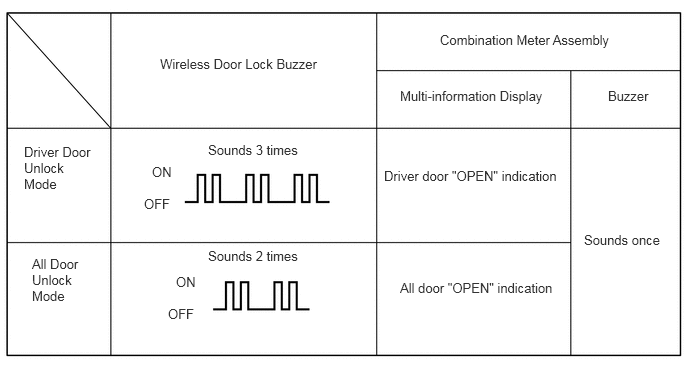
Key Cancel Function
The following system functions can be deactivated by using the key cancel procedure:
Entry Lock
Entry Unlock
Hands Free Power Back Door*
Prevention of Key Confinement
Start
Warning
*: Models with hands free power back door
The system functions can be deactivated by using the following key cancel procedure when the power source is off and the driver door is closed and unlocked:
| Key Cancel Procedure |
The procedure is as follows:
-
Press the unlock button of the electrical key once.
-
Within 5 seconds of the step above, open the driver door (driver door: close → open).
-
Within 5 seconds of the step above, press the unlock button of the electrical key twice.
-
Repeat close → open for the driver door twice* (driver door: open → close → open → close → open).
-
Press the unlock button of the electrical key twice.*
-
Repeat close → open for the driver door once* (driver door: open → close → open).
-
Within 5 seconds of the step above, close the driver door. When the cancel procedure is complete, the buzzer sounds twice. Meanwhile, when the procedure is performed again to resume the system, the buzzer sounds once. |
- HINT:
-
*: All these 3 steps are performed within 30 seconds of the previous step.
Key Code Registration Function
The table below shows the 3 special ID code registration function modes through which up to 7 different transmitter recognition codes can be registered. For details, refer to the Repair Manual.
| Mode | Function |
|---|---|
| Rewrite | Clears all previously registered codes and registers only the newly received codes. This mode is used whenever the certification ECU is replaced. |
| Add | Adds a newly received code while preserving previously registered codes. This mode is used when adding a new transmitter. |
| Confirm | Confirms how many codes are currently registered. When adding a new code, this mode is used to check how many codes already exist. |
DIAGNOSIS
The certification ECU can detect malfunctions in the entry and start system when the power source is on (IG).
When the ECU detects a malfunction, a message is displayed on the multi-information display to warn the driver. At the same time, the ECU stores a 5-digit Diagnostic Trouble Code (DTC) in its memory.
The indicator light warning continues for 15 seconds even after the power source is turned off.
The 5-digit DTCs can be read after connecting the Global TechStream (GTS) to the DLC3.
The entry and start system may not operate successfully if a malfunction occurs.