PARK ASSIST / MONITORING MULTI-TERRAIN MONITOR SYSTEM CONTROL MULTI-TERRAIN MONITOR CONTROL
FUNCTION OF MAIN COMPONENTS
| Component | Function |
|---|---|
|
*1: Models with RCD function *2: Models with RCTA function |
|
| Front Television Camera Assembly | Sends a video signal of the area in front of the vehicle to the parking assist ECU. |
| Side Television Camera Assembly RH | Sends a video signal of the area to the right side of the vehicle to the parking assist ECU. |
| Side Television Camera Assembly LH | Sends a video signal of the area to the left side of the vehicle to the parking assist ECU. |
| Rear Television Camera Assembly |
·
Sends a video signal of the area to the rear of the vehicle to the parking assist ECU.
·
Sends RCD detection information to the parking assist ECU.*1 |
| Parking Assist ECU |
·
Combines video signals from the front, rear, left and right television camera to create a seamless overhead image.
·
Calculates each guide line based on information signals from each ECU and sensor, combines the lines with the panoramic view and images from each television camera assembly, and outputs a video signal to the multi-display.
·
Turns each television camera assembly on and off according to the input shift position signal and VIEW switch signal.
·
Combines detection information with the currently displayed multi-terrain monitor system screen according to signals from the clearance warning ECU assembly, blind spot monitor sensor LH*2 or rear television camera assembly*1 and outputs a video signal to the multi-display. |
| Multi-display Assembly | Displays image information received from the parking assist ECU. |
| Trip Switch
·
VIEW Switch |
Switches the multi-terrain monitor system screen display. |
| 4 Wheel Drive Control ECU | Sends the transfer position signal to the parking assist ECU. |
| Steering Sensor | Detects the direction and angle of the steering wheel and sends the resulting signals to the parking assist ECU. |
| ECM | Sends the shift position signal to the parking assist ECU. |
| Brake Actuator Assembly
·
No. 2 Skid Control ECU |
Sends the vehicle speed signals to the parking assist ECU. |
| Main Body ECU (Multiplex Network Body ECU) | Sends the front doors and back door opening and closing signals and mirror retraction signals to the parking assist ECU. |
| Clearance Warning ECU Assembly | Sends the Toyota parking assist-sensor and parking support brake (PKSB) system information signal to the parking assist ECU. |
| Blind Spot Monitor Sensor LH*2 | Sends the RCTA function information signal to the parking assist ECU. |
| Central Gateway ECU (Network Gateway ECU) | Relays the signal between the CAN communication lines. |
OPERATING CONDITION
In addition to manual display mode using a VIEW switch operation (when automatic display mode is off), automatic display mode (when automatic display mode is on) that displays the "front view and dual side views" or "under vehicle terrain view and dual side views" automatically according to the vehicle speed is provided as a method for displaying the multi-terrain monitor screen.
Under vehicle terrain view function
A front television camera assembly image captured in the past is combined with a current image to display the image as an underfloor transparent image at the bottom of the vehicle to help the driver in operations such as checking conditions under the vehicle and understanding the front wheel positions.
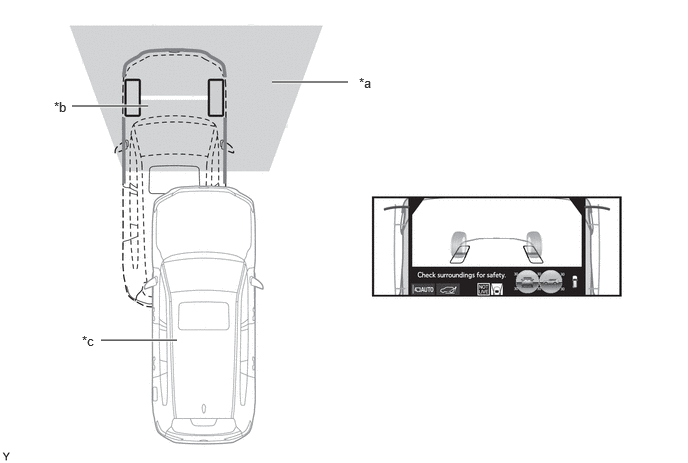
| *a | Image displayed in the under vehicle terrain view (image taken behind the current vehicle position) | *b | Current vehicle position |
| *c | Vehicle position at the time the image was taken (behind the current vehicle position) | - | - |
When the under vehicle terrain view (rear wheel) switch is pressed while the "front view and dual side views" or "under vehicle terrain view and dual side views" are displayed, the "under vehicle terrain view (rear wheel) and dual side views" are displayed.
Under Vehicle Terrain View (Rear Wheel) Function
A front television camera assembly image captured before the current vehicle position is combined with lines indicating the current vehicle position and tire positions on the vehicle to help the driver in operations such as understanding conditions under the vehicle and the rear wheel positions.
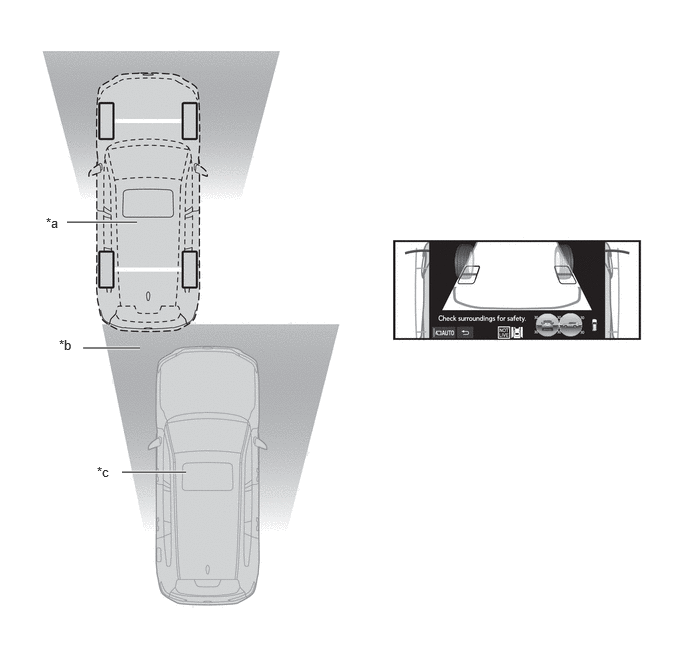
| *a | Current vehicle position | *b | Image displayed in the under vehicle terrain view (rear wheel) (image taken behind the current vehicle position) |
| *c | Vehicle position at the time the image was taken (Behind the current vehicle position) | - | - |
In addition to manual display mode using a VIEW switch operation (when automatic display mode is off), automatic display mode (when automatic display mode is on) that displays the "panoramic view and wide front view", "panoramic view and side clearance view" or "panoramic view and cornering view" automatically according to vehicle speed is provided as a method for displaying the panoramic view monitor screen.
Cornering View Automatic Display Function
The "panoramic view and cornering view" is automatically displayed depending on the operation of the steering wheel when the "panoramic view and side clearance view" is displayed.
When all of the following conditions are met, the "panoramic view and cornering view" is automatically displayed.
|
·
The shift position is not P or R.
·
Cornering view automatic display mode is on.
·
The vehicle speed is below approximately 20 km/h (12 mph).
·
The steering wheel is operated approximately 180° or more to either side from the straight condition. |
When any of the following conditions are met, the "panoramic view and cornering view" is no longer displayed.
|
·
The shift position is not P or R.
·
Cornering view automatic display mode is off.
·
The vehicle speed is approximately 20 km/h (12 mph) or more.
·
The steering wheel is operated approximately 45° or less to either side from the straight condition.
·
The VIEW switch is pressed. |
Manual Display Mode and Automatic Display Mode
Manual Display Mode
Manual display mode is a method of displaying the multi-terrain monitor system screen according to the needs of the driver via operation of the VIEW switch.
The multi-terrain monitor system is displayed by operating the VIEW switch when vehicle speed is approximately 20 km/h (12 mph) or less.
When the vehicle speed exceeds approximately 20 km/h (12 mph), the multi-terrain monitor system screen ends and switches to display the navigation screen or information screen.
Automatic Display Mode
When starting off and stopping the vehicle in automatic display mode, it is possible to display the "panoramic view and wide front view", "panoramic view and side clearance view", "panoramic view and cornering view", "front view and dual side views" or "under vehicle terrain view and dual side views" automatically instead of by pressing the VIEW switch.
The automatic display mode can be set with the auto mode button displayed on the screen.
| Display | Screen Display Conditions | Objective | Assumed Situation |
|---|---|---|---|
| Display when starting off | Vehicle speed is 10 km/h (6 mph) or less and shift position is not P or R | Reminder to check surroundings | Check surroundings |
| Display when stopping vehicle | Shift position is not P or R and vehicle speed becomes 10 km/h (6 mph) or less | Reduce switch operations |
·
Check forward blind spot
·
Check inside blind spot
·
Check vehicle width
·
Check vehicle-to-vehicle distance |
Display Function Linked to Toyota Parking Assist-Sensor (When Panoramic View Monitor Displayed)
When the Toyota parking assist-sensor detects a stationary object, the monitor screen automatically changes from the current screen (navigation screen, DVD screen, etc.) to the clearance information screen with the "panoramic view and wide front view" screen.
When all of the following conditions are met, the panoramic view and wide front view will be displayed.
|
·
The shift position is not P or R.
·
The Toyota parking assist-sensor has detected a stationary object. |
When either of the following conditions is met, the panoramic view and wide front view will be canceled and return to its original screen.
|
·
The Toyota parking assist-sensor does not detect a stationary object. |
FUNCTION
Multi-terrain Monitor Screen and Operation
Each screen of the multi-terrain monitor displays guide lines, estimated course lines calculated from steering angle signals input from the steering sensor via CAN communication, etc., together according to the selected screen display mode to inform the driver of the tire positions and trajectories which cannot be directly seen from the driver seat.
When the Toyota parking assist-sensor system, RCTA function*1 or RCD function*2 detects an operation target, Toyota parking assist-sensor information, RCTA function information*1 or RCD function information*2 is superimposed on the screen according to the selected screen display mode.
*1: Models with RCTA function
*2: Models with RCD function
Front View and Dual Side Views
Images from the front television camera assembly and the left and right side television camera assemblies are displayed simultaneously to help the driver in operations such as checking conditions near the vehicle front and the travel direction of the wheels.
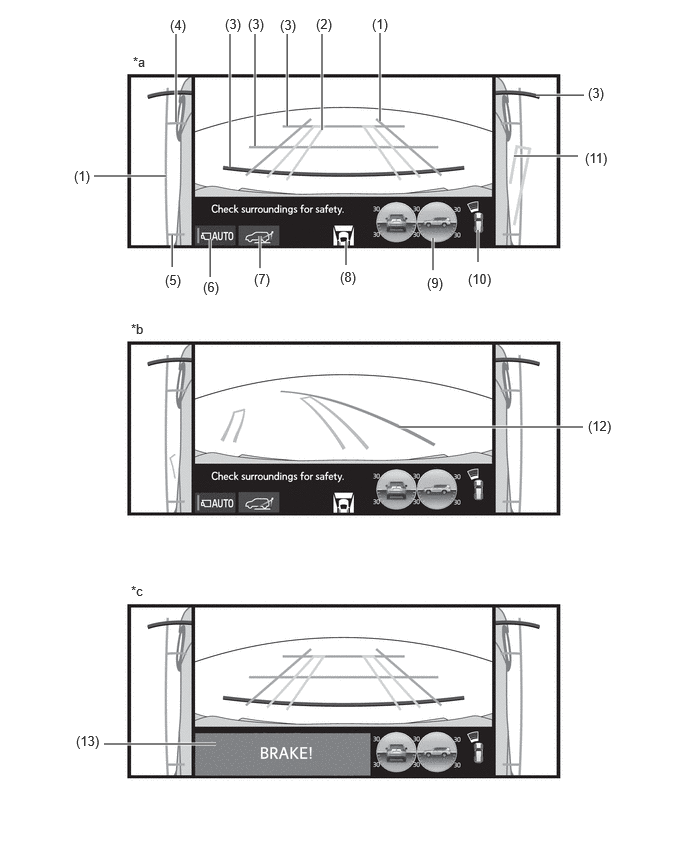
| *a | Normal condition | *b | If the steering wheel is turned 270° or more |
| *c | When the parking support brake system operates | - | - |
- HINT:
-
The illustration shown is an example only. The illustration may differ from the actual vehicle screen.
| Item | Description | |
|---|---|---|
|
*1: Models with parking support brake system *2: Except models for Australia |
||
| (1) | Vehicle Width Lines (Blue) | Displays guide lines at a distance approximately 0.5 m from the vehicle width. |
| (2) | Front Tire Course Line (Yellow) | Displays guide lines for the estimated course of the front wheels when the vehicle moves forward. |
| (3) | Front Distance Guide Line (Red/Blue) | Displays guide lines at distances approximately 0.5 m (red), 1.0 m (blue) and 2.0 m (blue) from the front end of the vehicle. |
| (4) | Front Tire Contact Line (Blue) | Displays guide lines for the front tire contact positions. |
| (5) | Rear Tire Contact Line (Blue) | Displays guide lines for the rear tire contact positions. |
| (6) | Auto Mode Button | Is used to turn the automatic display mode on and off. |
| (7) | Under Vehicle Terrain View (Rear Wheel) Selection Switch | Switches to the display of the under vehicle terrain view (rear wheel) and dual side views. |
| (8) | Camera Direction Display Vehicle Icon | Indicates that the front view and dual side views is displayed. |
| (9) | Tilt Meter | Displays the approximate tilt of the vehicle in the longitudinal and lateral directions within a range of 0° to approximately 40°. |
| (10) | Toyota Parking Assist-sensor/Slip Display |
·
If a stationary object is detected when the Toyota parking assist-sensor is activated, the approximate distance between the vehicle and the stationary object is displayed.
·
Displays the slipping tire when tire slip is detected. |
| (11) | Rear Tire Course Line (Yellow) | Displays guide lines for the rear tire trajectories. |
| (12) | Forward Movement Guide Line | Displays guide lines for the forward moving trajectory of the front bumper edge when the vehicle moves forward with the steering operated to the maximum steering angle. |
| (13) | PKSB System Information*1, *2 | Displayed when the PKSB system detects an operation target with which the vehicle could collide. |
Under Vehicle Terrain View and Dual Side Views
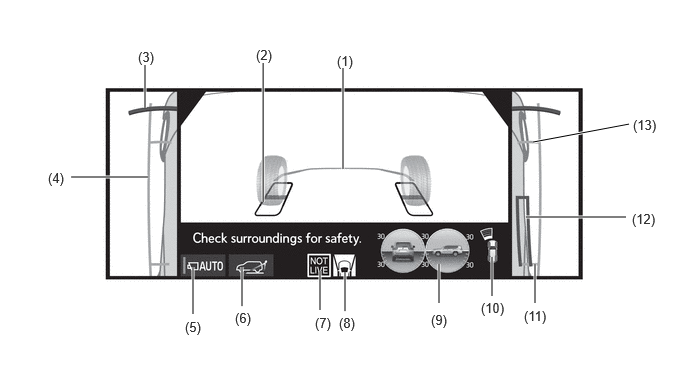
Images from the front television camera assembly and the left and right side television camera assemblies are displayed simultaneously to help the driver in operations such as checking conditions under the vehicle and understanding the front wheel positions.
- CAUTION:
-
·
Guide Lines
The tire shape lines and vehicle shape lines may differ from actual vehicle positions depending on the number of passengers, cargo weight, road grade, road surface conditions, brightness of the surrounding environment, installed options, installation of non-specified tires or suspension, etc. Always drive while confirming the safety of your surroundings.
·Display of Under Vehicle Terrain View
The displayed image is an image captured in the past. Therefore, the displayed under vehicle terrain view does not necessarily match the current conditions; for example, if an object moves after the image is captured. Also, it may not be possible to confirm obstacles in the image at night or in other dark environments.
- HINT:
-
·
When the under vehicle terrain view is first displayed for a certain period of time, the NOT LIVE icon and the target area frame blink.
·A different screen is displayed if the outer rear view mirrors are retracted while the under vehicle terrain view is displayed.
·In the following cases, the under vehicle terrain view display turns black.
-Vehicle has not been driven for a certain distance or longer after the engine starts or the system returns to normal
-Tires have spun
-When ABS is operating
-When the system does not operate normally
·The system may not operate normally in the following situations.
-Snow-covered road
-When shadows are cast by a light source such as sunlight or artificial illumination
-On a slippery road or when the wheels spin
-When there is dirt or other foreign matter on the camera lens
-Watery surface (river, sea, etc.)
-Optional equipment has been installed
-When the camera is covered or an object is in the imaging range
-Tires have been replaced
-When the camera is not in the correct position, such as when the back door is open
-When the steering wheel is operated for more than a certain steering angle or when on a gradient, such as a slope
·Images captured in the past are displayed. Therefore, the screen may differ from actual conditions in the following situations.
-When the situation changes after the image is captured, such as an object moves or enters the range
-When objects such as sand or snow collapse or move
-When the obstacle moves
-There is a puddle, tract of mud, etc., within the display range
-The vehicle slips
- HINT:
-
The illustration shown is an example only. The illustration may differ from the actual vehicle screen.
| Item | Description | |
|---|---|---|
| (1) | Vehicle Position Indicator Lines (Blue) | Displays the guide lines for the position of the vehicle edge. |
| (2) | Tire Position Indicator Lines (Black/White) | Displays guide lines for the tire positions and contact surfaces. |
| (3) | Front Distance Guide Line (Red/Black) | Displays guide lines at a distance approximately 0.5 m from the front end of the front bumper. |
| (4) | Vehicle Width Lines (Blue) | Displays guide lines at a distance approximately 0.5 m from the vehicle width. |
| (5) | Auto Mode Button | Is used to turn the automatic display mode on and off. |
| (6) | Under Vehicle Terrain View (Rear Wheel) Selection Switch | Switches to the display of the under vehicle terrain view (rear wheel) and dual side views. |
| (7) | NOT LIVE Icon | Indicates that the under vehicle terrain view display is of an image taken in the past. After simultaneously blinking for a certain amount of time with the lines that indicate the area using an image taken in the past, the icon remains illuminated. (The blinking of the lines stops.) |
| (8) | Camera Direction Display Vehicle Icon | Indicates that the under vehicle terrain view and dual side views is displayed. |
| (9) | Tilt Meter | Displays the approximate tilt of the vehicle in the longitudinal and lateral directions within a range of 0° to approximately 40°. |
| (10) | Toyota Parking Assist-sensor/Slip Display |
·
If a stationary object is detected when the Toyota parking assist-sensor is activated, the approximate distance between the vehicle and the stationary object is displayed.
·
Displays the slipping tire when tire slip is detected. |
| (11) | Rear Tire Contact Line (Blue) | Displays guide lines for the rear tire contact positions. |
| (12) | Rear Tire Course Line (Yellow) | Displays guide lines for the rear tire trajectories. |
| (13) | Front Tire Contact Line (Blue) | Displays guide lines for the front tire contact positions. |
Under Vehicle Terrain View (Rear Wheel) and Dual Side Views
Images from the rear television camera assembly and the left and right side television camera assemblies are displayed simultaneously to help the driver in operations such as understanding conditions under the vehicle and the rear wheel positions.
- CAUTION:
-
·
Guide Lines
The tire shape lines and vehicle shape lines may differ from actual vehicle positions depending on the number of passengers, cargo weight, road grade, road surface conditions, brightness of the surrounding environment, installed options, installation of non-specified tires or suspension, etc. Always drive while confirming the safety of your surroundings.
·Display of Under Vehicle Terrain View (Rear Wheel)
The displayed image is an image captured in the past. Therefore, the displayed under vehicle terrain view (rear wheel) does not necessarily match the current conditions; for example, if an object moves after the image is captured. Also, it may not be possible to confirm obstacles in the image at night or in other dark environments.
- HINT:
-
·
A different screen is displayed if the outer rear view mirrors are retracted while the under vehicle terrain view (rear wheel) is displayed.
·While the under vehicle terrain view (rear wheel) is displayed, if the vehicle speed reaches or exceeds approximately 5 km/h (3 mph), the screen automatically returns to the previous display.
·In the following cases, the screen display ends and returns to the previously displayed camera screen or the under vehicle terrain view (rear wheel) selection switch cannot be operated.
-Vehicle has not been driven for a certain distance or longer after the engine starts or the system returns to normal
-Tires have spun
-When ABS is operating
-When the steering wheel is operated for more than a certain steering angle
-When the system does not operate normally
·In the following cases, the system does not operate normally or the under vehicle terrain view (rear wheel) selection switch cannot be operated.
-Snow-covered road
-When shadows are cast by a light source such as sunlight or artificial illumination
-On a slippery road or when the wheels spin
-When there is dirt or other foreign matter on the camera lens
-Watery surface (river, sea, etc.)
-Optional equipment has been installed
-When the camera is covered or an object is in the imaging range
-Tires have been replaced
-When the camera is not in the correct position, such as when the back door is open
-When the steering wheel is operated for more than a certain steering angle or when on a gradient, such as a slope
·Images captured in the past are displayed. Therefore, the screen may differ from actual conditions in the following situations.
-When the situation changes after the image is captured, such as an object moves or enters the range
-When objects such as sand or snow collapse or move
-When the obstacle moves
-There is a puddle, tract of mud, etc., within the display range
-The vehicle slips
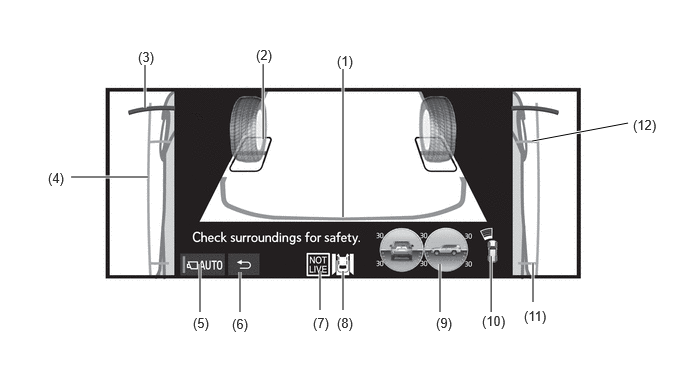
- HINT:
-
The illustration shown is an example only. The illustration may differ from the actual vehicle screen.
| Item | Description | |
|---|---|---|
| (1) | Vehicle Position Indicator Lines (Blue) | Displays the guide lines for the position of the vehicle edge. |
| (2) | Tire Position Indicator Lines (Black/White) | Displays guide lines for the tire positions and contact surfaces. |
| (3) | Front Distance Guide Line (Red/Black) | Displays guide lines at a distance approximately 0.5 m from the front end of the front bumper. |
| (4) | Vehicle Width Lines (Blue) | Displays guide lines at a distance approximately 0.5 m from the vehicle width. |
| (5) | Auto Mode Button | Is used to turn the automatic display mode on and off. |
| (6) | Return Switch | Displays the screen that was displayed before the under vehicle terrain view (rear wheel). |
| (7) | NOT LIVE Icon | Indicates that the under vehicle terrain view display is of an image taken in the past. After simultaneously blinking for a certain amount of time with the lines that indicate the area using an image taken in the past, the icon remains illuminated. (The blinking of the lines stops.) |
| (8) | Camera Direction Display Vehicle Icon | Indicates that the under vehicle terrain view (rear wheel) and dual side views is displayed. |
| (9) | Tilt Meter | Displays the approximate tilt of the vehicle in the longitudinal and lateral directions within a range of 0° to approximately 40°. |
| (10) | Toyota Parking Assist-sensor/Slip Display |
·
If a stationary object is detected when the Toyota parking assist-sensor is activated, the approximate distance between the vehicle and the stationary object is displayed.
·
Displays the slipping tire when tire slip is detected. |
| (11) | Rear Tire Contact Line (Blue) | Displays guide lines for the rear tire contact positions. |
| (12) | Front Tire Contact Line (Blue) | Displays guide lines for the front tire contact positions. |
Rear View/Wide Rear View and Dual Side Views
For checking safety while parking, the images from the vehicle sides and the image from the rear television camera assembly are displayed simultaneously to help the driver confirm safety while reversing.
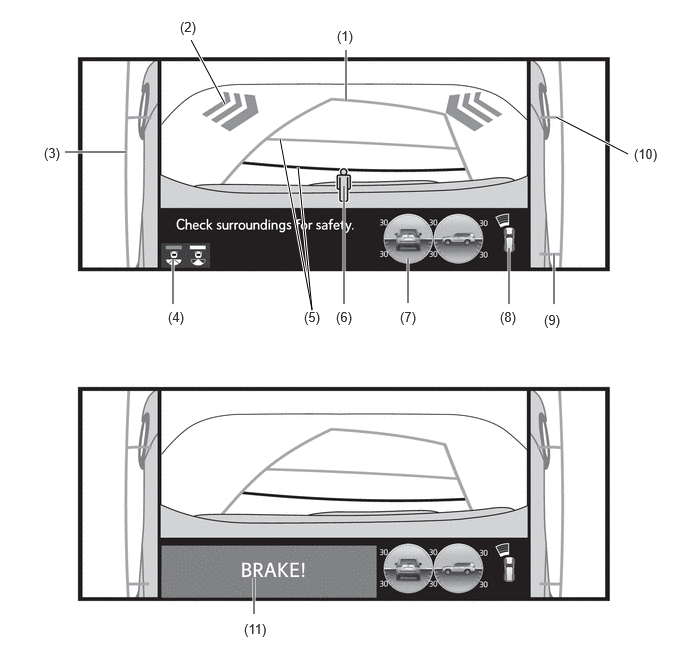
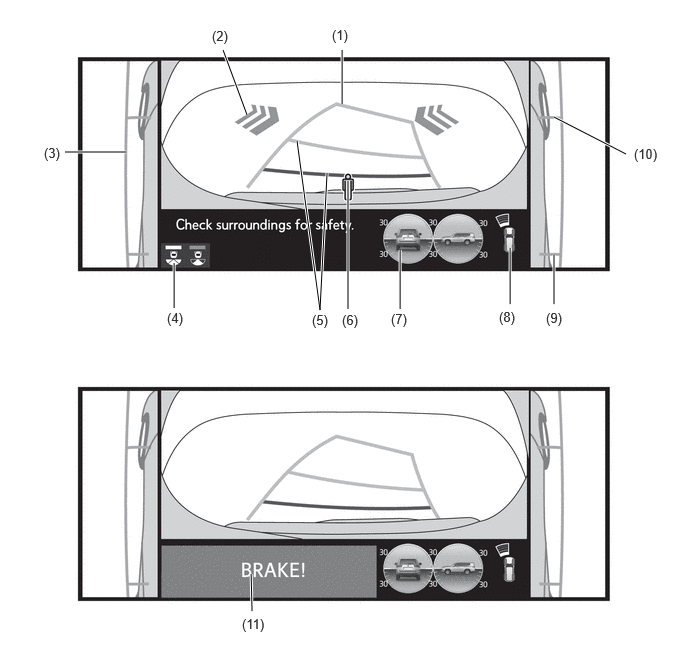
- HINT:
-
The illustration shown is an example only. The illustration may differ from the actual vehicle screen.
| Item | Description | |
|---|---|---|
|
*1: Models with RCD function *2: Models with RCTA function *3: Models with parking support brake system |
||
| (1) | Rear Estimated Course Line (Yellow) | Moves in sync with the steering wheel to indicate the estimated reverse course of the vehicle. |
| (2) | RCTA Icon*1 | If a vehicle is detected when the RCTA function is activated, the direction of the approaching vehicle is displayed. |
| (3) | Rear Vehicle Width Guide Line (Blue) | Indicates the estimated vehicle width. |
| (4) | Display Mode Switching Button | Changes the display mode. |
| (5) | Rear Distance Guide Line | These lines are distance guide lines showing the distance from the edge of the rear bumper. [Approximately 1.0 m (3.3 ft.): yellow, approximately 0.5 m (1.6 ft.): red] |
| (6) | RCD Icon*2 | This icon is displayed when the rear camera detection function detects a pedestrian to the rear. |
| (7) | Tilt Meter | Displays the approximate tilt of the vehicle in the longitudinal and lateral directions within a range of 0° to approximately 40°. |
| (8) | Toyota Parking Assist-sensor/Slip Display |
·
If a stationary object is detected when the Toyota parking assist-sensor is activated, the approximate distance between the vehicle and the stationary object is displayed.
·
Displays the slipping tire when tire slip is detected. |
| (9) | Rear Tire Contact Line (Blue) | Displays guide lines for the rear tire contact positions. |
| (10) | Front Tire Contact Line (Blue) | Displays guide lines for the front tire contact positions. |
| (11) | PKSB System Information*3 | Displayed when the PKSB system detects an operation target with which the vehicle could collide. |
- HINT:
-
For details on the estimated course line display mode, refer to "Panoramic View and Wide Rear View" in "Panoramic View Monitor Screen and Operation".
Wide Front View/Rear View/Wide Rear View and Dual Side Views (When Outer Rear View Mirror Assemblies are Retracted)
When the outer rear view mirrors are retracted, the multi-terrain monitor screen does not display. Instead, an image from the side television camera assemblies and the wide front view, rear view or wide rear view screen are combined and displayed to assist with confirming the safety of the surroundings and parking close to another object, etc.
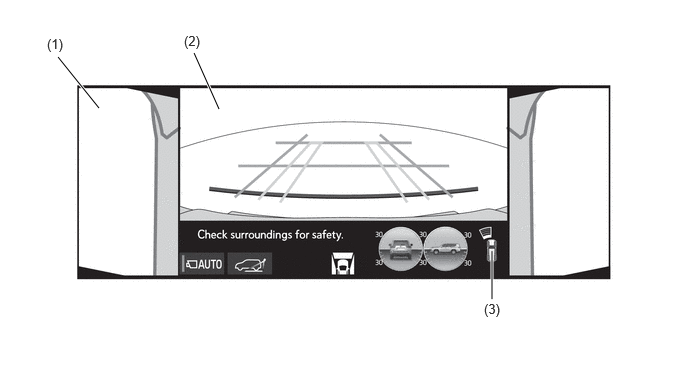
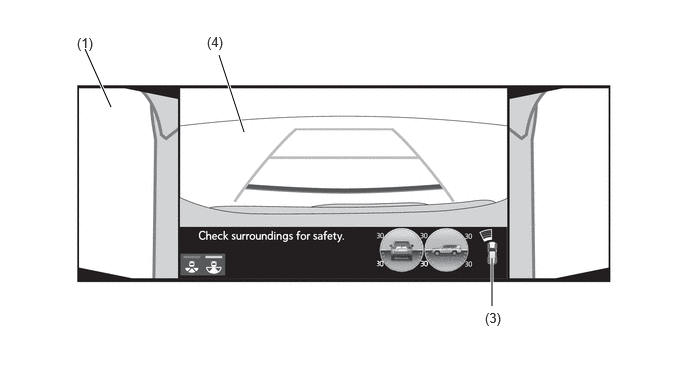
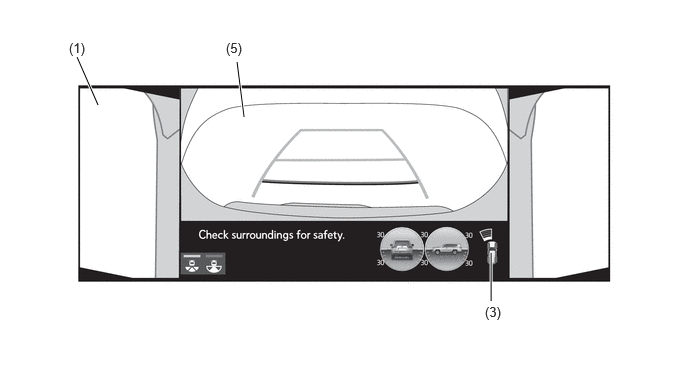
- HINT:
-
The illustration shown is an example only. The illustration may differ from the actual vehicle screen.
| Item | Description | |
|---|---|---|
|
*1: See Panoramic View and Wide Front View for the display content. *2: See Panoramic View and Rear View for the display content. *3: See Panoramic View and Wide Rear View for the display content. |
||
| (1) | Side View | An image of the area to the side of the vehicle captured by the left and right side television camera assembly. |
| (2) | Wide Front View*1 | An image captured by the front television camera assembly of the area in front of the vehicle. |
| (3) | Toyota Parking Assist-sensor Information | If a stationary object is detected when the Toyota parking assist-sensor is activated, the approximate distance between the vehicle and the stationary object is displayed. |
| (4) | Rear View*2 | An image captured by the rear television camera assembly of the area to the rear of the vehicle. |
| (5) | Wide Rear View*3 | An image captured by the rear television camera assembly of the area to the rear of the vehicle. |
Tilt Meter/Slip
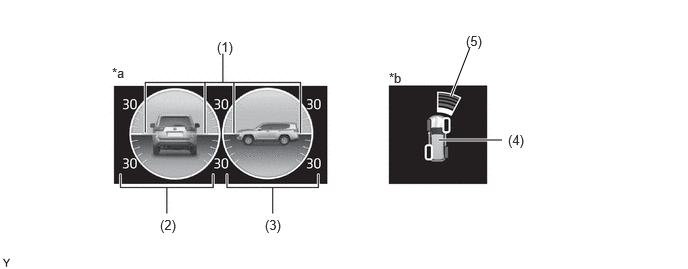
| *a | Tilt Meter | *b | Toyota Parking Assist-sensor/Slip Display |
- HINT:
-
The illustration shown is an example only. The illustration may differ from the actual vehicle screen.
| Item | Description | |
|---|---|---|
| (1) | Pointer | Indicates the degree of the vehicle inclination in comparison to a parallel line. |
| (2) | Degree Markers of Incline to The Left and Right | Indicates the vehicle inclination in degrees in the left and right directions. |
| (3) | Degree Markers of Incline to The Front and Rear | Indicates the vehicle inclination in degrees in the front and rear directions. |
| (4) | Slip Display | When a tire is spinning freely, the orange frame around the spinning tire blinks. |
| (5) | Toyota Parking Assist-sensor Display | Displayed when the Toyota parking assist-sensor system is operating. |
Multi-terrain Monitor System Screen Transition
The multi-terrain monitor assists the driver to confirm the conditions around the vehicle while driving at low speeds and when parking.
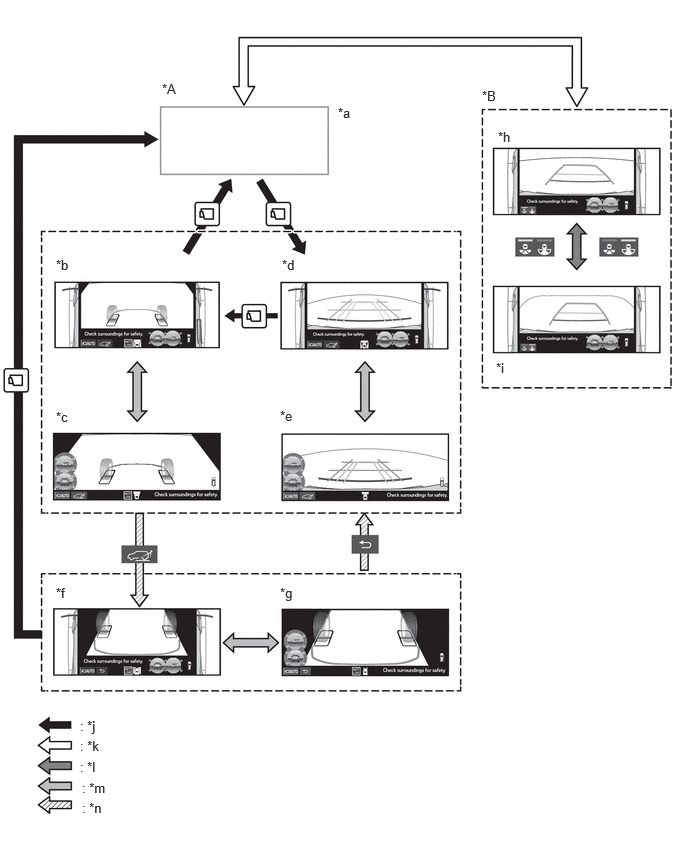
| *A | Except Shift Position R | *B | Shift Position R |
| *a | Navigation Display etc. | *b | Under Vehicle Terrain View and Dual Side Views |
| *c | Under Vehicle Terrain View (Magnified) | *d | Front View and Dual Side Views |
| *e | Front View (Magnified) | *f | Under Vehicle Terrain View (Rear Wheel) and Dual Side Views |
| *g | Under Vehicle Terrain View (Rear Wheel) (Magnified) | *h | Rear View and Dual Side Views |
| *i | Wide Rear View and Dual Side Views | *j | VIEW Switch is Pressed. |
| *k | Shift Position Operation | *l | Display Mode Switching Button is Pressed. |
| *m | Displayed Screen is Touched. | *n | Under Vehicle Terrain View (Rear Wheel) Switch is Selected/Return Switch is Operated. |
Panoramic View Monitor Screen and Operation
Each screen of the panoramic view monitor displays guide lines, estimated course lines, etc., to inform the driver of the tire positions and trajectories which cannot be directly seen from the driver seat, according to the selected screen display mode.
When the Toyota parking assist-sensor system, RCTA function*1 or RCD function*2 detects an operation target, Toyota parking assist-sensor information, RCTA function information*1 or RCD function information*2 is superimposed on the screen according to the selected screen display mode.
*1: Models with RCTA function
*2: Models with RCD function
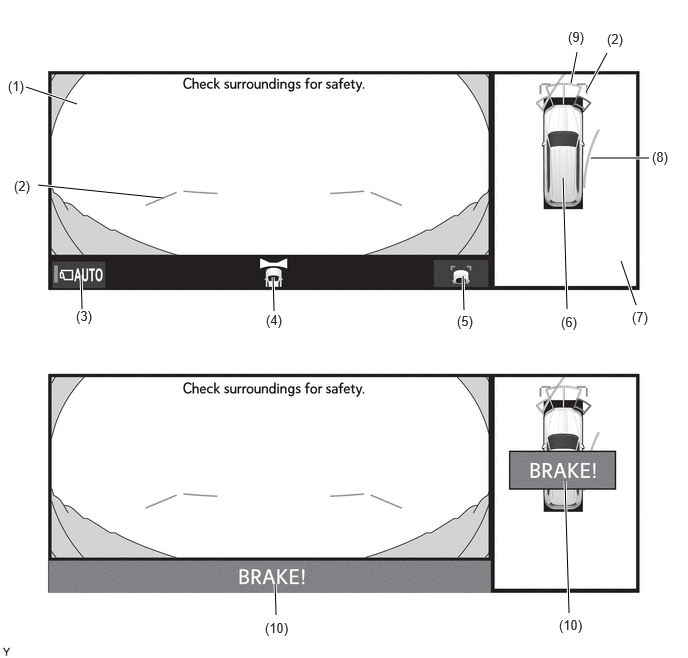
Panoramic View and Wide Front View
The panoramic view created by combining images from each television camera assembly and the image from the front television camera assembly are displayed simultaneously. The images assist the driver to confirm the safety of the surroundings and areas to the left and right of the vehicle at locations with poor visibility, such as intersections and T-junctions.
- HINT:
-
When the outer rear view mirror assemblies are retracted, the side view and wide front view is displayed.
- HINT:
-
The illustration shown is an example only. The illustration may differ from the actual vehicle screen.
| Item | Description | |
|---|---|---|
| (1) | Wide Front View | An image captured by the front television camera assembly of the area in front of the vehicle. |
| (2) | Front Distance Guide Line (Blue) | These lines are distance guide lines showing the distance forward from the edge of the front bumper. [Approximately 1.0 m (3.3 ft.)] |
| (3) | Auto Mode Button | Is used to turn the automatic display mode on and off. When the automatic display mode is on, the switch indicator illuminates. |
| (4) | Camera Direction Display Vehicle Icon | Indicates that the wide front view is displayed. |
| (5) | Guide Line Switching Button | Changes the guide line display mode. |
| (6) | Panoramic View Vehicle Icon*1 | Displays the vehicle position in the panoramic view. |
| (7) | Panoramic View | An overhead image of the vehicle created by combining images from the front, rear, left and right side television camera assemblies. |
| (8) | Forward Estimated Course Line (Yellow) | Displays the estimated course calculated from the steering angle. (Displays when the steering wheel is operated more than 90° to either side.) |
| (9) | Toyota Parking Assist-sensor Information | If a stationary object is detected when the Toyota parking assist-sensor is activated, the approximate distance between the vehicle and the stationary object is displayed. |
| (10) | PKSB System Information*2, *3 | Displayed when the PKSB system detects an operation target with which the vehicle could collide. |
- HINT:
-
*1: The color of the panoramic view vehicle icon can be changed. Refer to the Repair Manual for the details.
-
*2: Models with parking support brake system
-
*3: Except models for Australia
Estimated Course Line Display Mode
The forward estimated course lines represent the estimated course of the vehicle. By turning the steering wheel so that no objects are within the estimated course lines, the driver can easily maneuver the vehicle around objects.
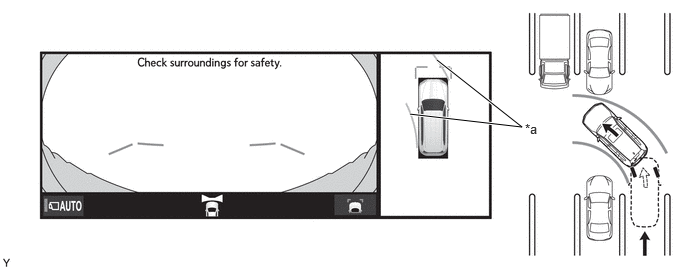
| *a | Forward Estimated Course Line | - | - |
- HINT:
-
The illustration shown is an example only. The illustration may differ from the actual vehicle screen.
Distance Guide Line Display Mode
The front distance guide lines inform the driver of the vehicles relative location when driving into a parking space. By aligning the front distance guide lines with the end of the parking space and the parking space lines, the driver can easily position the vehicle within the parking space.
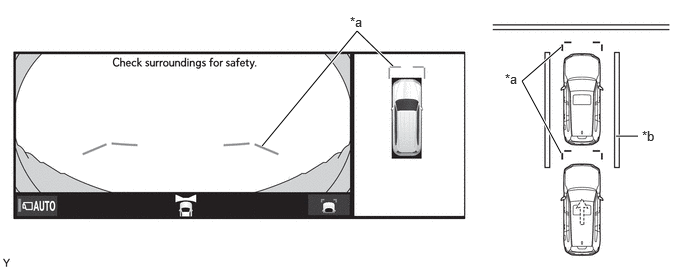
| *a | Front Distance Guide Line | *b | Parking Space Line |
- HINT:
-
The illustration shown is an example only. The illustration may differ from the actual vehicle screen.
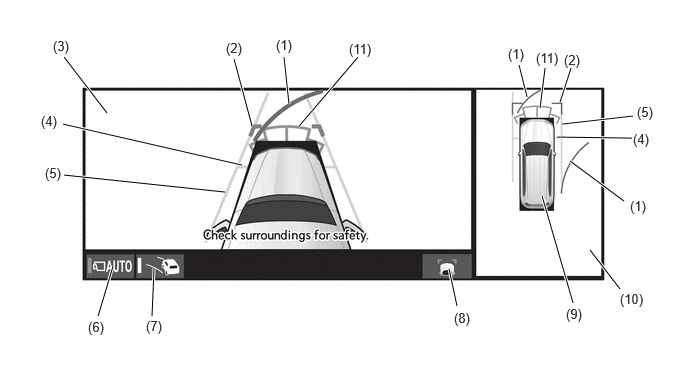
Panoramic View and Side Clearance View
An overhead image of the vehicle combined of images from the front, rear and side cameras (panoramic view), and an image combined of images from the front and side cameras (side clearance view) are displayed simultaneously. This helps the driver to confirm the safety of the areas to the sides of the vehicle and avoid contact with obstacles on narrow roads.
- HINT:
-
·
The panoramic view and side clearance view screens can be displayed when the Toyota parking assist-sensor is on.
·The panoramic view and side clearance view screens can be displayed when the outer rear view mirrors are extended.
- HINT:
-
The illustration shown is an example only. The illustration may differ from the actual vehicle screen.
| Item | Description | |
|---|---|---|
|
*: The color of the panoramic view vehicle icon can be changed. Refer to the Repair Manual for the details. |
||
| (1) | Forward Estimated Course Line (Yellow) | Displays the estimated course calculated from the steering angle. (Displays when the steering wheel is operated more than 90° to either side.) |
| (2) | Front Distance Guide Line (Blue) | These lines are distance guide lines showing the distance forward from the edge of the front bumper. [Approximately 1.0 m (3.3 ft.)] |
| (3) | Side Clearance View | Displays an image created by combining images from the vehicle front and side television camera assemblies. |
| (4) | Front Tire Contact Line | A guide line showing the front tire contact position. |
| (5) | Vehicle Width Parallel Line | A vehicle width guide line including the outer rear view mirror assembly. |
| (6) | Auto Mode Button | Is used to turn the automatic display mode on and off. When the automatic display mode is on, the switch indicator illuminates. |
| (7) | Camera Direction Display Vehicle Icon | Indicates that the side clearance view is displayed. |
| (8) | Guide Line Switching Button | Changes the guide line display mode. |
| (9) | Panoramic View Vehicle Icon* | Displays the vehicle position in the panoramic view. |
| (10) | Panoramic View | An overhead image of the vehicle created by combining images from the front, rear, left and right side television camera assemblies. |
| (11) | Toyota Parking Assist-sensor Information | If a stationary object is detected when the Toyota parking assist-sensor is activated, the approximate distance between the vehicle and the stationary object is displayed. |
Vehicle Width Parallel Line
The vehicle width parallel lines are used as a guide to know the approximate width of the vehicle including the outer rear view mirrors. By driving forward while steering so that the vehicle width parallel lines help not to overlap actual obstacles, white lines, curbs, etc., the vehicle can avoid obstacles and drive close to objects on narrow roads.
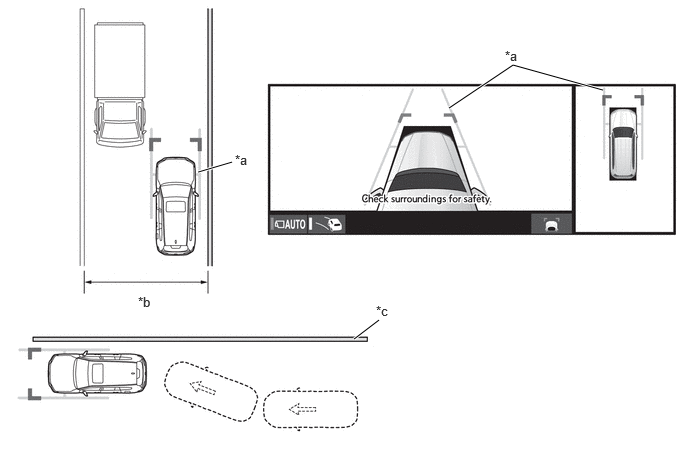
| *a | Vehicle Width Parallel Line | *b | Narrow Road, etc. |
| *c | Wall, Fence, etc. | - | - |
- HINT:
-
The illustration shown is an example only. The illustration may differ from the actual vehicle screen.
Panoramic View and Cornering View
An overhead image of the vehicle combined of images from the front, rear and side cameras (panoramic view), and an image combined of images from the front, rear and side cameras (cornering view) are displayed simultaneously. This helps the driver to confirm safety when turning right or left on narrow roads and prevent hitting the curb when pulling onto a roadway.
- HINT:
-
·
The panoramic view and cornering view screens can be displayed when the Toyota parking assist-sensor is on.
·The panoramic view and cornering view screens can be displayed when the outer rear view mirrors are extended.
·The panoramic view and cornering view can only be displayed when the cornering view automatic display mode is on.
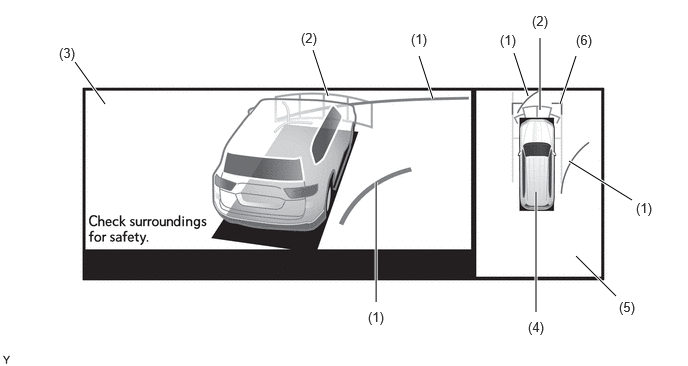
| Item | Description | |
|---|---|---|
|
*: The color of the panoramic view vehicle icon can be changed. Refer to the Repair Manual for the details. |
||
| (1) | Forward Estimated Course Line (Yellow) | Displays the estimated course calculated from the steering angle. (Displays when the steering wheel is operated more than 90° to either side.) |
| (2) | Toyota Parking Assist-sensor Information | If a stationary object is detected when the Toyota parking assist-sensor is activated, the approximate distance between the vehicle and the stationary object is displayed. |
| (3) | Cornering View | Displays an image created by combining images from the vehicle front, rear and side television camera assemblies. |
| (4) | Panoramic View Vehicle Icon* | Displays the vehicle position in the panoramic view. |
| (5) | Panoramic View | An overhead image of the vehicle created by combining images from the front, rear, left and right side television camera assemblies. |
| (6) | Front Distance Guide Line (Blue) | These lines are distance guide lines showing the distance forward from the edge of the front bumper. [Approximately 1.0 m (3.3 ft.)] |
Panoramic View and Rear View/Wide Rear View
The panoramic view created by combining images from the front, rear, left and right side television camera assemblies and the image from the rear television camera assembly are displayed simultaneously. The images assist the driver to confirm the safety of the surroundings when operating the vehicle in reverse.
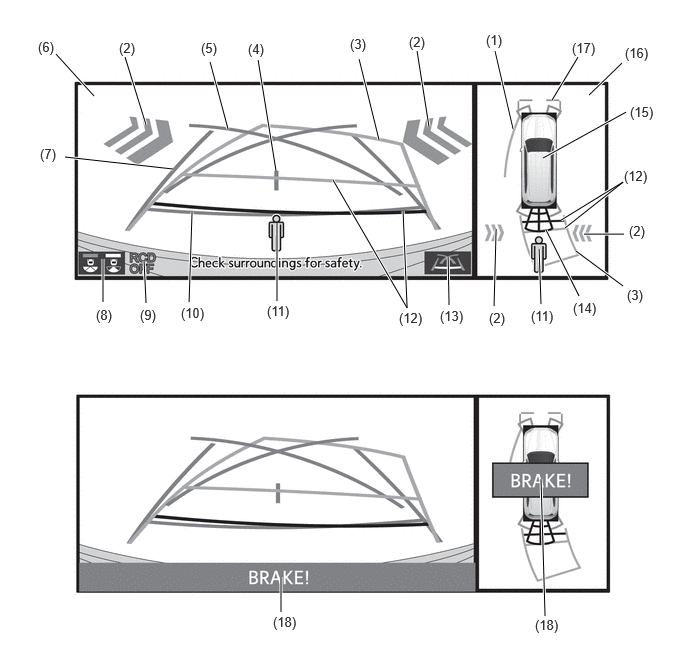
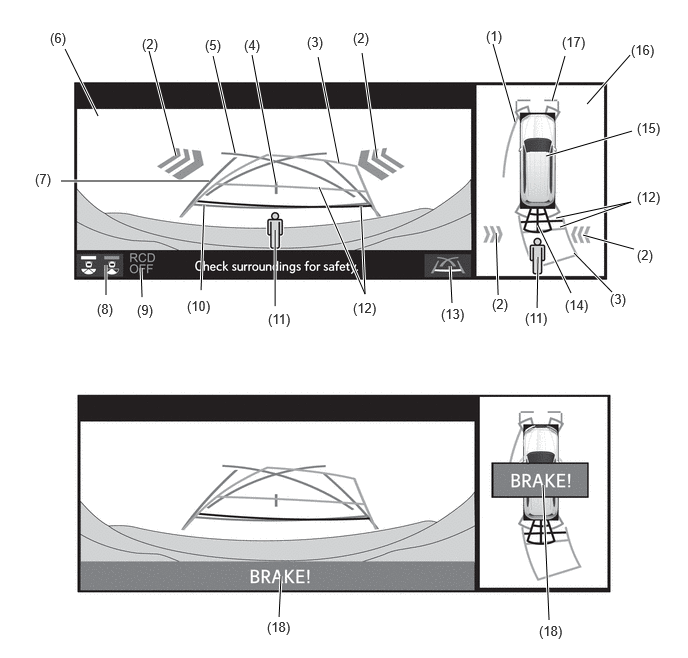
- HINT:
-
The illustration shown is an example only. The illustration may differ from the actual vehicle screen.
| Item | Description | |
|---|---|---|
| (1) | Side Estimated Course Line (Yellow) |
·
Displays the estimated course calculated from the steering angle.
·
Displays the estimated course on the outside of the steering direction. |
| (2) | RCTA Icon*1 | If a vehicle is detected when the RCTA function is activated, the direction of the approaching vehicle is displayed. |
| (3) | Rear Estimated Course Line (Yellow) | Moves in sync with the steering wheel to indicate the estimated reverse course of the vehicle. |
| (4) | Vehicle Center Guide Line (Blue) | Indicates the estimated position on the ground of the center of the vehicle. |
| (5) | Parking Assist Guide Line (Blue) | Indicates the path the vehicle will follow when the driver turns the steering wheel fully. |
| (6) | Rear View/Wide Rear View | An image captured by the rear television camera assembly of the area to the rear of the vehicle. |
| (7) | Rear Vehicle Width Extension Line (Blue) | Indicates the estimated vehicle width. |
| (8) | Display Mode Switching Button | Changes the display mode. |
| (9) | RCD OFF Indicator | Displayed when the RCD is off. |
| (10) | Rear Distance Guide Line (Blue) | These lines are distance guide lines showing the distance from the edge of the rear bumper. [Approximately 0.5 m (1.6 ft.)] |
| (11) | RCD Icon*2 | This icon is displayed when the rear camera detection function detects a pedestrian to the rear. |
| (12) | Rear Distance Guide Line (Yellow/Red) | These lines are distance guide lines showing the distance from the edge of the rear bumper. [Approximately 1.0 m (3.3 ft.): yellow, approximately 0.5 m (1.6 ft.): red] |
| (13) | Guide Line Switching Button | Changes the guide line display mode. |
| (14) | Toyota Parking Assist-sensor Information | If a stationary object is detected when the Toyota parking assist-sensor is activated, the approximate distance between the vehicle and the stationary object is displayed. |
| (15) | Panoramic View Vehicle Icon*3 | Displays the vehicle position in the panoramic view. |
| (16) | Panoramic View | An overhead image of the vehicle created by combining images from the front, rear, left and right side television camera assemblies. |
| (17) | Front Distance Guide Line (Blue) | These lines are distance guide lines showing the distance forward from the edge of the front bumper. [Approximately 1.0 m (3.3 ft.)] |
| (18) | PKSB System Information*4 | Displayed when the PKSB system detects an operation target with which the vehicle could collide. |
- HINT:
-
*1: Models with RCTA function
-
*2: Models with RCD function
-
*3: The color of the panoramic view vehicle icon can be changed. Refer to the Repair Manual for the details.
-
*4: Models with parking support brake system
Estimated Course Line Display Mode (Perpendicular Parking)
The estimated course lines inform the driver of the estimated course of the vehicle based on the current steering angle. When reversing, by turning the steering wheel so that the estimated course lines are correctly positioned with respect to the parking space lines, the driver can easily position the vehicle within the parking space. Also, the estimated course lines assist the driver to avoid obstacles.
The rear vehicle width extension lines can be used to determine whether the vehicle is parked straight in the parking space by confirming whether the parking space lines and rear vehicle width extension lines are crossed or parallel.
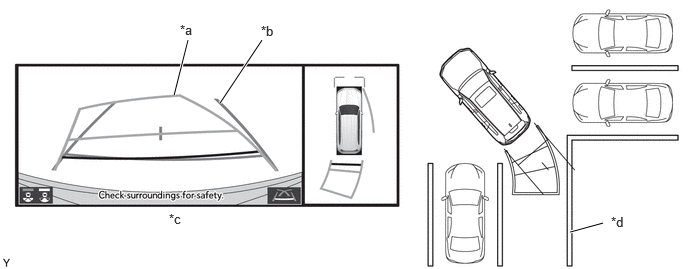
| *a | Rear Estimated Course Line | *b | Rear Vehicle Width Extension Line |
| *c | Panoramic View and Rear View | *d | Parking Space Line |
- HINT:
-
The illustration shown is an example only. The illustration may differ from the actual vehicle screen.
Estimated Course Line Display Mode (Parallel Parking)
The estimated course lines inform the driver of the estimated course of the vehicle based on the current steering angle. By turning the steering wheel so that the estimated course lines are correctly positioned with respect to the side of the road or parking space line, the driver can easily position the vehicle within the parking space. Also, the estimated course lines assist the driver to avoid obstacles.
The rear vehicle width extension lines can be used to determine whether the vehicle is parked straight in the desired parking position by confirming the status of the shoulder and parking space lines, etc., and rear vehicle width extension lines.
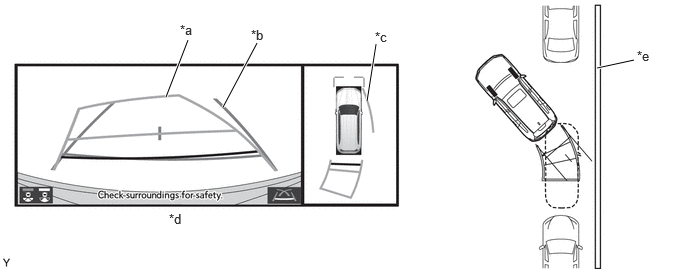
| *a | Rear Estimated Course Line | *b | Rear Vehicle Width Extension Line |
| *c | Side Estimated Course Line | *d | Panoramic View and Rear View |
| *e | Shoulder and Parking Space Lines, etc. | - | - |
- HINT:
-
The illustration shown is an example only. The illustration may differ from the actual vehicle screen.
Parking Assist Guide Line Display Mode (Perpendicular Parking)
The parking assist guide lines inform the driver of the course of the vehicle when the steering wheel is turned to full lock while driving in reverse. By driving the vehicle in reverse until the parking assist guide lines align with the parking space line, the vehicle can be guided to the position at which the driver should start turning the steering wheel.
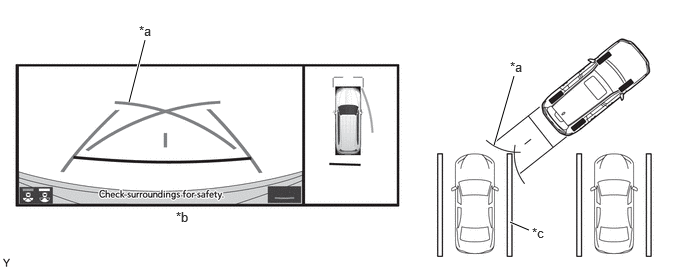
| *a | Parking Assist Guide Line | *b | Panoramic View and Rear View |
| *c | Parking Space Line | - | - |
- HINT:
-
The illustration shown is an example only. The illustration may differ from the actual vehicle screen.
Parking Assist Guide Line Display Mode (Parallel Parking)
The parking assist guide lines inform the driver of the course of the vehicle when the steering wheel is turned to full lock while driving in reverse. By driving the vehicle in reverse until the parking assist guide lines align with the side of the road or parking space line, the vehicle can be guided to the position at which the driver should start turning the steering wheel.
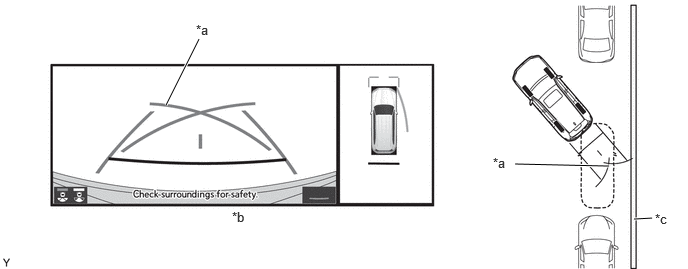
| *a | Parking Assist Guide Line | *b | Panoramic View and Rear View |
| *c | Parking Space Line | - | - |
- HINT:
-
The illustration shown is an example only. The illustration may differ from the actual vehicle screen.
Side View and Wide Front View/Rear View/Wide Rear View (when Outer Rear View Mirror Assemblies are Retracted)
When the outer rear view mirrors are retracted, the panoramic view screen does not display. Instead, an image from the side television camera assemblies and the wide front view, rear view or wide rear view screen are combined and displayed to assist with confirming the safety of the surroundings and parking close to another object, etc.
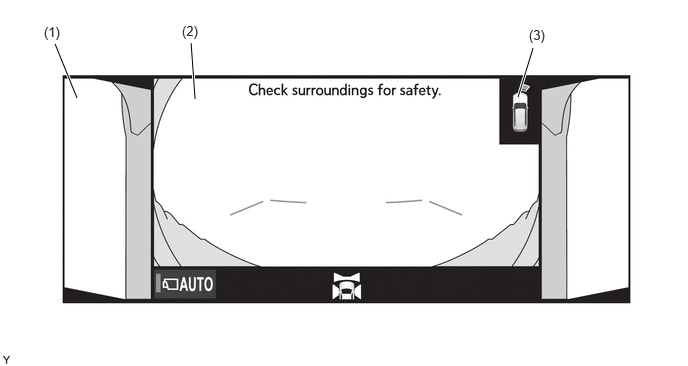
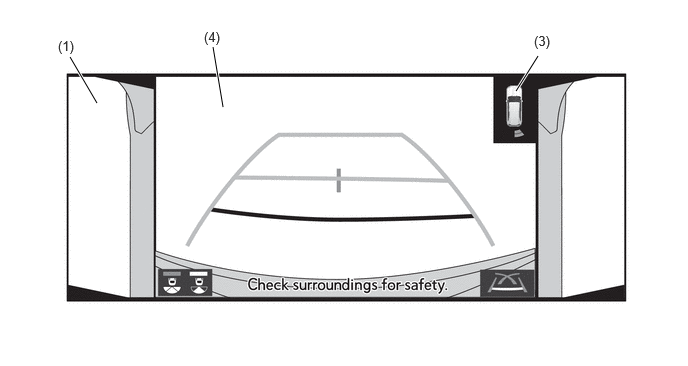
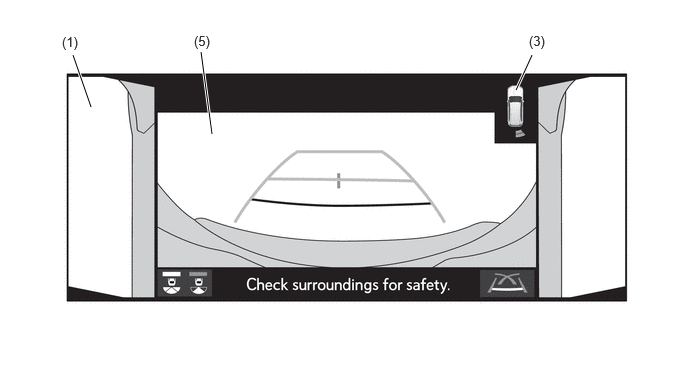
- HINT:
-
The illustration shown is an example only. The illustration may differ from the actual vehicle screen.
| Item | Description | |
|---|---|---|
|
*1: See Panoramic View and Wide Front View for the display content. *2: See Panoramic View and Rear View for the display content. *3: See Panoramic View and Wide Rear View for the display content. |
||
| (1) | Side View | An image of the area to the side of the vehicle captured by the left and right side television camera assembly. |
| (2) | Wide Front View*1 | An image captured by the front television camera assembly of the area in front of the vehicle. |
| (3) | Toyota Parking Assist-sensor Information | If a stationary object is detected when the Toyota parking assist-sensor is activated, the approximate distance between the vehicle and the stationary object is displayed. |
| (4) | Rear View*2 | An image captured by the rear television camera assembly of the area to the rear of the vehicle. |
| (5) | Wide Rear View*3 | An image captured by the rear television camera assembly of the area to the rear of the vehicle. |
Moving View
This view combines images from the front, rear, left and right side television camera assemblies to display an image of the vehicle from a viewpoint diagonally above the vehicle. The displayed image rotates 360 degrees around the vehicle displayed on the screen to assist the driver to confirm the safety of the surroundings. Furthermore, after the image of the vehicle from a viewpoint diagonally above the vehicle rotates a full 360 degrees, an overhead view of the vehicle is displayed.
Using the rotation pause button, the rotation of the moving view can be paused and unpaused at will.
When all of the following conditions are met, the moving view will be displayed.
|
·
Shift position is P.
·
Toyota parking assist-sensor is on.
·
The VIEW switch is pressed. |
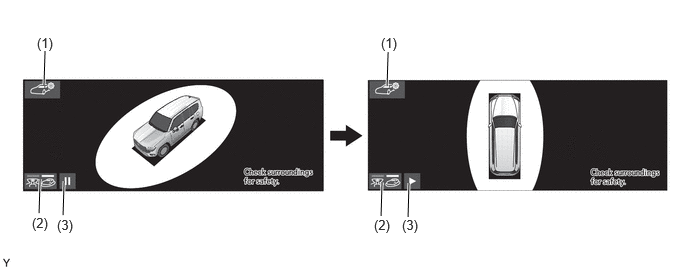
- HINT:
-
The illustration shown is an example only. The illustration may differ from the actual vehicle screen.
| Item | Description | |
|---|---|---|
| (1) | Body Color Setting Switch | Displays the body color setting screen. |
| (2) | Display Mode Switching Button | Changes the display mode. |
| (3) | Rotation Pause Button | Pauses and unpauses the rotation of the moving view. |
- HINT:
-
·
When the shift position is changed to D or N while the moving view screen is displayed, the screen transitions to the panoramic view and wide front view screen.
·The driver can change the body color of the vehicle icon displayed by the panoramic view monitor system to the desired color via the body color setting screen.
See Through View
By combining the images from cameras on the front, rear, and both sides of the vehicle, a simulated video display of the area around the vehicle is created. By reducing the size of blind spots from inside the vehicle, it assists the driver to confirm the safety of the area around the vehicle.
Using the rotation pause button, the rotation of the see through view can be paused and unpaused at will.
When all of the following conditions are met, the see through view will be displayed.
|
·
Shift position is P.
·
Toyota parking assist-sensor is on.
·
The VIEW switch is pressed. |
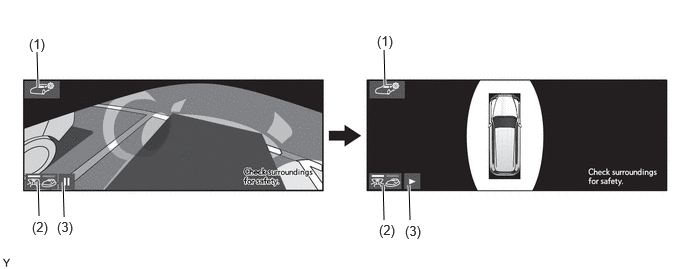
| Item | Description | |
|---|---|---|
| (1) | Body Color Setting Switch | Displays the body color setting screen. |
| (2) | Display Mode Switching Button | Changes the display mode. |
| (3) | Rotation Pause Button | Pauses and unpauses the rotation of the moving view. |
- HINT:
-
·
When the shift position is changed to D or N while the see through view screen is displayed, the screen transitions to the panoramic view and wide front view screen.
·The driver can change the body color of the vehicle icon displayed by the panoramic view monitor system to the desired color via the body color setting screen.
Panoramic View Zoom Function
If objects on the monitor are small and difficult to see while the panoramic view screen is displayed, this function can enlarge either the front or back area.
Either the front or back area of the panoramic view screen can be selected to enlarge the selected area.
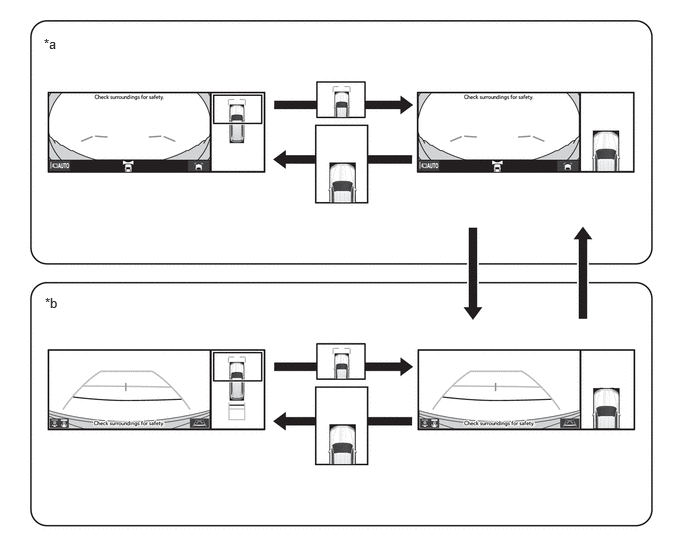
| *a | Panoramic View and Wide Front View | *b | Panoramic View and Rear View |
- HINT:
-
The panoramic view enlarged display differs from the normal panoramic view screen and does not display guide lines.
When all of the following conditions are met, the panoramic view magnification function can be used.
|
·
The vehicle speed is approximately 12 km/h (7 mph) or less
·
Toyota parking assist-sensor is on. |
When any of the following conditions are met, the panoramic view magnification function is automatically canceled.
|
·
The vehicle speed is approximately 12 km/h (7 mph) or more
·
Toyota parking assist-sensor is off. |
Panoramic View Monitor Screen Transition
The panoramic view monitor assists the driver to confirm the conditions around the vehicle while driving at low speeds and when parking.
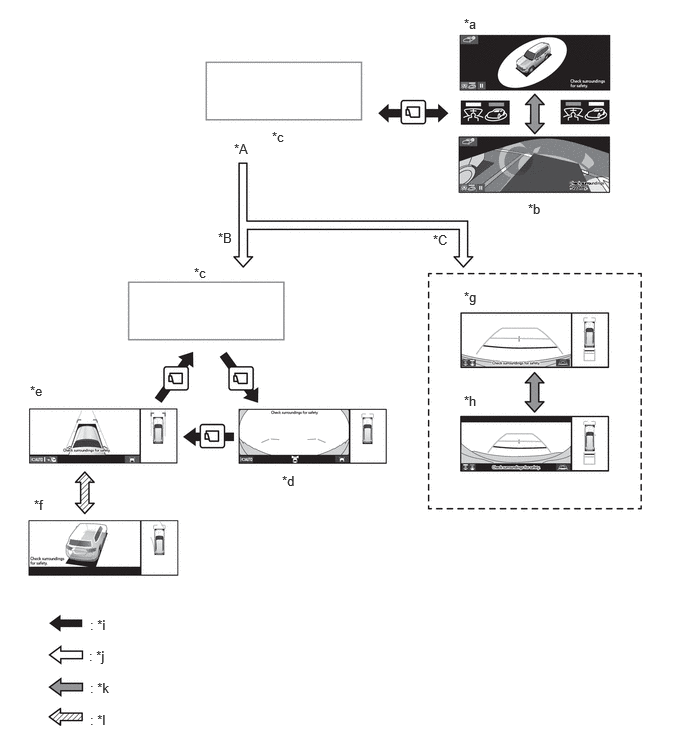
| *A | Shift Position P | *B | Except Shift Position P and R |
| *C | Shift Position R | - | - |
| *a | Moving View | *b | See Through View |
| *c | Navigation Display etc. | *d | Panoramic View and Wide Front View |
| *e | Panoramic View and Side Clearance View | *f | Panoramic View and Cornering View |
| *g | Panoramic View and Rear View | *h | Panoramic View and Wide Rear View |
| *i | VIEW Switch is Pressed. | *j | Shift Position Operation |
| *k | Display Mode Switching Button is Pressed. | *l | Steering Operation |
DIAGNOSIS
The parking assist ECU is equipped with a diagnosis function which can display a diagnosis menu for the multi-terrain monitor system. For details, refer to the Repair Manual.