NM38G0E _56 Audio / Visual / Telematics _100513 TELEMATICS _0489093 TELEMATICS SYSTEM(for Toyota Connected Services) DE DETAILS F
TELEMATICS TELEMATICS SYSTEM(for Toyota Connected Services) DETAILS MANUAL (SOS) SWITCH INDICATOR
CONSTRUCTION
a.
A manual (SOS) switch is located in the map light assembly.
b.
The manual (SOS) switch indicator, which shows the system status, is built into the manual (SOS) switch.
c.
The manual (SOS) switch is illuminated for enhanced visibility.
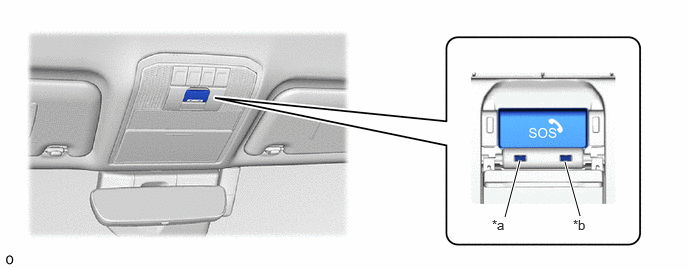
5.26,2.26 5.417,1.667 true 6.042,2.25 5.885,1.688 true 5.125,2.26 5.438,2.458 0.313,0.198 10 false *a 5.969,2.26 6.281,2.458 0.313,0.198 10 false *b
| *a | Manual (SOS) Switch Green Indicator | *b | Manual (SOS) Switch Red Indicator |
d.
Indicators shown in each mode are as follows:
| DCM Status | Plant Mode | Before CUST (Customer Account Management) Activation | After CUST (Customer Account Management) Activation | |||
|---|---|---|---|---|---|---|
| Green | Red | Green | Red | Green | Red | |
| IG-OFF | Off | Off | Off | Off | Off | Off |
| NAD (Network Access Device) boot-up | Off | Blinks (0.25-second intervals) | The green and red indicators are alternatingly illuminated at 2-second intervals. | |||
| IG-ON (Normal) | Off | Blinks (0.25-second intervals) | Off | Off | On | Off |
| IG-ON (Malfunction) | Off | On | Off | On | Off | On |
| Emergency call/SVT ongoing (Normal)* | Blinks (0.5-second intervals) | Off | Blinks (0.5-second intervals) | Off | Blinks (0.5-second intervals) | Off |
| Emergency call/SVT ongoing (Malfunction)* | Blinks (0.5-second intervals) | On | Blinks (0.5-second intervals) | On | Blinks (0.5-second intervals) | On |
| Reprogramming ongoing | On | On | On | On | On | On |
- HINT:
-
* No use case of emergency call in Plant Mode. Stolen Vehicle Tracking Service (SVT) function not available before CUST (Customer Account Management) activation (including Plant Mode).