METER / GAUGE / DISPLAY METER / GAUGE SYSTEM DETAILS COMBINATION METER
CONSTRUCTION
Speedometer
The vehicle speed is displayed.
Tachometer
The engine speed is displayed.
Engine Coolant Temperature Gauge
The engine coolant temperature is displayed.
Fuel Gauge
The remaining amount of fuel is displayed.
Voltmeter
The voltage is displayed.
Oil Pressure Gauge
The engine oil pressure is displayed.
Shift Position Indicator
The current shift position is displayed.
ODO/TRIP Meter
The odometer, trip meter A or trip meter B is displayed.
The item shown can be switched by pressing the ODO/TRIP switch.
| Display Range | 0 - 999999 km |
| Function | Displays 999999 km when there is a display overflow. |
| Display Range | 0.0 - 9999.9 km |
| Function | When there is a display overflow, the display returns to 0.0 km from 9999.9 km and the total continues. |
Outside Temperature Gauge
The outside temperature is displayed.
| Display Range | -40 to 50 °C (-40 to 122°F) |
| Function |
·
A signal from the air conditioning amplifier assembly is processed and the outside air temperature is displayed.
·
The displayed value is updated approximately every second. |
Rheostat
A rheostat function which can be used to control the brightness of the meter panel is installed.
Brightness can be adjusted in 22 levels, and the adjustment range changes based on whether it is determined to be day or night.
Brightness adjustment is performed using the display settings on the multi-information display.
Warning lights and indicator lights
Warning indicators are provided in the combination meter, and illuminate or blink to show the status of each system.
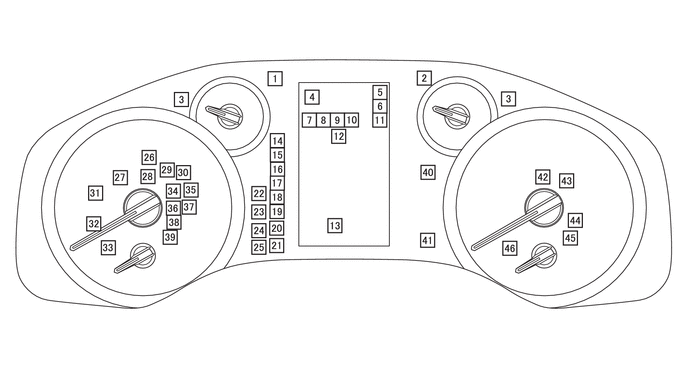
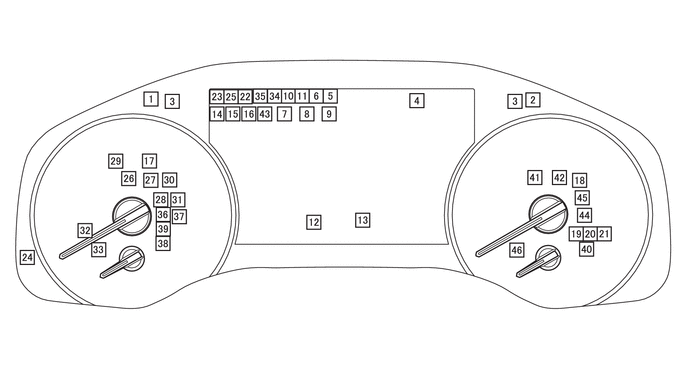
| No. | Item* | Name | Color | Outline |
|---|---|---|---|---|
|
*: The application of indicator differs by vehicle specification. |
||||
| 1 |

|
Headlight High Beam Indicator | Blue | Illuminates when the high beams are illuminated. |
| 2 |

|
Tail Light Indicator | Green | Illuminates when the tail lights are illuminated. |
| 3 |

|
Turn Signal Indicator | Green | Blinks when the turn signal switch or hazard warning signal switch assembly is ON. |
| 4 |

|
Road Sign Icons | - | The applicable road sign icon illuminates when the RSA system recognizes a road sign. |

|
||||

|
||||

|
||||
| 5 |

|
Cruise Control Indicator | Green |
·
Illuminates when the cruise control system is ON.
·
Does not illuminate when a malfunction occurs in the cruise control system even when the system is ON. |
|
|
Cruise Control Indicator (Constant Speed Control Mode) | Green |
·
Illuminates when the dynamic radar cruise control system (constant speed control mode) is ON.
·
Does not illuminate when a malfunction occurs in the dynamic radar cruise control system even when the system is ON. |
|

|
Cruise Control Indicator (Vehicle-to-vehicle Distance Control Mode) | Green |
·
Illuminates when the dynamic radar cruise control system (vehicle-to-vehicle distance control mode) is ON.
·
Does not illuminate when a malfunction occurs in the dynamic radar cruise control system even when the system is ON. |
|
| 6 |

|
Cruise SET Indicator | Green | Illuminates when the set vehicle speed of the cruise control system/dynamic radar cruise control system is set. |
| 7 |

|
Downhill Assist Control System Indicator | Green |
·
Illuminates when the downhill assist control is ON.
·
Blinks when the shift position is changed to N while the downhill assist control is ON.
·
Blinks when downhill assist control stops temporarily. |

|
CRAWL Control Indicator | Green |
·
Illuminates when the CRAWL is ON.
·
Blinks when the CRAWL is canceled.
·
Blinks when the CRAWL stops temporarily. |
|
| 8 |

|
CRAWL Control Mode Display | Green | Displays the status of the CRAWL speed operation. |

|
Power Mode Indicator | Green | Illuminates when the Power mode is selected. | |
| 9 |

|
Second Start Mode Indicator | Green | Illuminates when the second start mode is selected. |

|
Drive Mode Indicator (ECO) | Green | Illuminates when the drive mode is ECO selected. | |

|
Drive Mode Indicator (COMFORT) | Green | Illuminates when the drive mode is COMFORT selected. | |

|
Drive Mode Indicator (SPORT) | Green | Illuminates when the drive mode is SPORT selected. | |

|
Drive Mode Indicator (SPORT S) | Green | Illuminates when the drive mode is SPORT S selected. | |

|
Drive Mode Indicator (SPORT S+) | Green | Illuminates when the drive mode is SPORT S+ selected. | |

|
Drive Mode Indicator (CUSTOM) | Green | Illuminates when the drive mode is CUSTOM selected. | |

|
Multi-terrain Select Indicator (AUTO) | Green | Illuminates when the multi-terrain select mode is AUTO selected. | |

|
Multi-terrain Select Indicator (DIRT) | Green | Illuminates when the multi-terrain select mode is DIRT selected. | |

|
Multi-terrain Select Indicator (SAND) | Green | Illuminates when the multi-terrain select mode is SAND selected. | |

|
Multi-terrain Select Indicator (MUD) | Green | Illuminates when the multi-terrain select mode is MUD selected. | |

|
Multi-terrain Select Indicator (DEEP SNOW) | Green | Illuminates when the multi-terrain select mode is DEEP SNOW selected. | |

|
Multi-terrain Select Indicator (ROCK) | Green | Illuminates when the multi-terrain select mode is ROCK selected. | |
| 10 |

|
Eco Driving Indicator | Green | Illuminates when the vehicle is being driven in an eco-friendly manner. |
| 11 |

|
LDA Indicator LTA Indicator |
White | Illuminates when the LDA/LTA system is ON. |
| Green |
·
Illuminates when LDA/LTA system is operating (yaw/steering assist is being performed).
·
Illuminates when the emergency steering assist is operating. |
|||
| Amber |
·
Blinks when a lane departure alert is being output.
·
Illuminates when a malfunction occurs in the LDA/LTA system. |
|||
| 12 |

|
Ice Warning Indicator | White |
·
Illuminates when the outside air temperature is 3 °C (37.4 °F) or less to warn the driver that the road surface may be icy.
·
After illuminating, turns off when the outside air temperature is 5 °C (41 °F) or more. |
| 13 |

|
Rear Passenger Seat Belt Warning Light | Red | Illuminates/blinks when the rear passenger seat belt is unfastened. |
| 14 |

|
Automatic High Beam Indicator | Green | Illuminates when the Automatic High Beam (AHB) system is operating. |
| Adaptive High Beam Indicator | Green | Illuminates when the Adaptive High beam System (AHS) is operating. | ||
| 15 |

|
Front Fog Light Indicator | Green | Illuminates when the front fog lights are illuminated. |
| 16 |

|
Rear Fog Light Indicator | Amber | Illuminates when the rear fog lights are illuminated. |
| 17 |

|
Tire Pressure Warning Light | Amber |
·
Illuminates when the tire pressure of any tire decreases below the threshold.
·
Illuminates/blinks when a tire pressure warning system malfunction occurs.
·
Blinks 3 times when the system starts initialization. |
| 18 |

|
Glow Indicator | Amber | Illuminates under the control of the ECM during glow plug residual heat. |
| 19 |

|
Front Differential Lock Indicator | Red |
·
Blinks while switching the front differential between free and lock.
·
Illuminates when the front differential lock system is lock mode.
·
Blinks when the front differential lock system malfunction occurs.
·
Blinks 3 times when the front differential lock system switching condition is violated. |
| 20 |

|
Center Differential Lock Indicator | Amber |
·
Blinks while switching the center differential between free and lock.
·
Illuminates when the center differential lock system is lock mode.
·
Blinks when the center differential lock system malfunction occurs.
·
Blinks 3 times when the center differential lock system switching condition is violated. |
| 21 |

|
Rear Differential Lock Indicator | Red |
·
Blinks while switching the rear differential between free and lock.
·
Illuminates when the rear differential lock system is lock mode.
·
Blinks when the rear differential lock system malfunction occurs.
·
Blinks 3 times when the rear differential lock system switching condition is violated. |
| 22 |

|
Toyota Parking Assist Sensor OFF Indicator | Amber |
·
Illuminates when the Toyota parking assist sensor system is OFF.
·
Illuminates when an Toyota parking assist sensor system malfunction occurs. |
| 23 |

|
BSM OFF Indicator | Amber |
·
Illuminates when the Blind Spot Monitor (BSM) system is set to OFF.
·
Illuminates when a BSM system malfunction occurs. |
| 24 |

|
RCD OFF Indicator | Amber |
·
Illuminates when the Rear Camera Detection (RCD) function is set to OFF.
·
Illuminates when the RCD function is malfunctioning. |
| 25 |

|
RCTA OFF Indicator | Amber |
·
Illuminates when the Rear Crossing Traffic Alert (RCTA) function is set to OFF.
·
Illuminates when the RCTA is malfunctioning. |
| 26 |

|
PKSB OFF Indicator | Amber |
·
Illuminates when the ParKing Support Brake (PKSB) system is set to OFF.
·
Illuminates when the PKSB system is malfunctioning. |
| 27 |

|
PCS OFF Warning Light | Amber |
·
Illuminates when the Pre-Collision System (PCS) is set to OFF.
·
Illuminates 3 seconds when the ignition switch is turned to on (IG).
·
Illuminates when the VSC system is set to OFF.
·
Illuminates when in L4 mode.
·
Illuminates when the PCS is temporarily unavailable.
·
Illuminates when the PCS is malfunctioning. |
| 28 |

|
ABS Warning Light | Amber |
·
Illuminates when a malfunction occurs that prevents the ABS system from operating.
·
Illuminates when there is a communication malfunction with the No. 2 skid control ECU. |
| 29 |

|
Power Steering System Warning Light | Amber | Illuminates when a power steering system malfunction which limits assist force occurs. |
| 30 |

|
VSC OFF Indicator | Amber |
·
Illuminates when the VSC system is set to OFF.
·
The status is retained until the ignition switch is turned off when there is a communication malfunction with the No. 2 skid control ECU. |
| 31 |

|
Slip Indicator | Amber |
·
Blinks when the TRC or VSC system is operating.
·
Illuminates when the TRC or VSC system is malfunctioning.
·
Illuminates when there is a communication malfunction with the No. 2 skid control ECU. |
| 32 |

|
Security Indicator Light | Red | Blinks when the theft deterrent system or immobiliser system is set. |
| 33 |

|
SRS Warning Light | Red |
·
Illuminates when the airbag system is malfunctioning.
·
Illuminates after the airbag system deploys. |
| 34 |

|
Stop and Start Cancel Indicator | Amber |
·
Illuminates when the stop and start system is cancel state.
·
Blinks when the stop and start system is malfunctioning. |
| 35 |

|
Stop and Start Indicator | Green |
·
Illuminates when the engine is stopped due to stop and start control.
·
Blinks when the stop and start system is malfunctioning. Blinks when the driver door is opened with the shift lever in D during idling stop. |
| 36 |

|
Brake Warning Light (Amber) | Amber |
·
Illuminates when a minor malfunction of the brake system is detected which does not prevent the vehicle from being driven.
·
Illuminates when the electric parking brake system is malfunctioning. |
| 37 |

|
Driver/Front Passenger Seat Belt Warning Light | Red |
·
Illuminates/blinks when the driver seat or passenger seat seatbelt is unfastened and the ignition switch is turned to ON.
·
Blinks when the vehicle speed is 20 km/h (12.4 mph) or higher with the seat belt not fastened, or whenever the vehicle is not parked (when the shift position is not in P or the parking brake is not applied at a vehicle speed of 1.75 km/h (1.1 mph) or higher) with the seat belt not fastened.
·
Illuminates after blinking for a certain period of time. |
| 38 |

|
Parking Brake Warning Light | Red |
·
Illuminates when the electric parking brake is operating.
·
Blinks when the electric parking brake system cannot operate when the electric parking brake switch is operated. |
| 39 |
|
Brake Warning Light (Red) | Red |
·
Illuminates when normal brake performance could decrease due to a malfunction in the brake actuator assembly or other part.
·
Illuminates when the brake fluid level is less than the threshold.
·
Illuminates when there is a communication malfunction with the No. 2 skid control ECU. |
| 40 |

|
Low Speed Four-wheel Drive Indicator | Amber |
·
Blinks while switching the transfer gear ratio between high and low.
·
Illuminates when the transfer gear ratio is L4 mode.
·
Blinks when the transfer shifting system malfunction occurs. |
| 41 |

|
Malfunction Indicator Light (MIL) | Amber | Illuminates/blinks when the engine control system is malfunctioning. |
| 42 |

|
Urea Solution Level Warning | Amber | Illuminates when the urea solution level is below the threshold. |
| 43 |

|
Turn Assist Indicator | Green |
·
Illuminates when the turn assist function is operating.
·
Blinks when the turn assist function stops temporarily. |
| 44 |

|
Brake Hold Standby Indicator | Green | Illuminates when the brake hold standby conditions are met. |
| 45 |

|
Brake Hold Operated Indicator | Amber |
·
Illuminates when the brake hold control system is operating.
·
Blinks when a malfunction occurs in the brake hold control system. |
| 46 |

|
Low Fuel Level Warning Light | Amber | Illuminates when the fuel level is below the threshold.
Except Models with Dual Fuel Tank
·
approximately 12.0 liters
Models with Dual Fuel Tank
·
approximately 16.5 liters |
Warning Indicator Active Circuit
When a wiring malfunction or communication malfunction occurs between the combination meter assembly and each system, the active circuit turns on or blinks the indicator for the corresponding system using meter control.
| System | Warning light / indicator light | Drive Method |
|---|---|---|
| Engine Control System | MIL | Illuminates |
| Brake Control System |
·
Brake Warning Light (Red)
·
Brake Warning Light (Amber)
·
ABS Warning Light
·
Slip Indicator |
Illuminates |
| Power Steering System | Power Steering System Warning Light | Illuminates |
| Airbag System | SRS Warning Light | Illuminates |
| Pre-Collision System (PCS) | PCS OFF Warning Light | Illuminates |
| Toyota Parking Assist-sensor System | Toyota Parking Assist Sensor OFF Indicator | Illuminates |
| Lane Departure Alert (LDA) System | LDA Indicator | Illuminates |
| Lane Tracing Assist (LTA) System | LTA Indicator | Illuminates |
| ParKing Support Brake (PKSB) System | PKSB OFF Indicator | Illuminates |
Liquid Crystal Display (LCD) Monitor
The following information can be displayed on the LCD monitor:
| Item | Outline |
|---|---|
|
*1: Models with cruise control system *2: Models with dynamic radar cruise control system *3: Models with cruise control system or dynamic radar cruise control system *4: Models with LDA system *5: Models with LTA system *6: Except models with 1GR-FE engine *7: Models with downhill assist control *8: Models with CRAWL control *9: Models with RSA system *10: Models with multimedia system or navigation system |
|
| Indicator | When the display conditions are met, the following indicators illuminate.
·
Cruise Control Indicator*1
·
Cruise Control Indicator (Constant Speed Control Mode)*2
·
Cruise Control Indicator (Vehicle-to-Vehicle Distance Control Mode)*2
·
Cruise SET Indicator*3
·
LDA Indicator*4
·
LTA Indicator*5
·
Eco Driving Indicator
·
Drive Mode Indicator (ECO/SPORT)*6
·
Downhill Assist Control System Indicator*7
·
CRAWL Control Indicator*8
·
CRAWL Control Mode Display*8
·
Multi-terrain Select Indicator (AUTO/DIRT/SAND/MUD/DEEP SNOW/ROCK)*9
·
Ice Warning Indicator
·
Rear Seat Belt Warning |
| Driving Support System Information | The operation condition of the following items is displayed:
·
Dynamic Radar Cruise Control System*2
·
Lane Departure Alert (LDA) System*4
·
Lane Tracing Assist (LTA) System*5
·
Road Sign Assist (RSA) System*9 |
| Drive Mode*6 | The currently selected drive mode is displayed:
·
ECO Mode
·
NORMAL Mode
·
SPORT Mode |
| Multi-information Display | The following information can be displayed on the multi-information display by switching the tabs.
·
Fuel Economy Tab
·
Driving Assist System Information Tab
·
Audio Information Tab*10
·
Vehicle Information Tab
·
Settings Tab
·
Warning Message Tab |
| Clock | The current time is displayed. |
| Shift Position Indicator | The current shift position is displayed. |
| Outside Temperature |
·
The outside temperature is displayed.
·
When the outside temperature drops below 3°C (37°F), an ice warning is displayed to warn the driver to drive with caution due to possibly icy road conditions. After the ice warning blinks 10 times, the ice warning stay on. When the temperature reaches 5°C (41°F), the ice warning goes off. |
| Rear Seat Belt Warning Indicator | The state of wearing the rear seat belt is displayed. |
| Vehicle Power Source State |
·
The vehicle power source state is displayed.
·
The following indicator is displayed.
-
Key Certification Indicator |
| ODO/TRIP Meter |
·
The odometer, trip meter A or trip meter B is displayed.
·
The item shown can be switched by pressing the ODO/TRIP switch. |
| Item | Outline |
|---|---|
|
*1: Models with BSM system *2: Models with AHB system *3: Models with AHS *4: Models with front fog light *5: Models with rear fog light *6: Models with cruise control system *7: Models with dynamic radar cruise control system *8: Models with LDA system *9: Models with LTA system *10: Models with AVS *11: Models without AVS *12: Models with AVS and navigation system *13: Except models with 1GR-FE engine *14: Models with DAC/CRAWL switch *15: Models with multi-terrain select *16: Models with RSA system *17: Models with multimedia system or navigation system |
|
| Voltmeter | The current voltage is displayed. |
| Oil Pressure Gauge | The current engine oil pressure is displayed. |
| Indicator | When the display conditions are met, the following indicators illuminate.
·
BSM OFF Indicator*1
·
Toyota Parking Assist Sensor OFF Indicator
·
Automatic High Beam Indicator*2/Adaptive High Beam Indicator*3
·
Front Fog Light Indicator*4
·
Rear Fog Light Indicator*5
·
Cruise Control Indicator*6
·
Cruise Control Indicator (Constant Speed Control Mode)*7
·
Cruise Control Indicator (Vehicle-to-Vehicle Distance Control Mode)*7
·
Cruise SET Indicator
·
LDA Indicator*8
·
LTA Indicator*9
·
Eco Driving Indicator
·
Drive Mode Indicator (ECO/COMFORT*10/SPORT*11/SPORT S*10/SPORT S+*11/CUSTOM*12)*13
·
Downhill Assist Control System Indicator*14
·
CRAWL Control Indicator*14
·
CRAWL Control Mode Display*14
·
Turn Assist Indicator*14
·
Multi-terrain Select Indicator (AUTO/DIRT/SAND/MUD/DEEP SNOW/ROCK)*15
·
Ice Warning Indicator
·
Rear Seat Belt Warning |
| Driving Support System Information | The operation condition of the following items is displayed:
·
Dynamic Radar Cruise Control System*7
·
Lane Departure Alert (LDA) System*8
·
Lane Tracing Assist (LTA) System*9
·
Road Sign Assist (RSA) System*16 |
| Drive Mode*13 | The currently selected drive mode is displayed:
·
ECO Mode
·
COMFORT Mode*10
·
NORMAL Mode
·
SPORT*11/SPORT S*10/SPORT S+*10 Mode
·
CUSTOM Mode*12 |
| Multi-information Display | The following information can be displayed on the multi-information display by switching the tabs.
·
Fuel Economy Tab
·
Driving Assist System Information Tab
·
Audio Information Tab*17
·
Vehicle Information Tab
·
Settings Tab
·
Warning Message Tab |
| Clock | The current time is displayed. |
| Shift Position Indicator | The current shift position is displayed. |
| Outside Temperature |
·
The outside temperature is displayed.
·
When the outside temperature drops below 3°C (37°F), an ice warning is displayed to warn the driver to drive with caution due to possibly icy road conditions. After the ice warning blinks 10 times, the ice warning stay on. When the temperature reaches 5°C (41°F), the ice warning goes off. |
| Rear Seat Belt Warning Indicator | The state of wearing the rear seat belt is displayed. |
| Vehicle Power Source State |
·
The vehicle power source state is displayed.
·
The following indicator is displayed.
-
Key Certification Indicator |
| ODO/TRIP Meter |
·
The odometer, trip meter A or trip meter B is displayed.
·
The item shown can be switched by pressing the ODO/TRIP switch. |
Multi-information Display
The following information can be displayed on the multi-information display by switching the tabs:
| Item | Outline |
|---|---|
|
*1: Models with dynamic radar cruise control system *2: Models with LDA system *3: Models with LTA system *4: Models with RSA system *5: Models with navigation system *6: Models with multimedia system or navigation system *7: Models with tire pressure warning system *8: Models with F33A-FTV engine *9: Models with PCS *10: Models with BSM system *11: Models with parking support brake system *12: Models with RCTA function *13: Models with headup display *14: Models with dynamic radar cruise control with road sign assist |
|
| Fuel Economy Tab | The following items can be displayed:
·
Fuel Consumption Graph
·
ECO Drive Indicator Zone Display
·
Digital Speedometer |
| Driving Assist System Information Tab | The following items can be displayed:
·
Dynamic Radar Cruise Control System Information*1
·
Lane Departure Alert (LDA) System Information*2
·
Lane Tracing Assist (LTA) System Information*3
·
Road Sign Assist (RSA) System Information*4
·
Navigation System Informartion*5 |
| Audio Information Tab*6 | The audio source or an audio track can be selected. |
| Vehicle Information Tab | The following items can be displayed:
·
System Status
·
4WD Status
·
Tire Inflation Pressure Display*7
·
Remaining Urea Solution Display*8 |
| Settings Tab | The following settings can be changed:
·
Rheostat
·
Lane Departure Alert (LDA) System*2
·
Lane Tracing Assist (LTA) System*3
·
Pre-Collision System (PCS)*9
·
Blind Spot Monitor (BSM) System*10
·
Toyota Parking Assist-sensor System*11
·
Rear Crossing Traffic Alert (RCTA) Function*12
·
Headup Display*13
·
Road Sign Assist (RSA) System*4
·
Dynamic Radar Cruise Control System*14
·
Vehicle Settings
·
Meter Settings |
| Warning Message Tab | Warning messages about vehicle malfunctions are displayed. |
Display Function Flow
The multi-information display can be switched as shown in the flow chart below:
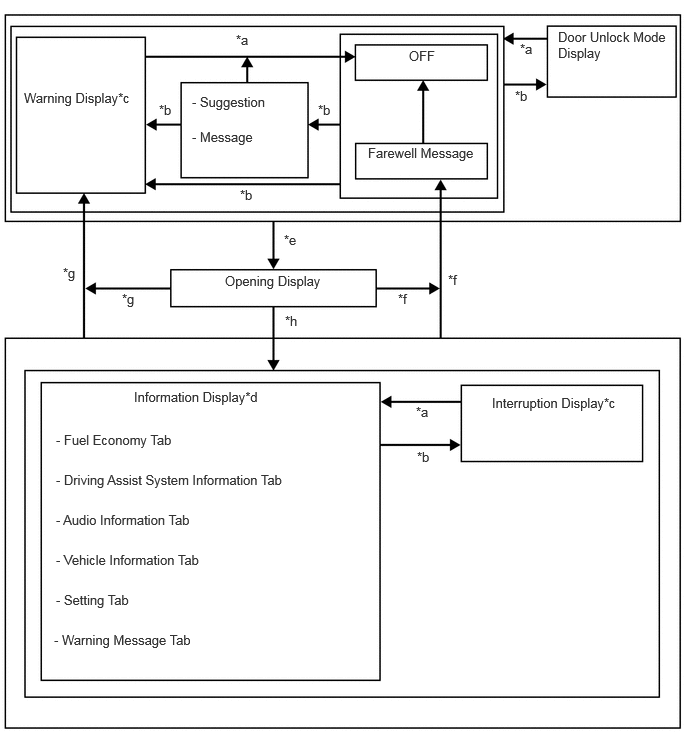
| *a | Conditions are not met. |
| *b | Conditions are met. |
| *c |
·
Immediately interrupts and displays for 6 seconds when there is a new message display request
·
Displays each message from the highest priority for 6 seconds and then switches displays at a 2-second interval, when there are multiple massages to display |
| *d | Item or display is selected by operating the steering pad switch assembly. |
| *e | IG off to ACC or ON. |
| *f | IG ON to off (Conditions are not met). |
| *g | IG ON to off (Conditions are met). |
| *h | After IG ON |
Multi-information Display Operation
The information currently displayed can be switched by operating the steering pad switch assembly.
Fuel Economy Tab
The fuel economy tab displays information for the fuel consumption graph, digital speedometer and eco driving indicator zone display.
Fuel Consumption Graph
| Display Range | 0.0 to 20.0 km/L |
| Minimum Unit | 0.1 km/L |
| Function |
·
Displays the instantaneous fuel economy calculated from the driving distance (calculated based on the vehicle speed signal) and fuel consumption signal.
·
The displayed value is updated every 10 seconds.
·
When the value cannot be calculated, "--.-" is displayed. |
| Display Range | 0.0 to 99.9 km/L |
| Minimum Unit | 0.1 km/L |
| Function |
·
Displays the average fuel consumption calculated from the driving distance (calculated based on the vehicle speed signal) and fuel consumption signal after the engine starts.
·
The displayed value is updated every 10 seconds.
·
When the value cannot be calculated, the display changes to blank. |
| Display Range | 0.0 to 99.9 km/L |
| Minimum Unit | 0.1 km/L |
| Function |
·
Displays the average fuel consumption calculated from the driving distance (calculated based on the vehicle speed signal) and fuel consumption signal.
·
The displayed value is updated every 10 seconds.
·
When the value cannot be calculated, the display changes to blank. |
| Display Range | 0.0 to 99.9 km/L |
| Minimum Unit | 0.1 km/L |
| Function |
·
Displays the average fuel consumption calculated from the driving distance from the previous refueling (calculated based on the vehicle speed signal) and fuel consumption signal.
·
The displayed value is updated every 10 seconds.
·
When the value cannot be calculated, the display changes to blank. |
| Display Range | 1 to 1999 km |
| Minimum Unit | 1 km |
| Function |
·
From the vehicle speed signal, fuel consumption signal, etc., the fuel economy is learned*1, the estimated distance to empty is calculated*2 from the current amount of fuel remaining signal and is displayed.
·
The displayed value is updated every second.
·
If the value cannot be calculated, the display will be blank.
|
ECO Driving Indicator Zone Display
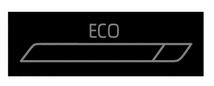
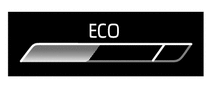
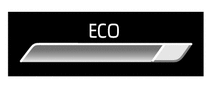
When the ECM, using information (such as vehicle speed, accelerator pedal depressed volume, engine speed signal (engine r/min data), and so on), calculates that the vehicle is driven in an Eco-friendly manner, it turns on Eco driving indicator and shows the bar graph of ECO driving indicator zone display within zone of Eco driving.
The following table shows the operation of Eco driving indicator and ECO driving indicator zone display in different driving conditions:
| Driving Condition | Eco Driving Indicator | ECO Driving Indicator Zone Display |
|---|---|---|
| While Stopped | Turns off |
|
| While Eco Driving | Illuminates |
|
| While Non-eco Driving | Turns off |
|
| When any of the following conditions is met, operation is stopped.
·
Ignition switch off
·
Engine stopped
·
Shift position is not D.
·
Drive mode is not NORMAL or ECO.
·
The vehicle is being driven at a speed of approximately 130 km/h (81 mph) or higher. |
Turns off |
|
Digital Speedometer
The vehicle speed is displayed digitally.
Driving Assist System Information Tab
The driving assist system information tab displays the operation conditions of the dynamic radar cruise control system*1, LDA system*2 and the LTA system*3, as well as a compass and destination guidance*4 linked with the navigation system.
*1: Models with dynamic radar cruise control system
*2: Models with LDA system
*3: Models with LTA system
*4: Models with navigation system
Audio Information Tab (Models with Multimedia System or Navigation System)
Audio information displays information (status information) on audio. It also allows for audio sources to be switched and songs to be selected.
Vehicle Information Tab
The vehicle information tab displays information of the tire pressure warning system information, 4WD status and system status.
System Status
The operation conditions of the PCS*1, Toyota parking assist-sensor system*2, BSM system*3 and RCTA function*4 is displayed.
*1: Models with PCS
*2: Models with Toyota parking assist-sensor system
*3: Models with BSM system
*4: Models with RCTA function
4WD Status
Slip wheel, G monitor* and steering angle is displayed.
*: When in SPORT/SPORT S/SPORT S+ mode
Tire Inflation Pressure Display (Models with Tire Pressure Warning System)
Tire pressure signals are received from each tire, and this information is used to display numbers for each location where the tire is installed.
This will be blank if tire pressure signals cannot be received.
Remaining Urea Solution Display (Models with F33A-FTV Engine)
The remaining amount of urea solution is displayed.
Settings Tab
The items displayed on the multi-information display can be customized.
The following items can be selected on the information setting screen.
| Item | Available Setting |
|---|---|
| Meter Brightness | Meter panel luminance can be changed by using the multi-information display. |
| Item | Available Setting |
|---|---|
|
*: Models without multimedia system or navigation system |
|
| On the hour setting | Sets the minute display to "00" via the enter switch on the steering pad switch.
|
| Clock | Select to adjust clock of the combination meter. |
| Item | Available Setting | |
|---|---|---|
|
*: Models with LDA system |
||
| LDA | Alert | Alert method can be selected:
·
Steering wheel vibration (Icon is displayed)
·
Buzzer (Icon is displayed) |
| Sensitivity | Sensitivity of lane departure alert can be changed:
·
High (Icon is displayed)
·
Standard (Icon is displayed) |
|
| Sway Warning | Vehicle sway warning function can be set to on/off:
·
ON
·
OFF |
|
| Sway Sensitivity | Vehicle sway sensitivity can be selected:
·
High (Icon is displayed)
·
Standard (Icon is displayed)
·
Low (Icon is displayed) |
|
| Item | Available Setting | |
|---|---|---|
|
*: Models with LTA system |
||
| LTA | Lane Center | Setting for lane centering function can be set to on/off:
·
ON
·
OFF |
| Alert | Alert method can be selected:
·
Steering wheel vibration (Icon is displayed)
·
Buzzer (Icon is displayed) |
|
| Sensitivity | Sensitivity of lane departure alert can be changed:
·
High (Icon is displayed)
·
Standard (Icon is displayed) |
|
| Sway Warning | Vehicle sway warning function can be set to on/off:
·
ON
·
OFF |
|
| Sway Sensitivity | Vehicle sway sensitivity can be selected:
·
High (Icon is displayed)
·
Standard (Icon is displayed)
·
Low (Icon is displayed) |
|
| Item | Available Setting | |
|---|---|---|
|
*: Models with PCS |
||
| PCS | Sensitivity | PCS sensitivity can be selected:
·
Early (Icon is displayed)
·
Middle (Icon is displayed)
·
Late (Icon is displayed) |
| Functions | The PCS can be set to on/off:
·
ON
·
OFF |
|
| Item | Available Setting | |
|---|---|---|
|
*: Models with BSM system |
||
| BSM | The BSM system can be set to on/off:
·
ON
·
OFF |
|
| Brightness | Brightness of the outer rear view mirror indicator light can be changed:
·
Bright (Icon is displayed)
·
Dim (Icon is displayed) |
|
| Sensitivity | BSM system sensitivity can be selected:
·
Early (Icon is displayed)
·
Middle (Icon is displayed)
·
Later (Icon is displayed)
·
Only blind spots (Icon is displayed) |
|
| Item | Available Setting | |
|---|---|---|
|
*: Models with Toyota parking assist-sensor system |
||
| Toyota Parking Assist-sensor System | The Toyota parking assist-sensor system can be set to on/off:
·
ON
·
OFF |
|
| Volume | The volume of the warning buzzer can be selected:
·
1 (Icon is displayed)
·
2 (Icon is displayed)
·
3 (Icon is displayed) |
|
| Item | Available Setting | |
|---|---|---|
|
*: Models with RCTA Function |
||
| RCTA | The RCTA function can be set to on/off:
·
ON
·
OFF |
|
| Volume | The volume of the warning buzzer can be selected:
·
1 (Icon is displayed)
·
2 (Icon is displayed)
·
3 (Icon is displayed) |
|
| Item | Available Setting | |
|---|---|---|
|
*: Models with RCD Function |
||
| RCD | The RCD function can be set to on/off:
·
ON
·
OFF |
|
| Volume | The volume of the warning buzzer can be selected:
·
1 (Icon is displayed)
·
2 (Icon is displayed)
·
3 (Icon is displayed) |
|
| Item | Available Setting | |
|---|---|---|
|
*1: Models with headup display *2: Models with navigation system *3: Models with Toyota Safety Sense |
||
| HUD Main | The headup display can be set to on/off:
·
ON
·
OFF |
|
| HUD Brightness/Position |
·
The brightness and position of the display can be changed.
·
When changing the brightness of the HUD image, press the right or left switch of the steering pad switch assembly.
·
When changing the position of the HUD image, press the up or down switch of the steering pad switch assembly. |
|
| HUD Driving Support | Tachometer Settings
·
Blank
·
Eco Indicator
·
Tachometer The following items can set to on/off:
·
Navigation*2
·
Lane*2
·
Driving Assist*3
·
Compass*2
·
Audio |
|
| HUD Rotation |
·
The tilt of the HUD image can be changed.
·
When changing the tilt of the HUD image counterclockwise, press the left switch of the steering pad switch assembly.
·
When changing the tilt of the HUD image clockwise, press the right switch of the steering pad switch assembly. |
|
| Item | Available Setting | |
|---|---|---|
|
*1: Models with RSA system *2: Models without multiplex network steering ECU *3: Models with multiplex network steering ECU |
||
| RSA | The RSA system can be set to on/off:
·
ON
·
OFF |
|
| Notification Method | Notification method can be selected: Above Speed Limit
-
No Notification
-
Only Visual
-
Visual & Audio Overtaking
-
No Notification
-
Only Visual
-
Visual & Audio*2
-
Visual & Steering Wheel Vibration*3 Others
-
No Notification
-
Only Visual
-
Visual & Audio |
|
| Notification Level | Notification level can be selected:
·
10 km/h (5 mph)
·
5 km/h (3 mph)
·
2 km/h (1 mph) |
|
| Item | Available Setting | |
|---|---|---|
|
*1: Models with dynamic radar cruise control with road sign assist *2: Models with curve speed reduction control function |
||
| Dynamic Radar Cruise Control System | RSA*1 | The dynamic radar cruise control with road sign assist can be set to on/off:
·
ON
·
OFF |
| Curve Speed Reduction*2 | Curve speed reduction control function can be selected:
·
2 (Icon is displayed)
·
1 (Icon is displayed)
·
OFF |
|
| Item | Available Setting | |
|---|---|---|
|
*1: Models with power back door system *2: Models with hands free power back door *3: Models with stop and start system *4: Models with tire pressure warning system *5: Models with fingerprint authentication system |
||
| PBD*1 | System Settings | The power back door system can be set to on/off:
·
ON
·
OFF |
| Hands Free*2 | The hands free power back door can be set to on/off:
·
ON
·
OFF |
|
| Opening Adjustment | The opening angle can be selected:
·
User Settings (Icon is displayed)
·
5 (Icon is displayed)
·
4 (Icon is displayed)
·
3 (Icon is displayed)
·
2 (Icon is displayed)
·
1 (Icon is displayed) |
|
| Volume | The operation buzzer volume can be selected:
·
3 (Icon is displayed)
·
2 (Icon is displayed)
·
1 (Icon is displayed) |
|
| Stop and Start*3 | The idling stop time of stop and start system can be selected:
·
Standard
·
Extended |
|
| TPWS*4 | Set Pressure | The TPWS can be initialized. |
| Change Wheel | The tire pressure warning system ID can be selected. | |
| Setting Unit | The unit displayed can be selected:
·
kPa
·
psi
·
bar |
|
| Rear Seat Reminder | The rear seatbelt reminder can be set to on/off:
·
ON
·
OFF |
|
| My Settings | Setting | The following settings can be set:
·
Driver Change
·
Key Assignment
·
Driver Name Change
·
Driver Information Initialization |
| System Settings | The My Settings system can be set to on/off:
·
ON
·
OFF |
|
| Fingerprint Authentication*5 | Registration | The following fingerprint settings can be set:
·
Addition
·
Removal
·
All Removal |
| System Settings | The fingerprint authentication system can be set to on/off:
·
ON
·
OFF |
|
| Oil Maintenance | The oil maintenance management function can be reset. | |
| Item | Available Setting | |
|---|---|---|
|
*1: Models with navigation system *2: Models with multimedia system or navigation system *3: Models with voice recognition system *4: Models with stop and start system |
||
| Language | The language used on the multi-information display can be selected:
·
Arabic
·
Danish
·
English
·
Finnish
·
French
·
German
·
Hebrew
·
Hungarian
·
Indonesian
·
Italian
·
Malay
·
Polish
·
Portuguese
·
Romanian
·
Russian
·
Slovak
·
Spanish
·
Thai
·
Turkish
·
Ukrainian
·
Vietnamese
|
|
| Unit | The unit displayed on the multi-information display can be selected:
·
km (km/L, km/kWh)
·
km (L/100 km, kWh/100km)
·
miles (MPG, miles/kWh)
|
|
| Eco Driving Indicator | The Eco driving indicator can be set to on/off:
·
ON
·
OFF |
|
| Digital Speedometer | The digital speedometer can be set to on/off:
·
ON
·
OFF |
|
| Gadget Content | The gadget content displayed on the multi-information display can be selected:
·
No Display
·
Average Speed
·
Distance
·
Elapsed Time |
|
| Drive Information Calculation Type | The drive information calculation type can be selected:
·
After Start
·
After Reset
·
After Refuel |
|
| Fuel Economy Tab | Fuel Consumption Graph | The fuel economy type can be selected:
·
Trip Average
·
Total Average
·
Tank Average |
| Audio Information Tab | Audio information tab can be set to on/off:
·
ON
·
OFF |
|
| Vehicle Information Tab | Drive Info Type | The drive information type can be selected:
·
Trip
·
Total |
| Drive Info Items | The upper and lower of drive information items can be selected:
·
Average Speed
·
Distance
·
Elapsed Time |
|
| Pop-Up Display | Pop-up display can be set to on/off:
·
Turn-by-turn Navigation*1
·
Telephone*2
·
Volume Operation*2
·
Voice Control*3
·
Duration*4
·
Status*4 |
|
| Multi-information Display OFF | Multi-information display is turned off. | |
| Default Settings | The set items can be initialized. | |
Suggestion/Message
When a display condition is met depending on the vehicle conditions and the operations of each switch, the suggestion/message feature uses an interruption screen to display the following suggestions and messages.
| Suggestion/Message | Available Setting | Display Conditions |
|---|---|---|
| Turn Power Back Door Master Switch On? |
·
Yes
·
No |
When the power back door function is off and the power back door is attempted to be operated. |
| Could not Turn Master Switch On | - | When the main switch cannot be turned ON after the power back door main switch operation suggestion is executed. |
| Turn ON Headlamps | - | When it is judged to be nighttime, the vehicle is being driven, and the headlights are not illuminated. |
| Headlamps Are ON | - | When the ignition switch is off and the headlights are illuminated (when headlight dimmer switch not in AUTO position) |
| The headlights are not turned off while the vehicle is being driven after exiting a tunnel. | ||
| Headlamps Are ON Turn Headlamps OFF? |
·
Yes
·
No |
When the ignition switch is off and the headlights are illuminated (when headlight dimmer switch is in AUTO position) |
| Headlamps can not be Turned OFF | - | When the headlights cannot be turned off after headlights not turned off after stopping notification is executed. |
| Close Open Windows? |
·
Yes
·
No |
When any door window is open and the wipers are attempted to be operated. |
| When any door window is open and the vehicle is driven at high speed. | ||
| When any door window is open and the ignition switch is turned off. | ||
| Push "OK" to Stop Windows | - | When a door window close operation is being performed after close door windows when wipers are operating suggestion notification is executed. |
| When a door close operation is being performed after close door windows when driving at high speed suggestion notification is executed. | ||
| When a door window close operation is being performed after close door windows when exiting the vehicle suggestion notification is executed. | ||
| When a door window operation is being performed after the door windows returning to previous state notification is executed. | ||
| Windows cannot be Closed | - | When the windows cannot be closed after the door window close operation being performed when wipers are operated notification is executed. |
| When the windows cannot be closed after close door windows when driving at high speed suggestion notification is executed. | ||
| When the windows cannot be closed after the close door windows when exiting the vehicle suggestion notification is executed. | ||
| When the windows cannot be returned to their previous state after the door windows returning to previous state notification is executed. | ||
| Power Window Lock On | - | When the window lock switch is off and any passenger power window is attempted to be operated. |
Warning Mode Function
Warnings are displayed by interrupting the current screen with a screen indicating that a vehicle malfunction has occurred, in order to warn the driver of the malfunction.
The warning is displayed on the multi-information display and the buzzer also sounds based on the type of warning, in order to notify the driver as quickly as possible.
If there is only 1 warning, it will continue to be displayed.
If multiple warnings are output at the same time, they will be displayed in order from highest priority level (initial display will last 6 seconds). After all warnings have been displayed once, they will be repeatedly displayed in order from highest priority level at an interval of approximately 2 seconds.
| Message | Display Conditions |
|---|---|
|
*: Models with F33A-FTV engine |
|
| Replace fuel filter* | When the fuel filter is clogged. |
| Release Accelerator (and image display) |
When a shift operation is performed when the accelerator pedal is continually depressed. |
| Check Engine Visit Your Dealer | Engine system malfunction (without driving torque restriction). |
| Check Engine Reduced engine power Visit Your Dealer | Engine system malfunction (with driving torque restriction). |
| Engine Maintenance Required Visit Your Dealer | Engine system malfunction (without driving torque restriction). |
| Engine Coolant Temp High Stop in a Safe Place See Owner's Manual (and image display) |
When the engine coolant temperature is more than the threshold. |
| Oil pressure low Stop in a safe place See owner's manual (and image display) |
When the engine oil pressure is low. |
| Drive-Start Control Malfunction Visit Your Dealer (and image display) |
Drive start control function malfunction. |
| Brake Override Malfunction Visit Your Dealer (and image display) |
Brake override system malfunction. |
| Water in Fuel Filter See Owner's Manual* | When the amount of water separated in the fuel filter exceeds a certain amount. |
| Engine Oil Level Low Add or Replace | When the engine oil amount is below the threshold. |
| Accelerator and Brake Pedals Pressed Simultaneously (and image display) |
When the accelerator pedal and brake pedal are both depressed at the same time. |
| Fuel Low | When the fuel level is less than the threshold. |
| Oil Maintenance Required Soon | When there is 1000 km of remaining distance before it is necessary to replace the engine oil. (Updated remaining distance will be continuously displayed.) |
| Oil Maintenance Required Visit Your Dealer | When the distance at which it is necessary to replace the engine oil has been reached. |
| Check Fuel Cap | When the ignition switch is turned to ON without closing the fuel filler cap. |
| Message | Display Conditions |
|---|---|
|
*: Models with F33A-FTV engine |
|
| DPF full See Owner's Manual | When the regeneration of the DPF catalyst is insufficient. |
| DPF Manual Regeneration Available | When manual regeneration of DPF catalyst is possible. |
| DPF Full Manual Regeneration Required See Owner's Manual | When the regeneration of the DPF catalyst is insufficient and the DPR switch assembly needs to be operated. |
| Manual Regeneration in Progress Keep Flammables Away from Vehicle | When the DPF catalyst is regenerated by operating the DPR switch assembly. |
| Manual Regeneration Unavailable DPF Normal | When the DPR switch assembly is operated while the DPF catalyst cannot be regenerated. |
| DPF Regeneration in Progress | When regenerating DPF catalyst. |
| DPF Full Visit Your Dealer | DPF catalyst malfunction. |
| Message | Display Conditions |
|---|---|
|
*: Models with F33A-FTV engine |
|
| AdBlue level Low Fill up AdBlue in #### km See Owner's Manual | When the urea solution level is less than the threshold. (pre-notification) |
| AdBlue level LowFill up AdBlue in #### miles See Owner's Manual | |
| AdBlue level Low Fill up AdBlue in #### km See Owner's Manual*a | When the urea solution level is less than the threshold. |
| AdBlue level Low Fill up AdBlue in #### miles See Owner's Manual*a | |
| AdBlue level Low No start in #### km Fill up AdBlue See Owner's Manual*b | When the drivable distance reaches the specified value after displaying "*a". |
| AdBlue level Low No start in #### miles Fill up AdBlue See Owner's Manual*b | |
| AdBlue Empty Unable t orestart Engine Fill up AdBlue See Owner's Manual | When the remaining drivable distance reaches 0 km after displaying "*b". |
| Emissions too High Check AdBlue Visit Your Dealer*c |
·
When an abnormality occurs in urea solution quality due to contamination with water, etc.
·
When urea solution cannot be sprayed due to an abnormality. |
| Emissions too High No start in #### kmCheck AdBlue Visit Your Dealer*d | When the drivable distance reaches the specified value after displaying "*c". |
| Emissions too High No start in #### miles Check AdBlue Visit Your Dealer*d | |
| Emissions too High Unable to restart Engine Check AdBlue Visit Your Dealer | When the remaining drivable distance reaches 0 km after displaying "*d". |
| Message | Display Conditions |
|---|---|
|
*: Models with cruise control system |
|
| Cruise Control Malfunction Visit Your Dealer | Cruise control system malfunction. |
| Message | Display Conditions |
|---|---|
|
*: Models with stop and start system |
|
| Stop & Start System Malfunction Visit Your Dealer | Stop and start system malfunction. |
| Message | Display Conditions |
|---|---|
| Transmission Oil Temp High Stop in a Safe Place and See Owner's Manual | When the ATF temperature is above the threshold. |
| Transmission Oil Temp Sensor Needs Maintenance Visit Your Dealer | Transmission oil temperature sensor malfunction. |
| Transmission System Malfunction Visit Your Dealer | Transmission system malfunction. |
| Message | Display Conditions |
|---|---|
|
*: Models with E-KDSS |
|
| E-KDSS Malfunction Visit Your Dealer | E-KDSS malfunction. |
| Message | Display Conditions |
|---|---|
|
*: Models with tire pressure warning system |
|
| Adjust Pressure | Tire pressure decreases below the threshold. |
| TPWS Malfunction Visit Your Dealer | Tire pressure warning system malfunction. |
| Wheel ID Detected TPWS Activated | When the tire pressure warning system automatically returns to normal after the system stopped. |
| Immediately Check Tire when Safe | When the air pressure of a tire suddenly drops. |
| Set Pressure Accepted | When setting of the tire air pressure to the system is completed. |
| Identify Wheel Accepted | When registration of a sensor ID or wheel location to the tire pressure warning system is completed. |
| Message | Display Conditions |
|---|---|
|
*: Models with DAC/CRAWL switch |
|
| Braking Power Low [Stop] in a Safe Place See Owner's Manual | Brake system malfunction. |
| Brake Hold Malfunction Press Brake to Deactivate Visit Your Dealer | Brake hold malfunction. |
| Brake Hold Warning Press Brake on Slope | Vehicle is stopped on a steep slope and then the brake pedal is released, with brake hold in operation. |
| Antilock Brake System Malfunction Visit Your Dealer | ABS malfunction. |
| Secondary Collision Brake System Malfunction Visit Your Dealer | Secondary collision brake malfunction. |
| Braking Power Low Visit Your Dealer | Electronic control type hydraulic pressure brake system malfunction. |
| Brake Hold Malfunction Visit Your Dealer | Brake hold system malfunction. |
| Brake Hold Unavailable See the Owner's Manual | Brake hold system malfunction. |
| Brake Hold Active Press Brake and Switch to Deactivate | Brake hold switch is operated without depressing the brake pedal, with brake hold in operation. |
| Brake Hold Unavailable Driver Door Open | Brake hold switch is operated with the driver door open. |
| Brake Hold Unavailable Driver Seat Belt Unbuckled | Brake hold switch is operated without the seat belt fastened. |
| Brake Hold Unavailable Press Brake to Deactive | Brake hold system malfunction. |
| Press Brake to Maintain Brake Hold | A certain period of time has passed with the brake pedal not depressed with brake hold in operation. |
| Close Driver Door to Maintain Brake Hold | Driver door is opened with brake hold in operation. |
| Fasten Driver Seat Belt to Maintain Brake Hold | Seat belt is unfastened with brake hold in operation. |
| Brake Hold Unavailable | Brake hold system cannot operate temporarily. |
| Brake Hold Deactivated | Brake hold system cannot operate temporarily. |
| Brake Hold Deactivated Parking Brake Automatically Applied | Brake system temperature is high with brake hold in operation. |
| Traction Control Turned Off | TRC is turned off. |
| Release Accelerator (and image display) |
Secondary collision brake is operated. |
| Turn Assist Function Deactivated* | Turn assist function is deactivated. |
| Turn Assist Function Unavailable Check System Operation Conditions* | Turn assist is turned ON in a condition other than the operation conditions. |
| Turn Assist Function Unavailable Activate CRAWL* | Turn assist is turned ON while CRAWL is OFF. |
| CRAWL Deactivated* | CRAWL is deactivated |
| CRAWL Unavailable See Owner's Manual* | CRAWL is turned ON in a condition other than the operation conditions. |
| DAC Deactivated* | Downhill assist control is deactivated. |
| MTS Deactivated* | Multi-terrain select is deactivated. |
| Message | Display Conditions |
|---|---|
| EPB Shift Interlock Function Activated | Electric parking brake system automatic function is turned on. |
| EPB Shift Interlock Function Deactivated | Electric parking brake system automatic function is turned off. |
| Vehicle May Roll Shift into P | Shift position is not in P with the parking brake in operation. |
| EPB Automatically Applied | Parking brake is automatically applied. |
| Parking Brake Unavailable | Electric parking brake system does not operate temporarily. |
| Parking Brake Temporarily Unavailable | Electric parking brake system temperature is high. |
| EPB Activation Stopped Incompletely | Parking brake does not operate normally and stops. |
| Vehicle May Roll Park on Flat Road | Vehicle is stopped on a steep slope and the brake rotor temperature is high. |
| Parking Brake Unable to Disengage Press Brake and Push Parking Brake Switch to Release | Parking brake is operated without depressing the brake pedal. |
| Parking Brake Unable to Disengage Close Door and Fasten Seat Belt | Parking brake cannot be automatically released, with the driver door open or the driver's seat belt not fastened. |
| Parking Brake ON | Vehicle speed is approximately 5 km/h or higher with the parking brake not released. |
| Parking Brake Malfunction Visit Your Dealer | Electric parking brake system malfunction. |
| Message | Display Conditions |
|---|---|
|
*: Models with steer actuator |
|
| Engine Stopped Steering Power Low | Power steering system unable to perform assist due to the engine stopping. |
| Message | Display Conditions |
|---|---|
|
*: Models with Toyota parking assist-sensor system |
|
| Toyota parking assist-sensor system detection display (image display) |
Toyota parking assist-sensor system detects a stationary object. |
| Toyota parking assist-sensor system temporary mute display | Toyota parking assist-sensor system detects a stationary object. |
| Clean Parking Assist Sensor | Ultrasonic sensor is dirty and frozen. |
| Parking Assist Malfunction Visit Your Dealer | Toyota parking assist-sensor system malfunction. |
| Parking Assist Unavailable | Toyota parking assist-sensor system is temporarily stopped. |
| Message | Display Conditions |
|---|---|
|
*1: Models with parking support brake system *2: Models with rear camera detection |
|
| WRITE ZERO-POINT OF STEERING ANGLE | Steering neutral point memorization is complete. |
| END OF ADJUSTMENT | Steering angle adjustment is complete. |
| MEMORY ERROR | Failed to adjust steering angle. |
| Switch to Brake (and image display) |
Accelerator pedal is depressed when the vehicle is stopped by the parking support brake system. |
| Brake (and image display) |
Accelerator pedal is not depressed when the vehicle is stopped by the parking support brake system. |
| BRAKE! | Parking support brake system determines the possibility of a collision. |
| Object Detected Acceleration Reduced | Drive force suppression control is applied by the parking support brake system. |
| Parking Support Brake Malfunction Visit Your Dealer | Parking support brake system malfunction. |
| Parking Support Brake Unavailable | Parking support brake system is temporarily stopped. |
| Parking Support Brake Unavailable Remove the Dirt of Rear Camera*2 | |
| Message | Display Conditions |
|---|---|
|
*: Models with BSM system |
|
| Rear Cross Traffic Alert Malfunction Visit Your Dealer | RCTA malfunction. |
| Rear Cross Traffic Alert Unavailable See Owner's Manual | Blind spot monitor sensor RH/LH or rear bumper (where blind spot monitor sensor is installed) is dirty and system does not operate. |
| Blind Spot Monitor Unavailable See Owner's Manual | |
| Blind Spot Monitor Malfunction Visit Your Dealer | BSM system malfunction. |
| Message | Display Conditions |
|---|---|
|
*: Models with ARFHL system |
|
| Rear Traffic Approaching | Proximity warning function for vehicles to the rear detects a vehicle approaching from the rear. |
| Flashing Hazard Lights Malfunction Visit Your Dealer | Proximity warning function for vehicles to the rear malfunction. |
| Flashing Hazard Lights Unavailable | Proximity warning function for vehicles to the rear istemporarily stopped. |
| Message | Display Conditions |
|---|---|
|
*: Models with rear camera detection |
|
| Rear Camera Detection Unavailable See Owner's Manual | Rear camera system is temporarily stopped. |
| Rear Camera Detection Malfunction Visit Your Dealer | Rear television camera assembly is dirty and the system does not operate. |
| Rear Camera Detection Unavailable Remove the Dirt of Rear Camera | Rear television camera assembly malfunction. |
| Message | Display Conditions |
|---|---|
|
*: Models with fingerprint authentication system |
|
| Push and hold engine switch for emergency stop | Engine switch is pressed while driving. |
| Shift into [N] and push engine switch to restart | Engine is stopped while driving. |
| Engine Stopped Shift into P |
·
Engine is stopped with the shift position not in P or N.
·
Shift position is changed to a position other than P or N with the ignition switch on (IG) (engine stopped) and the vehicle stopped. |
| Engine Stopped Stop in a Safe Place | Vehicle roll warning is provided when the ignition switch is turned on (IG) and the engine is stopped, with theshift position not in P or N. |
| Shift into P before exiting vehicle |
·
Ignition switch is turned off with the shift position not in P.
·
Driver door is opened with the shift position not in P. |
| Auto power off to conserve battery | Automatic power off function is operated. |
| Key Not Detected Check Key Location |
·
Electrical key is not located in the vehicle with the ignition switch on (IG) or on (ACC).
·
Engine starting operation is performed with the electrical key not in the vehicle.
·
Vehicle starts moving (first time only) with the electrical key not in the vehicle.
·
Key is taken outside the vehicle and the door is closed, with the ignition switch on (IG) or on (ACC). |
| Smart Entry & Start System malfunction See owner's manual | Entry and start system malfunction. |
| Turn Power Off |
·
Shift position changed to P when "Shift to [P] Before Exiting Vehicle" is displayed.
·
Key is taken outside the vehicle and the door is locked, with the ignition switch on (IG) or on (ACC). |
| Key detected in vehicle | Door is locked with the electrical key inside the vehicle, when the ignition switch is off. |
| Press brake pedal and touch engine switch with key |
·
Electrical key is not certified by the vehicle after unlocking the door with the mechanical key.
·
Engine starting operation is performed 2 times with the electrical key not certified by the vehicle.
·
Fingerprint authentication fails 3 or more times consecutively.
·
Fingerprint sensor is malfunctioning. |
| Shift to P to Start | Shift position is changed to N when the engine can be started, with the ignition switch on (IG) (Engine stopped) and the vehicle stopped. |
| {Not ready to drive} Press brake pedaland push engine switch to start |
·
Driver door is opened after unlocking the door (displayed for approx. 19 seconds).
·
ignition switch is turned from off to on (ACC) or on (IG) without depressing the brake pedal.
·
Shift position is changed to P from a position other than P with the ignition switch on (IG) (Engine stopped). |
| Press brake pedal and push engine switch to start | Immobilizer certification completed via operation of the smart ignition. |
| Push engine switch while turning steering wheel in either direction | Steering lock is not released. |
| Key battery low Replace key battery | Electrical key battery level is low. |
| A new key has been registered Contact your dealer for details | New key is registered. |
| Press Brake Pedal and Push Engine Switch to Start (and image display) |
Engine start conditions are satisfied. |
| "Fingerprint Authentication Icon" Sensor Malfunction Visit Your Dealer* | Fingerprint sensor is malfunctioning. |
| "Fingerprint Authentication Icon" Sensor is DirtyClean Sensor* | Fingerprint authentication fails. |
| "Fingerprint Authentication Icon" Function OFF* | Power source is turned off while fingerprint authentication is OFF. |
| Message | Display Conditions |
|---|---|
|
*: Models with theft sensor cancel switch |
|
| Theft sensor turned OFF* | Intrusion sensor operation is turned off. |
| Theft sensor turned ON* | Intrusion sensor operation is turned on. |
| Message | Display Conditions |
|---|---|
| SRS Airbag System Malfunction Visit Your Dealer | SRS airbag system malfunction. |
| Message | Display Conditions |
|---|---|
| Window Open | Any window is open when the ignition switch is turned off, or when the driver door is opened with the ignition switch turned off. |
| Window/Moon Roof Open | Any window or sliding roof is open when the ignition switch is turned off, or when the driver door is opened with the ignition switch turned off. |
| Message | Display Conditions |
|---|---|
|
*: Models with sliding roof system |
|
| Moon Roof Open | The sliding roof is open when the ignition switch is turned off, or when the driver door is opened with the ignition switch turned off. |
| Window/Moon Roof Open | Any window or sliding roof is open when the ignition switch is turned off, or when the driver door is opened with the ignition switch turned off. |
| Message | Display Conditions |
|---|---|
| Driver door open (image display) |
·
Either a door (driver seat, front passenger seat, rear seats), the hood or the back door is open (or ajar).
·
If multiple doors are open, they will be shown on the illustration. |
| Front passenger door open (image display) |
|
| Rear passenger door LH open (image display) |
|
| Rear passenger door RH open (image display) |
|
| Hood open (image display) |
|
| Back door open (image display) |
| Message | Display Conditions |
|---|---|
| Windshield Washer Fluid Low | Washer fluid level decreases below the threshold. |
| Message | Display Conditions |
|---|---|
|
*1: Models with AHB system *2: Models with AHS |
|
| Headlight System Uninitialized Visit Your Dealer | System uninitialized. |
| Turn Lights OFF | Taillights and headlights illuminate with the ignition switch turned off. |
| Headlight System Malfunction Visit your dealer |
·
AHB system malfunction.*1
·
AHS malfunction.*2
·
Automatic headlight beam level control system malfunction.
·
LED headlight system malfunction. |
| Headlight Leveling system Uninitialized | When the headlight leveling system is not initialised. |
| Message | Display Conditions |
|---|---|
|
*: Models with grille shutter system |
|
| Grille Shutter Malfunction Visit Your Dealer | Grille shutter system malfunction. |
| Message | Display Conditions |
|---|---|
|
*: Models with PCS |
|
| CHECKING PCS BRAKE | The system has been switched to test mode (forward recognition camera). |
| BRAKE! | Warning is provided indicating a risk of collision with the preceding vehicle while the vehicle is being driven. |
| Front Camera Out of Temperature Range Unavailable Wait until Normal Temperature | Forward recognition camera temperature malfunction. |
| Front Camera Low Visibility Unavailable See Owner's Manual | Obstacle due to dirt or fog in front of the forward recognition camera. |
| Pre-Collision System Malfunction Visit Your Dealer | PCS malfunction. |
| VSC Turned Off Pre-Collision Brake System Unavailable | Pre-collision brake operation is stopped due to the VSC being turned off. |
| Pre-Collision System Radar In Self Calibration Unavailable See Owner's Manual | Millimeter wave radar sensor assembly beam axis misalignment. |
| Pre-Collision System Out of Temperature Range Unavailable See Owner's Manual | Millimeter wave radar sensor assembly temperature malfunction. |
| Pre-Collision System Radar Sensor Blocked Unavailable Clean Radar Sensor | Millimeter wave radar sensor assembly or radar sensor cover is dirty. |
| Pre-Collision System Off | PCS is turned off. |
| Front Camera Unavailable See Owner's Manual |
·
Forward recognition camera voltage malfunction.
·
Forward recognition camera malfunction (other). |
| Pre-Collision System Unavailable See Owner's Manual | Millimeter wave radar sensor assembly voltage malfunction. |
| Message | Display Conditions |
|---|---|
|
*1: Models with dynamic radar cruise control system *2: Models with full-speed range following function |
|
| Dynamic radar cruise control system status (image display) |
Vehicle-to-vehicle distance with preceding vehicle decreased while the radar cruise control system is operating. |
| Radar Cruise Control Unavailable See Owner's Manual |
·
Millimeter wave radar sensor assembly front surface or radar sensor cover is dirty.
·
Forward recognition camera front surface is dirty. |
| Radar Cruise Control Unavailable | Measurement is difficult due to bad weather, etc. |
| Radar Cruise Control Unavailable Press Brake to Resume Driving |
·
Vehicle is stopped on a steep slope with the radar cruise control system in operation.
·
Unable to detect a preceding vehicle during stop retention control.*2 |
| Cruise Control Malfunction Visit Your Dealer | Radar cruise control system malfunction. |
| Cruise Control Fault Press Brake to Deactivate Visit Your Dealer | Radar cruise control system malfunction during stop retention control.*2 |
| Radar Cruise Active Please Pay Attention to Other Vehicles | Radar cruise control system is turned on. |
| Dynamic radar cruise control system status (image display) |
Radar cruise control system is in operation. |
| Curve Speed Reduction Unavailable | When the curve speed reduction control function is set to "High" or "Low" and the curve speed reduction control function is not available due to a system malfunction. |
| Message | Display Conditions |
|---|---|
|
*: Models with LDA system |
|
| ADJUSTING FORWARD CAMERA | The system has been switched to test mode (forward recognition camera). |
| LDA Malfunction Visit Your Dealer (and image display) |
LDA system malfunction. |
| Lane Departure Alert Unavailable (and image display) |
LDA system is temporarily stopped. |
| Lane Departure Alert Turned On Yaw Assist Active (and image display) |
LDA system is started. |
| LDA Yaw Assist Active (and image display) |
|
| Lane Departure Alert Unavailable at Current Speed (and image display) |
LDA system operation speed range is exceeded. |
| LDA system status (image display) |
LDA system is in operation. |
| Would You Like to Take a Break? (and image display) |
Vehicle sway is detected. |
| Message | Display Conditions |
|---|---|
|
*: Models with LTA system |
|
| ADJUSTING FORWARD CAMERA | The system has been switched to test mode (forward recognition camera). |
| LTA Hold Steering Wheel (and image display) |
Hands-off judgment signal received while the LTA system is starting. |
| LTA Steering assist unavailable Hold Steering Wheel (and image display) |
LTA system receives a hands-off judgment signal and then stops. |
| LTA Malfunction Visit Your Dealer (and image display) |
LTA system malfunction. |
| LTA Unavailable (and image display) |
LTA system is temporarily stopped. |
| LTA Yaw Assist Active Lane Centering Active (and image display) |
LTA system is started. |
| LTA Yaw Assist Active (and image display) |
|
| LTA Unavailable at Current Speed (and image display) |
LTA system operation speed range is exceeded. |
| LTA system status (image display) |
LTA system is in operation. |
| Would You Like to Take a Break? (and image display) |
Vehicle sway is detected. |
| Message | Display Conditions |
|---|---|
|
*: Models with RSA system |
|
| RSA malfunction Visit Your Dealer | RSA system malfunction. |
| Message | Display Conditions |
|---|---|
|
*: Models for G.C.C. countries |
|
| Engine Stopped Press Brake Firmly to Restart | Engine stalls while the vehicle is stopped with the shift in a driving position. |
| Speed Limit Exceeded* | Vehicle speed limit is exceeded. |
| Roads May Be Icy Drive with Care | When the outside air temperature is 3 °C or less. |
| 12-Volt Battery Charging System Malfunction Stop in a Safe Place See Owner's Manual (and image display) |
When a malfunction has occurred in the auxiliary battery charging system (driving is possible). |
| 12-Volt Battery Charging System Malfunction Visit Your Dealer | When a malfunction has occurred in the auxiliary battery charging system (driving is possible). |
| Low Battery Turn Power OFF | When the auxiliary battery State Of Charge (SOC) is below the threshold. |
| Attention: Check Rear Seat | When the ignition switch is turned off when the vehicle has been driven after a rear door is opened then closed. |
| Drive Mode Select Deactivated | When the transfer is switched to the L4 position while a drive mode other than NORMAL mode is selected. |
| Transfer in L4 Drive Mode Select Unavailable | When an attempt is made to change the drive mode while the transfer L4 position is selected. |
Buzzer
The table below shows the warning and reminder functions of the buzzer in the combination meter assembly:
| Priority | Item | Sounding Pattern | Frequency (Hz) |
Period (sec.) |
ON Duty (sec.) |
Time Constant |
|---|---|---|---|---|---|---|
|
*1: Models with Toyota Safety Sense *2: Models with BSM system *3: Models with LDA system *4: Models with LTA system *5: Models with stop and start system *6: Models with RSA system *7: Models for G.C.C. countries *8: Models with tire pressure warning system *9: Models with rear differential lock system *10: Models with front differential lock system |
||||||
| 1 | FPB/PB Notification/Brake Inspection Normal Return Notification/Radar Axis Adjustment Incomplete Notification/Camera Adjustment Start Notification*1 | Continuous | 2.4 k | - | - | - |
| 2 | PBA Notification*1 | Intermittent | 2.4 k | 0.1 | 0.05 | - |
| 3 | ALM Notification*1 | Intermittent | 2.4 k | 0.2 | 0.1 | - |
| 4 | Brake Inspections Standby Mode Notification*1 | Intermittent | 2.4 k | 0.4 | 0.2 | - |
| 5 | Radar Axis Adjustment Complete Notification*1 | Intermittent | 2.4 k | 0.5 | 0.25 | - |
| 6 | Camera Axis Adjustment Complete Notification*1 | Intermittent | 2.4 k | 1.0 | 0.5 | - |
| 7 | Brake System Learning | Intermittent | 1.6 k | 0.2 | 0.1 | - |
| 8 | Start Brake System Check | Once | 1.6 k | 0.13 | - | - |
| 9 | End Brake System Check | 2 Times | 1.6 k | 0.13 | 0.065 | - |
| 10 | PCS Warning*1 | Intermittent | 2.4 k | 0.2 | 0.1 | - |
| 11 | Dynamic Radar Cruise Control System Proximity Warning*1 | Intermittent | 2.4 k | 0.2 | 0.1 | - |
| 12 | BSM Rear Vehicle Approaching Door Open Warning | Intermittent | 2.4 k | 0.2 | 0.1 | - |
| 13 | Pedestrian Warning*1 | Intermittent | 2.4 k | 0.6 | 0.3 | - |
| 14 | Engine Switch Operation while Driving Warning | Intermittent | 1.6 k | 0.4 | 0.2 | - |
| 15 | Secondary Collision Brake Operation | Intermittent | 1.6 k | 0.4 | 0.2 | - |
| 16 | Entry and Start System Warning (Intermittent 1) | Intermittent | 1.6 k | 0.4 | 0.2 | - |
| 17 | Brake Fluid Low Warning | Intermittent | 1.6 k | 0.4 | 0.2 | - |
| 18 | Unexpected Vehicle Motion Warning (Level 2) | Intermittent | 1.6 k | 0.4 | 0.2 | - |
| 19 | Engine Coolant Temperature Warning | Once | 800 | 0.9 | - | 0.8 |
| 20 | Engine Start while Driving Notice | Continuous | 800 | - | - | - |
| 21 | Engine Oil Pressure Warning | Intermittent | 1.6 k | 0.4 | 0.2 | - |
| 22 | Auxiliary Battery Charging Malfunction Warning | Intermittent | 1.6 k | 0.4 | 0.2 | - |
| 23 | Parking Brake Engaged Warning | Intermittent | 1.6 k | 0.4 | 0.2 | - |
| 24 | Shift Reject Warning | 2 Times | 1.6 k | 0.13 | 0.065 | - |
| 25 | Dynamic Radar Cruise Control Cancel Warning*1 | 2 Times | 1.6 k | 0.2 | 0.1 | - |
| 26 | Low Speed Zone Leading Vehicle Lost Warning*1 | 4 Times | 1.6 k | 0.15 | 0.075 | - |
| 27 | LDA System Cancel Warning*3 LTA System Cancel Warning*4 |
2 Times | 1.6 k | 0.2 | 0.1 | - |
| 28 | Lane Departure Alert*3, *4 | Intermittent | 1.6 k | 0.4 | 0.2 | - |
| 29 | Unexpected Vehicle Motion Warning (Level 1) | Continuous | 800 | - | - | - |
| 30 | Entry and Start System Warning (Intermittent 2) | Intermittent | 800 | 0.7 | 0.35 | - |
| 31 | Door Open when Shift Lever Not in P Warning | Continuous | 800 | - | - | - |
| 32 | Stop and Start System Warning*5 | Continuous | 1.6 k | - | - | - |
| 33 | Vehicle Sway Warning*3, *4 | 2 Times | 1.6 k | 0.2 | 0.1 | - |
| 34 | Dynamic Radar Cruise Control Brake Operation Request*1 | Intermittent | 2.4 k | 0.4 | 0.2 | - |
| 35 | Reverse Warning | Intermittent | 1.6 k | 0.7 | 0.35 | - |
| 36 | Seat Belt Warning (Level 2) | Intermittent | 800 | 0.4 | - | 0.8 |
| 37 | RSA System*6 | Once | 800 | 0.9 | - | 0.8 |
| 38 | Speed Limit Warning*7 | 6 Times | 1.6 k | 0.7 | 0.014 | - |
| 39 | Door Open while Driving Warning | Intermittent | 1.6 k | 0.7 | 0.35 | - |
| 40 | Brake System Non-operation | Intermittent | 1.6 k | 0.4 | 0.2 | - |
| 41 | Brake System Non-operation | Intermittent | 1.6 k | 0.4 | 0.2 | - |
| 42 | Brake System Non-operation | Intermittent | 1.6 k | 0.2 | 0.1 | - |
| 43 | Seat Belt Warning (Level 1) | Intermittent | 800 | 1.2 | - | 0.8 |
| 44 | Driver Seat Belt Warning | Once | 800 | 1.2 | - | 0.8 |
| 45 | Front Passenger Seat Belt Warning | Once | 800 | 1.2 | - | 0.8 |
| 46 | Rear Seat Belt Warning | Once | 800 | 1.2 | - | 0.8 |
| 47 | Engine Malfunction | Once | 800 | 0.9 | - | - |
| 48 | Multi-information Display Warning | Once | 800 | 0.9 | - | 0.8 |
| 49 | Light Reminder | Continuous | 800 | - | - | - |
| 50 | Warning for Transfer Switching Condition Violation | Intermittent | 1.6 k | 1.0 | - | - |
| 51 | Warning for Center Differential Switching Condition Violation | 3 Times | 1.6 k | 1.0 | - | - |
| 52 | Warning for Rear Differential Switching Condition Violation*9 | 3 Times | 1.6 k | 1.0 | - | - |
| 53 | Warning for Front Differential Switching Condition Violation*10 | 3 Times | 1.6 k | 1.0 | - | - |
| 54 | Radar Cruise Control Customization Switching Completion Notification*1 | Once | 800 | - | - | - |
| 55 | Hands off Steering Wheel Warning*4 | Intermittent | 800 | 0.7 | 0.35 | - |
| 56 | Tire Pressure Warning System Malfunction*8 | Once | 800 | 0.9 | - | - |
| 57 | Entry and Start System Warning | Once | 800 | 0.9 | - | 0.8 |
| 58 | Key Reminder | Intermittent | 800 | 1.2 | - | 0.8 |
| 59 | Brake System Application Drive Notification | 2 Times | 1.6 k | 0.13 | 0.065 | - |
| 60 | Intermittent | 1.6 k | 0.4 | 0.2 | - | |
| 61 | Intermittent | 1.6 k | 0.2 | 0.1 | - | |
| 62 | Brake Hold System Control Not Release Warning | 2 Times | 1.6 k | 0.2 | 0.1 | - |
| 63 | Immobiliser Certification Reminder | Once | 1.6 k | 0.13 | - | - |
| 64 | Notification for Success of My Settings System Personal Identification Device Detection | Once | 1.6 k | 0.2 | - | - |
| 65 | Notification for Failure of My Settings System Personal Identification Device Detection | Once | 1.6 k | 0.2 | - | - |
| 66 | Notification for My Settings System Driver Detection | Continuous | 800 | - | - | - |
| 67 | Turn Signal/Hazard Warning Operation | Intermittent | When turn signal light is operating, sounds intermittently. | |||