RM38G0E _58 Vehicle Interior _100886 DOOR LOCK _0468174 DOOR CONTROL SWITCH(for Front Passenger Side) G
DOOR LOCK DOOR CONTROL SWITCH(for Front Passenger Side) INSPECTION
PROCEDURE

 84930 1.INSPECT DOOR CONTROL SWITCH ASSEMBLY
a.
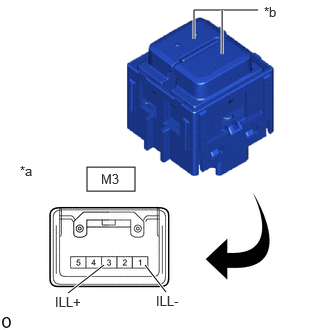
0.906,1.74 1.406,1.99 0.5,0.25 2.021,0.406 2.021,0.104 2.021,0.104 2.688,0.104 true 2.313,0.563 2.313,0.104 true 1.729,3.042 1.51,2.76 true 0.708,3.052 1.083,2.76 true 2.75,0.042 3.063,0.24 0.313,0.198 10 false *b 0.208,1.698 0.479,1.906 0.271,0.208 10 false *a 1.052,1.781 1.406,2 0.354,0.219 10 false M3 0.573,3.063 0.927,3.281 0.354,0.219 10 false ILL+ 1.625,3.052 1.979,3.271 0.354,0.219 10 false ILL-
| *a | Component without harness connected (Door Control Switch Assembly) |
| *b | LED Illumination |
Check that the LED illuminates.
i.
Apply auxiliary battery voltage to the door control switch assembly and check that the LED illuminates.
- OK:
-
Tester Connection Specified Condition Click Location & Routing(M3)Location & Routingewd_type=routing;type=c;code=M3
Click Connector(M3)Body>Front Door Wire RH>Door Control Switch Assemblyewd_type=component;type=c;code=M3;pinno=3,1
Auxiliary battery positive (+) → M3-3 (ILL+)
Auxiliary battery negative (-) → M3-1 (ILL-)LED illuminates
If the result is not as specified, replace the door control switch assembly.