NAVIGATION / MULTI INFO DISPLAY NAVIGATION SYSTEM CD/DVD Sound Skips
CAUTION / NOTICE / HINT
- HINT:
-
Depending on the parts that are replaced during vehicle inspection or maintenance, performing initialization, registration or calibration may be needed. Refer to Precaution for Navigation System.
-
Click hereAudio / Visual / Telematics>NAVIGATION / MULTI INFO DISPLAY>NAVIGATION SYSTEM>PRECAUTION
PROCEDURE
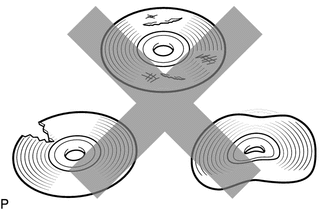
Check that the disc is not deformed or cracked.
- OK:
-
No deformation or cracks on the disc
- Result:
-
Proceed to OK NG
OK
NG
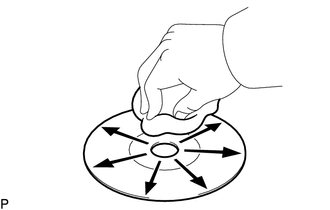
Check the disc.
- OK:
-
The disc is clean.
- NOTICE:
-
Do not use a conventional record cleaner or anti-static preservative.
- HINT:
-
If dirt is on the disc surface, wipe it clean with a soft cloth from the inside to the outside in a radial direction.
- Result:
-
Proceed to OK NG
OK
NG
Replace the disc with a known good one and check that the malfunction disappears.
- OK:
-
Malfunction disappears.
- Result:
-
Proceed to OK NG
OK
NG
Check the radio receiver assembly installation condition.
Check that the radio receiver assembly is properly installed.
- OK:
-
The radio receiver assembly is properly installed.
- Result:
-
Proceed to OK NG
OK
Click hereAudio / Visual / Telematics>AUDIO / VIDEO>RADIO RECEIVER (for Radio Receiver Type)>REMOVAL
NG
Click hereAudio / Visual / Telematics>AUDIO / VIDEO>RADIO RECEIVER (for Radio Receiver Type)>INSTALLATION