STOP AND START STOP AND START SYSTEM VEHICLE CONTROL HISTORY (RoB)
DESCRIPTION
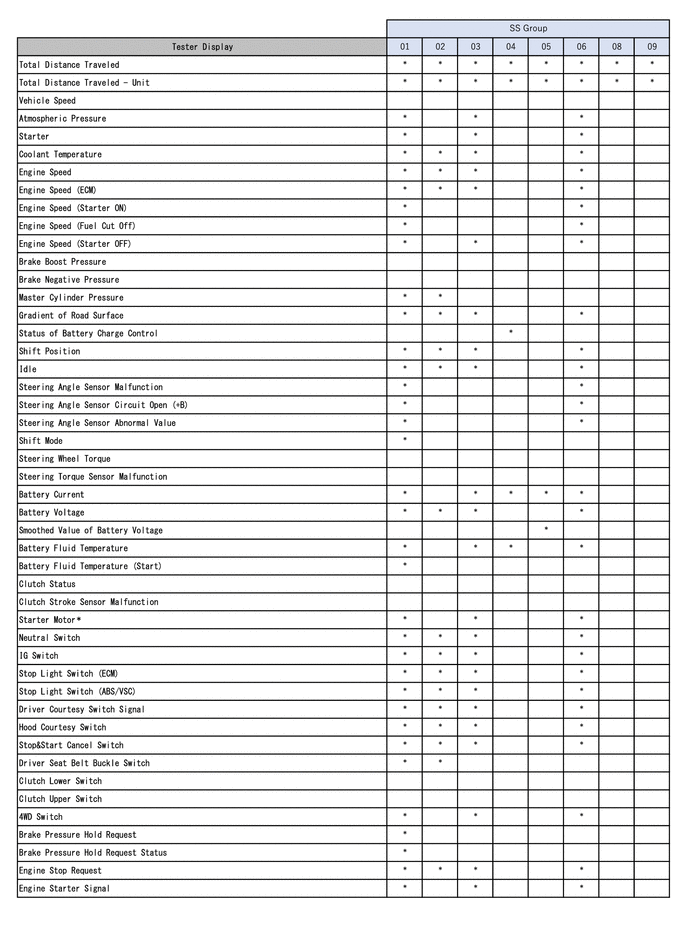
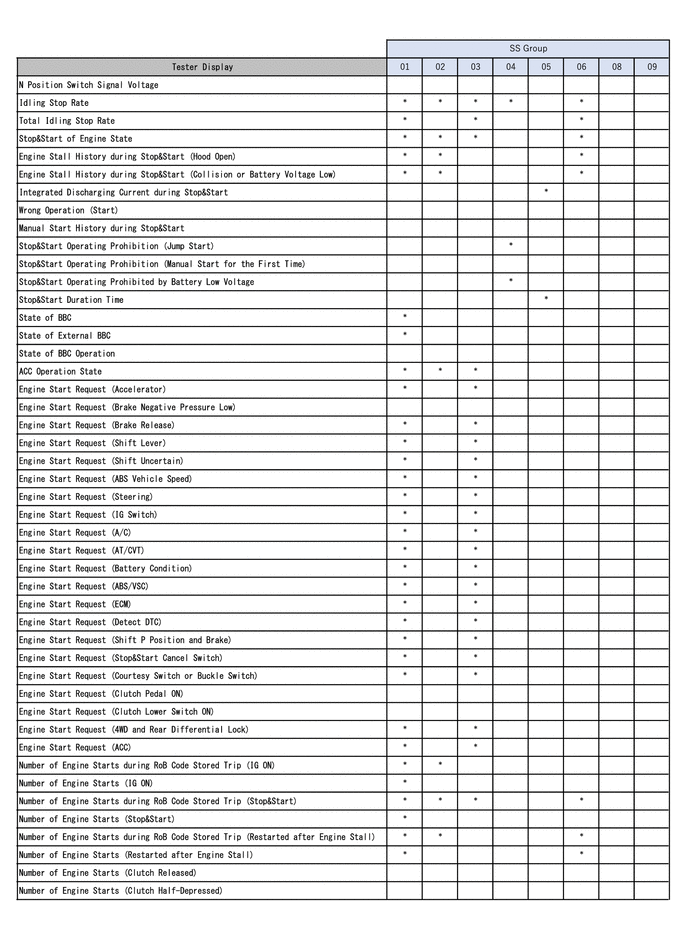
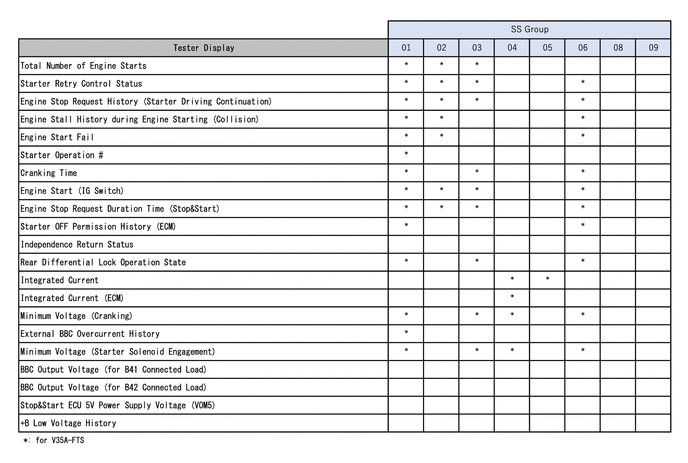
Vehicle Control History is a function that captures and stores ECU data when triggered by specific vehicle behavior.
If the customer states that there was a problem such as the engine not restarting after having been stopped by the stop and start system, it may be possible to diagnose the cause of the malfunction by checking the vehicle history information and freeze frame data.
PRECAUTIONS
As Vehicle Control History may be overwritten whenever the trigger conditions are met, make sure to save Vehicle Control History before performing any inspections.
As Vehicle Control History may be stored when performing an Active Test, learning, etc., make sure to clear the Vehicle Control History before returning the vehicle to the customer.
CHECK VEHICLE CONTROL HISTORY
Enter the following menus: Powertrain / Stop and Start / Utility / Vehicle Control History (RoB).
- Powertrain > Stop and Start > Utility
-
Tester Display Vehicle Control History (RoB) - 50005 392 55
| Code | Tester Display | Trigger Description | Stored Group | Reference Inspection Procedure | Link |
|---|---|---|---|---|---|
| X0870 | Stop&Start Prohibition (Power Management) | - | 04 | - | - |
| X0871 | Stop&Start Restart (Power Management) | - | 05 | - | - |
| X0872 | Stop&Start Restart Failure (Engine Restart) |
·
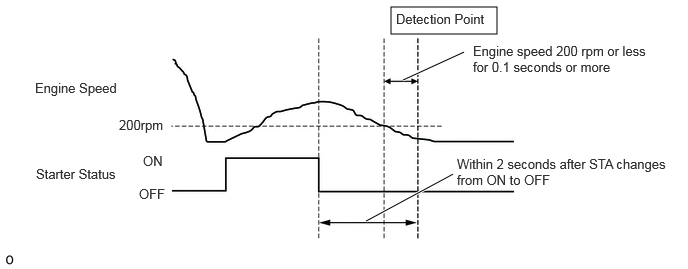
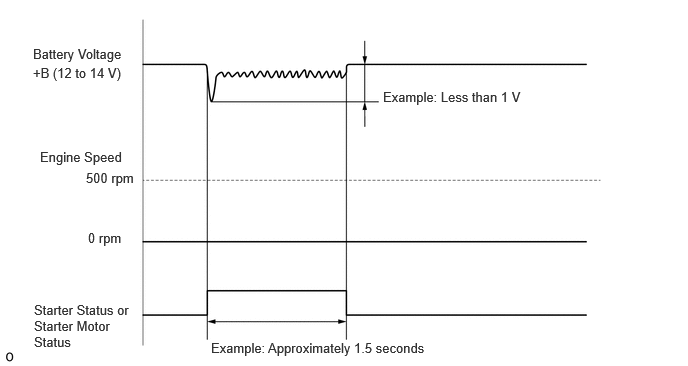
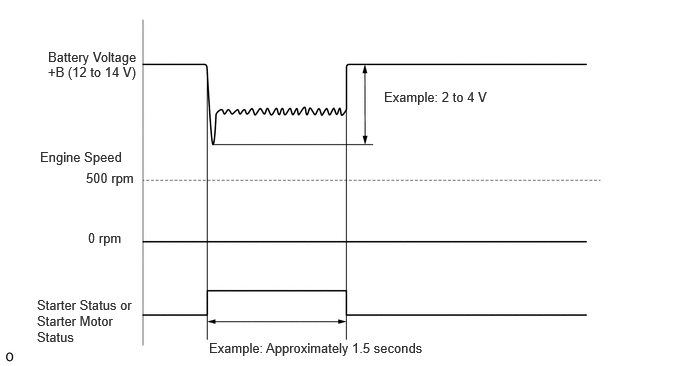
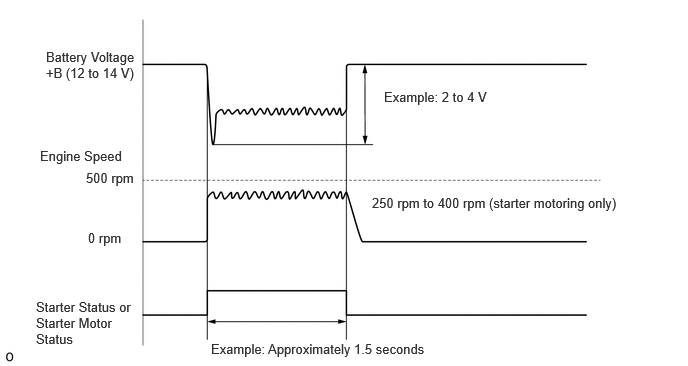
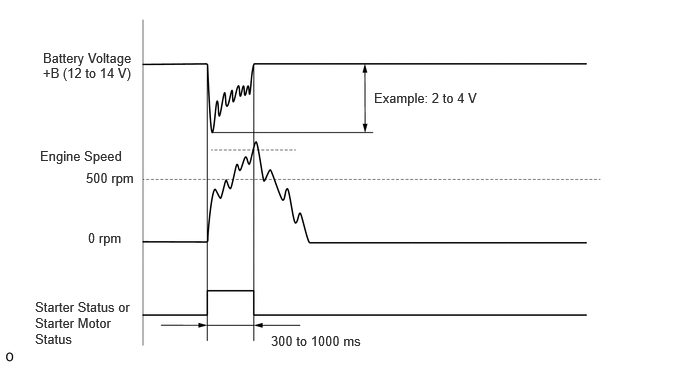
In a situation where engine is restarting after being stopped by the stop and start system, within 2 seconds after starter status* changes from ON to OFF, engine speed is 200 rpm or less for 0.1 seconds or more. *: For other than tandem starter: "Starter status" for tandem starter: "Starter motor status"
·
Refer to illustration below |
01 | Proceed to "After Engine Stops due to Stop and Start System, Engine does not Restart" in Problem Symptoms Table | ( ) |
| X0873 | Hood Open during Stop&Start (Engine Stall) | While engine was stopped by stop and start system, the hood was opened, causing an engine stall. | 02 | Proceed to "Caused by Hood" troubleshooting procedure of "After Engine Stops due to Stop and Start System, Engine does not Restart" in Problem Symptoms Table | () |
| X0874 | Stop&Start Restart Failure (Engine Restart after Engine Stall) | In a situation where engine is restarting after a failed start by the stop and start system, within 2 seconds after STA changes from ON to OFF, engine speed is 200 rpm or less for 0.1 seconds or more. | 06 | Proceed to "Failure to Restart from IG-ON Engine Stall" in Problem Symptoms Table | () |
| X0875 | Voltage Low for Stop&Start Control Module (Engine Start from Stop&Start) |
·
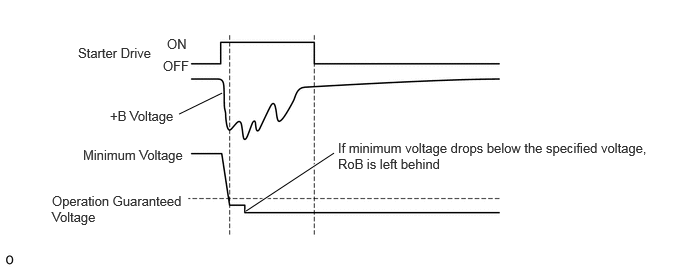
In a situation where engine is restarting after being stopped by the stop and start system, the battery voltage decreases below the operation guaranteed voltage
·
Refer to illustration below |
03 | - | - |
| X0877 | Life Cycle of Starter | The number of starter operations reaches the specified limit. | 08 | Proceed to "Stop and Start System does not Operate" in Problem Symptoms Table | () |
| X0878 | Life Cycle of Engine Starter Related Parts | Drive plate and ring gear sub-assembly operating life-span reached | 09 | Proceed to "Stop and Start System does not Operate" in Problem Symptoms Table | () |
| X0879 | Charging Control Malfunction History (EFI) |
·
Charging control malfunction signal received from the ECM.
·
Communication between the engine stop and start ECU and ECM is normal and 30 seconds or more have elapsed since the ignition switch was turned to ON. |
08 | Proceed to "Stop and Start System does not Operate" in Problem Symptoms Table |
·
Stop and Start System does not Operate: (
·
Stop and Start System does not Operate (Battery Condition): ( |
| XF01B | ECU Security Key Not Registered | ECU security key has not been updated | - | Proceed to "Update ECU Security Key" in Problem Symptoms Table | () |
- HINT:
-
1.
When the engine is restarted by the stop and start system, if there is only slight voltage depression of the battery and the engine speed does not reach the level at which a complete combustion judgment is made, there may be a malfunction in the starting circuit system. (Figure 1)
2.When the engine is restarted by the stop and start system, if there is significant voltage depression of the battery and the engine speed does not increase to 200 rpm, starter lock should be considered. (Figure 2)
3.When the engine is restarted by the stop and start system, if there is significant voltage depression of the battery and initial combustion does not occur during starter driven revolution, engine control factors (injector system, ignition system, STA input open circuit, etc.) should be considered. (Figure 3)
4.When the engine is restarted by the stop and start system, if there is significant voltage depression of the battery and engine stall occurs after the engine speed reaches the level at which a complete combustion judgment is made, engine control factors (accumulated deposits, fuel system, etc.) should be considered. (Figure 4)
| Stored Group | Number of Records | Number of Multi Freeze Frame Data Points | Multi Freeze Frame Data Sampling Period | Note |
|---|---|---|---|---|
| 01 | 2 codes
|
7 points (1 point at detection + 5 points before detection + 1 point after detection) |
0.5 seconds | The data can be cleared using the GTS. |
| 02 | 1 code
|
3 points (1 point at detection + 1 point before detection + 1 point after detection) |
0.5 seconds | The data can be cleared using the GTS. |
| 03 | 2 codes
|
3 points (1 point at detection 0 point before detection +2 point after detection) |
0.5 seconds | The data can be cleared using the GTS. |
| 04 | 8 codes
|
2 points (1 point at detection + 1 point before detection + 0 points after detection) |
1.0 seconds | The data can be cleared using the GTS. |
| 05 | 8 codes
|
2 points (1 point at detection + 1 point before detection + 0 points after detection) |
1.0 seconds | The data can be cleared using the GTS. |
| 06 | 1 code
|
7 points (1 point at detection + 5 points before detection + 1 point after detection) |
0.5 seconds | The data can be cleared using the GTS. |
| 08 | 1 code
|
1 point (multi freeze frame data not available) | - | The data can be cleared using the GTS. |
| 09 | 1 code
|
1 point (multi freeze frame data not available) | - | The data can be cleared using the GTS. |
- HINT:
-
·
The multi freeze frame data makes it possible to check the vehicle data before and after the trigger point at which the vehicle control history was stored.
·The number of stored points differs according to the stored group.
·If the value of a data item does not change across the freeze frame data points, only the value from the detection point at which the vehicle control history was stored will be displayed.
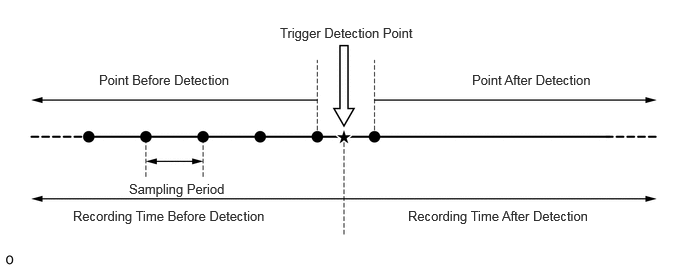
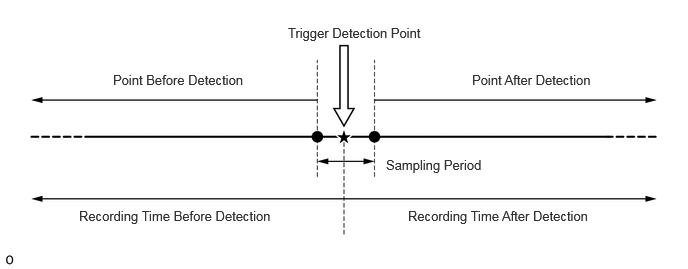
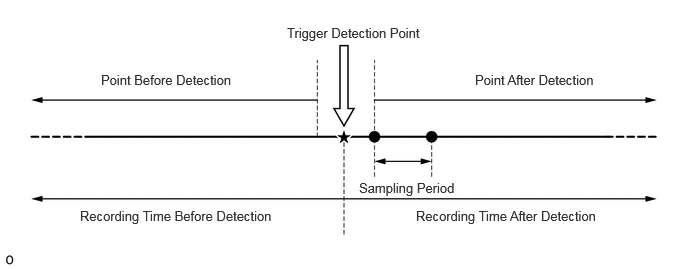
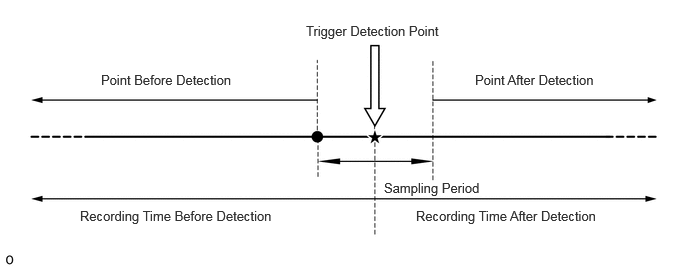
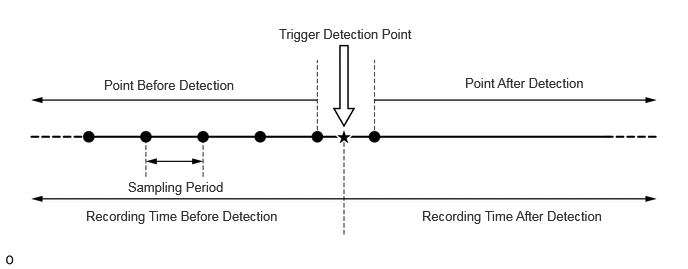
Only 1 measurement point can be displayed for stored group 08 and 09 Freeze Frame Data.
CLEAR VEHICLE CONTROL HISTORY
Enter the following menus: Powertrain / Stop and Start / Utility / Vehicle Control History (RoB).
- Powertrain > Stop and Start > Utility
-
Tester Display Vehicle Control History (RoB) - 50005 392 55
Select the name of a vehicle control history item to display the data from the time of control.
Check the output data.