RM38G0E _51 Engine / Hybrid System _106332 F33A-FTV EMISSION CONTROL _0491921 DPF SWITCH G
F33A-FTV EMISSION CONTROL DPF SWITCH INSPECTION
PROCEDURE

 84270K 1.INSPECT DPR SWITCH ASSEMBLY
a.
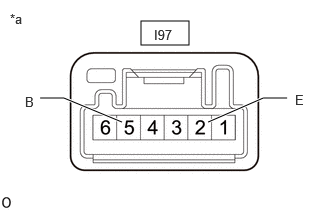
1.469,0.219 1.969,0.469 0.5,0.25 0.417,1.021 0.667,1.021 0.667,1.021 1.271,1.271 true 2.167,1.271 2.74,1.021 2.74,1.021 2.99,1.021 true 0.104,0.115 0.417,0.313 0.313,0.198 10 false *a 0.26,0.979 0.417,1.177 0.156,0.198 10 false B 3.073,0.958 3.229,1.156 0.156,0.198 10 false E 1.604,0.281 2.063,0.479 0.458,0.198 10 false I97
| *a | Component without harness connected (DPR Switch Assembly) |
Measure the resistance according to the value(s) in the table below.
- Standard Resistance:
-
Tester Connection Condition Specified Condition Click Location & Routing(I97)Location & Routingewd_type=routing;type=c;code=I97
I97-2 (E) - I97-5 (B) Switch OFF 10 kΩ or higher I97-2 (E) - I97-5 (B) Switch ON Below 1 Ω
b.
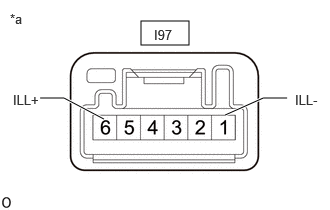
1.469,0.219 1.969,0.469 0.5,0.25 0.417,1.021 0.667,1.021 0.667,1.021 1.083,1.24 true 2.344,1.198 2.74,1.021 2.74,1.021 2.99,1.021 true 0.104,0.115 0.417,0.313 0.313,0.198 10 false *a 0.135,0.958 0.573,1.167 0.438,0.208 10 false ILL+ 3.073,0.958 3.406,1.198 0.333,0.24 10 false ILL- 1.604,0.281 2.063,0.479 0.458,0.198 10 false I97
| *a | Component without harness connected (DPR Switch Assembly) |
Apply the battery voltage across the terminals and check the illumination on.
- Standard:
-
Tester Connection Condition Specified Condition Click Location & Routing(I97)Location & Routingewd_type=routing;type=c;code=I97
I97-6 (ILL+) - Battery positive (+) - Illumination on I97-1 (ILL-) - Battery negative (-) -
c.
If the result is not as specified, replace the DPR switch assembly.